Slider
v0.0.10
The Mishka Chelekom Mob Slider lets you drag a value along a range on iOS and Android, using the native slider of each platform. It is the native port of the headless Slider, built for Mob, which drives Jetpack Compose and SwiftUI from Elixir.
Overview of the Mob Slider component for iOS and Android
MishkaSlider wraps Mob's native Slider. The widget is controlled: your screen owns the value, and the slider reports it while the finger drags, as {:change, tag, float} in handle_info/2. The component always sends min and max, because the bridge would otherwise default max to 1.0. Its own defaults are 0 and 100.
step sets the distance between positions, and the native control snaps itself to them. MishkaSlider.steps/3 turns that distance into the number of positions between the endpoints, so steps(5, 0, 100) is 19. snap/2 is still available for a screen that clamps to rules of its own, because the widget can only snap to an even division of the range.
Pass values, a two-element list, instead of value for two thumbs. The pair comes back as one "lo,hi" string, because the change channel carries a single number otherwise. parse_range/1 decodes it, and resolve/3 applies the minimum gap and the push or stop rule. Both are pure functions, so they behave the same on every platform.
orientation={:vertical} turns the control a quarter turn, and length sets the track length, because a rotated slider cannot inherit a width.
A vertical slider is sent with its width set to length as well. The Android bridge parks the rotated track in a box that is length tall and only 48dp wide, and a child cannot be wider than the box that holds it. On its own the track would be clipped to a 48dp stub: a thumb with a short run of track on either side. Giving the node length of width lets the box open up to the track. The control then takes a length by length square with the track down its middle, so length has to fit the width of its parent.
Generate the slider component
Run this from your Mob app's root to add the component to lib/<app>/components/:
mix mishka.ui.gen.mob sliderThe generator registers the tag, so you can use it in ~MOB markup. It also copies the shared Event module that the component uses. The examples on this page use the mishka_ prefix of the showcase app (--module-prefix mishka_), so the tag is <MishkaSlider>. Without a prefix, the tag is <Slider>.
Continuous slider
Drag the thumb. The screen owns the value: it receives {:change, :volume, v} while you drag and stores the rounded number, and the slider shows whatever the screen assigns. label adds a caption above the track, and show_value adds a readout beside the caption.
Continuous slider
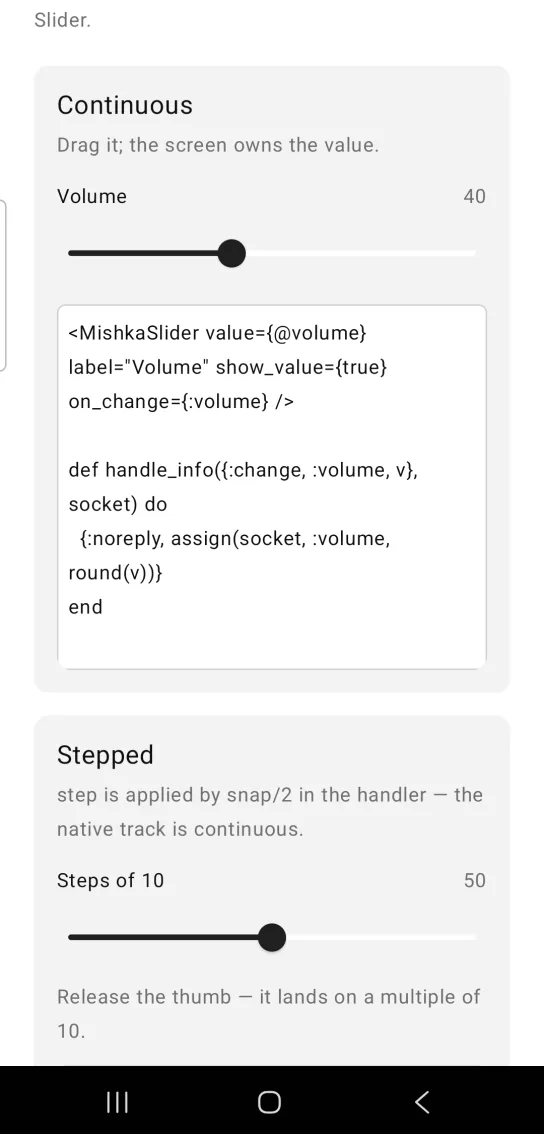
<MishkaSlider value={@volume} label="Volume" show_value={true} on_change={:volume} />

def handle_info({:change, :volume, v}, socket) do
  {:noreply, assign(socket, :volume, round(v))}
end
Stepped slider
step={10} makes the track snap to multiples of 10. The handler in this example also calls MishkaSlider.snap/2 on the raw value it receives, which snaps and clamps it in your screen. The card in the screenshot adds a line that says the thumb lands on a multiple of 10 when released.
Stepped slider
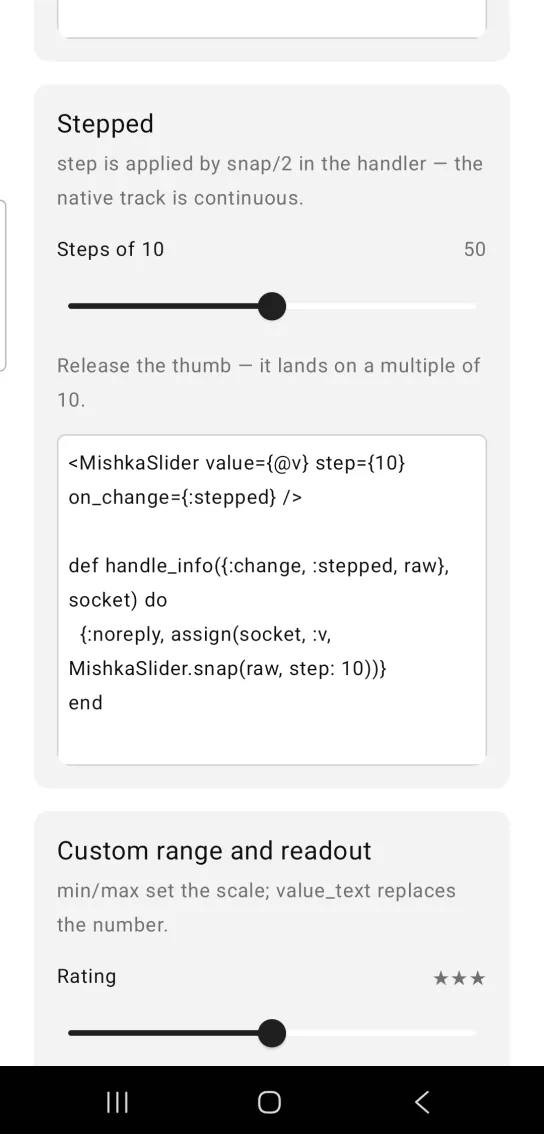
<MishkaSlider value={@v} step={10} on_change={:stepped} />

def handle_info({:change, :stepped, raw}, socket) do
  {:noreply, assign(socket, :v, MishkaSlider.snap(raw, step: 10))}
end
Slider with a custom range and readout
min and max set the scale, here 1 to 5. show_value turns the readout on, and value_text replaces the number in it. The card in the screenshot uses a row of stars as the readout and adds a label.
Slider with a custom range and readout
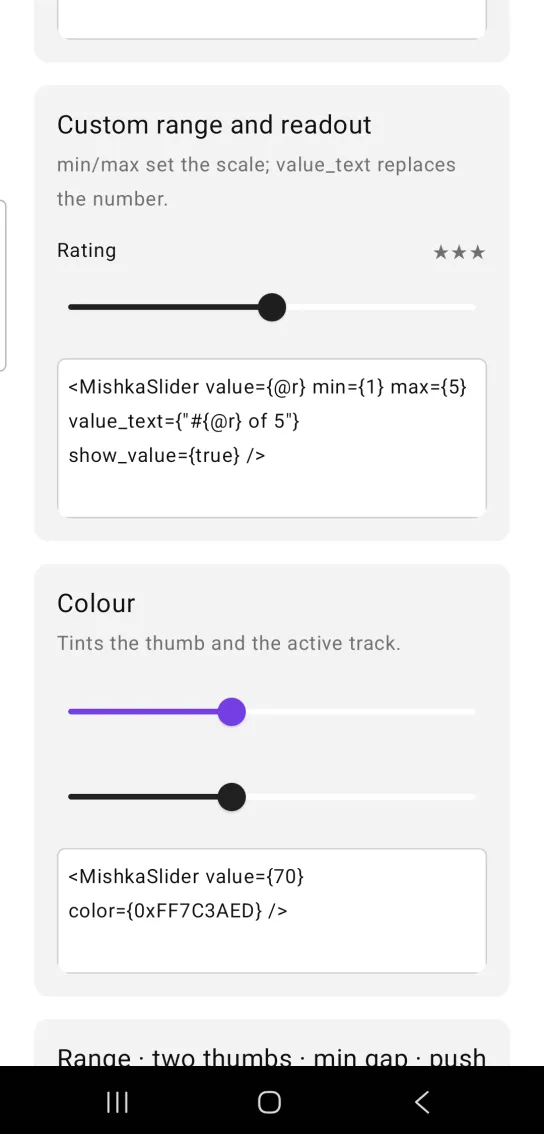
<MishkaSlider value={@r} min={1} max={5} value_text={"#{@r} of 5"} show_value={true} />Slider color
color tints the thumb and the active track. It takes a theme token or an ARGB integer. The card in the screenshot shows the violet slider above a second one in the :primary color.
Slider color
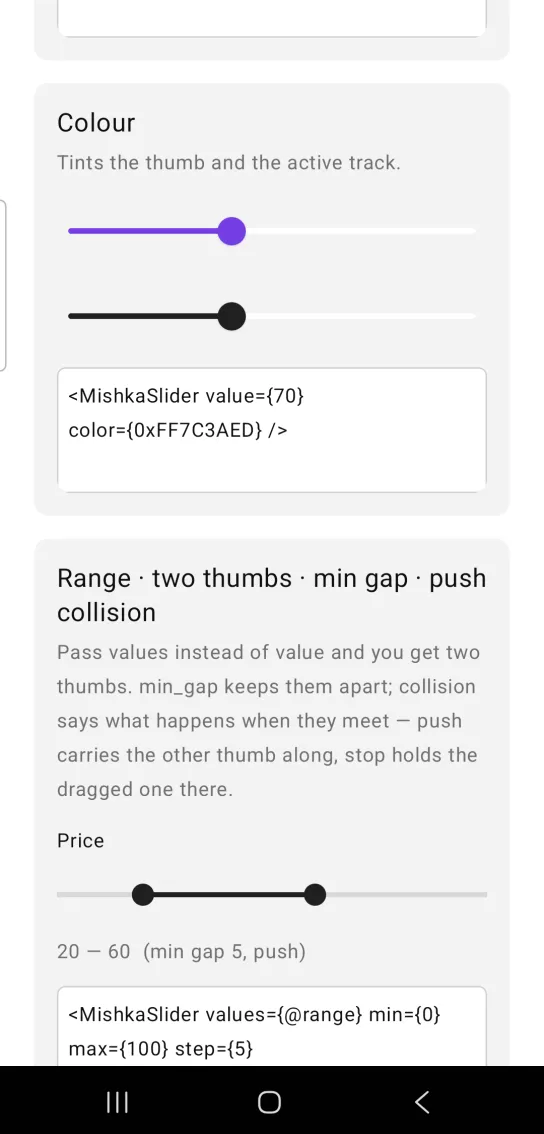
<MishkaSlider value={70} color={0xFF7C3AED} />Range slider with two thumbs
Pass values instead of value to get two thumbs. min_gap keeps them apart. collision decides what happens when they meet: :push carries the other thumb along, and :stop holds the dragged thumb in place. The widget enforces both rules, so a push happens under the finger with no round trip. resolve/3 applies the same rule as a pure function, for a screen that wants to apply it again as the authority. This slider works on Android only.
The code uses handle_change/3, the callback of the showcase app. In your own screen, write it as a handle_info/2 clause that matches {:change, :range, reported}.
Range slider with two thumbs
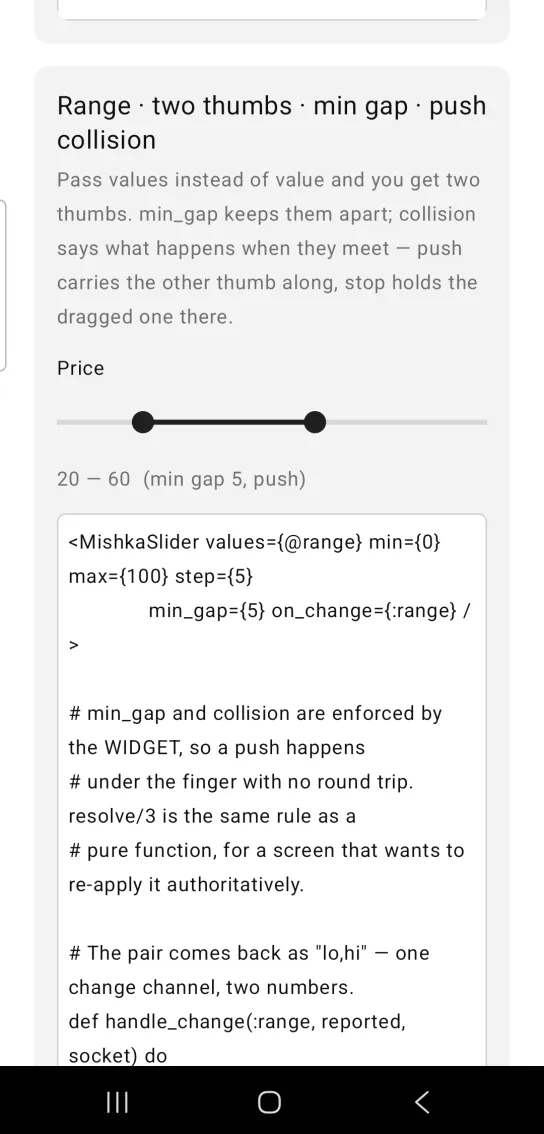
<MishkaSlider values={@range} min={0} max={100} step={5}
              min_gap={5} on_change={:range} />

# min_gap and collision are enforced by the WIDGET, so a push happens
# under the finger with no round trip. resolve/3 is the same rule as a
# pure function, for a screen that wants to re-apply it authoritatively.

# The pair comes back as "lo,hi" — one change channel, two numbers.
def handle_change(:range, reported, socket) do
  case MishkaSlider.parse_range(reported) do
    {lo, hi} ->
      moved = if lo != hd(socket.assigns.range), do: :lo, else: :hi
      {lo, hi} = MishkaSlider.resolve({lo, hi}, moved,
                   min_gap: 5, collision: :push, min: 0, max: 100)
      Mob.Socket.assign(socket, :range, [lo, hi])

    :error ->
      socket
  end
endVertical slider
orientation={:vertical} turns the control a quarter turn. length sets how long the track is, because a rotated slider cannot inherit a width. The control takes a length by length square with the track down its middle. This slider works on Android only. The card in the screenshot shows the current level as text beside the track.
Vertical slider
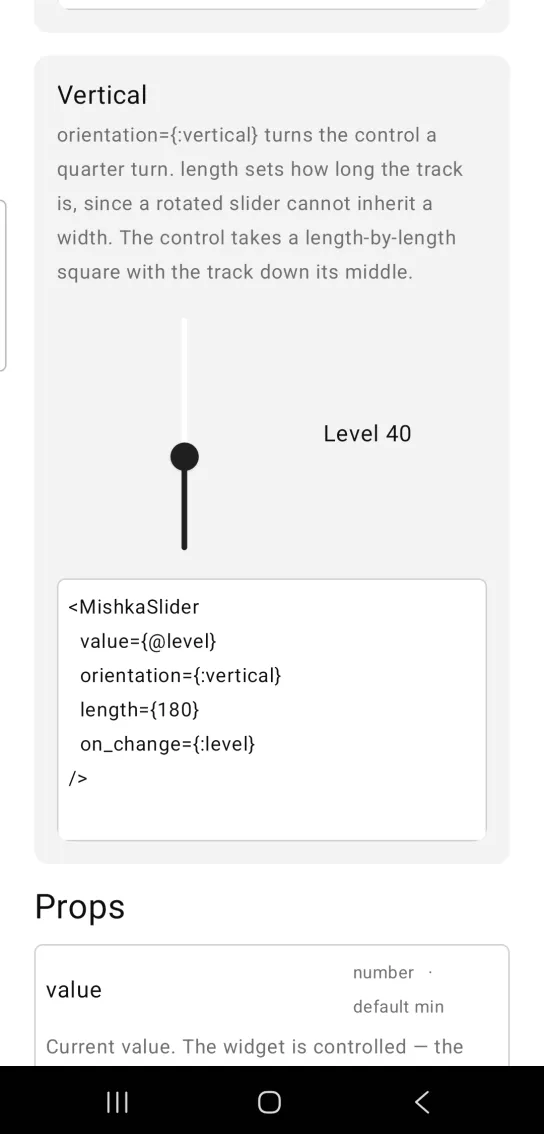
<MishkaSlider
  value={@level}
  orientation={:vertical}
  length={180}
  on_change={:level}
/>
Helper functions
The generated MishkaSlider module exports these functions.
| Function | Description |
|---|---|
snap(value, opts) | Snaps a raw value to the nearest step and clamps it into the range. The options are :step, which has to be set for any snapping, :min (default 0) and :max (default 100). It snaps relative to min, so a range of 5 to 25 steps through 5, 10, 15. snap(42.7, step: 5) returns 45. |
parse_range(reported) | Decodes the "lo,hi" string a range slider reports. parse_range("12.0,30.5") returns {12.0, 30.5}, and any other input returns :error. |
resolve({lo, hi}, moved, opts) | Keeps the thumbs min_gap apart. moved is :lo or :hi and says which thumb the finger has. The options are :min_gap, :collision, :min and :max. :push carries the other thumb along, and :stop holds the dragged one at the boundary. |
steps(step, min, max) | Counts the positions between the endpoints, which is what Compose's steps counts. steps(1, 1, 5) returns 3, and steps(nil, 0, 1) returns 0, which means continuous. |
Props
| Prop | Type | Default | Description |
|---|---|---|---|
value | number | min | Current value. The widget is controlled, so the screen owns it. |
min | number | 0 | Lower bound. |
max | number | 100 | Upper bound. Always sent, because the bridge would otherwise default it to 1.0. |
step | number | Not set, continuous | Snaps the thumb to positions this far apart. A missing, zero or negative step gives a continuous track. |
values | list of two numbers | nil | Two thumbs, as [lo, hi]. Overrides value. Android only. |
orientation | :horizontal or :vertical | :horizontal | Android only. A vertical slider is sent with its width set to length. |
length | number | 160 | Track length when vertical. It must fit the width of the parent. |
min_gap | number | 0 | Least distance between the two thumbs. |
collision | :push or :stop | :push | What happens when the thumbs meet. |
label | string | nil | Caption above the track. |
show_value | boolean | false | Renders a readout beside the label. |
value_text | string | nil | Overrides the readout. The default is the rounded value. |
color | color token or ARGB integer | platform default | Thumb and active track. |
on_change | event tag | None | Sent as {:change, tag, float} while dragging. |
Events
on_change sends {:change, tag, float} to the screen while the user drags. Handle it in handle_info/2:
def handle_info({:change, :volume, v}, socket) do
  {:noreply, assign(socket, :volume, round(v))}
end
A range slider reports one string, "lo,hi", instead of the float. Pass it to MishkaSlider.parse_range/1 and match on {lo, hi} or :error, as the range example above does.
Differences from the web component
These attributes of the web component are not ported:
thumb_labels. They are per-thumbaria-labelvalues, and Mob has no accessibility layer to announce them into.on_commit. Neither native bridge exposes a release event, only continuous change.large_step. It is a keyboard affordance (PageUp or Shift with an arrow key), and the control has no keyboard.formatandlocale. Format the number yourself and pass it invalue_text.name,formandid. They are HTML form plumbing and DOM anchoring.disabled, for the reason in the overview.
Attributes
| Name | Type | Default | Values | Required | Description |
|---|---|---|---|---|---|
value
|
number
|
min
| — | No | Current value. The widget is controlled — the screen owns it. |
min
|
number
|
0
| — | No | Lower bound. |
max
|
number
|
100
| — | No | Upper bound. |
values
|
[lo, hi]
| — | — | No | Two thumbs. Overrides `value`. Android only. |
orientation
|
:horizontal :vertical
|
:horizontal
| — | No | Android only. |
length
|
number
|
160
| — | No | Track length when vertical. |
min_gap
|
number
|
0
| — | No | Least distance between the two thumbs. |
collision
|
:push :stop
|
:push
| — | No | What happens when they meet. |
label
|
string
| — | — | No | Caption above the track. |
show_value
|
boolean
|
false
| — | No | Render a readout beside the label. |
value_text
|
string
| — | — | No | Overrides the readout (default is the rounded value). |
color
|
color token / ARGB int
|
platform default
| — | No | Thumb and active track. |
on_change
|
event tag (atom)
| — | — | No | Sent as `{:change, tag, float}` while dragging. |
Options
Each option takes one or more of its values, separated by commas.
| Option | Values |
|---|---|
--type
|
slider
|
--module
| A module name of your own |
What it generates
mix mishka.ui.gen.mob slider