Angle slider
v0.0.10
mix mishka.ui.gen.mob angle_slider
The Mob Angle Slider is the native iOS and Android version of the headless Angle Slider in Mishka Chelekom. It draws a circular dial where 0 degrees points up and the angle grows clockwise, and you set the angle by touching or dragging the ring. Mob renders it with Jetpack Compose on Android and SwiftUI on iOS.
Overview of the Mob Angle Slider component for iOS and Android
The dial is drawn on a canvas. It has a track ring, a filled arc from 12 o'clock to the current angle, a round handle on the ring, and the angle in the center, such as 45°. The default size is 160 units.
The ring is the control, and no native slider sits under it. A touch sends your screen a {:drag, tag, payload} message with the touch position, and angle_at/3 converts that position to degrees. A touch inside the center disc returns :dead. Near the middle, an angle would swing through a whole turn over a few pixels, so skip :dead in your handler.
An angle has a seam. Dragging clockwise past 12 o'clock takes 359° straight to 0°, and the ring would empty in one frame. follow/2 reads a jump of more than half a turn as crossing the seam and pins the value to the end the finger was heading for. A full ring stays full until you drag back the other way.
The screen owns the state. Assign the angle in handle_info/2 and the dial redraws. The value prop wraps, size sets the diameter, and show_value={false} hides the center reading. point_on_dial/4 returns the point at an angle on a circle, with 0° at the top as well.
Generate the angle slider component
Run this from your Mob app's root to add the component to lib/<app>/components/:
mix mishka.ui.gen.mob angle_sliderThe generator registers the component's tag, so you can use it in ~MOB markup. It also adds the shared Color and Event modules it uses. The examples on this page use the mishka_ prefix of the showcase app (--module-prefix mishka_), so the tag is <MishkaAngleSlider>. Without a prefix the tag is <AngleSlider>.
Angle slider dial
Ring, arc and handle are drawn on a canvas, and you drag them directly: touch anywhere on the ring and the handle follows your finger. angle_at/3 turns the touch position into degrees and returns :dead near the center, so the handler skips that case. The label caption and the 45° text under the dial in the screenshot come from the showcase page.
Angle slider dial
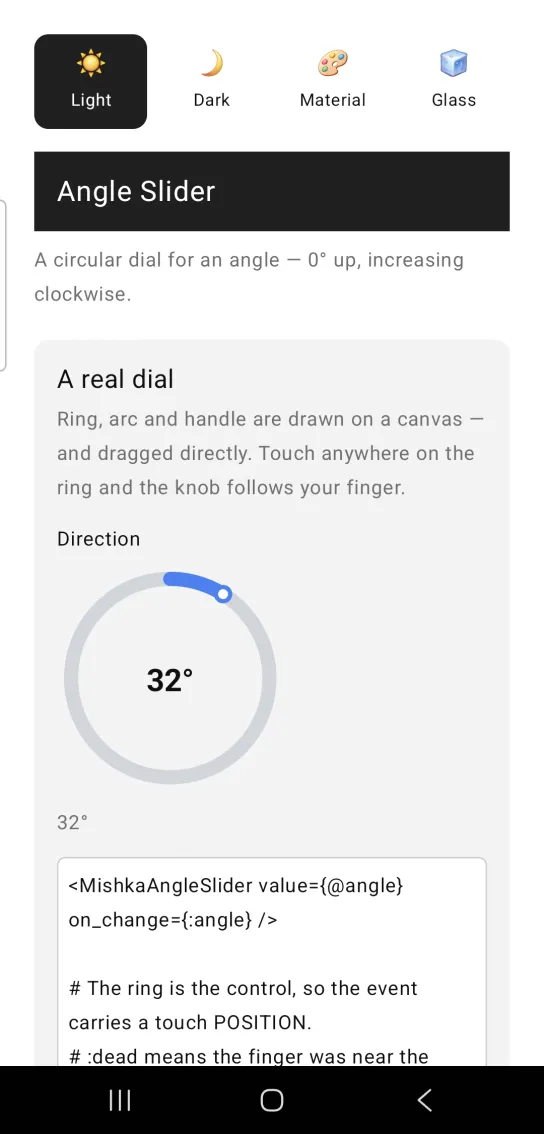
<MishkaAngleSlider value={@angle} on_change={:angle} />

# The ring is the control, so the event carries a touch POSITION.
# :dead means the finger was near the centre, where no angle was meant.
def handle_info({:drag, :angle, %{x: x, y: y}}, socket) do
  case MishkaAngleSlider.angle_at(x, y) do
    :dead -> {:noreply, socket}
    deg -> {:noreply, Mob.Socket.assign(socket, :angle, deg)}
  end
end
Angle slider snapped to 15°
The component has no step prop. Snap the value in the screen, where it settles. This handler passes the angle to MishkaSlider.snap/2 with step: 15 and max: 360. Give angle_at/3 the same size you gave the dial.
Angle slider snapped to 15°
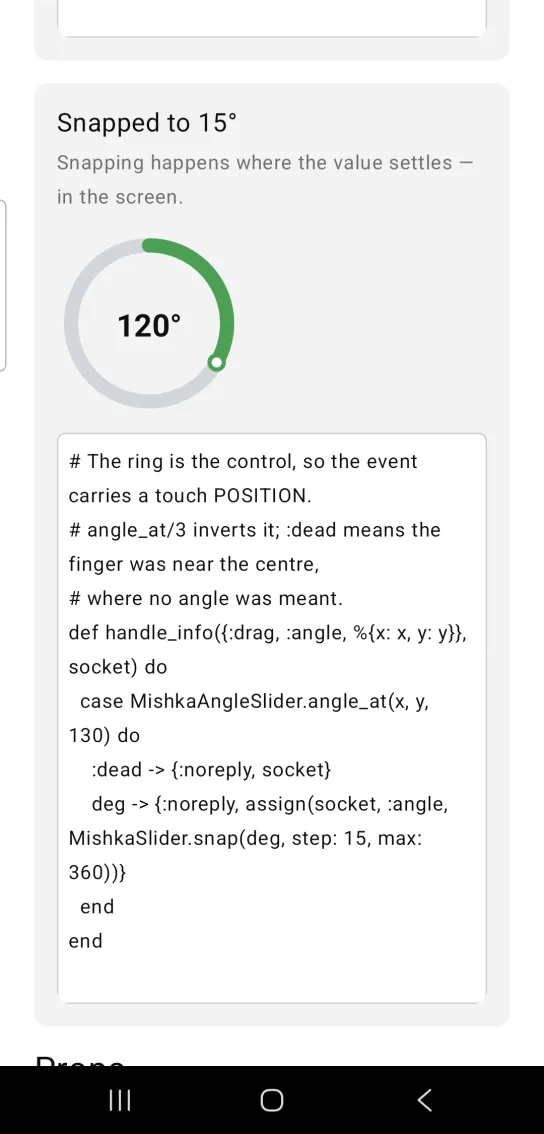
# The ring is the control, so the event carries a touch POSITION.
# angle_at/3 inverts it; :dead means the finger was near the centre,
# where no angle was meant.
def handle_info({:drag, :angle, %{x: x, y: y}}, socket) do
  case MishkaAngleSlider.angle_at(x, y, 130) do
    :dead -> {:noreply, socket}
    deg -> {:noreply, assign(socket, :angle, MishkaSlider.snap(deg, step: 15, max: 360))}
  end
end
Helper functions
The module exports four helpers. Call them from your screen.
| Function | Description |
|---|---|
angle_at(x, y, size \\ 160) | Converts a touch position to an angle, with 0° up and the angle growing clockwise. Returns :dead inside the center disc. |
follow(current, new) | Returns the angle a drag should settle on. A jump of more than half a turn counts as crossing the seam and pins the value to 0 or 360. A :dead input returns the current angle. |
point_on_dial(cx, cy, radius, angle) | Returns the {x, y} point at an angle on a circle, with 0° pointing up, not right. |
dial(size, angle, props) | Returns the draw ops for the dial at an angle. |
Props
| Prop | Type | Default | Description |
|---|---|---|---|
value | number, 0 to 360 | 0 | The angle in degrees. Wraps. |
size | number | 160 | Dial diameter in logical units. |
show_value | boolean | true | Draws the angle reading in the center. Only an explicit false hides it. |
color | ARGB integer | 0xFF3B82F6 (blue) | Color of the arc and the handle. |
label | string | nil | Caption above the dial. |
text_color | color token or ARGB integer | :on_surface | Color of the center reading. |
on_change | event tag | None | Sends {:drag, tag, payload} with a touch position. Convert it with angle_at/3. |
id | string | None | A native test tag for the dial. A canvas has no text that a test can find it by. |
Events
Your screen receives {:drag, tag, %{x:, y:, phase:}} in handle_info/2 when the user touches or drags the ring. The payload holds a touch position, so use angle_at/3 to get an angle. The phase field reports began on touch-down, dragging while the finger moves and ended on release.
def handle_info({:drag, :angle, %{x: x, y: y}}, socket) do
  next = MishkaAngleSlider.follow(socket.assigns.angle, MishkaAngleSlider.angle_at(x, y, 160))

  {:noreply, Mob.Socket.assign(socket, :angle, next)}
end

def handle_info(_msg, socket), do: {:noreply, socket}
Differences from the web component
The Mob version leaves these parts of the web slider out:
step(keyboard nudging) is not ported. Snap in the screen withMishkaSlider.snap/2, as in the second example.disabledis not ported.nameandformare not ported. Theidprop is a native test tag, not a DOM id.
Attributes
| Name | Type | Default | Values | Required | Description |
|---|---|---|---|---|---|
value
|
number
|
0
| — | No | Angle in degrees. Wraps. |
size
|
number
|
160
| — | No | Dial diameter in logical units. |
show_value
|
boolean
|
true
| — | No | Draw the `45°` reading in the centre. |
label
|
string
| — | — | No | Caption above the dial. |
text_color
|
color token / ARGB int
|
:on_surface
| — | No | Colour of the centre reading. |
color
|
ARGB int
|
:primary-ish blue
| — | No | Arc and handle colour. |
on_change
|
event tag (atom)
| — | — | No | `{:drag, tag, %{x:, y:, phase:}}` — a touch POSITION. Convert with `angle_at/3`, which returns `:dead` near the centre. |
id
|
string
| — | — | No | A native testTag. A canvas has no text to find it by. |
Options
Each option takes one or more of its values, separated by commas.
| Option | Values |
|---|---|
--type
|
angle_slider
|
--module
| A module name of your own |
What it generates
mix mishka.ui.gen.mob angle_slider