Dialog
v0.0.10
The Mob Dialog component from Mishka Chelekom shows a centered modal over a dimmed backdrop on iOS and Android. It is the native port of the headless Dialog for screens built with Mob, and your screen decides when it is open.
Overview of the Mob Dialog component for iOS and Android
A closed dialog draws nothing, or only its trigger if you give it one. An open dialog draws a backdrop and a centered panel on top of your screen. Mob has no z-index and no modal layer, so the dialog is a box that stacks the backdrop and the panel over your content.
Your screen owns the state. Keep an open? value in the screen's assigns and set it to true when the user taps a button. Set it back to false when the dialog sends on_close or on_open_change, or when a footer button is tapped. These events arrive in handle_info/2.
Render the dialog at the screen root
The open dialog is a fill node, and a fill node inside a scrolling list has no bounded height to fill. Render it in the screen's root Box, or in a root Column that does not scroll.
When the button that opens the dialog sits in a scrolling page, build it with MishkaDialog.trigger/3 and place it where it belongs. Give the trigger and the dialog the same id to tie them together. The showcase app works this way, and the same dialog can open from two places.
Panel and parts
The panel is a box with a fixed width, 320 by default, so its rounded corners clip on both iOS and Android. It has the parts of the web dialog: backdrop, viewport, popup, title, description, content and footer. With an id, each part gets a native test tag such as <id>-panel, and <id>-open exists only while the dialog is open.
Generate the dialog component
Run this from your Mob app's root to add the component to lib/<app>/components/:
mix mishka.ui.gen.mob dialogThe generator registers the tag, so you can use it in ~MOB markup. It also copies the shared Event helper module. The examples on this page use the mishka_ prefix of the showcase app (--module-prefix mishka_), so the tag is <MishkaDialog>. Without a prefix, the tag is <Dialog>.
Dialog with title, description, body and footer
This dialog uses every part: a title, a description, a body and footer buttons. With an id, each part gets a tag built from it: <id>-title, <id>-description, <id>-content and <id>-footer. The second block puts the trigger in a <MishkaDialogTrigger> slot. A closed dialog draws nothing else, so the tag can sit where the button belongs while the open panel stacks at the screen root.
Dialog with title, description, body and footer
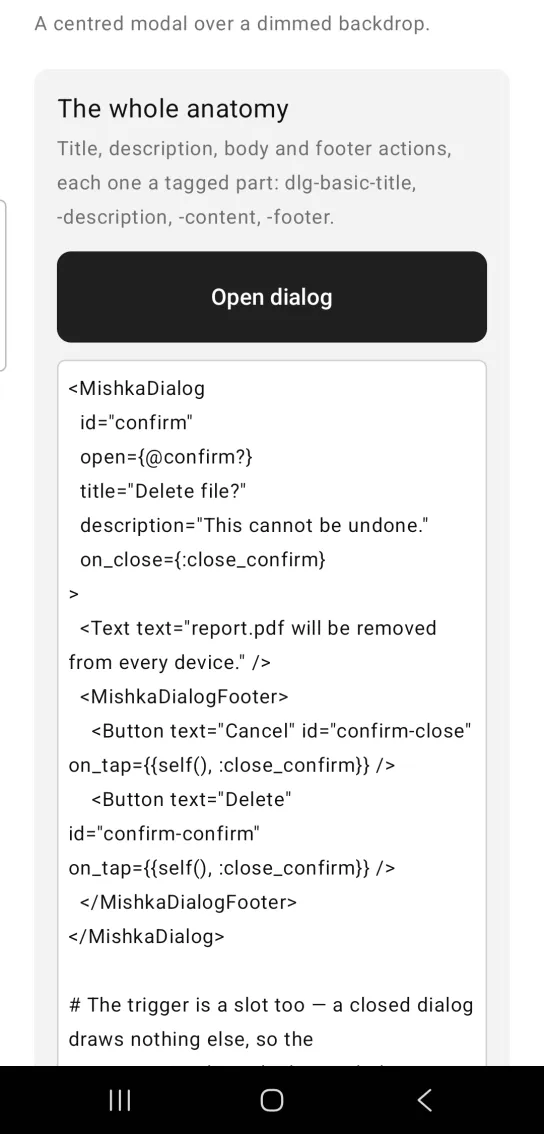
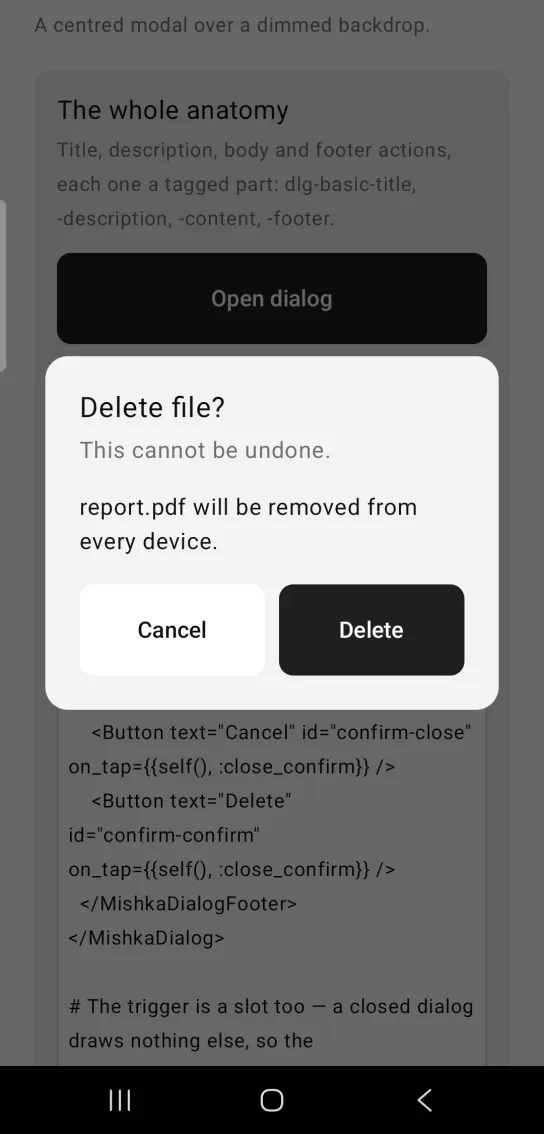
Left: the example as it loads. Right: after a tap. A dialog has a title, a description, a body and footer actions.
<MishkaDialog
  id="confirm"
  open={@confirm?}
  title="Delete file?"
  description="This cannot be undone."
  on_close={:close_confirm}
>
  <Text text="report.pdf will be removed from every device." />
  <MishkaDialogFooter>
    <Button text="Cancel" id="confirm-close" on_tap={{self(), :close_confirm}} />
    <Button text="Delete" id="confirm-confirm" on_tap={{self(), :close_confirm}} />
  </MishkaDialogFooter>
</MishkaDialog>

# The trigger is a slot too — a closed dialog draws nothing else, so the
# tag can sit where the button belongs while the panel stacks at the
# screen root. `id` is what ties the two together.
<MishkaDialog id="confirm" open={false}>
  <MishkaDialogTrigger label="Delete" on_tap={:open_confirm} />
</MishkaDialog>

def handle_info({:tap, :open_confirm}, socket) do
  {:noreply, Mob.Socket.assign(socket, :confirm?, true)}
end

def handle_info({:tap, :close_confirm}, socket) do
  {:noreply, Mob.Socket.assign(socket, :confirm?, false)}
endDialog slots that take any node
<MishkaDialogTitle>, <MishkaDialogDescription> and <MishkaDialogFooter> take arbitrary nodes as well as text. Here the title is a row with an emoji and a line of text. The title and description string props are shorthands for the same slots, and a slot wins when you pass both.
Dialog slots that take any node
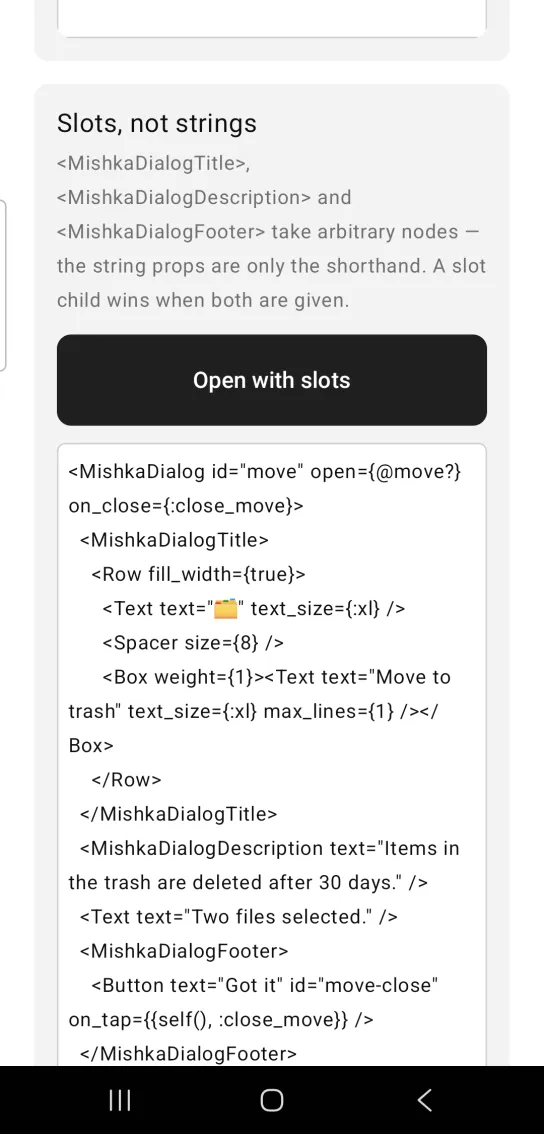
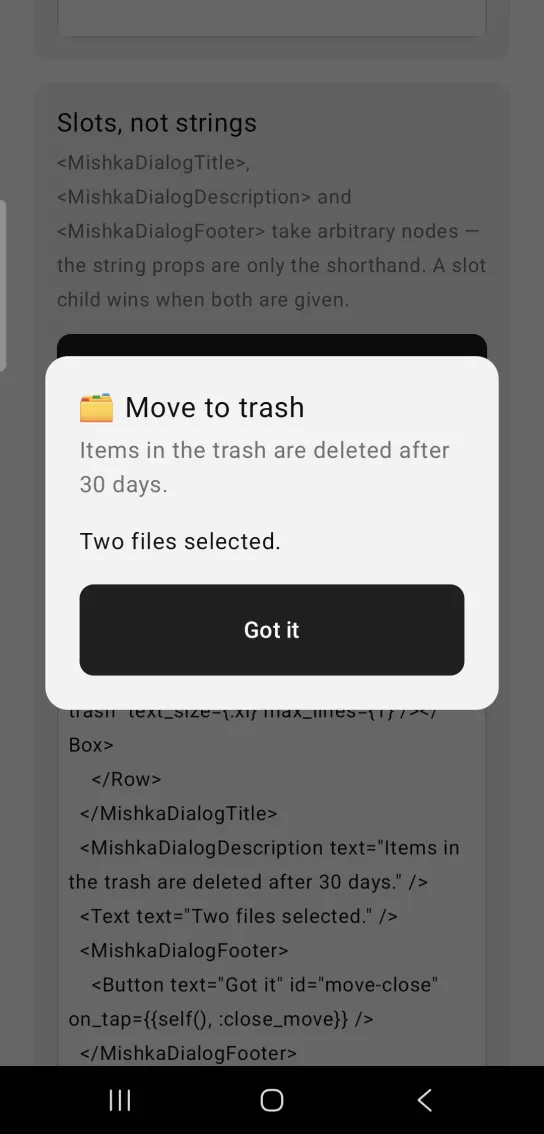
Left: the example as it loads. Right: after a tap. Titles and descriptions can be any node, not only strings.
<MishkaDialog id="move" open={@move?} on_close={:close_move}>
  <MishkaDialogTitle>
    <Row fill_width={true}>
      <Text text="🗂" text_size={:xl} />
      <Spacer size={8} />
      <Box weight={1}><Text text="Move to trash" text_size={:xl} max_lines={1} /></Box>
    </Row>
  </MishkaDialogTitle>
  <MishkaDialogDescription text="Items in the trash are deleted after 30 days." />
  <Text text="Two files selected." />
  <MishkaDialogFooter>
    <Button text="Got it" id="move-close" on_tap={{self(), :close_move}} />
  </MishkaDialogFooter>
</MishkaDialog>

def handle_info({:tap, :close_move}, socket) do
  {:noreply, Mob.Socket.assign(socket, :move?, false)}
endDialog dismissed by a backdrop tap
dismissible is true by default, so a tap on the backdrop closes the dialog. This example reports the change through on_open_change, which sends the new state with the event. The card shows the last value it received under the button.
Dialog dismissed by a backdrop tap
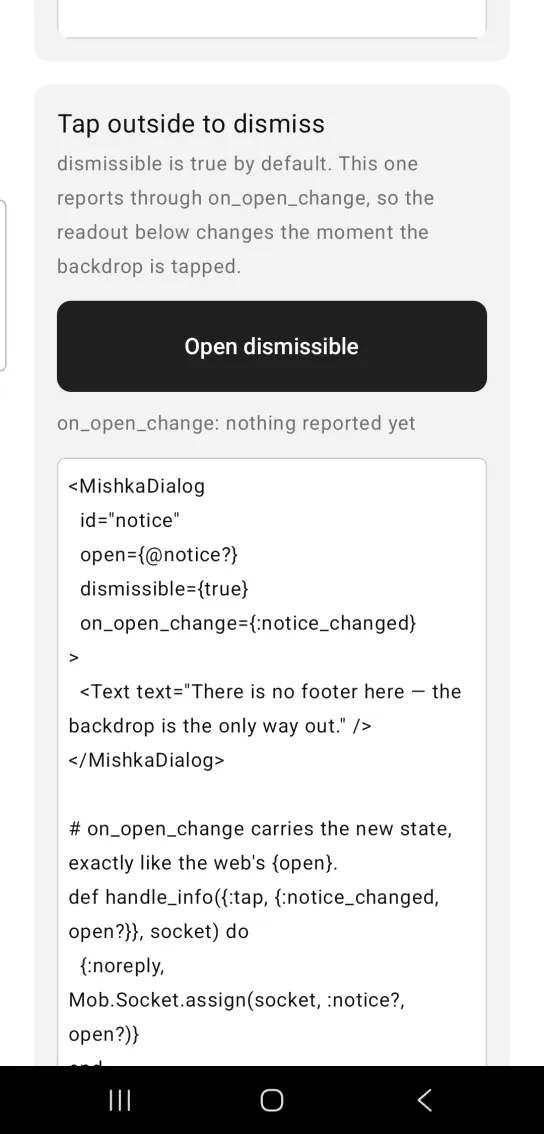
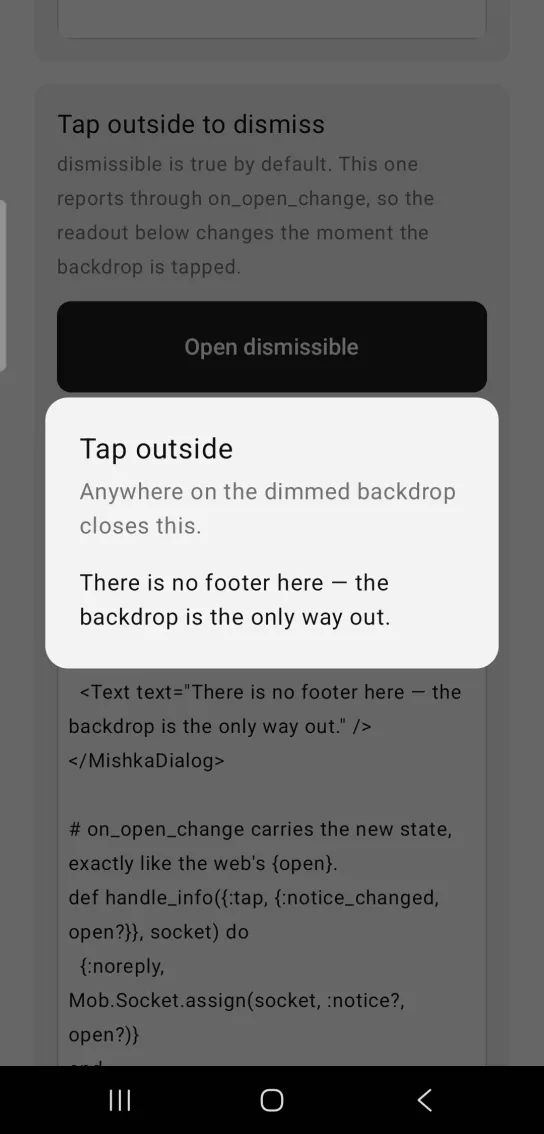
Left: the example as it loads. Right: after a tap. A tap on the backdrop dismisses it.
<MishkaDialog
  id="notice"
  open={@notice?}
  dismissible={true}
  on_open_change={:notice_changed}
>
  <Text text="There is no footer here — the backdrop is the only way out." />
</MishkaDialog>

# on_open_change carries the new state, exactly like the web's {open}.
def handle_info({:tap, {:notice_changed, open?}}, socket) do
  {:noreply, Mob.Socket.assign(socket, :notice?, open?)}
end
Dialog that forces a choice
dismissible={false} removes the backdrop's tap handler, so the user picks a footer action to close the dialog. A backdrop without a handler does not take touches on Android, so taps can reach the page behind it. Use the Alert dialog when the backdrop must block those taps.
Dialog that forces a choice
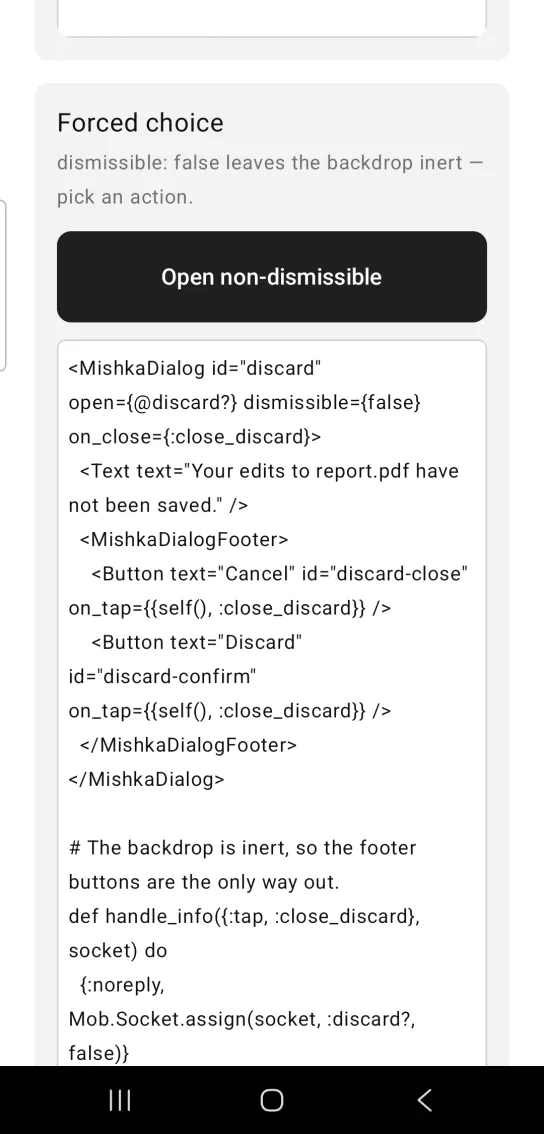
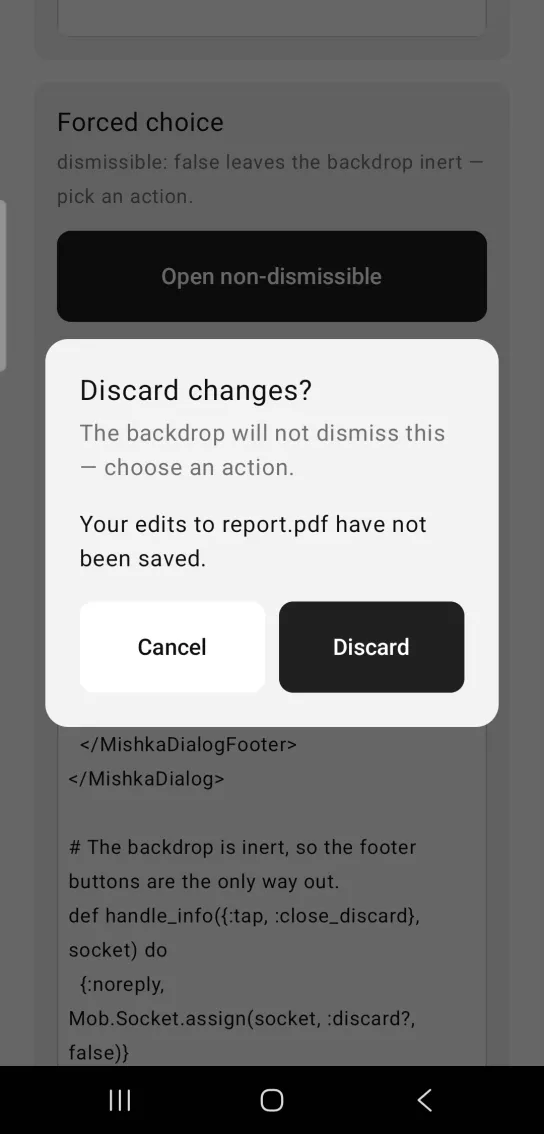
Left: the example as it loads. Right: after a tap. A forced choice keeps the backdrop inert.
<MishkaDialog id="discard" open={@discard?} dismissible={false} on_close={:close_discard}>
  <Text text="Your edits to report.pdf have not been saved." />
  <MishkaDialogFooter>
    <Button text="Cancel" id="discard-close" on_tap={{self(), :close_discard}} />
    <Button text="Discard" id="discard-confirm" on_tap={{self(), :close_discard}} />
  </MishkaDialogFooter>
</MishkaDialog>

# The backdrop is inert, so the footer buttons are the only way out.
def handle_info({:tap, :close_discard}, socket) do
  {:noreply, Mob.Socket.assign(socket, :discard?, false)}
end
Dialog without a dimmed backdrop
modal={false} leaves the backdrop transparent. The string "trap-focus" renders the same, because the focus trap it named has no native counterpart. When dismissible is true, a tap on the transparent backdrop still closes the dialog.
Dialog without a dimmed backdrop
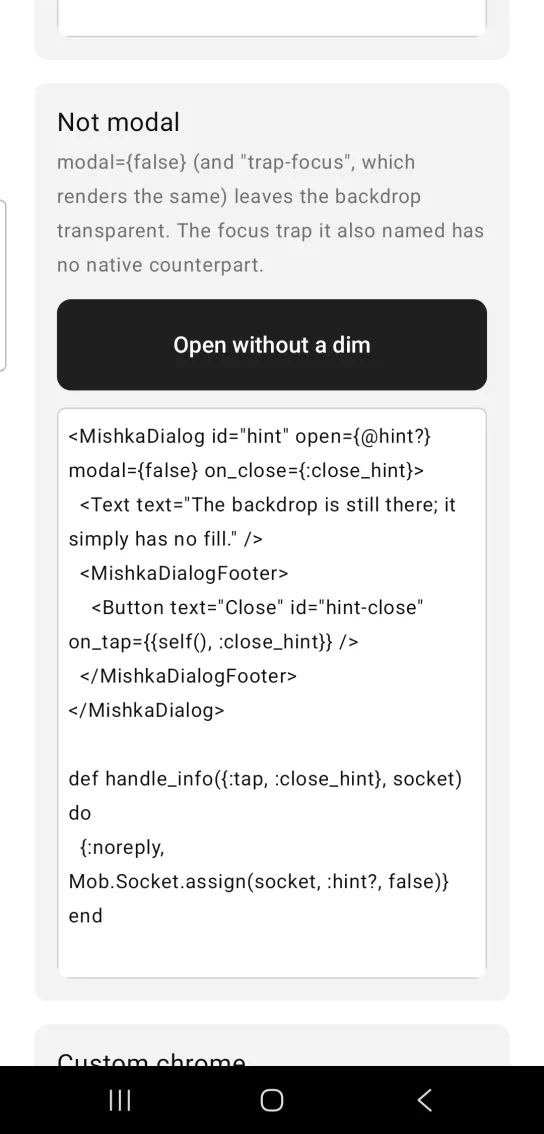
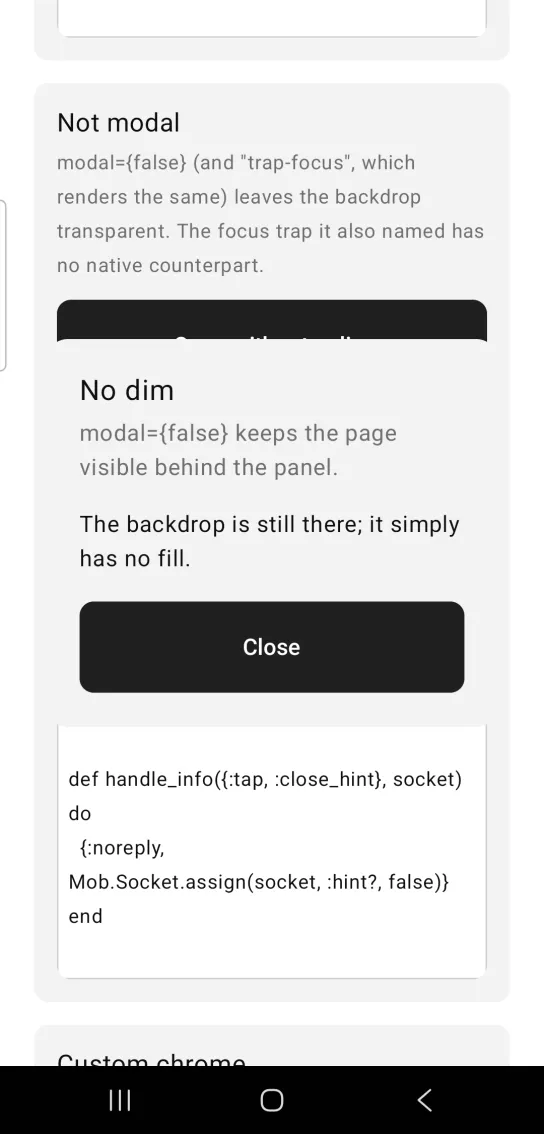
Left: the example as it loads. Right: after a tap. With modal off the backdrop has no fill.
<MishkaDialog id="hint" open={@hint?} modal={false} on_close={:close_hint}>
  <Text text="The backdrop is still there; it simply has no fill." />
  <MishkaDialogFooter>
    <Button text="Close" id="hint-close" on_tap={{self(), :close_hint}} />
  </MishkaDialogFooter>
</MishkaDialog>

def handle_info({:tap, :close_hint}, socket) do
  {:noreply, Mob.Socket.assign(socket, :hint?, false)}
end
Custom dialog size, colors and corners
The panel and backdrop take props instead of classes: width, background, corner_radius, padding, inset and scrim_color. A color can be a theme token or an ARGB integer. inset is the gap between the panel and the screen edges.
Custom dialog size, colors and corners
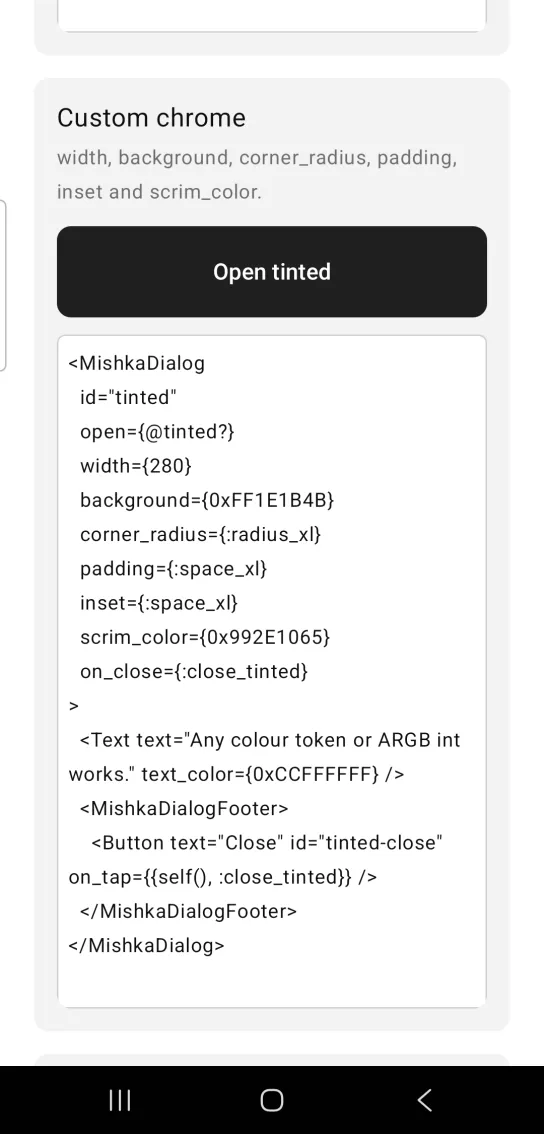
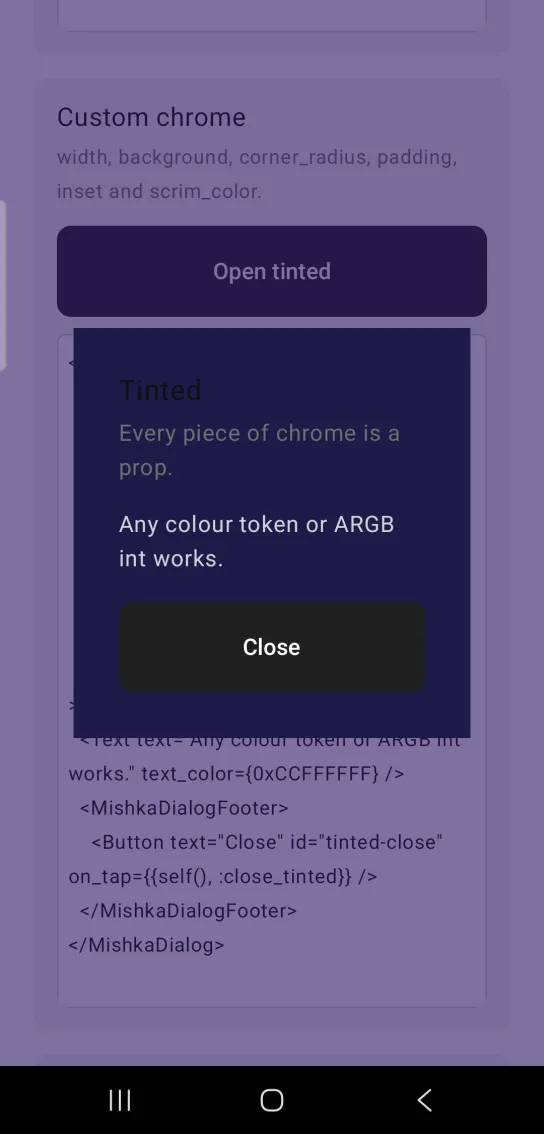
Left: the example as it loads. Right: after a tap. Width, colors and corners are all props.
<MishkaDialog
  id="tinted"
  open={@tinted?}
  width={280}
  background={0xFF1E1B4B}
  corner_radius={:radius_xl}
  padding={:space_xl}
  inset={:space_xl}
  scrim_color={0x992E1065}
  on_close={:close_tinted}
>
  <Text text="Any colour token or ARGB int works." text_color={0xCCFFFFFF} />
  <MishkaDialogFooter>
    <Button text="Close" id="tinted-close" on_tap={{self(), :close_tinted}} />
  </MishkaDialogFooter>
</MishkaDialog>
Disabled dialog trigger
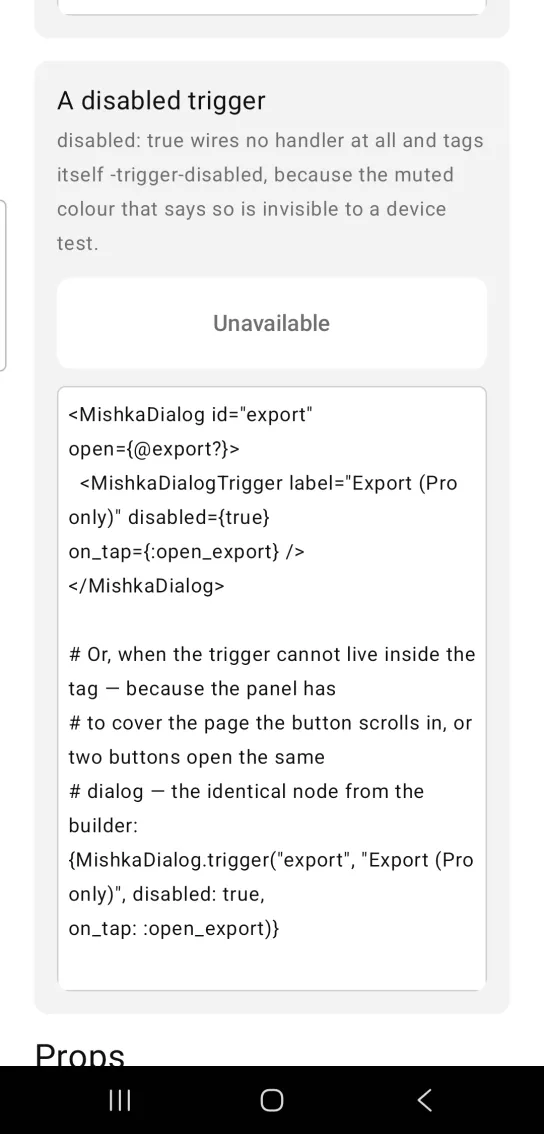
disabled={true} wires no tap handler, so the trigger cannot open the dialog, and it draws in muted colors. It also gets the test tag <id>-trigger-disabled. When the trigger cannot live inside the dialog tag, because the panel has to cover a scrolling page or two buttons open the same dialog, MishkaDialog.trigger/3 builds the identical node.
Disabled dialog trigger
<MishkaDialog id="export" open={@export?}>
  <MishkaDialogTrigger label="Export (Pro only)" disabled={true} on_tap={:open_export} />
</MishkaDialog>

# Or, when the trigger cannot live inside the tag — because the panel has
# to cover the page the button scrolls in, or two buttons open the same
# dialog — the identical node from the builder:
{MishkaDialog.trigger("export", "Export (Pro only)", disabled: true, on_tap: :open_export)}
Props
| Prop | Type | Default | Description |
|---|---|---|---|
id | string | nil | Stem for the native test tag of every part, such as <id>-panel and <id>-title. Set it when a device test must find the dialog. |
open | boolean | false | Whether the dialog is shown. The screen owns this value. |
modal | true, false or "trap-focus" | true | Whether the backdrop dims. false and "trap-focus" leave it transparent. |
title | string | nil | Heading. Shorthand for <MishkaDialogTitle>. |
description | string | nil | Supporting line under the heading. Shorthand for <MishkaDialogDescription>. |
actions | list of nodes | [] | Footer buttons in a trailing-aligned row. Shorthand for <MishkaDialogFooter>. |
dismissible | boolean | true | Whether a backdrop tap closes the dialog. false makes the user choose an explicit action. |
on_close | event tag (atom) | none | Sent as {:tap, tag} on a backdrop tap. |
on_open_change | event tag (atom) | none | Sent as {:tap, {tag, false}} on a backdrop tap, like the web open payload. on_close wins when you pass both. |
width | number | 320 | Panel width. |
background | color token or ARGB integer | :surface | Panel background. |
corner_radius | radius token or number | :radius_lg | Panel corners. |
padding | spacing token or number | :space_lg | Padding inside the panel. |
inset | spacing token or number | :space_lg | Gap between the panel and the screen edges. |
scrim_color | ARGB integer or color token | 0x99000000 when modal, 0x00000000 otherwise | Backdrop fill. |
Slot tags and builders
Each slot tag builds the same node as its function, so you can use either form. Write the tags when you write a dialog out, and call the functions when the content comes from data. Children that are not slot tags are the dialog body. A slot wins over its shorthand prop.
| Tag | Phoenix slot | Takes | Builder |
|---|---|---|---|
<MishkaDialogTitle> | <:title> | text, or children | title/1 |
<MishkaDialogDescription> | <:description> | text, or children | description/1 |
<MishkaDialogFooter> | <:close> | Children, the footer buttons | footer/1 |
<MishkaDialogTrigger> | <:trigger> | label (or text), on_tap, on_open_change, disabled, id, background, text_color, padding, fill_width | trigger/3 |
Events
The dialog sends messages to your screen's handle_info/2 when its own controls are used. A button you place inside the dialog uses an explicit {self(), tag} as its on_tap, as in the examples above.
| Prop | Message | When |
|---|---|---|
on_close | {:tap, tag} | The user taps the backdrop and dismissible is true. |
on_open_change | {:tap, {tag, false}} | The user taps the backdrop and dismissible is true. on_close wins when you pass both. |
Trigger on_tap | {:tap, tag} | The user taps the trigger. |
Trigger on_open_change | {:tap, {tag, true}} | The user taps the trigger. |
<MishkaDialog
  id="confirm"
  open={@open?}
  title="Delete file?"
  description="This cannot be undone."
  on_close={:close_dialog}
  actions={actions}
>{body}</MishkaDialog>

{MishkaDialog.trigger("confirm", "Delete", on_tap: :open_dialog)}

def handle_info({:tap, :open_dialog}, socket) do
  {:noreply, Mob.Socket.assign(socket, :open?, true)}
end

def handle_info({:tap, :close_dialog}, socket) do
  {:noreply, Mob.Socket.assign(socket, :open?, false)}
end
# REQUIRED catch-all: the panel routes stray taps to an ignored tag.
def handle_info(_msg, socket), do: {:noreply, socket}Differences from the web component
- The focus trap and scroll lock do not port.
modalcontrols only whether the backdrop dims. - A non-modal web dialog lets an outside click close the dialog and also reach the content beneath it. A native hit test cannot do both, so the tap closes the dialog when
dismissibleistrue. Setdismissibletofalseand the transparent backdrop stops taking taps, which is the closest match to the web behavior. close_on_escapeis not ported, because Mob registers no key or back-press event for a screen to listen to.initial_focus,final_focus,labelledbyanddescribedbyare not ported. Focus restoration and ARIA anchoring belong to the DOM.- The nine
*_classattributes are replaced by the chrome props:width,background,corner_radius,padding,insetandscrim_color. on_open_change_targetis not ported. A Mob event goes to the screen process, and there is no second LiveView to target.
Attributes
| Name | Type | Default | Values | Required | Description |
|---|---|---|---|---|---|
id
|
string
| — | — | No | Tag stem for every part. Give it one if a device test must find the dialog. |
open
|
boolean
|
false
| — | No | Whether the dialog is shown. Lives in the screen. |
modal
|
true false "trap-focus"
|
true
| — | No | Whether the backdrop dims. |
title
|
string
| — | — | No | Heading. Shorthand for `<DialogTitle>` / `title/1`. |
description
|
string
| — | — | No | Supporting line under the heading. Shorthand for `<DialogDescription>` / `description/1`. |
actions
|
list of nodes
|
[]
| — | No | Footer buttons. Shorthand for `<DialogFooter>` / `footer/1`. |
dismissible
|
boolean
|
true
| — | No | Whether a backdrop tap closes it. `false` forces an explicit choice (what Alert Dialog does). |
on_close
|
event tag (atom)
| — | — | No | Sent as `{:tap, tag}` on backdrop tap. |
on_open_change
|
event tag (atom)
| — | — | No | Sent as `{:tap, {tag, false}}` on backdrop tap, mirroring the web's `{open}` payload. `on_close` wins when both are given. |
width
|
number
|
320
| — | No | Panel width. |
background
|
color token / ARGB int
|
:surface
| — | No | Panel background. |
corner_radius
|
radius token / number
|
:radius_lg
| — | No | Panel corners. |
padding
|
spacing token / number
|
:space_lg
| — | No | Padding inside the panel. |
inset
|
spacing token / number
|
:space_lg
| — | No | The viewport gap between the panel and the screen edges. |
scrim_color
|
ARGB int / token
|
0x99000000 when modal, 0x00000000 otherwise
| — | No | Backdrop fill. |
Options
Each option takes one or more of its values, separated by commas.
| Option | Values |
|---|---|
--type
|
dialog
|
--module
| A module name of your own |
What it generates
mix mishka.ui.gen.mob dialog