Pills input
v0.0.10
mix mishka.ui.gen.mob pills_input
The Mishka Chelekom Mob Pills Input is a bordered control that holds pills you supply beside a text field, on iOS and Android. It is the native port of the headless Pills Input and runs on Mob.
Overview of the Mob Pills Input component for iOS and Android
Pills Input does not own its pills. You pass the pill nodes as children, and they can be Mob Pill components, avatars, color swatches or anything else. The control draws them in rows above a text field. The field has no border of its own, because the control around it is the box.
Tags Input owns its tokens instead: you hand it strings and it renders them as pills with ✕ buttons. Use Tags Input for a list of strings, and Pills Input when the tokens are richer, such as a recipient picker that shows avatars. The web component draws the same line with its pills slot.
The screen owns the state: the draft text and the list of pills. on_draft reports typing. on_add reports the return key and carries no text, so you commit the draft the screen already holds.
Pills Input owns no suggestion list, but a picker usually wants one. on_press tells the screen to open the list, on_draft filters it, and a tap on a row adds a pill, or removes it when that pill is already there. Removing on a second tap keeps a picker from collecting the same recipient twice. The example below shows the whole pattern.
Mob has no flow layout, and a row runs off the edge instead of wrapping. The control packs the pills into rows itself, against a budget of wrap_chars characters per row. It costs each pill by the text inside it plus 5 for padding, the ✕ and the gap. Mob reports no geometry back to the screen, so this is an estimate. A pill with no text, such as an avatar or swatch, costs a flat 10. When the pills are uniform, set per_row to chunk by count instead.
Generate the pills input component
Run this from your Mob app's root to add the component to lib/<app>/components/:
mix mishka.ui.gen.mob pills_inputThe generator registers the <PillsInput> tag so you can use it in ~MOB markup. It does not generate other components. The pills are yours: the example below builds them with the Pill component, which you add with mix mishka.ui.gen.mob pill. The examples on this page use the mishka_ prefix of the showcase app (--module-prefix mishka_), so the tag is <MishkaPillsInput>. Without a prefix the tag is <PillsInput>.
Pills input as a picker
Tap the field to open the list, type to filter it, and tap a name to add it as a pill. Tapping a name you already have removes it. One clause does both, which also means the same person cannot be added twice. Pressing return still commits what you typed.
Pills input as a picker
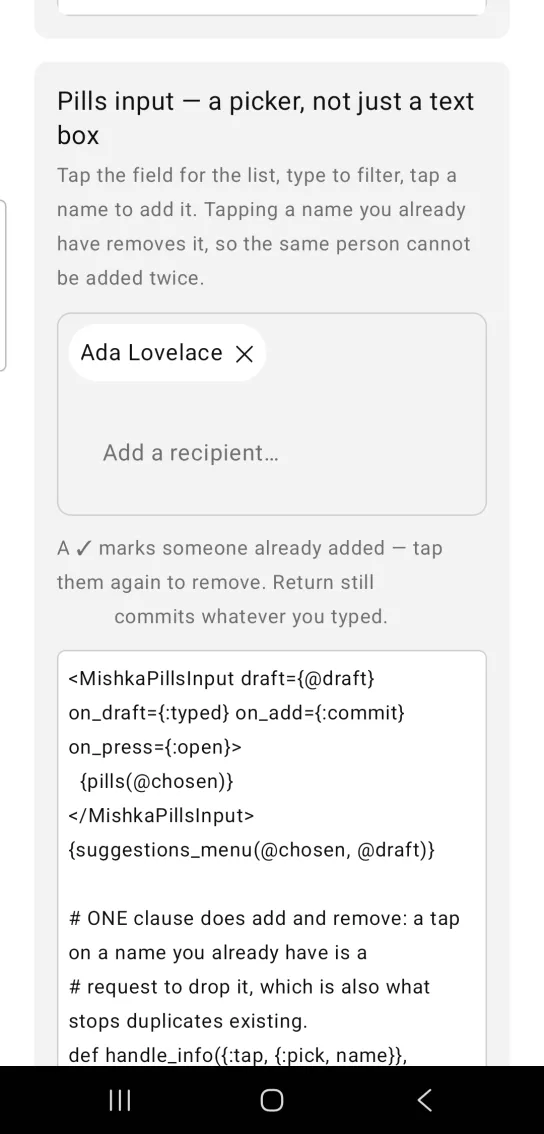
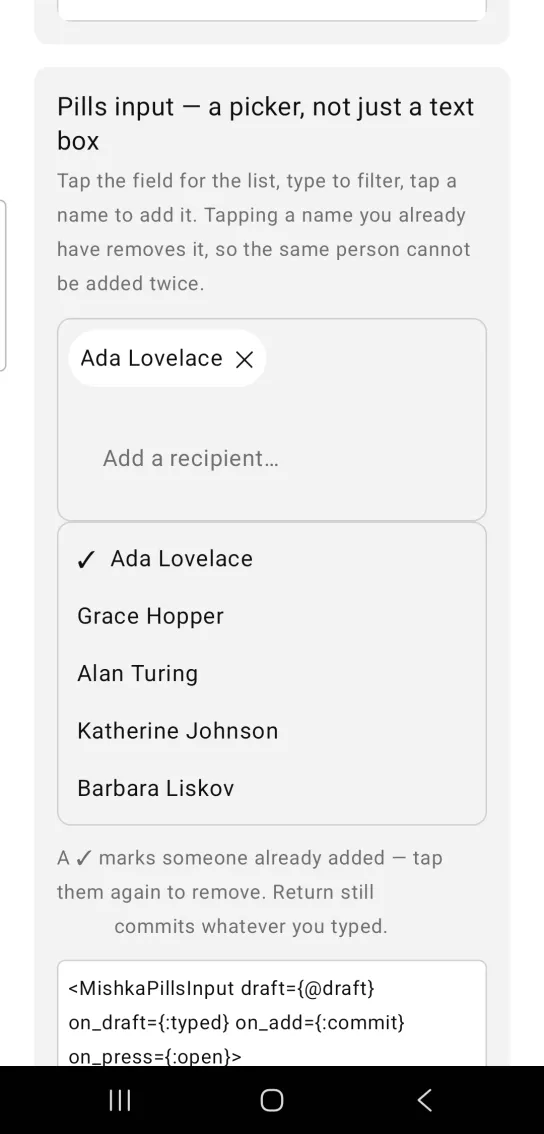
Left: the example as it loads. Right: after a tap. Tap the field for the list, tap a name to add it.
<MishkaPillsInput draft={@draft} on_draft={:typed} on_add={:commit} on_press={:open}>
  {pills(@chosen)}
</MishkaPillsInput>
{suggestions_menu(@chosen, @draft)}

# ONE clause does add and remove: a tap on a name you already have is a
# request to drop it, which is also what stops duplicates existing.
def handle_info({:tap, {:pick, name}}, socket) do
  chosen = socket.assigns.chosen

  next =
    if name in chosen, do: List.delete(chosen, name), else: chosen ++ [name]

  {:noreply, socket |> assign(:chosen, next) |> assign(:draft, "")}
end
Props
The children of <MishkaPillsInput> are the pills.
| Prop | Type | Default | Description |
|---|---|---|---|
draft | string | "" | The text field's value. |
placeholder | string | nil | Placeholder of the draft field. |
disabled | boolean | false | Mutes the control and unwires it. |
on_draft | event tag (atom) | None | Sends {:change, tag, text} as the draft is typed. |
on_add | event tag (atom) | None | Sends {:submit, tag} on return. It carries no text, so commit your own draft. |
on_press | event tag (atom) | None | Sends {:tap, tag} on every tap of the draft. |
on_focus | event tag (atom) | None | Sends {:focus, tag} when the draft gains focus. |
on_blur | event tag (atom) | None | Sends {:blur, tag} when the draft loses focus. |
space | number | 6 | Gap between pills. |
wrap_chars | number | 34 | Characters per pill row. |
per_row | number | nil | A fixed count of pills per row, for uniform pills. |
id | string | nil | Test tag on the draft field (<id>-draft). |
Helper functions
| Function | Description |
|---|---|
pack(pills, budget) | Packs pills into rows against a character budget, costing each pill by the text it contains. |
Events
Your screen receives these messages in handle_info/2:
on_draftsends{:change, tag, text}as the draft is typed.on_addsends{:submit, tag}when you press return. It has no text.on_presssends{:tap, tag}on every tap of the draft.on_focussends{:focus, tag}andon_blursends{:blur, tag}.
With on_draft={:typed} and on_add={:commit}, the screen stores the typed draft and commits it on return. Typing also opens the picker list, so someone who types before the list appears does not have to tap again.
def handle_info({:change, :typed, text}, socket) do
  {:noreply, socket |> Mob.Socket.assign(:draft, text) |> Mob.Socket.assign(:open?, true)}
end

# A submit carries no payload, so the draft the screen already holds is what commits.
def handle_info({:submit, :commit}, socket) do
  draft = String.trim(socket.assigns.draft)

  if draft == "" or draft in socket.assigns.chosen do
    {:noreply, Mob.Socket.assign(socket, :draft, "")}
  else
    {:noreply,
     socket
     |> Mob.Socket.assign(:chosen, socket.assigns.chosen ++ [draft])
     |> Mob.Socket.assign(:draft, "")}
  end
endDifferences from the web component
input_nameis not ported, because it is form plumbing. Theidprop only sets a test tag on the draft field.- The
*_classattributes are not ported. Mob draws native views, so there is no CSS.
Attributes
| Name | Type | Default | Values | Required | Description |
|---|---|---|---|---|---|
draft
|
string
|
""
| — | No | The text field's value. |
placeholder
|
string
| — | — | No | Draft placeholder. |
disabled
|
boolean
|
false
| — | No | Mutes and unwires. |
on_draft
|
event tag (atom)
| — | — | No | `{:change, tag, text}` as the draft is typed. |
on_add
|
event tag (atom)
| — | — | No | Fired on return. Carries NO text — commit your own draft. |
on_press
|
event tag (atom)
| — | — | No | `{:tap, tag}` on EVERY tap of the draft. |
on_focus / on_blur
|
event tags
| — | — | No | The draft gained or lost focus. |
space
|
number
|
6
| — | No | Gap between pills. |
wrap_chars
|
number
|
34
| — | No | Characters per pill row. |
per_row
|
number
| — | — | No | A fixed count instead, when the pills are uniform. |
id
|
string
| — | — | No | Test tag on the draft field. |
Options
Each option takes one or more of its values, separated by commas.
| Option | Values |
|---|---|
--type
|
pills_input
|
--module
| A module name of your own |
What it generates
mix mishka.ui.gen.mob pills_input