Menu
v0.0.10
The Mob Menu in Mishka Chelekom shows a list of actions on iOS and Android screens built with Mob. It is the native port of the headless Menu and draws items, separators, section labels, checkboxes, radio rows and nested submenus as native views.
Menu with every row kind
This menu uses every row kind, written as tags: two items with icons, a checkbox, a documentation row, a section label above two radio rows, a disabled item and a submenu with two nested items.
One on_select tag, :pick, serves every row, and the message carries the row's own id. A checkbox row and a submenu row report like any other row, so the screen decides whether to toggle the tick or open the submenu.
Menu with every row kind
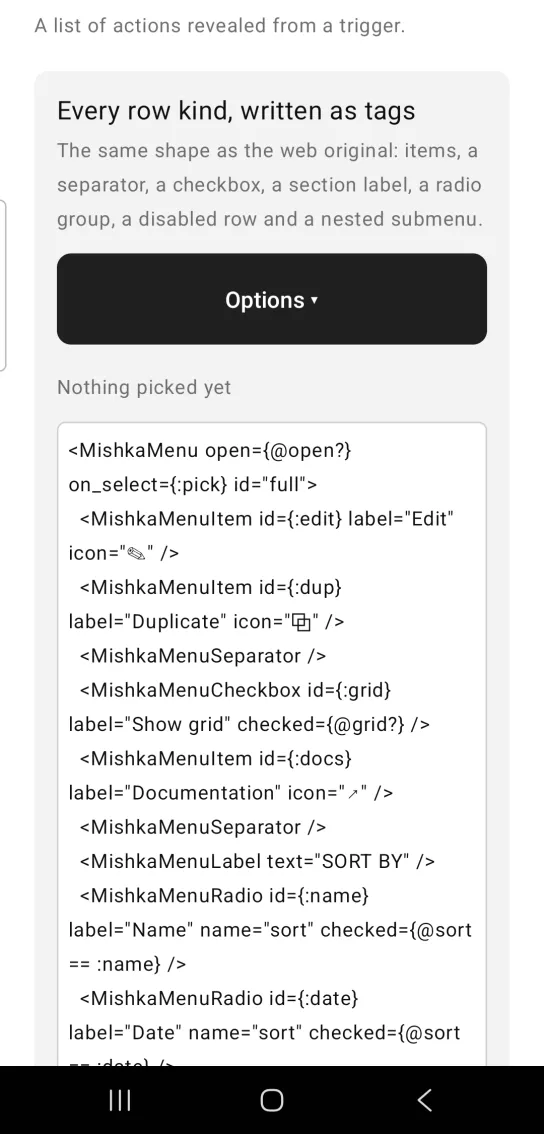
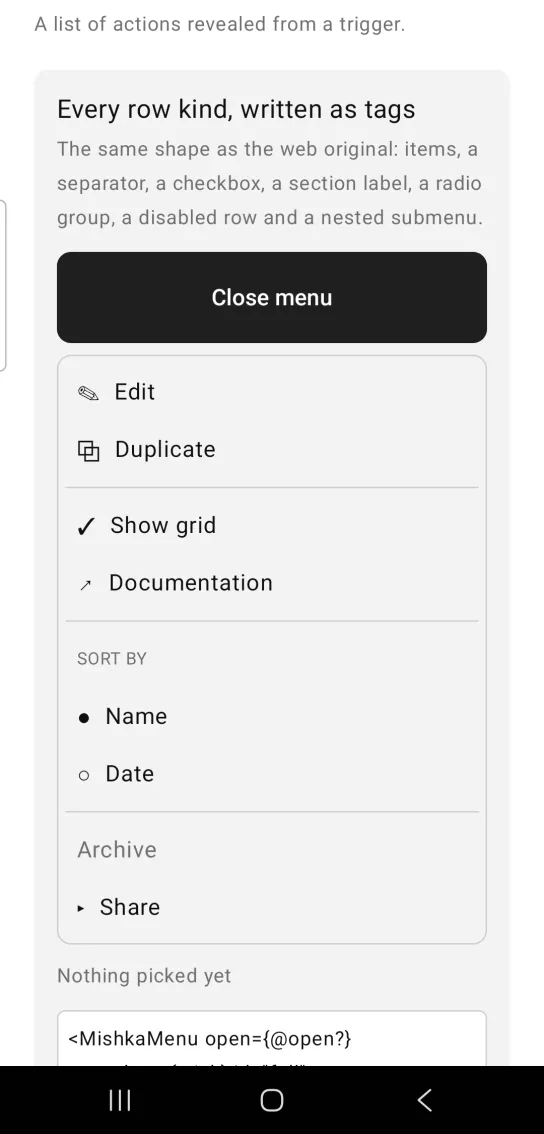
Left: the example as it loads. Right: after a tap. A list of actions revealed from a trigger.
<MishkaMenu open={@open?} on_select={:pick} id="full">
  <MishkaMenuItem id={:edit} label="Edit" icon="✎" />
  <MishkaMenuItem id={:dup} label="Duplicate" icon="⧉" />
  <MishkaMenuSeparator />
  <MishkaMenuCheckbox id={:grid} label="Show grid" checked={@grid?} />
  <MishkaMenuItem id={:docs} label="Documentation" icon="↗" />
  <MishkaMenuSeparator />
  <MishkaMenuLabel text="SORT BY" />
  <MishkaMenuRadio id={:name} label="Name" name="sort" checked={@sort == :name} />
  <MishkaMenuRadio id={:date} label="Date" name="sort" checked={@sort == :date} />
  <MishkaMenuSeparator />
  <MishkaMenuItem id={:archive} label="Archive" disabled={true} />
  <MishkaMenuSubmenu id={:share} label="Share" open={@submenu == :share}>
    <MishkaMenuItem id={:copy} label="Copy link" />
    <MishkaMenuItem id={:email} label="Email" />
  </MishkaMenuSubmenu>
</MishkaMenu>

# One handler for every row — the message carries the row's own id.
def handle_info({:tap, {:pick, :grid}}, socket) do
  {:noreply, assign(socket, :grid?, not socket.assigns.grid?)}
end

def handle_info({:tap, {:pick, :share}}, socket) do
  # A submenu trigger reports like any row; the screen decides.
  {:noreply, assign(socket, :submenu, toggle(socket.assigns.submenu, :share))}
endMenu with plain actions
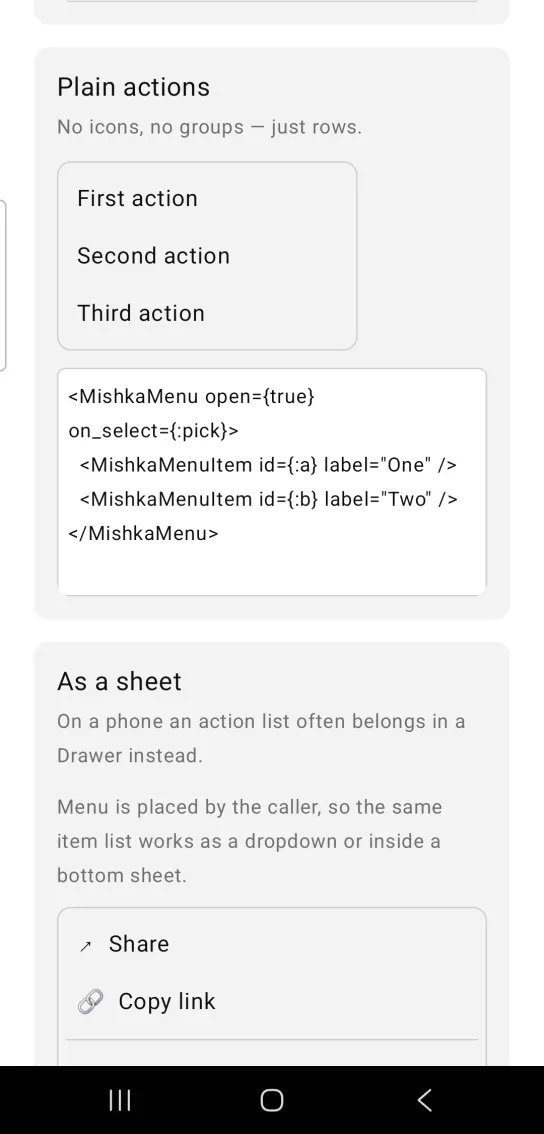
A menu needs neither icons nor groups. This one has two plain rows. Add width to give the panel a fixed width, otherwise it fills the available width.
Menu with plain actions
<MishkaMenu open={true} on_select={:pick}>
  <MishkaMenuItem id={:a} label="One" />
  <MishkaMenuItem id={:b} label="Two" />
</MishkaMenu>
Menu as a bottom sheet
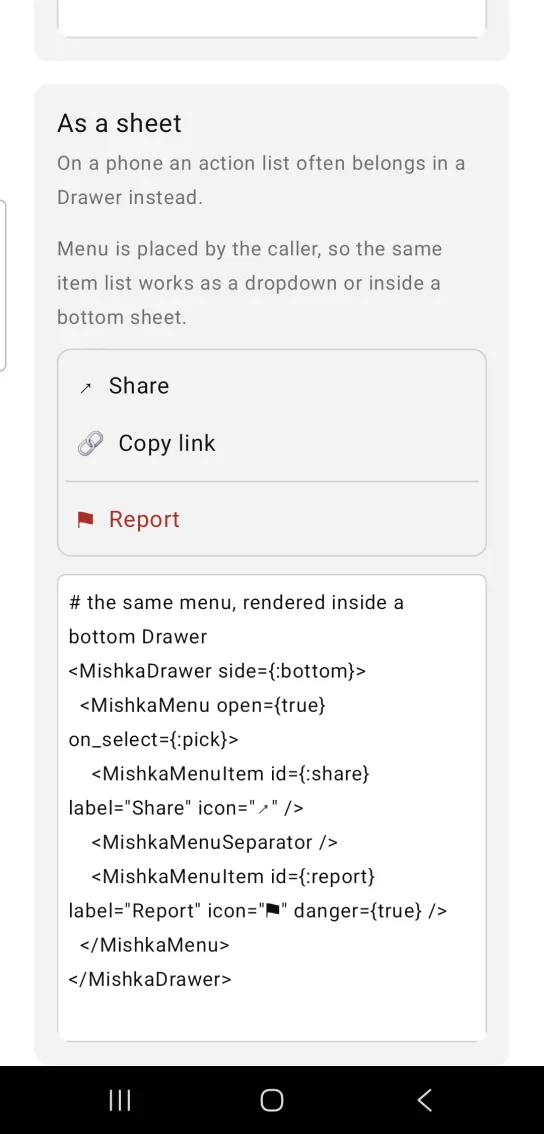
On a phone, an action list often works better as a bottom sheet. Because you place the menu yourself, you can render the same menu inside a Drawer with side={:bottom}. The Report item sets danger, so it takes the danger_color.
Menu as a bottom sheet
# the same menu, rendered inside a bottom Drawer
<MishkaDrawer side={:bottom}>
  <MishkaMenu open={true} on_select={:pick}>
    <MishkaMenuItem id={:share} label="Share" icon="↗" />
    <MishkaMenuSeparator />
    <MishkaMenuItem id={:report} label="Report" icon="⚑" danger={true} />
  </MishkaMenu>
</MishkaDrawer>
Props
| Prop | Type | Default | Description |
|---|---|---|---|
open | boolean | false | Whether the menu is shown. The screen owns it, and a closed menu renders nothing. |
on_select | event tag | none | Sent as {:tap, {tag, item_id}} when a user taps an enabled row. |
width | number | nil | Panel width. Without it the panel fills the available width. |
danger_color | color token or ARGB integer | :error | Color of items marked danger. |
background | color token or ARGB integer | :surface | Panel fill, from the Popover panel. |
corner_radius | radius token or number | :radius_md | Panel corners. |
padding | spacing token or number | 6 | Padding inside the panel. |
border_color | color token or ARGB integer | :border | Panel border color. |
border_width | number | 1 | Panel border width. |
Row tags
Write rows as child tags. Each tag has the attributes below.
| Tag | Attributes | Description |
|---|---|---|
<MishkaMenuItem> | id, label, icon, disabled, danger, test_id | An action row. id is the value on_select reports, and test_id becomes the row's native test tag. |
<MishkaMenuSeparator> | none | A divider between groups. |
<MishkaMenuLabel> | text | A small heading above a group. |
<MishkaMenuCheckbox> | id, label, checked, disabled, test_id | A row with a tick. When test_id is set, the test tag gains -checked or -unchecked. |
<MishkaMenuRadio> | id, label, name, checked, disabled, test_id | One choice in a named group. It reports like any row, and the screen sets which row is checked. |
<MishkaMenuSubmenu> | id, label, open, disabled, test_id | A row that reveals nested rows inline. When test_id is set, the test tag gains -open or -closed. |
Each tag has a builder function that returns the same node, for rows that come from data: item/3, separator/0, label/1, checkbox/3, radio/4 and submenu/3. For example, item(:delete, "Delete", danger: true).
Events
Set on_select to an atom. When a user taps an enabled row, your screen receives {:tap, {tag, item_id}} in handle_info/2, where tag is your atom and item_id is the row's id. Disabled rows send nothing.
def handle_info({:tap, {:pick, :grid}}, socket) do
  {:noreply, Mob.Socket.assign(socket, :grid?, not socket.assigns.grid?)}
end

def handle_info({:tap, {:pick, id}}, socket) do
  socket =
    socket
    |> Mob.Socket.assign(:last, id)
    |> Mob.Socket.assign(:open?, false)

  {:noreply, socket}
end
The first clause keeps the menu open while a checkbox toggles. The second treats every other row as a command and closes the menu.
Differences from the web component
The Mob Menu does not port these parts of the headless Menu:
side,alignand the offsets. You place the menu, so it has no side to take.open_on_hoveranddelay. A touch screen has no hover.- The web component's
idand*_classattributes. Style the panel with the props above. - The sideways submenu. A submenu opens inline, with its rows indented below the trigger row.
Attributes
| Name | Type | Default | Values | Required | Description |
|---|---|---|---|---|---|
open
|
boolean
|
false
| — | No | Whether the menu is shown. |
on_select
|
event tag (atom)
| — | — | No | Sent as `{:tap, {tag, item_id}}`. |
width
|
number
| — | — | No | Panel width. |
danger_color
|
color token / ARGB int
|
0xFFDC2626
| — | No | Destructive item colour. |
plus everything .Popover accepts
| — | — | — | No | — |
Options
Each option takes one or more of its values, separated by commas.
| Option | Values |
|---|---|
--type
|
menu
|
--module
| A module name of your own |
What it generates
mix mishka.ui.gen.mob menu