Bring your site to Mishka CMS,
with a dry run first.
Mishka CMS Migration reads a site from another CMS and writes its posts, pages, media, menus and addresses into Mishka CMS. WordPress works today; Joomla and other CMSs come next. A dry run shows what would happen before anything is written.
Nine kinds of content, each in its place.
Title, slug, content, excerpt and featured image. A sticky post becomes featured. Private, pending and scheduled posts come in as drafts.
Categories keep their parents. A category or tag the site already has waits for your decision.
Each author becomes a Blog blogger tied to a user of your site by email. You choose to skip the authors with no match, or create a user for them.
Brought into Mishka Blog when you switch them on. They are off by default.
Drawn in your site's main layout, as drafts or live at their old addresses. Elementor layouts are read.
Pictures and files are downloaded from the source's own site. A file that lives on a CDN is skipped.
Each menu waits for you to say where it goes: header links, footer links, a component, or left out.
An address a visitor knew that now lives elsewhere gets a 301: old slugs, feeds, sitemaps, archives and paged lists.
The site title, logo and icon. An Elementor site's global colours and fonts become a stylesheet, with a dark twin of each colour.
From any source, the same four steps.
-
STEP 01Connect
Pick a source and answer four short questions. For WordPress, give the address and an application password, or upload the export file.
4 questions -
STEP 02Dry run
It reads the whole source and shows what an import would create, update and skip. Nothing is written, so run it as often as you like.
Writes nothing -
STEP 03Decide
Items with two fair answers wait for you. Settle a whole group at once, or set rules in Advanced mode.
Needs your decision -
STEP 04Import
Run it once more, then Import. Records go in through the CMS's own actions, parents first, and the report is kept.
Report saved
Runs, reports and decisions, on one screen each.
Open the Migration entry in the Mishka CMS admin sidebar and press New import.
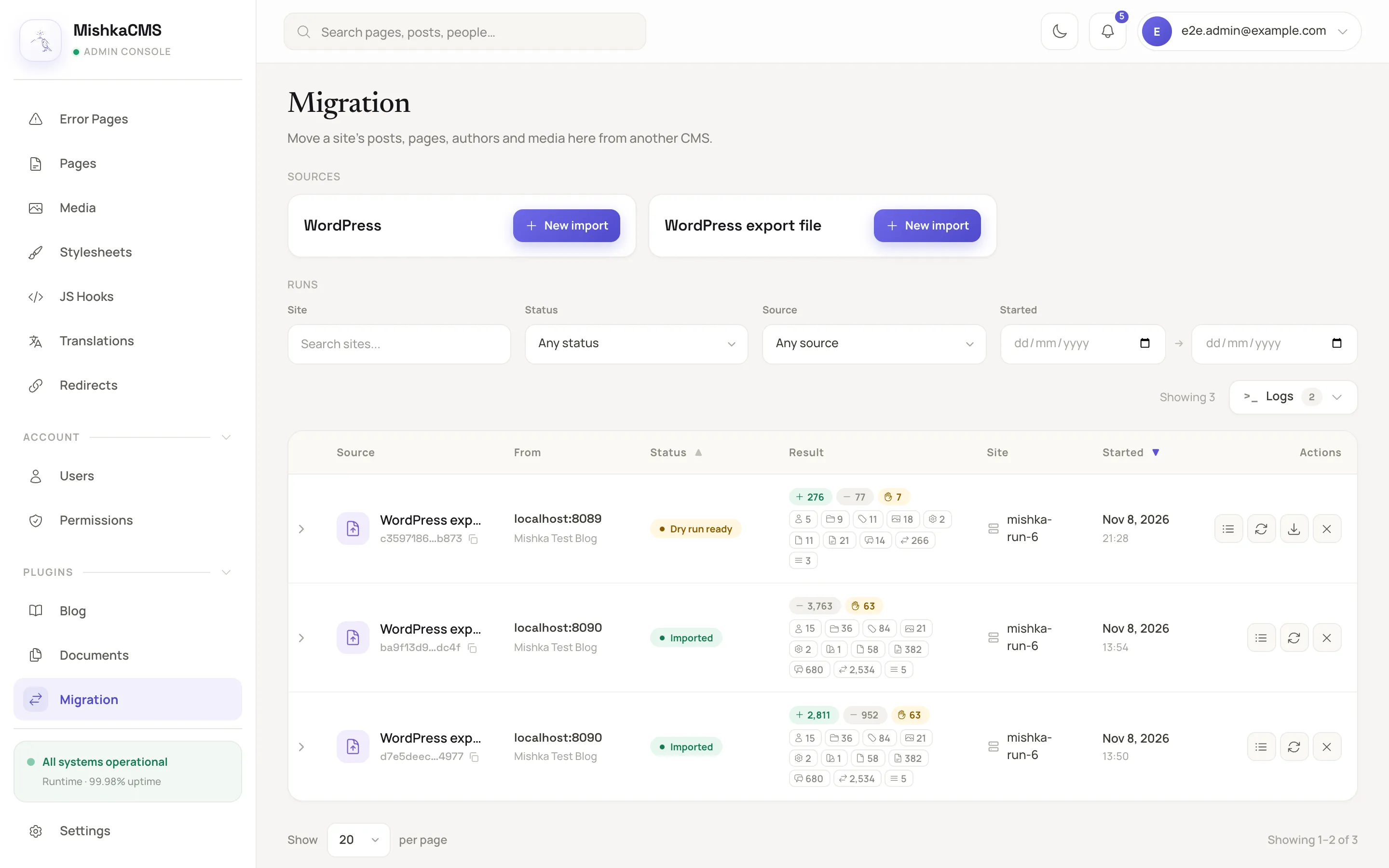
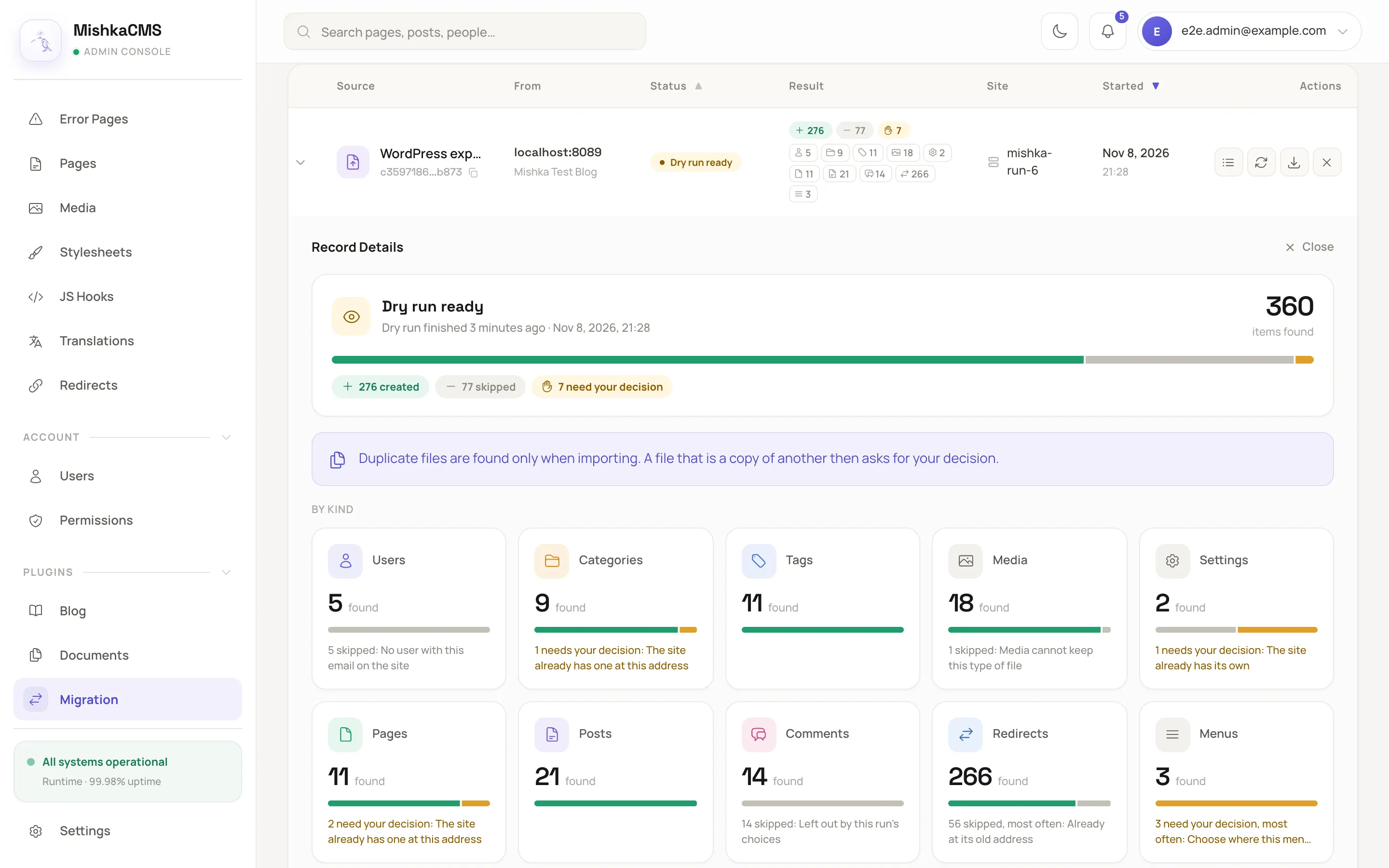
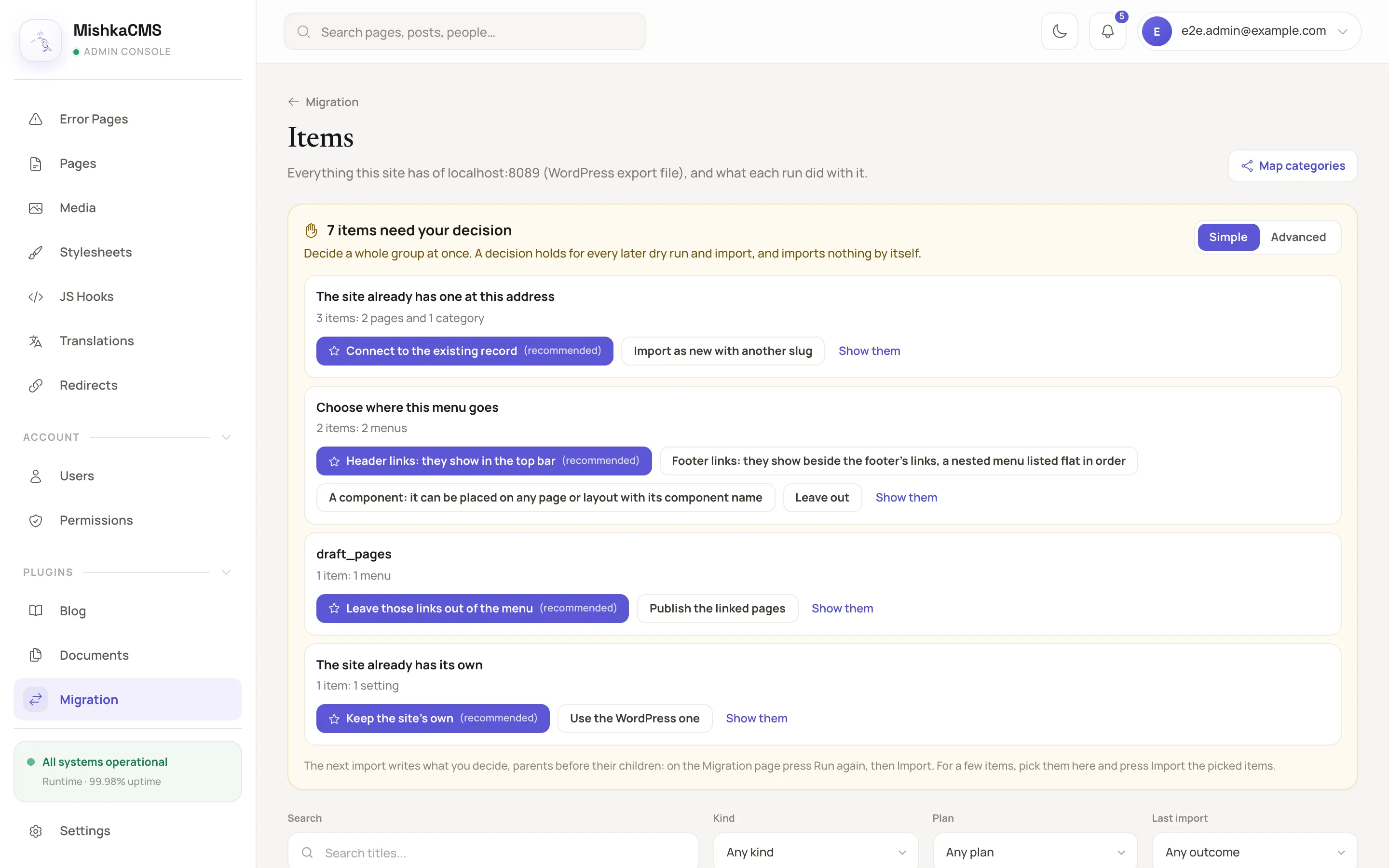
Run it as often as you need, it asks before it guesses.
It reads the whole source and reports what an import would create, update and skip. It writes nothing, so repeat it as often as you like.
Every record is written through the CMS's own actions as the admin who pressed Import. The CMS's permissions and validations decide what is accepted.
A clash, such as the same address, fails that item with the CMS's reason. Running again updates what the source changed and keeps what an admin changed.
Take content from several WordPress sites, such as two blogs. Each item is remembered per site, host, kind and source id.
Before you move a site.
Which sources can it import from?
WordPress, over its REST API or from the file that Tools, Export makes. Both read Polylang and WPML translations and Elementor layouts. Joomla and other CMSs come next.
Does it change my WordPress site?
No. It reads the source and writes only into your Mishka CMS site. A REST import needs a WordPress administrator and an application password, and the password is kept sealed until the run ends.
Do I need Mishka Blog?
Posts, categories, tags, authors and comments are written into Mishka Blog, so it has to run on the same site. Without it, those items wait with the reason that Mishka Blog is not installed.
What happens to my old addresses?
By default posts, categories, tags and pages are served at their WordPress addresses, and every address that moved gets a 301 redirect. You can choose /blog/slug instead, with or without redirects.
What if the site already has the same category or page?
The import never picks when two answers are both reasonable. The item is marked Needs your decision and waits, and you connect it to the existing record or import it as new with another slug.
What about my authors' passwords?
WordPress passwords cannot be carried over. A user the import creates signs in with Forgot password or a social sign-in.
Start with a dry run.
Mishka CMS Migration is free and open source under Apache-2.0. Add it from Hex, set it up on a site, and open Migration in the admin.
{:mishka_cms_migration, "~> 0.0.2"}Want the walkthrough first? Read how to move WordPress to Phoenix LiveView, or hire us for a custom migration.
New features & releases, once a month.
Release notes and product updates from the team building Mishka. No spam, unsubscribe anytime.