Preview card
v0.0.10
mix mishka.ui.gen.mob preview_card
The Mob Preview Card in Mishka Chelekom reveals a card of detail when a user holds a name on iOS and Android screens built with Mob. It is the native port of the headless Preview Card.
Overview of the Mob Preview Card component for iOS and Android
The web component has two parts: a trigger, and a popup that appears when the trigger is hovered or focused. A phone has no hover, so the user holds the trigger instead. Holding sends on_hold. A plain tap goes to on_tap, because the web trigger is usually a link and tapping a link should still follow it.
The screen owns open. The card never changes it, so a second hold can close the card or move it to another trigger, as your screen decides. A tap outside the open card sends on_dismiss. Without that handler, the user can close the card only from its trigger.
The trigger and the card form one anchored node. The trigger stays in the page flow and the card draws in its own window over the page. The card takes no room, it can sit above or beside its trigger, and no parent can clip it. Three props place it: side picks the side of the trigger, align picks the position along that side, and side_offset sets the gap. When the requested side has no room and the opposite side does, the card flips to the opposite side. The card is then clamped into the window with 8 dp of edge padding plus the safe-area inset.
The trigger and the card both hug their content. The card shows an optional avatar, a title, a subtitle and a description. Any other children become the card's footer, which is where actions belong. Write the trigger as <MishkaPreviewCardTrigger>, or pass it in the trigger prop when a list comprehension builds the cards.
Generate the preview card component
Run this from your Mob app's root to add the component to lib/<app>/components/:
mix mishka.ui.gen.mob preview_cardThe generator registers the <PreviewCard> tag so you can use it in ~MOB markup. It also generates the Avatar and Popover components that the card uses, plus the shared Event and Anchored support modules. The examples on this page use the mishka_ prefix of the showcase app (--module-prefix mishka_), so the tag is <MishkaPreviewCard>. Without a prefix the tag is <PreviewCard>.
Hold a name to show its preview card
Hold either name to reveal its card, as the web reveals it on hover. A plain tap goes to on_tap instead.
The card owns no state. A hold asks for a change and the screen decides. In this screen, holding the open card closes it and holding the other name moves the card, so only one card is open at a time.
The tag form suits markup you write by hand. A list built with Enum.map/2 has no markup to put a tag in, so pass the trigger node in the trigger prop. Both forms build the same tree.
Hold a name to show its preview card
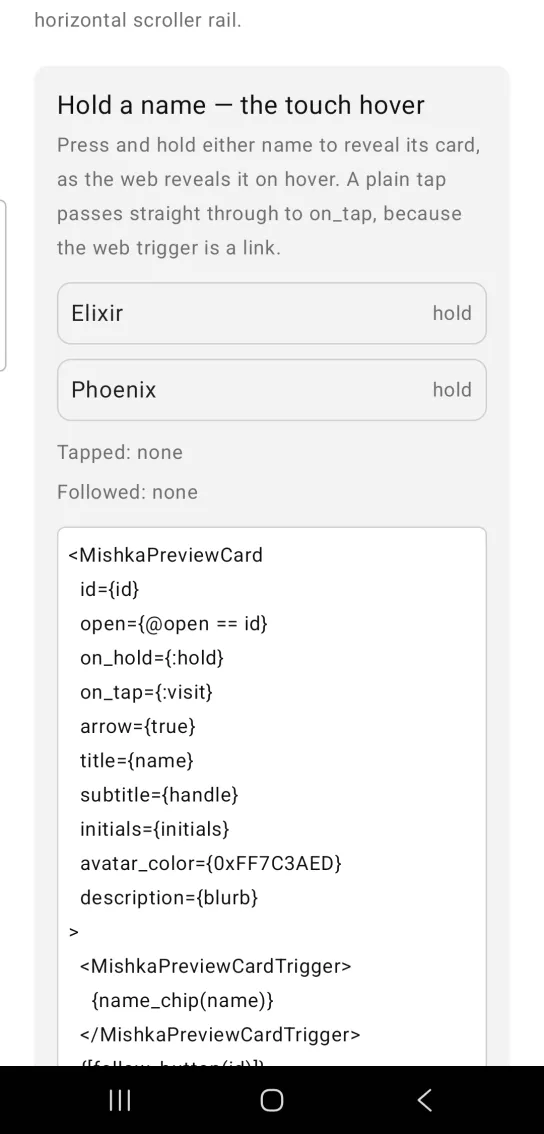
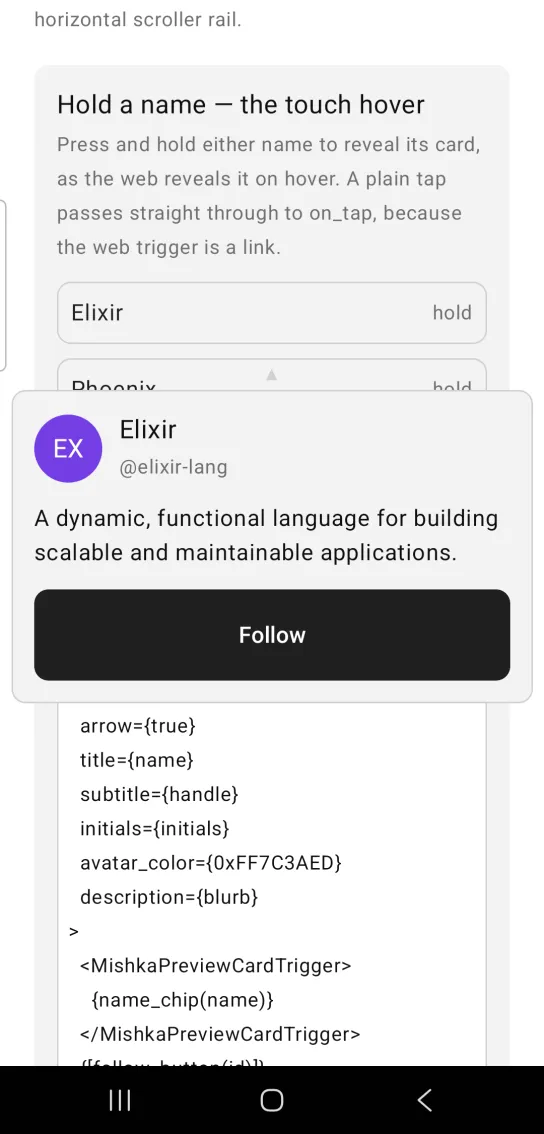
Left: the example as it loads. Right: after a long press. Hold a name to reveal its card of detail.
<MishkaPreviewCard
  id={id}
  open={@open == id}
  on_hold={:hold}
  on_tap={:visit}
  arrow={true}
  title={name}
  subtitle={handle}
  initials={initials}
  avatar_color={0xFF7C3AED}
  description={blurb}
>
  <MishkaPreviewCardTrigger>
    {name_chip(name)}
  </MishkaPreviewCardTrigger>
  {[follow_button(id)]}
</MishkaPreviewCard>

# The tag is the form to reach for. A whole LIST of cards comes out of
# DATA instead, and then there is no markup to hang a tag in: the
# `trigger` prop takes the node the same helper already built. Both
# forms end up in trigger/3, so the tree is identical either way.
Enum.map(@people, fn {id, name} ->
  preview_card(%{id: id, open: @open == id, trigger: name_chip(name), on_hold: :hold})
end)

# The card owns no state. A hold ASKS for a change and the screen
# decides — here holding the open one closes it and holding the other
# moves the card, so only ever one is open.
def handle_info({:tap, {:hold, id}}, socket) do
  next = if socket.assigns.open == id, do: nil, else: id
  {:noreply, Mob.Socket.assign(socket, :open, next)}
end

# The tap the long press did NOT swallow — a link still follows.
def handle_info({:tap, {:visit, id}}, socket) do
  {:noreply, Mob.Socket.assign(socket, :visited, id)}
endPreview card above the trigger
Set side={:top} to put the card above the trigger. align={:end} moves the card and its arrow toward the trigger's far edge. side_offset sets the gap between the two, and align_offset nudges the arrow along the card's edge. arrow_color={:primary} colors the arrow, which points down at the trigger.
Preview card above the trigger
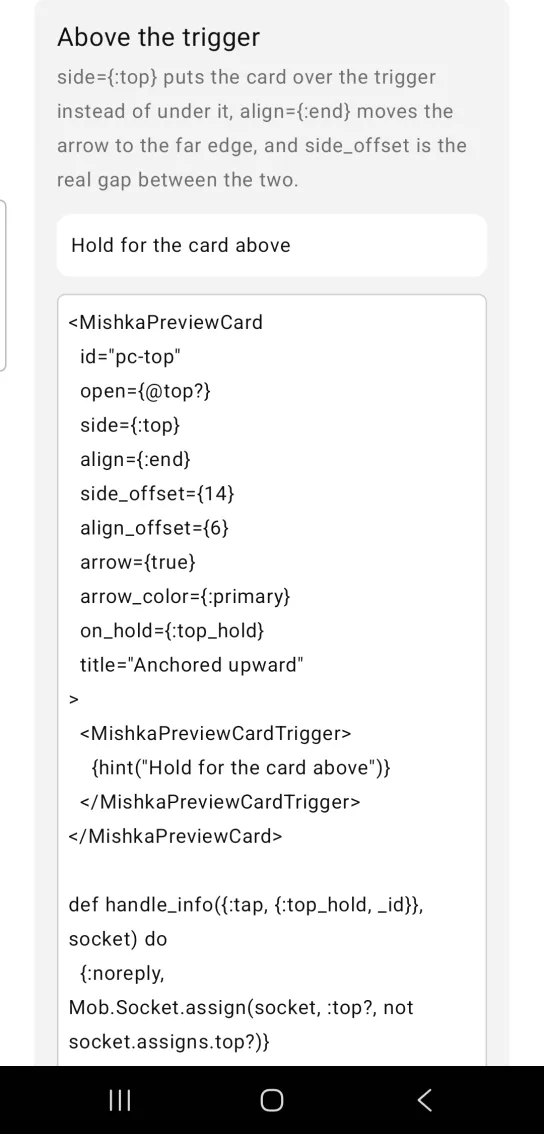
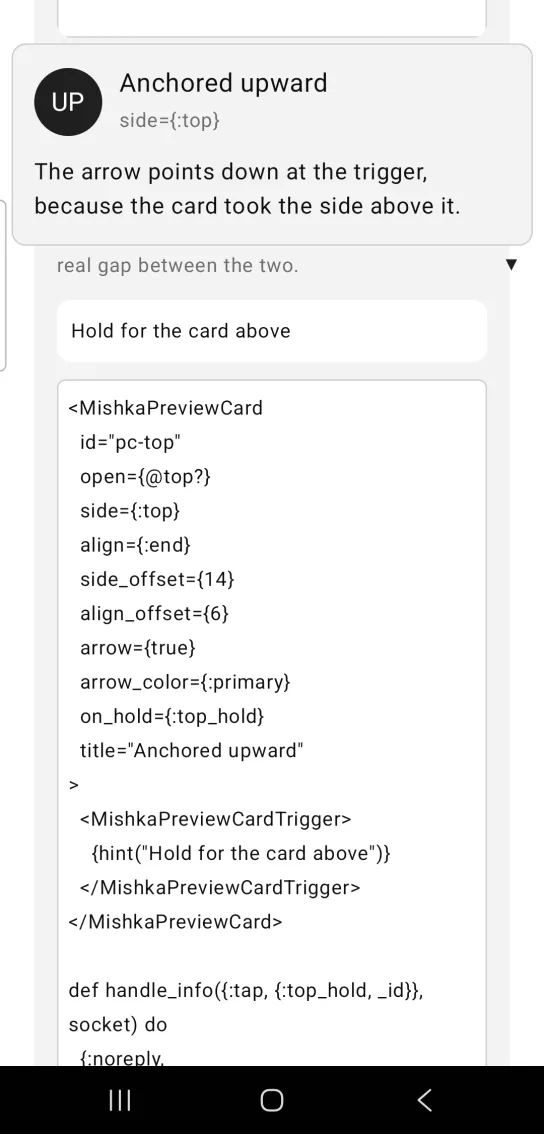
Left: the example as it loads. Right: after a long press. The side prop places the card above its trigger.
<MishkaPreviewCard
  id="pc-top"
  open={@top?}
  side={:top}
  align={:end}
  side_offset={14}
  align_offset={6}
  arrow={true}
  arrow_color={:primary}
  on_hold={:top_hold}
  title="Anchored upward"
>
  <MishkaPreviewCardTrigger>
    {hint("Hold for the card above")}
  </MishkaPreviewCardTrigger>
</MishkaPreviewCard>

def handle_info({:tap, {:top_hold, _id}}, socket) do
  {:noreply, Mob.Socket.assign(socket, :top?, not socket.assigns.top?)}
endPreview card beside the trigger
Set side={:right} to put the card beside the trigger. align={:start} sets where the card sits along the trigger's edge.
A card beside the trigger floats over the page like any other, so it takes no room in the layout. If the right side has no room and the left side does, the card flips to the left.
Preview card beside the trigger
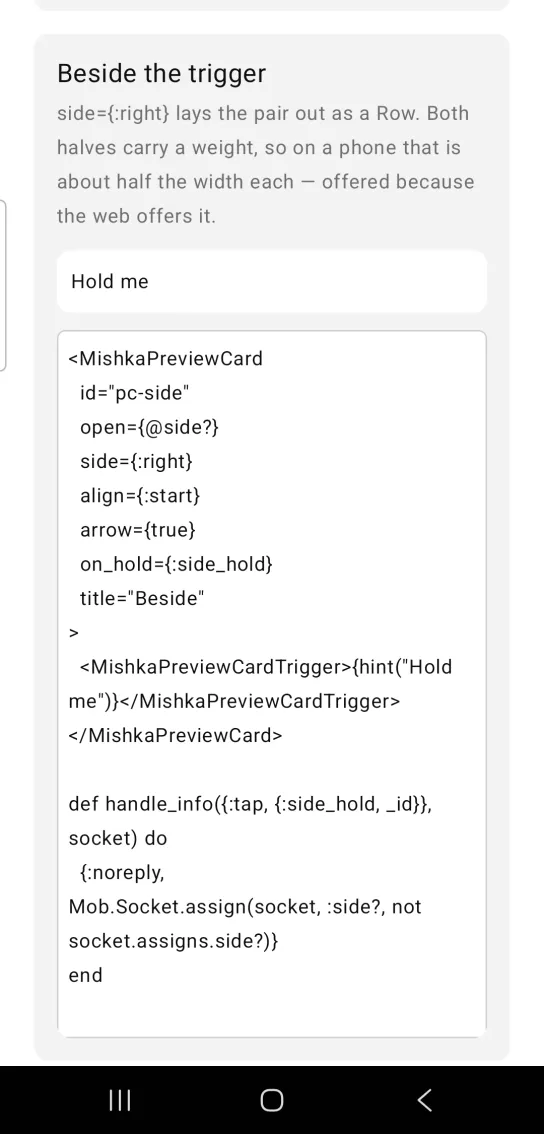
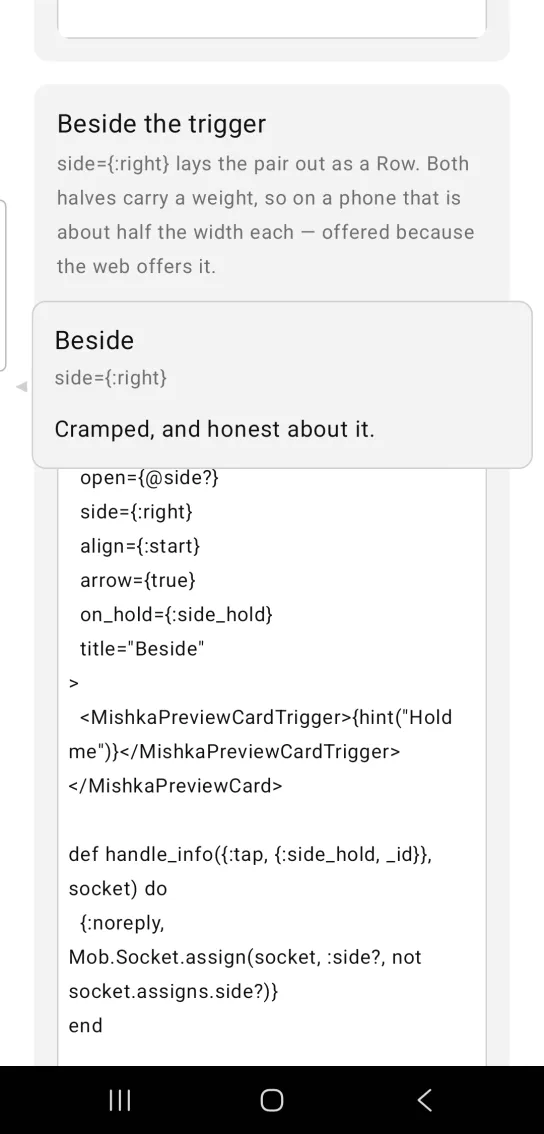
Left: the example as it loads. Right: after a long press. The side prop places the card beside its trigger.
<MishkaPreviewCard
  id="pc-side"
  open={@side?}
  side={:right}
  align={:start}
  arrow={true}
  on_hold={:side_hold}
  title="Beside"
>
  <MishkaPreviewCardTrigger>{hint("Hold me")}</MishkaPreviewCardTrigger>
</MishkaPreviewCard>

def handle_info({:tap, {:side_hold, _id}}, socket) do
  {:noreply, Mob.Socket.assign(socket, :side?, not socket.assigns.side?)}
end
Preview card pinned open without a trigger
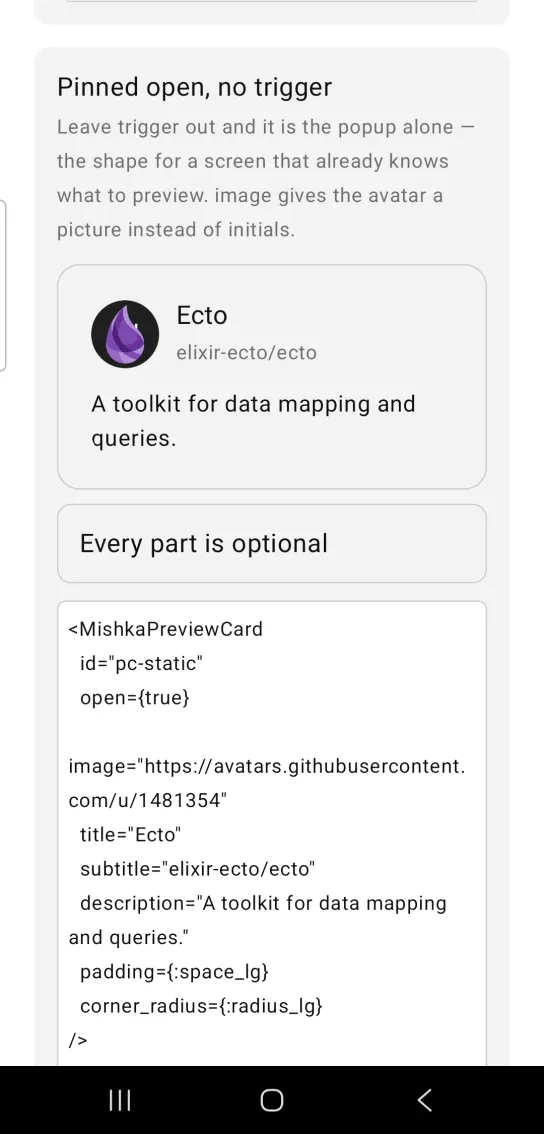
Leave out the trigger and the card renders in place as the popup alone. Use this when the screen already knows what to preview. open is a constant here, and there is nothing to hold, so the screen has no event to handle.
image gives the avatar a picture instead of initials. padding and corner_radius change the card's shell.
Preview card pinned open without a trigger
<MishkaPreviewCard
  id="pc-static"
  open={true}
  image="https://avatars.githubusercontent.com/u/1481354"
  title="Ecto"
  subtitle="elixir-ecto/ecto"
  description="A toolkit for data mapping and queries."
  padding={:space_lg}
  corner_radius={:radius_lg}
/>

# Nothing to handle — with no trigger there is nothing to hold, and
# `open` is a constant.
Props
| Prop | Type | Default | Description |
|---|---|---|---|
id | string | nil | Root of the native test tags (<id>-open, <id>-closed, <id>-trigger, <id>-popup-<side>, <id>-arrow-<align>) and the value that on_hold and on_tap report. |
open | boolean | false | Whether the card is shown. The trigger renders either way. |
<MishkaPreviewCardTrigger> | slot | None | What the user holds, as markup. The card wires the hold, so the tag takes no props of its own. |
trigger | node or list of nodes | nil | The same slot as data, for a card built by Enum.map/2. Omit both and only the card renders. |
on_hold | event tag | nil | Long press on the trigger. Sent as {:tap, {tag, id}}. |
on_tap | event tag | nil | Plain tap on the trigger. Sent as {:tap, {tag, id}}, so a link still follows. |
on_dismiss | event tag | nil | A tap outside the open card. Sent as {:tap, tag}. |
side | :bottom, :top, :left or :right | :bottom | Which side of the trigger the card takes. It flips to the opposite side when the requested one has no room. |
align | :start, :center or :end | :center | Where the card sits along that side, measured from the trigger's own edge. The arrow sits at the same end. |
side_offset | number | 8 | Gap between the trigger and the card, in dp. |
align_offset | number | 0 | Nudges the arrow along the card's facing edge, in dp. It does not move the card. |
arrow | boolean | false | Draws a pointer back at the trigger. |
arrow_color | color token or ARGB integer | :border | Arrow color. |
title | string | nil | The name. |
subtitle | string | nil | A line of context under the title. |
description | string | nil | The body text. |
initials, image | string | nil | Avatar content, drawn with the Avatar component. With neither, the card has no avatar. |
avatar_color | color token or ARGB integer | :primary | Avatar fill. |
width, background, corner_radius, padding, border_*, fill_width | see Popover | None | Passed to the Popover panel. The card hugs its content. Set width for a fixed card, or fill_width={true} for a filling one. |
Of the Popover's positioning props, only side, align and side_offset reach the anchored node. flip, clamp, edge_padding and panel_offset_* are not forwarded, so setting them here does nothing.
Events
Your screen receives these messages in handle_info/2. on_hold and on_tap send {:tap, {tag, id}}, where id is the card's id, so one clause serves a whole list of triggers. on_dismiss sends {:tap, tag}.
def handle_info({:tap, {:hold, id}}, socket) do
  next = if socket.assigns.open == id, do: nil, else: id
  {:noreply, Mob.Socket.assign(socket, :open, next)}
end

def handle_info({:tap, {:visit, id}}, socket) do
  {:noreply, Mob.Socket.assign(socket, :visited, id)}
end
Differences from the web component
These parts of the headless Preview Card are not ported:
delayandclose_delay, because a phone has no hover to delay and the long press has a hold time of its own.close_on_escape, because a component cannot claim the system back gesture. The screen owns it.- The
<:arrow>slot. The component draws the arrow glyph itself, andarrowswitches it on. - The
*_classattributes.
Attributes
| Name | Type | Default | Values | Required | Description |
|---|---|---|---|---|---|
id
|
string
| — | — | No | testTag root, and the value the trigger events carry. |
open
|
boolean
|
false
| — | No | Whether the card is shown. |
trigger
|
node / [node]
| — | — | No | What you hold, as data. `<PreviewCardTrigger>` is the same thing as markup. Renders in both states. |
on_hold
|
event tag
| — | — | No | Long press on the trigger — `{:tap, {tag, id}}`. |
on_tap
|
event tag
| — | — | No | Plain tap on the trigger — `{:tap, {tag, id}}`. |
on_dismiss
|
event tag
| — | — | No | A tap OUTSIDE the open card — `{:tap, tag}`. Without it the card can only be closed from its trigger. |
side
|
:bottom :top :left :right
|
:bottom
| — | No | Which side of the trigger the card takes. Flips to the opposite side when that one has no room. |
align
|
:start :center :end
|
:center
| — | No | Where the card sits across that axis, from the trigger's own edge. |
side_offset
|
number
|
8
| — | No | Gap between trigger and card, in dp. |
align_offset
|
number
|
0
| — | No | Nudges the **arrow** along the card's facing edge, in dp. It does not move the card. |
arrow
|
boolean
|
false
| — | No | Draw the pointer back at the trigger. |
arrow_color
|
color token / ARGB int
|
:border
| — | No | Arrow colour. |
title
|
string
| — | — | No | The name. |
subtitle
|
string
| — | — | No | A line of context under it. |
description
|
string
| — | — | No | The body. |
initials / image
|
string
| — | — | No | Avatar content — omit both and there is no avatar. |
avatar_color
|
color token / ARGB int
|
:primary
| — | No | Avatar fill. |
plus everything .Popover's **panel** accepts
| — | — | — | No | `width`, `background`, `corner_radius`, `padding`, `border_*`, `fill_width`. |
Options
Each option takes one or more of its values, separated by commas.
| Option | Values |
|---|---|
--type
|
preview_card
|
--module
| A module name of your own |
What it generates
mix mishka.ui.gen.mob preview_card