Segmented control
v0.0.10
mix mishka.ui.gen.mob segmented_control
The Mishka Chelekom Mob Segmented Control is a joined strip of options where exactly one is always selected, for iOS and Android apps built with Mob. It is the native port of the headless Segmented Control.
Overview of the Mob Segmented Control component for iOS and Android
MishkaSegmentedControl draws one continuous track with the selection sitting inside it. The selection can never be empty. Tapping the selected segment does nothing, and select/2 states that rule: it returns the tapped id. When value matches no segment, the control selects the first one.
A toggle group can clear its selection, so use Mob Toggle Group when an empty selection is meaningful. A Mob Radio Group also keeps one option selected, but it draws separate circles instead of a joined strip.
Write segments as <MishkaSegmentedControlOption> children, the native version of Chelekom's <:option> slot. Each tag takes id, label and disabled. When the segments come from data, option/3 builds the identical node. The control keeps the handler, so a segment has no on_* prop of its own.
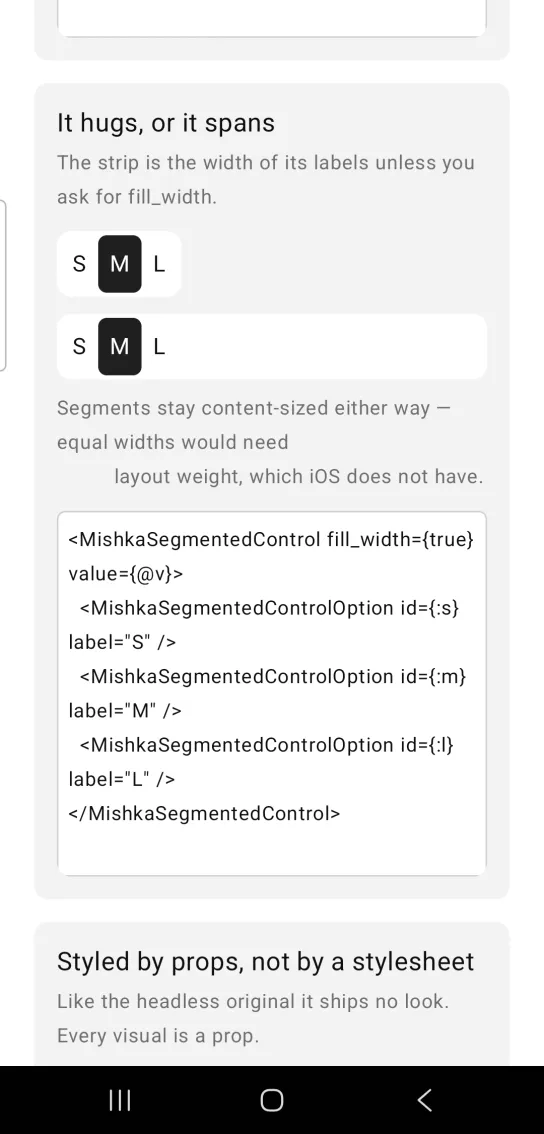
Segments are sized by their labels, and the track hugs them. Equal widths need layout weight, which Compose implements and Mob's iOS mapping does not, so a strip that looked right on Android would collapse on iOS. Set fill_width={true} to make the track span its parent. The segments still sit together at the leading edge. On Android, segment_weight gives the segments equal widths.
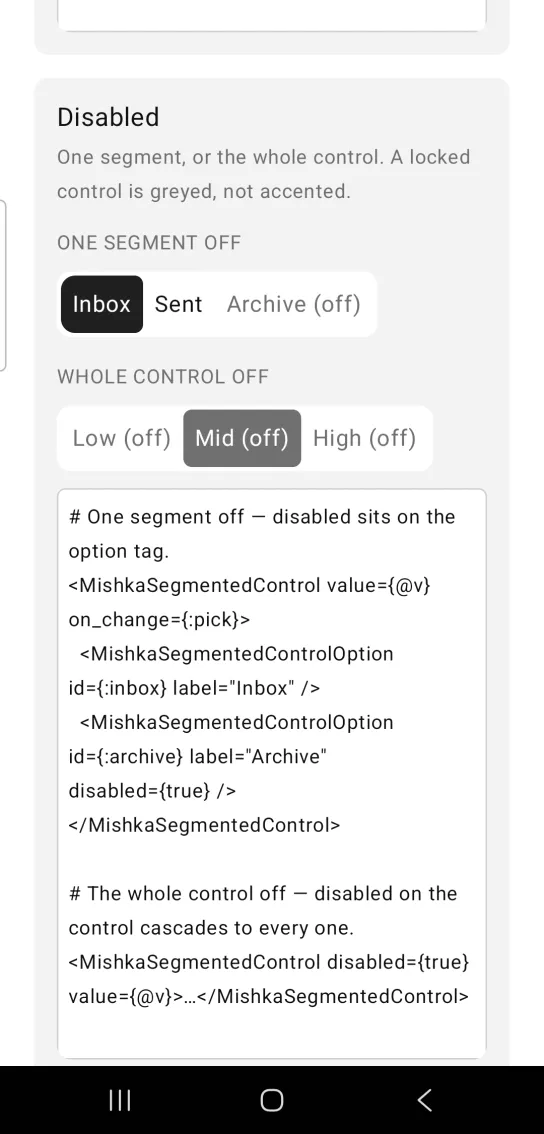
The headless original ships no colors or spacing, and there is no stylesheet here, so every visual is a prop with a default. A disabled selected segment is gray, without the accent color.
Give the control an id to name each segment for device tests. With id="view", the :week segment is tagged view-week-selected or view-week-idle. Selection is shown by fill color alone, and color is not in the accessibility tree, so these tags are the only thing a device test can read.
Generate the segmented control component
Run this from your Mob app's root to add the component to lib/<app>/components/:
mix mishka.ui.gen.mob segmented_controlThe generator registers the <SegmentedControl> tag so you can use it in ~MOB markup. It also copies the shared Event support module. The examples on this page use the mishka_ prefix of the showcase app (--module-prefix mishka_), so the tag is <MishkaSegmentedControl>. Without a prefix the tag is <SegmentedControl>.
To generate it with that prefix, run:
mix mishka.ui.gen.mob segmented_control --module-prefix mishka_Segmented control with one segment always selected
Tapping the selected segment is a no-op, so the selection cannot be cleared. select/2 states the rule: it always returns the tapped id, so the next value is never nil. A toggle group would clear the selection here.
Segmented control with one segment always selected
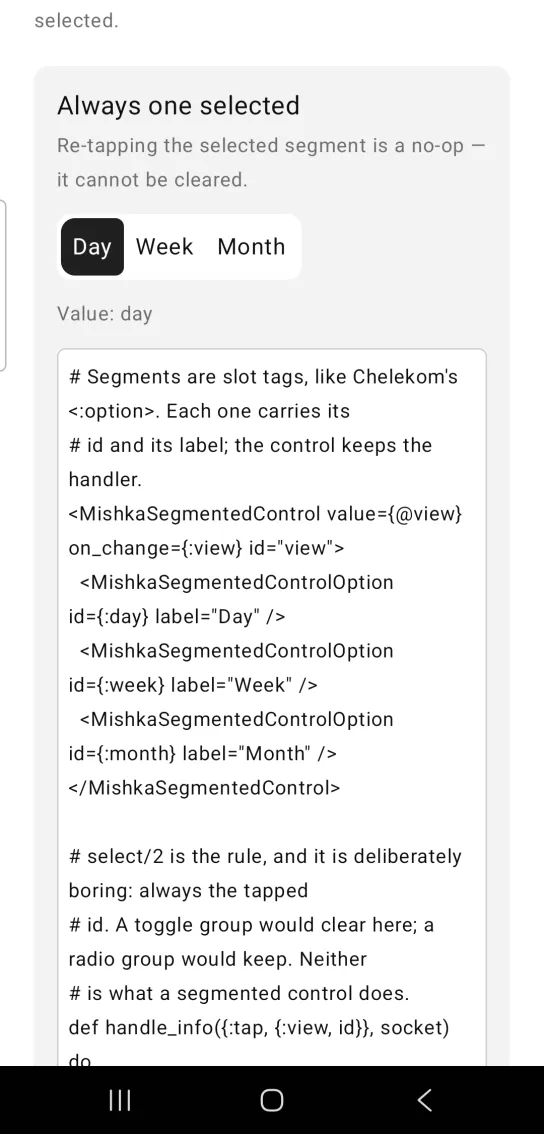
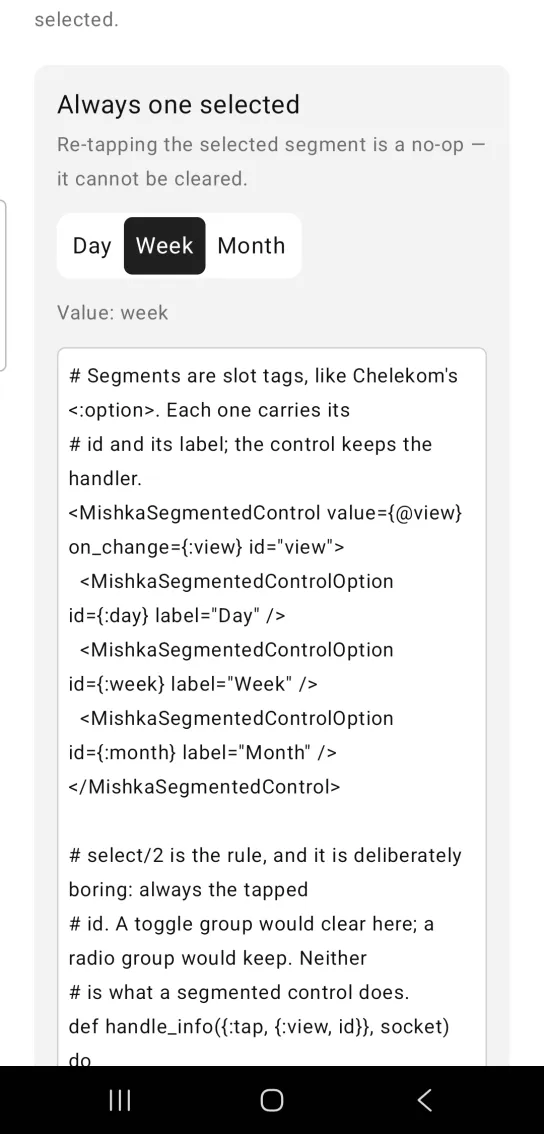
Left: the example as it loads. Right: after a tap. A segmented control always has exactly one selection.
# Segments are slot tags, like Chelekom's <:option>. Each one carries its
# id and its label; the control keeps the handler.
<MishkaSegmentedControl value={@view} on_change={:view} id="view">
  <MishkaSegmentedControlOption id={:day} label="Day" />
  <MishkaSegmentedControlOption id={:week} label="Week" />
  <MishkaSegmentedControlOption id={:month} label="Month" />
</MishkaSegmentedControl>

# select/2 is the rule, and it is deliberately boring: always the tapped
# id. A toggle group would clear here; a radio group would keep. Neither
# is what a segmented control does.
def handle_info({:tap, {:view, id}}, socket) do
  next = MishkaSegmentedControl.select(socket.assigns.view, id)
  {:noreply, Mob.Socket.assign(socket, :view, next)}
end

def handle_info(_msg, socket), do: {:noreply, socket}Segmented control with a label
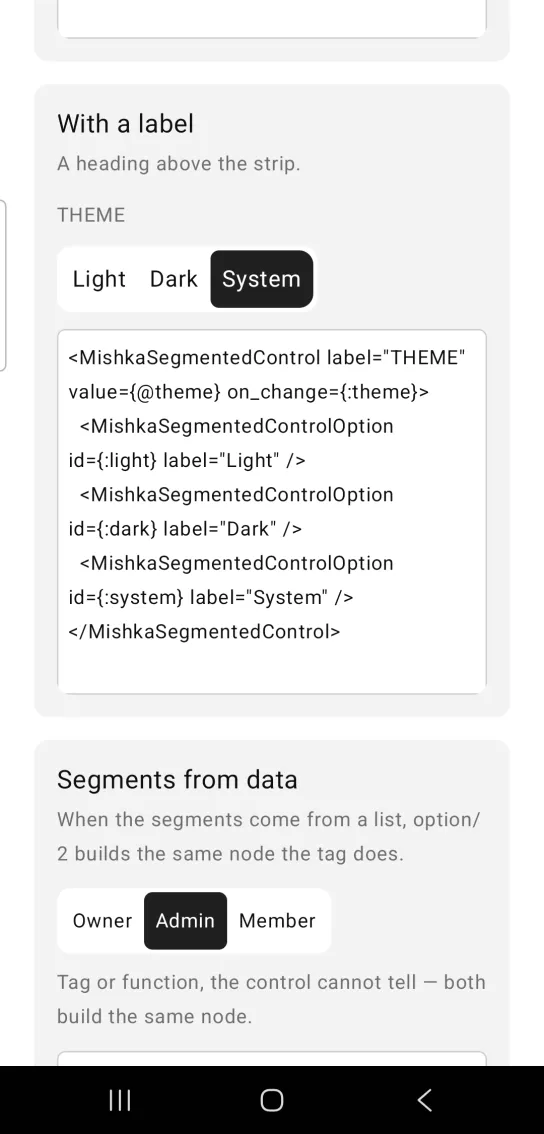
Set label to put a heading above the strip.
Segmented control with a label
<MishkaSegmentedControl label="THEME" value={@theme} on_change={:theme}>
  <MishkaSegmentedControlOption id={:light} label="Light" />
  <MishkaSegmentedControlOption id={:dark} label="Dark" />
  <MishkaSegmentedControlOption id={:system} label="System" />
</MishkaSegmentedControl>
Segmented control segments from data
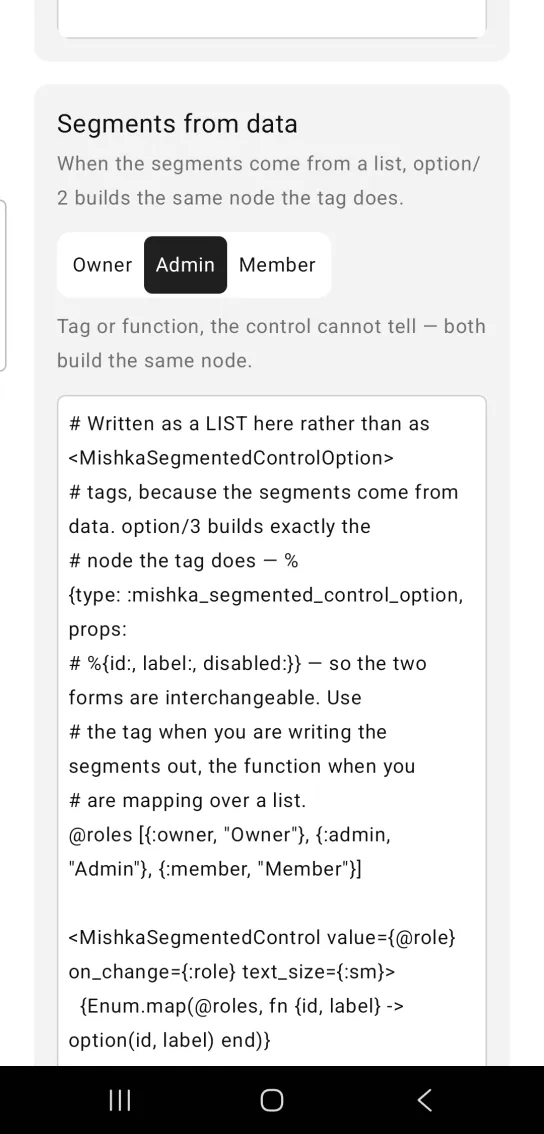
When the segments come from a list, option/3 builds the same node that the tag does, so the control cannot tell the two apart. Use the tag when you write the segments out and the function when you map over a list. text_size sets the size of the labels.
Segmented control segments from data
# Written as a LIST here rather than as <MishkaSegmentedControlOption>
# tags, because the segments come from data. option/3 builds exactly the
# node the tag does — %{type: :mishka_segmented_control_option, props:
# %{id:, label:, disabled:}} — so the two forms are interchangeable. Use
# the tag when you are writing the segments out, the function when you
# are mapping over a list.
@roles [{:owner, "Owner"}, {:admin, "Admin"}, {:member, "Member"}]

<MishkaSegmentedControl value={@role} on_change={:role} text_size={:sm}>
  {Enum.map(@roles, fn {id, label} -> option(id, label) end)}
</MishkaSegmentedControl>
Hugging and full-width segmented control
The strip is as wide as its labels unless you set fill_width. With fill_width={true} the track spans its parent. The segments stay sized by their labels either way.
Hugging and full-width segmented control
<MishkaSegmentedControl fill_width={true} value={@v}>
  <MishkaSegmentedControlOption id={:s} label="S" />
  <MishkaSegmentedControlOption id={:m} label="M" />
  <MishkaSegmentedControlOption id={:l} label="L" />
</MishkaSegmentedControl>
Styled segmented control
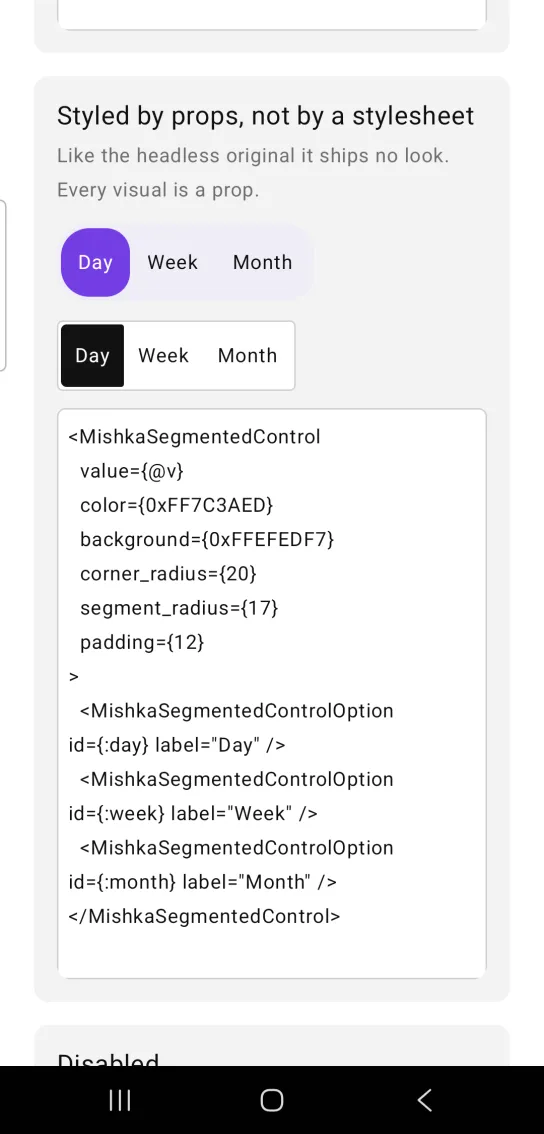
Like the headless original, the control ships no look of its own, so every visual is a prop. color fills the selected segment, background paints the track, and corner_radius, segment_radius and padding shape them.
Styled segmented control
<MishkaSegmentedControl
  value={@v}
  color={0xFF7C3AED}
  background={0xFFEFEDF7}
  corner_radius={20}
  segment_radius={17}
  padding={12}
>
  <MishkaSegmentedControlOption id={:day} label="Day" />
  <MishkaSegmentedControlOption id={:week} label="Week" />
  <MishkaSegmentedControlOption id={:month} label="Month" />
</MishkaSegmentedControl>
Disabled segmented control
Put disabled on a segment tag to disable one segment. Put it on the control to disable every segment. A locked control is gray, without the accent color.
Disabled segmented control
# One segment off — disabled sits on the option tag.
<MishkaSegmentedControl value={@v} on_change={:pick}>
  <MishkaSegmentedControlOption id={:inbox} label="Inbox" />
  <MishkaSegmentedControlOption id={:archive} label="Archive" disabled={true} />
</MishkaSegmentedControl>

# The whole control off — disabled on the control cascades to every one.
<MishkaSegmentedControl disabled={true} value={@v}>…</MishkaSegmentedControl>
Props
| Prop | Type | Default | Description |
|---|---|---|---|
value | option id | The first option | The selected segment. An id that matches no segment falls back to the first one. |
label | string | nil | Heading above the strip. |
disabled | boolean | false | Disables every segment. |
on_change | event tag | None | Sent as {:tap, {tag, option_id}}. |
color | color token or ARGB integer | :primary | Fill of the selected segment. |
text_color | color token or ARGB integer | :on_primary | Label of the selected segment. |
label_color | color token or ARGB integer | :on_surface | Label of an unselected segment. |
background | color token or ARGB integer | :surface_raised | The track behind the segments. |
padding | spacing token or number | :space_sm | Padding inside each segment. |
track_padding | number | 3 | Inset between the track and its segments. |
corner_radius | radius token or number | :radius_md | Corners of the track. |
segment_radius | radius token or number | :radius_sm | Corners of a segment. |
border_color and border_width | color and number | nil and 0 | An optional border around the track. |
text_size | text size token | :base | Size of the segment labels. |
fill_width | boolean | false | The track spans its parent instead of hugging its labels. |
id | string | nil | Prefix for each segment's test tag, such as view-week-selected. |
<MishkaSegmentedControlOption> | slot tag | None | One segment, with id, label and disabled. The control reads it and draws the segment. |
option/3 | helper | None | option(id, label, disabled: false) builds the same node, for segments that come from data. |
select/2 | helper | None | Returns the next value for a tap: always the tapped id, never nil. |
More text and layout props
| Prop | Type | Default | Description |
|---|---|---|---|
padding_top, padding_right, padding_bottom, padding_left | spacing token or number | Not set | One edge of a segment. It overrides padding on that side only. |
font_weight | :regular, :medium, :semibold, :bold, :light or :thin | Not set (regular) | Weight of every segment label. |
selected_weight | same as font_weight | The value of font_weight | Weight of the selected label only, for a strip that bolds its selection. |
letter_spacing | number (sp) | Not set | Tracking on every segment label. |
line_height | number | Not set | Multiplier of text_size. Ignored without one. |
max_lines | number | Not set (unlimited) | Caps a segment label and ends the rest with an ellipsis. |
width | number | Not set | Exact width of the track. |
height | number | Not set | Exact height of the track. |
align | :center, :leading and so on | Not set (top leading) | Where the segments sit when height leaves them room. |
shadow | shadow string | Not set | Shadow on the track. |
segment_width | number | Not set | Exact width of a segment. |
segment_height | number | Not set | Exact height of a segment. |
segment_align | :center, :leading and so on | :center | Where a label sits inside its segment. |
segment_weight | number | Not set | Row weight per segment, for equal widths. Android only. Pair it with fill_width={true}. |
selected_shadow | shadow string | Not set | Shadow on the selected segment only. |
heading_size | text size token or number | :sm | Size of the label heading. |
heading_color | color token or ARGB integer | :muted | Color of the heading. |
heading_weight | same as font_weight | Not set (regular) | Weight of the heading. |
heading_gap | number | 10 | Space between the heading and the track. |
These props leave the control as it was when you do not set them. Three notes help when you pin sizes:
- Padding applies before width and height, so
heightmeasures the box inside the padding. A 36 pt track with a 3 pt inset isheight: 30, track_padding: 3, and a 28 pt segment inside it issegment_height: 28with no vertical padding. widthandheighttake plain numbers. Tokens are not resolved for them. Never pass a negative padding, because it throws on the native side.shadowandselected_shadowtake a string in CSSbox-shadoworder,dx dy blur spread #AARRGGBB, with further layers after a pipe. A numerictext_sizeis in sp and stays put when the user scales their type.
Events
Your screen receives {:tap, {tag, option_id}} in handle_info/2 from on_change. The control pairs its tag with the id of the tapped segment, so one clause serves every segment:
def handle_info({:tap, {:view, id}}, socket) do
  next = MishkaSegmentedControl.select(socket.assigns.view, id)
  {:noreply, Mob.Socket.assign(socket, :view, next)}
end

def handle_info(_msg, socket), do: {:noreply, socket}
Differences from the web component
nameis not ported. It is HTML form plumbing.- The
*_classattributes are not ported. Every visual is a prop instead.
Attributes
| Name | Type | Default | Values | Required | Description |
|---|---|---|---|---|---|
value
|
option id
|
first option
| — | No | The selected segment. |
label
|
string
| — | — | No | Heading above the strip. |
disabled
|
boolean
|
false
| — | No | Disables every segment. |
on_change
|
event tag (atom)
| — | — | No | Sent as `{:tap, {tag, option_id}}`. |
color
|
color token / ARGB int
|
:primary
| — | No | Selected segment fill. |
text_color
|
color token / ARGB int
|
:on_primary
| — | No | Selected segment label. |
label_color
|
color token / ARGB int
|
:on_surface
| — | No | An unselected label. |
background
|
color token / ARGB int
|
:surface_raised
| — | No | The track. |
padding
|
spacing token / number
|
:space_sm
| — | No | Inside each segment. |
padding_top / padding_right / padding_bottom / padding_left
|
spacing token / number
|
unset
| — | No | One edge of a segment, overriding `padding` on that side only. |
track_padding
|
number
|
3
| — | No | Inset between track and segments. |
corner_radius
|
radius token / number
|
:radius_md
| — | No | The track's corners. |
segment_radius
|
radius token / number
|
:radius_sm
| — | No | A segment's corners. |
border_color
|
color token / ARGB int
| — | — | No | Track border, when set. |
border_width
|
number
|
0
| — | No | Track border width. |
text_size
|
text token / number
|
:base
| — | No | Segment labels. |
font_weight
|
:regular, :medium, :semibold, :bold, :light, :thin
|
unset (regular)
| — | No | Every segment label's weight. |
selected_weight
|
as font_weight
|
whatever font_weight is
| — | No | The selected label only, for a strip that bolds its selection. |
letter_spacing
|
number (sp)
|
unset
| — | No | Tracking on every segment label. |
line_height
|
number
|
unset
| — | No | Multiplier of `text_size`; ignored without one. |
max_lines
|
number
|
unset (unlimited)
| — | No | Caps a segment label and ellipsises the rest. |
fill_width
|
boolean
|
false
| — | No | Track spans its parent. |
width
|
number
|
unset
| — | No | The track's exact width. |
height
|
number
|
unset
| — | No | The track's exact height — the trough. |
align
|
:center, :leading, …
|
unset (top-leading)
| — | No | Where the segments sit when `height` leaves them room. |
shadow
|
shadow spec string
|
unset
| — | No | On the track. See "Shadows" below. |
segment_width
|
number
|
unset
| — | No | A segment's exact width. |
segment_height
|
number
|
unset
| — | No | A segment's exact height. |
segment_align
|
:center, :leading, …
|
:center
| — | No | Where a label sits inside its segment. |
segment_weight
|
number
|
unset
| — | No | Row weight per segment — equal widths. Android only; see below. |
selected_shadow
|
shadow spec string
|
unset
| — | No | On the selected segment only. |
heading_size
|
text token / number
|
:sm
| — | No | The `label` heading above the strip. |
heading_color
|
color token / ARGB int
|
:muted
| — | No | That heading's colour. |
heading_weight
|
as font_weight
|
unset (regular)
| — | No | That heading's weight. |
heading_gap
|
number
|
10
| — | No | Space between the heading and the track. |
id
|
string
| — | — | No | Prefix for each segment's test tag. |
Options
Each option takes one or more of its values, separated by commas.
| Option | Values |
|---|---|
--type
|
segmented_control
|
--module
| A module name of your own |
What it generates
mix mishka.ui.gen.mob segmented_control