Number formatter
v0.0.10
mix mishka.ui.gen.mob number_formatter
The Mishka Chelekom Mob Number Formatter renders a number with grouping, decimals, prefix and suffix as text on iOS and Android. It is the native port of the headless Number Formatter and runs on Mob.
Overview of the Mob Number Formatter component for iOS and Android
Number Formatter is mostly arithmetic, so format/2 is a pure function and the node is a Text around its result. You can call the function anywhere you want a string, such as a chart axis, a slider readout or an accessibility label.
Number Formatter keeps no state and sends no events. Pass the number as value, or call format/2 yourself.
format/2 accepts a number, a numeric string or nil. A string is parsed as a number, and a string that does not parse comes back as it is. nil gives an empty string.
Generate the number formatter component
Run this from your Mob app's root to add the component to lib/<app>/components/:
mix mishka.ui.gen.mob number_formatterThe generator registers the <NumberFormatter> tag so you can use it in ~MOB markup. It needs no sibling component and no shared helper module. The examples on this page use the mishka_ prefix of the showcase app (--module-prefix mishka_), so the tag is <MishkaNumberFormatter>. Without a prefix the tag is <NumberFormatter>.
Format a number with a prefix and decimals
Grouping, decimals, prefix and suffix are one pure function. This call groups the integer part, fixes two decimals and adds a dollar prefix.
Format a number with a prefix and decimals
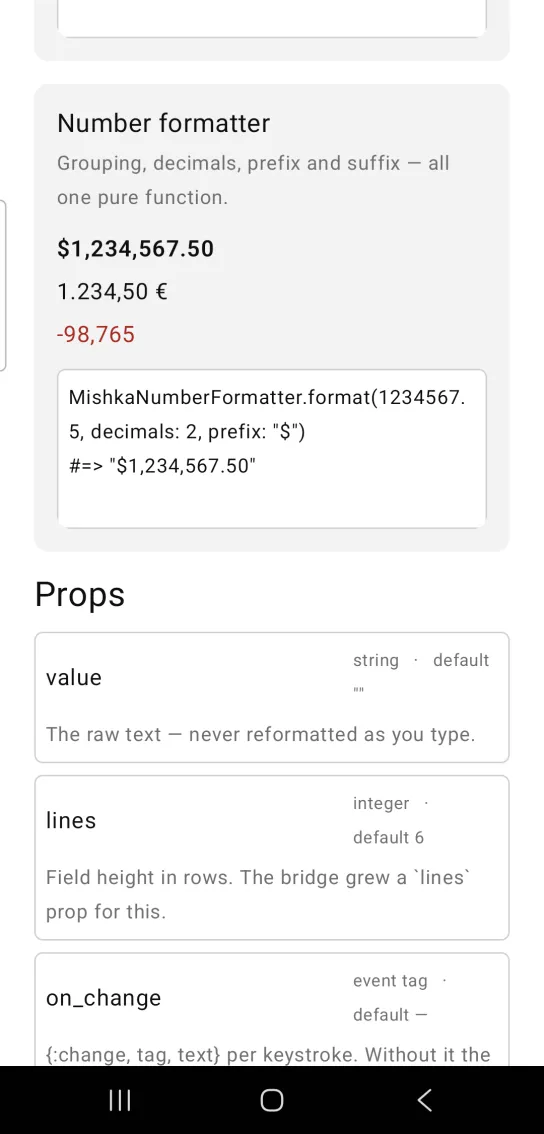
MishkaNumberFormatter.format(1234567.5, decimals: 2, prefix: "$")
#=> "$1,234,567.50"
The screenshot renders the same function through three tags, which the next section shows. Grouping applies to the integer part only, and a negative number keeps its sign outside the grouping.
Number formatter as a tag
Write the formatter as a tag when you want a Text node in your markup. The first line renders $1,234,567.50 in semibold weight. The second swaps both separators and adds a suffix to render 1.234,50 €. The third renders -98,765 in the error color.
<MishkaNumberFormatter value={1_234_567.5} decimals={2} prefix="$" font_weight={:semibold} />
<MishkaNumberFormatter
  value={1_234.5}
  decimals={2}
  thousand_separator="."
  decimal_separator=","
  suffix=" €"
/>
<MishkaNumberFormatter value={-98_765} text_color={:error} />
Common formats
Each row is a call to MishkaNumberFormatter.format/2 and the string it returns.
| Call | Result |
|---|---|
format(1234567) | "1,234,567" |
format(1234.5, decimals: 2) | "1,234.50" |
format(1234, prefix: "$", suffix: " USD") | "$1,234 USD" |
format(1234.5, decimals: 2, thousand_separator: ".", decimal_separator: ",") | "1.234,50" |
format(1234.5678, decimals: 4) | "1,234.5678" |
format(-1234567) | "-1,234,567" |
format(1234567, thousand_separator: false) | "1234567" |
Swap the two separators for European conventions, as the fourth row shows.
Props
| Prop | Type | Default | Description |
|---|---|---|---|
value | number | 0 | The number. |
decimals | integer | nil | Fixed decimal places. nil keeps what the number has. |
thousand_separator | string or boolean | "," | true means ",". false turns grouping off. |
decimal_separator | string | "." | The radix character. |
prefix | string | nil | Wrapped before the digits. |
suffix | string | nil | Wrapped after the digits. |
text_size | token | :base | Text size. |
text_color | token | :on_surface | Text color. |
font_weight | token | :regular | Text weight. |
Set the weight with font_weight. Both bridges read it for typography. A bare weight is a layout weight on a Row or Column, so passing it here styles nothing.
Attributes
| Name | Type | Default | Values | Required | Description |
|---|---|---|---|---|---|
value
|
number
|
0
| — | No | The number. |
decimals
|
integer
| — | — | No | Fixed decimal places. `nil` keeps what it has. |
thousand_separator
|
string · boolean
|
","
| — | No | `true` means `","`; `false` disables grouping. |
decimal_separator
|
string
|
"."
| — | No | Radix character. |
prefix / suffix
|
string
| — | — | No | Wrapped around the digits. |
text_size / text_color / font_weight
|
tokens
|
:base / :on_surface / :regular
| — | No | Text styling. |
Options
Each option takes one or more of its values, separated by commas.
| Option | Values |
|---|---|
--type
|
number_formatter
|
--module
| A module name of your own |
What it generates
mix mishka.ui.gen.mob number_formatter