Select
v0.0.10
The Mishka Chelekom Mob Select shows the current choice in a trigger and opens a list of options to pick from, on iOS and Android. It is the native port of the headless Select and runs on Mob.
Overview of the Mob Select component for iOS and Android
Select renders a column. An optional label sits above a bordered trigger. The trigger shows the label of each chosen option, or the placeholder in muted text when nothing is chosen. The ▾ at the end of the row turns into ▴ while the list is open.
The list opens in flow, directly below the trigger, and does not float over the page. A list of options is as long as its data, and a floating list would cover the field it came from. The list uses the surface of the Mob Menu component, so a select and a menu look alike, and a chosen option shows a ✓. For a long list, put the same options in a bottom Mob Drawer.
The screen owns the state. You keep value and open in assigns and pass them in. Taps arrive in handle_info/2, and MishkaSelect.toggle/3 returns the next {value, close?} pair. Its third argument sets the mode. In single mode, a pick replaces the value and closes the list. In multiple mode, a pick adds the option, or removes it when it is already chosen, and the list stays open.
Write options as <MishkaSelectOption> children, or build them from data with option/3. Both make the same node, so you can mix them in one select. Consecutive options that share a group form one run under a heading. The order you write the options in is the grouping.
Generate the select component
Run this from your Mob app's root to add the component to lib/<app>/components/:
mix mishka.ui.gen.mob selectThe generator registers the <Select> tag so you can use it in ~MOB markup. It also generates the Mob Menu component, which draws the list. The examples on this page use the mishka_ prefix of the showcase app (--module-prefix mishka_), so the tag is <MishkaSelect>. Without a prefix the tag is <Select>.
Single choice select
Picking an option replaces the value and closes the list. The screen passes in the current value and open state, and MishkaSelect.toggle/3 returns the next value and whether the list closes.
Single choice select
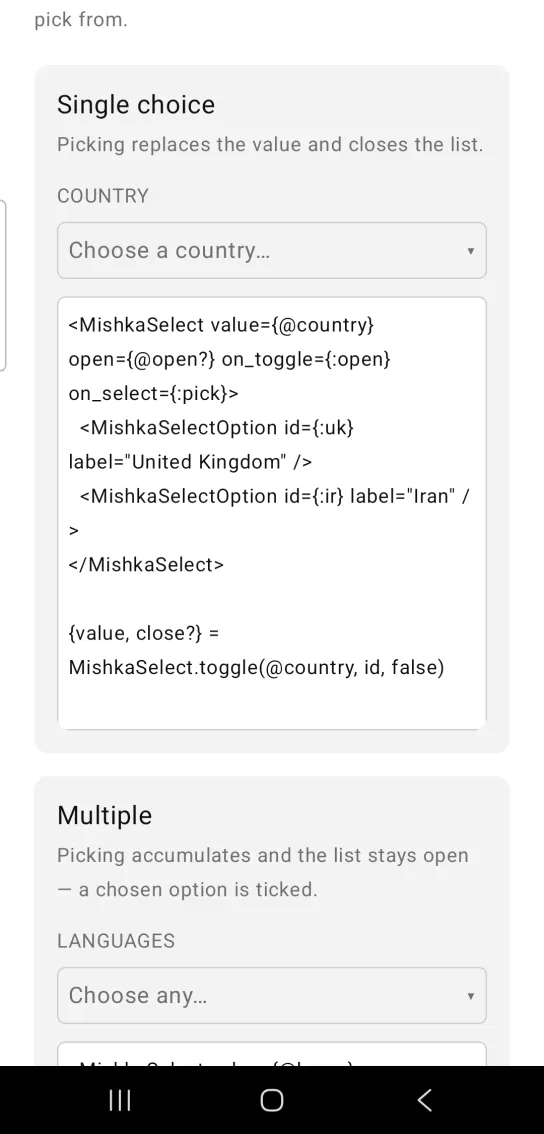
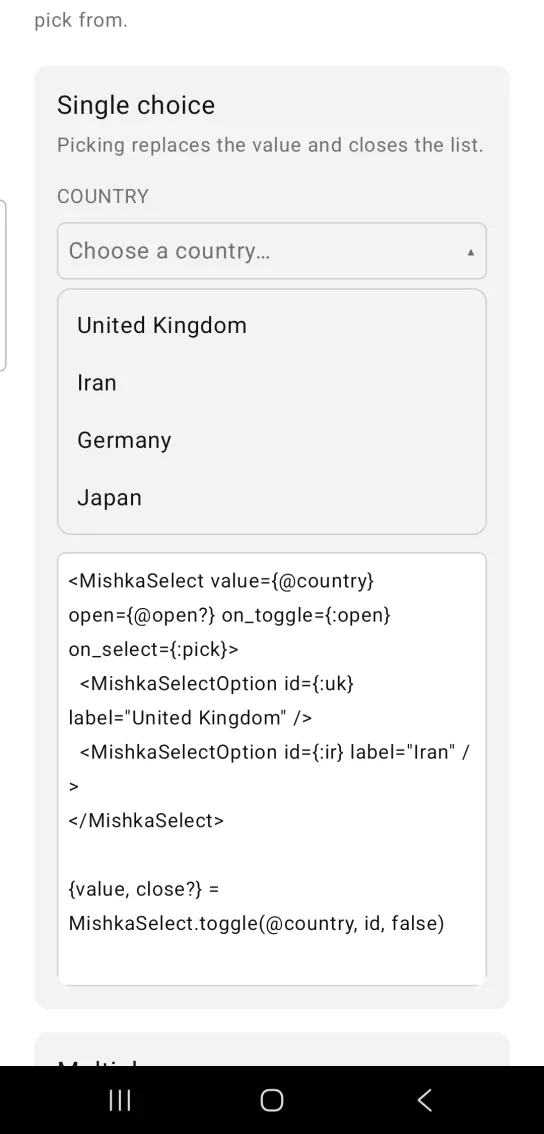
Left: the example as it loads. Right: after a tap. A trigger shows the current choice and opens a list.
<MishkaSelect value={@country} open={@open?} on_toggle={:open} on_select={:pick}>
  <MishkaSelectOption id={:uk} label="United Kingdom" />
  <MishkaSelectOption id={:ir} label="Iran" />
</MishkaSelect>

{value, close?} = MishkaSelect.toggle(@country, id, false)
Multiple select
In multiple mode, a pick adds the option to value and keeps the list open, so you can choose several in a row. A chosen option shows a ✓. The Rust option has disabled={true}, so you cannot pick it.
Multiple select
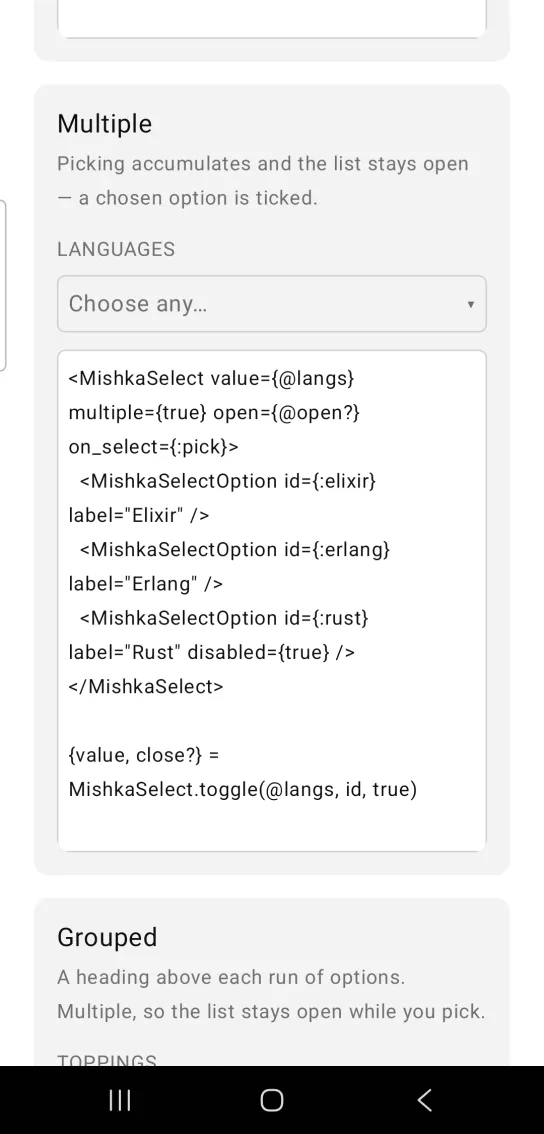
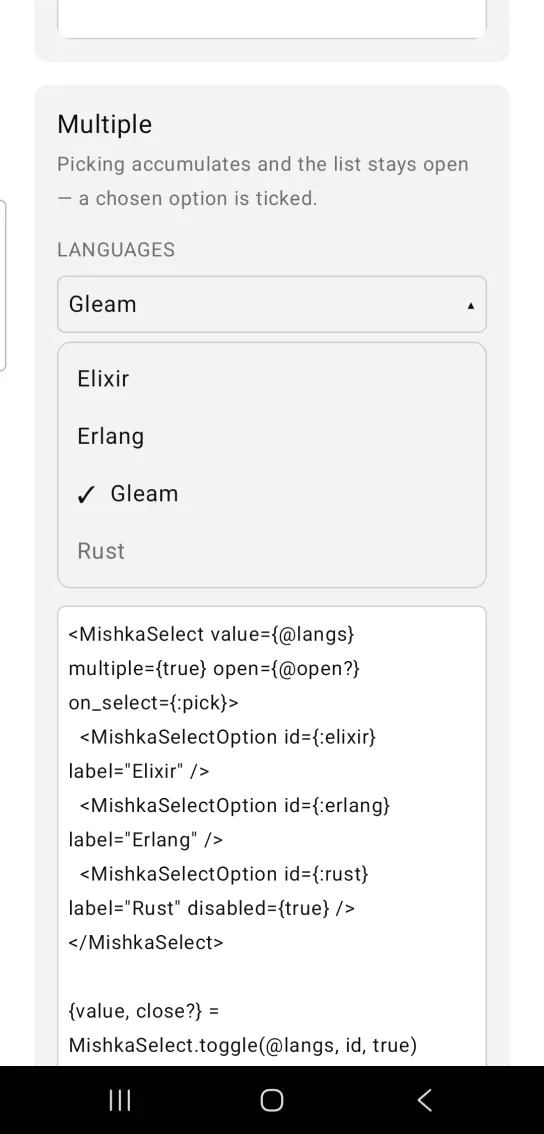
Left: the example as it loads. Right: after a tap. Picking accumulates and the list stays open.
<MishkaSelect value={@langs} multiple={true} open={@open?} on_select={:pick}>
  <MishkaSelectOption id={:elixir} label="Elixir" />
  <MishkaSelectOption id={:erlang} label="Erlang" />
  <MishkaSelectOption id={:rust} label="Rust" disabled={true} />
</MishkaSelect>

{value, close?} = MishkaSelect.toggle(@langs, id, true)
Grouped select options
Options that sit next to each other and share a group get one heading above them. The component sorts nothing, so the order you write the options in is the grouping. This select is also multiple, so the list stays open while you pick.
Grouped select options
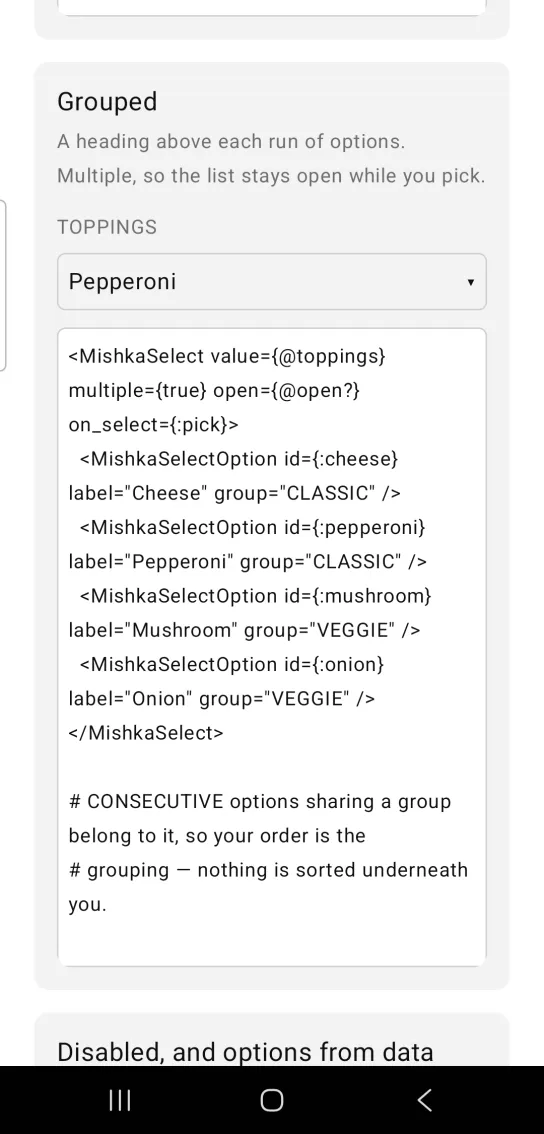
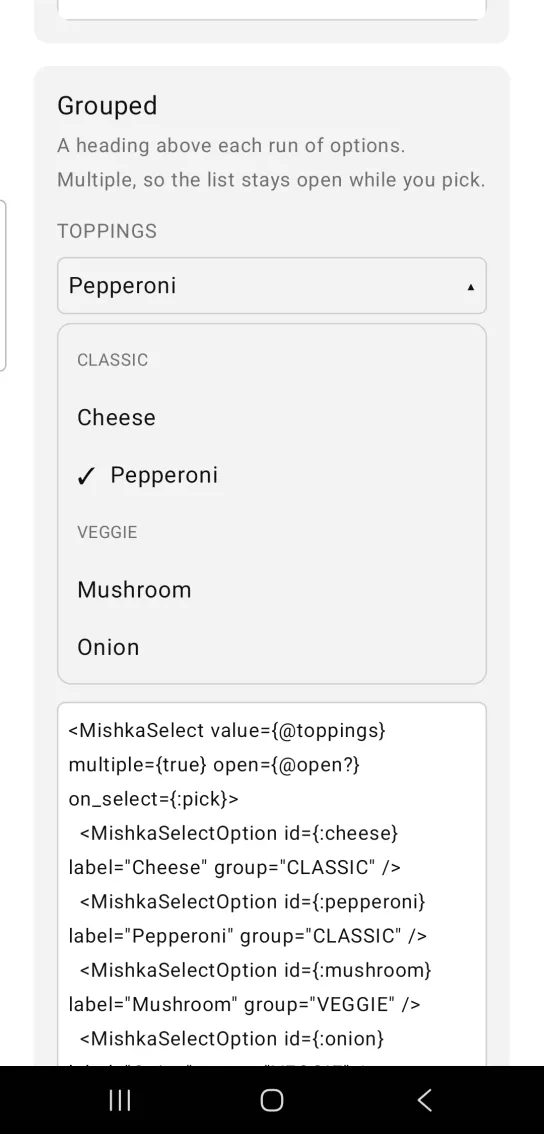
Left: the example as it loads. Right: after a tap. A heading above each run of options.
<MishkaSelect value={@toppings} multiple={true} open={@open?} on_select={:pick}>
  <MishkaSelectOption id={:cheese} label="Cheese" group="CLASSIC" />
  <MishkaSelectOption id={:pepperoni} label="Pepperoni" group="CLASSIC" />
  <MishkaSelectOption id={:mushroom} label="Mushroom" group="VEGGIE" />
  <MishkaSelectOption id={:onion} label="Onion" group="VEGGIE" />
</MishkaSelect>

# CONSECUTIVE options sharing a group belong to it, so your order is the
# grouping — nothing is sorted underneath you.
Disabled select and options from data
A disabled select shows muted text and does not open. Its options come from a list. option/3 builds the same node as <MishkaSelectOption>, so you can map data to options.
Disabled select and options from data
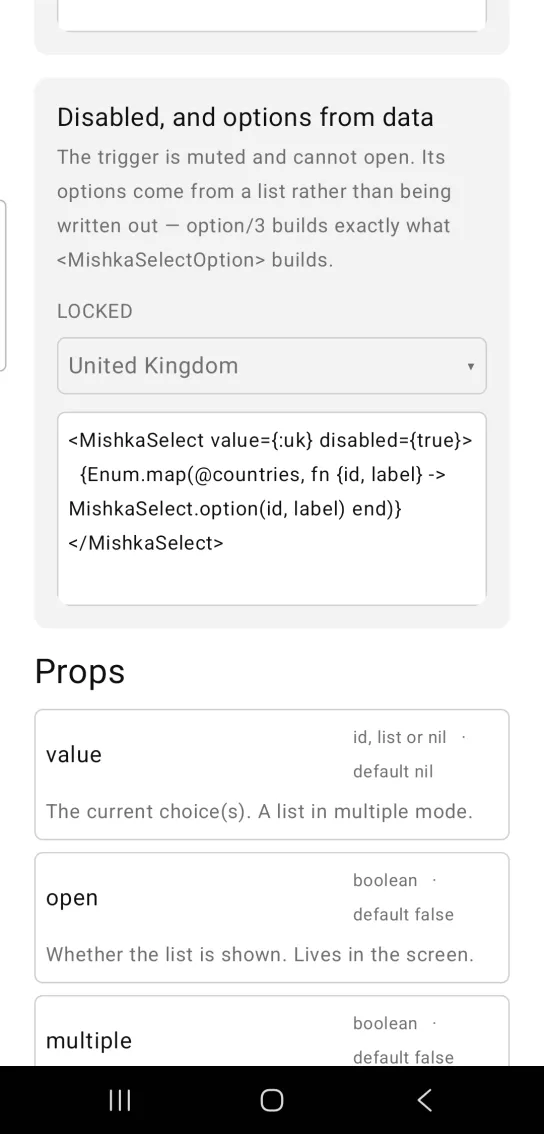
<MishkaSelect value={:uk} disabled={true}>
  {Enum.map(@countries, fn {id, label} -> MishkaSelect.option(id, label) end)}
</MishkaSelect>
Props
| Prop | Type | Default | Description |
|---|---|---|---|
value | option id, list or nil | nil | The current choice. A list in multiple mode. |
open | boolean | false | Whether the list is shown. The screen owns it. |
multiple | boolean | false | Allows several choices. Your handler passes the same mode to toggle/3. |
placeholder | string | "Select…" | Trigger text when nothing is chosen. |
label | string | nil | Caption above the trigger. |
disabled | boolean | false | Mutes the trigger and unwires it. |
on_toggle | event tag (atom) | None | Sends {:tap, tag} from the trigger. |
on_select | event tag (atom) | None | Sends {:tap, {tag, option_id}} from an option. |
id | string | nil | Test tags for the trigger (<id>-trigger-open or -closed) and for every option (<id>-option-<option_id>-selected or -idle). |
Option attributes
Each <MishkaSelectOption> takes these attributes. Every attribute except id is optional.
| Attribute | Default | Description |
|---|---|---|
id | None | What on_select reports, and the stem of the option's test tag. |
label | None | The row's text. |
disabled | false | Mutes the row and unwires it. |
group | nil | A heading above the run this option starts. |
Helper functions
The generated MishkaSelect module exposes these functions:
| Function | Description |
|---|---|
option(id, label, opts) | Builds one option node. Options are :disabled and :group. |
toggle(value, id, multiple?) | Returns the next {value, close?} after picking id. Single mode replaces the value and closes. Multiple mode adds or removes the id and stays open. |
display(value, labels, placeholder) | Returns the trigger text: the chosen labels joined with a comma, or the placeholder when nothing is chosen. |
group_runs(options) | Chunks options into {group, options} runs of consecutive options that share a group. |
Events
Your screen receives two messages in handle_info/2:
on_togglesends{:tap, tag}when you tap the trigger. A disabled select drops it.on_selectsends{:tap, {tag, option_id}}when you tap an option.
With on_toggle={:open} and on_select={:pick}, the screen handles them like this:
def handle_info({:tap, :open}, socket) do
  {:noreply, Mob.Socket.assign(socket, :open?, not socket.assigns.open?)}
end

def handle_info({:tap, {:pick, id}}, socket) do
  {value, close?} = MishkaSelect.toggle(socket.assigns.country, id, false)

  {:noreply,
   socket
   |> Mob.Socket.assign(:country, value)
   |> Mob.Socket.assign(:open?, not close?)}
end
Differences from the web component
- The list renders in flow under the trigger. It does not float beside it, so
sidedoes not apply. name,form,requiredandreadonlyare not ported, because they are form plumbing.highlight_on_hoveris not ported, because a touch screen has no hover.- The
*_classattributes are not ported. Mob draws native views, so there is no CSS.
Attributes
| Name | Type | Default | Values | Required | Description |
|---|---|---|---|---|---|
value
|
option id, list, or nil
| — | — | No | The current choice(s). |
open
|
boolean
|
false
| — | No | Whether the list is shown. |
multiple
|
boolean
|
false
| — | No | Allow several choices. |
placeholder
|
string
|
"Select…"
| — | No | Trigger text when nothing is chosen. |
label
|
string
| — | — | No | Caption above the trigger. |
disabled
|
boolean
|
false
| — | No | Mutes and unwires. |
on_toggle
|
event tag (atom)
| — | — | No | `{:tap, tag}` from the trigger. |
on_select
|
event tag (atom)
| — | — | No | `{:tap, {tag, option_id}}` from an option. |
id
|
string
| — | — | No | Test tags for the trigger and every option. |
Options
Each option takes one or more of its values, separated by commas.
| Option | Values |
|---|---|
--type
|
select
|
--module
| A module name of your own |
What it generates
mix mishka.ui.gen.mob select