Settings
v0.0.1
Settings hold the choices that apply to a whole Mishka CMS installation or to one site: the site title, the languages, maintenance mode, sign-in limits, email, captcha, the sidebar and more. This page lists every setting key with its tab, its group, its default and whether it is global or per site. To change a setting, open Settings at the bottom of the admin sidebar.
How the Settings screen works
The screen has one tab for each area. A master admin picks the scope in the select at the top of the screen: Global, or one of the sites. The select has no visible label, and a screen reader announces it as "Settings for". A site admin sees a badge such as Editing: this site in its place and always edits their own site. Press Save Changes to store the tab. Press Reset to Defaults to fill the tab with the defaults below before you save.
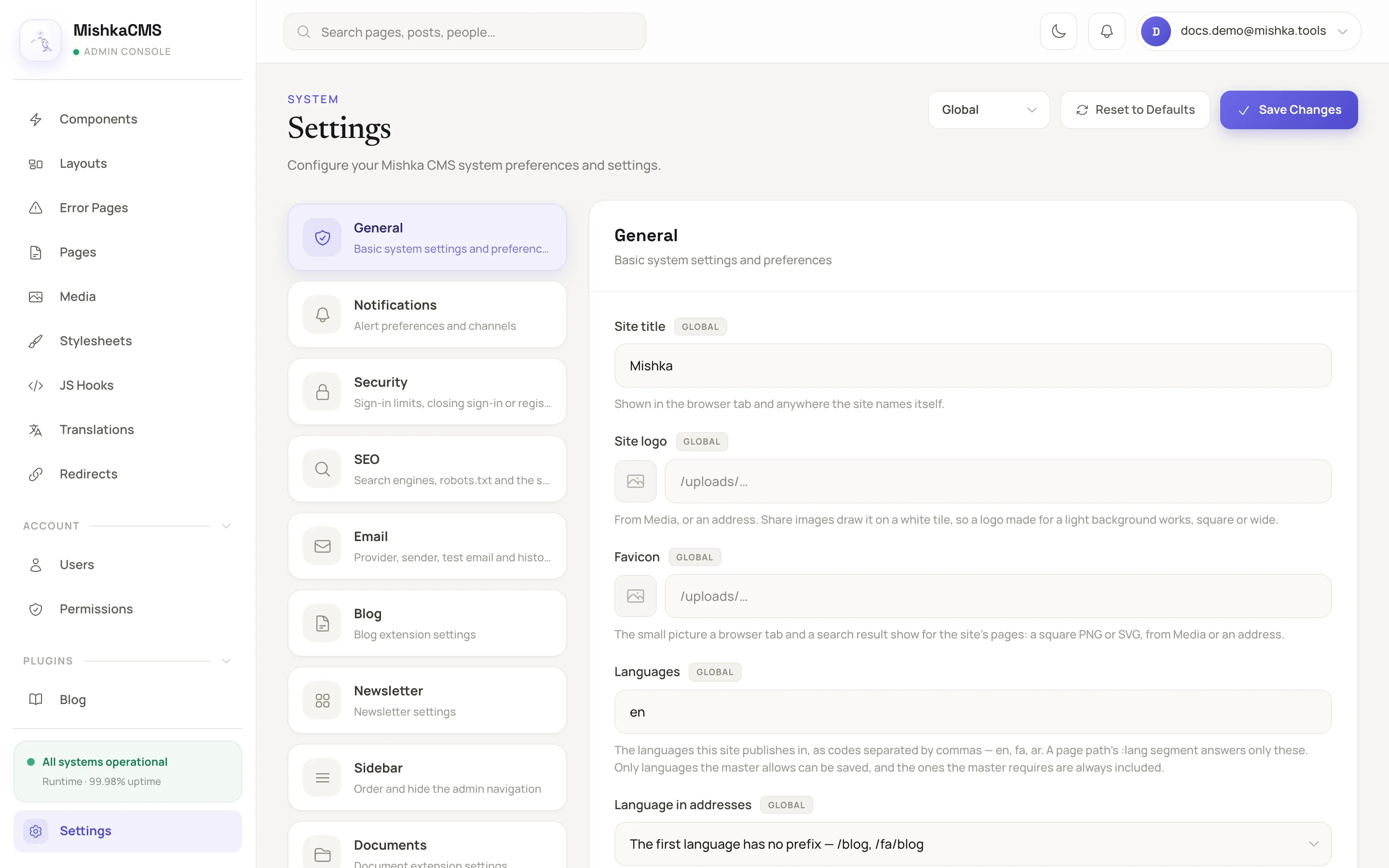
The Settings screen with the General tab open in the Global scope.
A setting shows a badge for its reach: Global, This site or Just for you. A setting that a site may not change is read-only in the site's view, or missing from it. A tab with nothing to show to the account is not drawn.
Reach
The Reach column of the tables below uses these values.
| Reach | Meaning |
|---|---|
| Global, site can override | The Global value is the default for every site. A site can set its own value, and a site that does not uses the Global one. |
| Global and site, each its own | Every scope sets its own value and never takes the Global one. Email and captcha settings work this way, so a site never sends mail or asks a captcha with another site's key. |
| Global and site, either turns it on | The Global and the site value are combined. A site can add to a Global on but cannot undo it. |
| Global only | One value for every site. A site sees it read-only. |
| Master only | One value for every site. Only the Global view shows it, and a site admin does not see it. |
| Site only | Each site sets its own. The Global view does not show it. |
| Per user | Each admin sets their own, and only that admin sees it. |
A read for a site uses the site's value, then the Global value, then the default. The exceptions are the settings that are each its own, which skip the Global value, and the ones where either turns it on.
Writing a setting takes admin:dashboard:setting, unless the setting names another permission. Every dashboard admin can open the screen, and it shows the tabs and fields that the account can write. See Permission names.
Types
| Type | Input |
|---|---|
string | One line of text. |
text | Several lines of text. |
boolean | A switch. |
integer | A number. A value outside the minimum or maximum is clamped to it. |
select | One value from a fixed list. |
list | Values separated by commas. Each is trimmed, and blanks and repeats are dropped. |
secret | A key. It is stored sealed and never shown again. A stored key shows Saved, ends in … with its last four characters and a Remove button. With no key the field shows Not set. |
image | A path on the site, or an http or https address, from Media or typed. Empty means none. |
Tabs
The core tabs come in this order: General, Notifications, Security, SEO and Email. The tabs that plugins and extensions register follow them, and Preferences is always last. A site shows only the tabs its installed extensions add.
| Tab | What it holds |
|---|---|
| General | Basic system settings: the site's name and pictures, languages, maintenance mode. |
| Notifications | Which alerts the site sends and how long they are kept. |
| Security | Sign-in limits, closing sign-in or registration, two-step sign-in, captcha and embeds. |
| SEO | Search engines, robots.txt, the sitemap and share cards. |
| The provider, the sender, a test email and the email history. | |
| Blog | Settings of the blog extension. |
| Documents | Settings of the document extension. |
| Newsletter | Settings of the newsletter extension: the confirmation page, sign-up limits and the Resend connection. |
| Sidebar | The order of the admin navigation and which entries show. |
| Share cards | The label, pitch and chips of the share cards that a plugin draws from settings. This tab shows only where such a plugin is installed. |
| Preferences | Your personal settings. Only you see these. This tab is always last. |
General
| Key | Label | Group | Type | Default | Reach |
|---|---|---|---|---|---|
site.title | Site title | None | string | MishkaCMS | Global, site can override |
site.logo | Site logo | None | image | Empty | Global, site can override |
site.favicon | Favicon | None | image | Empty | Global, site can override |
site.languages | Languages | None | list | en | Global, site can override |
site.language_urls | Language in addresses | None | select: prefix_others, prefix_all | prefix_others | Global, site can override |
site.allowed_languages | Languages sites may publish | None | list | Empty | Master only |
site.required_languages | Languages every site publishes | None | list | Empty | Master only |
cms.offline | Take this site offline (maintenance mode). In the Global view: Take every site offline (maintenance mode) | None | boolean | Off | Global and site, either turns it on |
cms.maintenance_message | Maintenance message | None | text | We are currently undergoing maintenance. Please check back soon. | Global, site can override |
dashboard.widget.recent-activity.count | Recent activity: Entries to show | Dashboard widgets | integer, 3 to 20 | 6 | Per user |
For site.language_urls, prefix_others gives the first language no prefix, as in /blog and /fa/blog. prefix_all gives every language a prefix, as in /en/blog and /fa/blog. A site can save only the languages that site.allowed_languages permits when it is not empty, and its list always includes the languages in site.required_languages. See Set a site's languages and language URLs.
A site is offline when its own cms.offline is on or the Global one is on. Signing in stays open so an admin can still get in. A site whose error pages include an Offline entry shows that page instead of the maintenance message.
Security
Embeds
| Key | Label | Type | Default | Reach |
|---|---|---|---|---|
security.frame_origins | Sites pages may embed | list of https origins | Empty | Global, site can override |
Sign-in limits
Each limit counts per site, and the masters are counted together. Every one has a minimum of 1.
| Key | Label | Type | Default | Reach |
|---|---|---|---|---|
security.sign_in_per_account | Sign-in attempts per account (per 15 minutes) | integer | 10 | Master only |
security.sign_in_per_ip | Sign-in attempts per IP address (per 5 minutes) | integer | 30 | Master only |
security.reset_request_per_account | Password reset requests per account (per hour) | integer | 3 | Master only |
security.reset_request_per_ip | Password reset requests per IP address (per hour) | integer | 10 | Master only |
security.magic_link_per_account | Sign-in link requests per account (per hour) | integer | 3 | Master only |
security.magic_link_per_ip | Sign-in link requests per IP address (per hour) | integer | 10 | Master only |
security.register_per_ip | New accounts per IP address (per hour) | integer | 10 | Master only |
security.change_password_per_account | Password change attempts per account (per 15 minutes) | integer | 10 | Master only |
security.totp_per_account | Authenticator codes per account (per 5 minutes) | integer | 5 | Master only |
Two-step sign-in
| Key | Label | Type | Default | Reach |
|---|---|---|---|---|
security.two_step.every_site | Two-step sign-in for admins on every site | select: sites (Each site decides), off, optional, recommended, required | sites | Master only |
security.two_step | Two-step sign-in for this site's admins | select: off, optional, recommended, required | optional | Site only |
A master's choice for every site comes first. With sites, each site's own choice applies, and the master site's applies to masters. See Secure sign-in.
Closed and Still allowed
| Key | Label | Group | Type | Default | Reach |
|---|---|---|---|---|---|
auth.sign_in.closed | Close sign-in. In the Global view: Close sign-in on every site | Closed | boolean | Off | Global and site, either turns it on |
auth.sign_in.sign_out | Sign out who is signed in. In the Global view: Sign out who is signed in on every site | Closed | boolean | Off | Global and site, either turns it on |
auth.register.closed | Close registration. In the Global view: Close registration on every site | Closed | boolean | Off | Global and site, either turns it on |
auth.reset.closed | Close password reset. In the Global view: Close password reset on every site | Closed | boolean | Off | Global and site, either turns it on |
auth.magic_link.closed | Close sign-in links. In the Global view: Close sign-in links on every site | Closed | boolean | Off | Global and site, either turns it on |
auth.allowed_permissions | Permissions that still get in | Still allowed | list of permission names | * | Global, site can override |
auth.allowed_emails | Accounts that still get in | Still allowed | list of email addresses | Empty | Global, site can override |
Masters can always sign in, at /auth?master_user=true (see the documentation). While a way in is closed, whoever holds one of the permissions in auth.allowed_permissions, or is listed in auth.allowed_emails, still gets through. Registration also admits the listed addresses.
Captcha
Every captcha setting is each scope's own. The JSON API never asks a captcha. A provider's own fields show only while that provider is chosen.
| Key | Label | Group | Type | Default | Reach |
|---|---|---|---|---|---|
security.captcha.provider | Captcha | Captcha | select: none, turnstile, recaptcha, hcaptcha | none | Global and site, each its own |
security.captcha.check_domain | Refuse a check solved on another address | Captcha | boolean. Shown while a provider is chosen. | On | Global and site, each its own |
security.captcha.turnstile.site_key | Turnstile site key | Cloudflare Turnstile | string | Empty | Global and site, each its own |
security.captcha.turnstile.secret_key | Turnstile secret key | Cloudflare Turnstile | secret | Empty | Global and site, each its own |
security.captcha.recaptcha.version | reCAPTCHA kind | Google reCAPTCHA | select: v2 (the "I'm not a robot" box), v3 (invisible, by score) | v2 | Global and site, each its own |
security.captcha.recaptcha.site_key | reCAPTCHA site key | Google reCAPTCHA | string | Empty | Global and site, each its own |
security.captcha.recaptcha.secret_key | reCAPTCHA secret key | Google reCAPTCHA | secret | Empty | Global and site, each its own |
security.captcha.recaptcha.min_score | Lowest v3 score let through (out of 100) | Google reCAPTCHA | integer, 1 to 100. Shown while the kind is v3. | 50 | Global and site, each its own |
security.captcha.hcaptcha.site_key | hCaptcha site key | hCaptcha | string | Empty | Global and site, each its own |
security.captcha.hcaptcha.secret_key | hCaptcha secret key | hCaptcha | secret | Empty | Global and site, each its own |
Notifications
| Key | Label | Group | Type | Default | Reach |
|---|---|---|---|---|---|
notify.cms_core.user.permissions_changed | Notify admins when a user's permissions change | Events | boolean | On | Global, site can override |
notify.cms_core.page_comment.mentioned | Notify people named in a review note | Events | boolean | On | Global, site can override |
notify.retention_read_days | Delete read notifications after (days) | Retention | integer | 30 | Global only |
notify.retention_max_days | Delete all notifications after (days) | Retention | integer | 180 | Global only |
The tab also holds Send a test email, which sends through the provider of the scope in view, and Email history. A provider's own fields show only while that provider is chosen. A site that has no provider sends no email. The Email tab shows a red dot until the sender and the provider are set. See Send email from your site.
| Key | Label | Group | Type | Default | Reach |
|---|---|---|---|---|---|
mailer.provider | Email provider | Delivery | select: none, resend, and dev_mailbox where the deployment enables it | none. A development configuration defaults to dev_mailbox. | Global and site, each its own |
mailer.resend.api_key | Resend API key | Resend | secret | Not set | Global and site, each its own |
mailer.from | Outgoing email "from" address | Sender | string | Empty. An empty value sends from noreply@ the site's own domain. | Global and site, each its own |
mailer.from_name | Sender name | Sender | string | Empty. An empty value uses the site's title. | Global and site, each its own |
mailer.reply_to | Reply-to address | Sender | string | Empty | Global and site, each its own |
mailer.history_days | Keep the email history for (days) | History | integer, 1 to 365 | 30 | Master only |
SEO
| Key | Label | Group | Type | Default | Reach |
|---|---|---|---|---|---|
seo.robots.extra | Extra robots.txt rules | None | text | Empty | Global, site can override |
seo.sitemap.paths | Extra sitemap addresses | None | list. Each starts with /. | Empty | Site only |
share_cards.workers | Share-card workers | Share cards | integer, 0 to 4 | 1 | Master only |
The tab also holds the Share cards panel for whoever may change the site logo. It has the Redraw all share cards button and a Redraw these row for each extension that draws cards. See Set a page's SEO and share card.
Blog and Documents
Each extension adds its own tab. The tab holds the two switches that every extension has, its notification toggles and the settings of its dashboard widgets. The two switches use the key prefix mishka_blog on the Blog tab and mishka_document on the Documents tab.
| Key | Tab | Label | Group | Type | Default | Reach |
|---|---|---|---|---|---|---|
mishka_blog.installed | Blog | Set up at version | None | string, read-only | Blank until the installer has set the site up | Site only |
mishka_blog.active | Blog | Active on this site | None | boolean | On | Site only |
notify.blog.post.published | Blog | Notify blog admins when a post is published | Notifications | boolean | On | Global, site can override |
dashboard.widget.blog-bloggers.count | Blog | Bloggers: Bloggers to rank | Dashboard widgets | integer, 3 to 12 | 5 | Per user |
dashboard.widget.blog-recent-posts.count | Blog | Recent posts: Posts to show | Dashboard widgets | integer, 1 to 12 | 4 | Per user |
dashboard.widget.blog-comments-moderation.count | Blog | Comments to moderate: Comments to show | Dashboard widgets | integer, 1 to 10 | 3 | Per user |
dashboard.widget.blog-drafts-scheduled.count | Blog | Drafts & scheduled: Posts to list | Dashboard widgets | integer, 1 to 12 | 4 | Per user |
dashboard.widget.blog-top-posts.count | Blog | Top posts: Posts to rank | Dashboard widgets | integer, 3 to 12 | 5 | Per user |
mishka_document.installed | Documents | Set up at version | None | string, read-only | Blank until the installer has set the site up | Site only |
mishka_document.active | Documents | Active on this site | None | boolean | On | Site only |
dashboard.widget.doc-recent.count | Documents | Recent documents: Documents to show | Dashboard widgets | integer, 1 to 12 | 5 | Per user |
dashboard.widget.doc-open-issues.count | Documents | Open issues: Issues to list | Dashboard widgets | integer, 1 to 12 | 5 | Per user |
dashboard.widget.doc-version-activity.count | Documents | Version activity: Versions to show | Dashboard widgets | integer, 3 to 30 | 12 | Per user |
A widget setting is labelled with the title of the widget followed by the name of the setting. The key dashboard.widget.<widget id>.count is the same value the gear on the dashboard card sets.
The switch <app>.active hides the extension's menu and stops its pages being served on the site when it is off. Nothing is deleted. The <app>.installed key is written by the installer, and an admin cannot edit it.
Preferences
These settings are yours alone. Each is stored under the key with ::u:: and your user id added. A widget setting from another tab is also yours alone.
| Key | Label | Group | Type | Default | Reach |
|---|---|---|---|---|---|
notify.pref.cms_core.user.permissions_changed | User permission changes | Notifications | boolean | On | Per user |
notify.pref.cms_core.page_comment.mentioned | Being named in a review note | Notifications | boolean | On | Per user |
notify.pref.blog.post.published | New posts published | Notifications | boolean | On | Per user |
Keys the CMS stores outside the Settings screen
The visual editor and the dashboard use these keys. They have no field on the Settings screen. The editor reads and writes the studio.* keys for the site it is open on. A site's value wins, and the Global value is the fallback.
| Key | Used by | Default |
|---|---|---|
studio.dark_pair | Studio switch Generate dark pair | Off |
studio.sync_tokens | Studio switch Sync tokens across sites | Off |
studio.lock_tokens | Studio switch Lock tokens | Off |
studio.registry_source | The registry source in the Studio | registry.mishka.tools |
studio.license_token | The license token field in the Studio | Empty |
studio.applied_preset | The preset the Studio marks as applied | None |
builder:preset:<component> | The preset choices of one component | None |
dashboard.layout.<user id> | The dashboard layout of one admin | None |
Writing a studio.* or builder:preset:* key takes any permission that opens a builder, such as admin:dashboard:runtime:page or admin:dashboard:code.