Read content over the JSON:API
v0.0.1
Every site that is not set to Phoenix Only answers a JSON:API under /api/json. A request is for the site named by its Host header. This guide reads public posts, signs in to get a token, reads a site's pages with it, lets a browser frontend call the API and opens the API's own spec. Replace https://example.com in the examples with your site's address.
Before you begin
- The site's Mode must be API Only or Hybrid. A Phoenix Only site refuses the API with a 403.
- Admin routes check names that start with
admin:api:. A name that starts withadmin:dashboard:, wildcards included, does not count on the API. See How permissions work. - Send
Accept: application/vnd.api+jsonon every request, andContent-Type: application/vnd.api+jsonon any request with a body.
Know the routes
Address under /api/json | Who can call it | What it holds |
|---|---|---|
/v1/user/mishka-blog/post/published | Anyone | Published posts. Add /:id for one post. The blog's tags, bloggers, teams and collections have routes beside it. |
/v1/auth/user/sign-in | Anyone | Sign in. /me, /logout, /reset-request, /reset-password and /change-password sit beside it. |
/v1/tenant/admin/runtime/page | An account of the site with an admin:api: name | The site's pages. Component, layout, error-page, js-hook, stylesheet, media, media-category and redirect work the same way. |
/v1/master/admin/runtime/page | A master | Every site's pages, on the master site's address. |
/v1/tenant/admin/mishka-blog/post | An account of the site with an admin:api: name | All of the site's posts, drafts included. |
Read public posts without a token
curl -g "https://example.com/api/json/v1/user/mishka-blog/post/published?page[limit]=5" \
  -H "Accept: application/vnd.api+json"
The -g flag stops curl from reading the brackets as a range. The answer lists up to five posts as JSON:API blog_post resources. A post locked to permissions is left out unless the token you send holds one of them.
Sign in and get a token
curl -X POST "https://example.com/api/json/v1/auth/user/sign-in" \
  -H "Accept: application/vnd.api+json" \
  -H "Content-Type: application/vnd.api+json" \
  -d '{"data": {"type": "user", "attributes": {"email": "[email protected]", "password": "your-password"}}}'
A 201 answer holds the account in data and the token in meta:
{
  "data": {"id": "<user id>", "type": "user", "attributes": {"email": "[email protected]"}},
  "meta": {"token": "<the token>"}
}
Send the token as Authorization: Bearer <the token> on later requests. Sign in on the address of the account's own site. An account with an authenticator app is answered 401 until it also sends totp_code, or recovery_code in its place, in attributes. The API never asks a captcha, but it counts attempts: 30 per five minutes from one address and 10 per 15 minutes for one account, by default. A refused attempt gets a 429 with a retry-after header.
A master signs in on the master site's address and adds -H "x-no-tenant: true". The master's token names no site, so send that header again on master routes. A route that works on one site answers a request without a site with tenant_required.
To check what a token holds, call GET /api/json/v1/auth/user/me?fields[user]=id,email,permission_values. To end it, POST to /api/json/v1/auth/user/logout with {"data": {"token": "<the token>"}}.
Read a site's pages
curl -g "https://example.com/api/json/v1/tenant/admin/runtime/page?fields[page]=title,path" \
  -H "Accept: application/vnd.api+json" \
  -H "Authorization: Bearer $TOKEN"
Reading takes any name under admin:api. Writing takes the area's own name, admin:api:runtime:page for pages, or admin:api:code. The page routes show the pattern every runtime resource follows:
GET …/pagelists, andGET …/page/:idreads one.POST …/pagecreates, with a body of{"data": {"type": "page", "attributes": {…}}}.PATCH …/page/:idupdates.DELETE …/page/:id/archivearchives, andPATCH …/page/:id/unarchiverestores.GET …/page/archivedlists what is archived.GET …/page/:id/with-versionsandGET …/page/:page_id/versionsread the version history.
Call the API from a browser frontend
The API answers a browser origin only when it is the site's own host, the site's Frontend Domain, or in its Allowed Origins. The check compares hosts and ignores ports. An allowed origin gets its preflight answered with a 204 and these allowed headers: Accept, Authorization, Content-Type, X-Requested-With and x-no-tenant.
- Sign in as a master at
/auth?master_user=true(see the documentation) and open Sites under Runtime. - Click Edit on the site's row. A dialog titled with the site's name opens on its Configuration tab.
- Enter the frontend's host in Frontend Domain, or click Add Origin and enter an address such as
https://app.example.comunder Allowed Origins. - Submit the form.
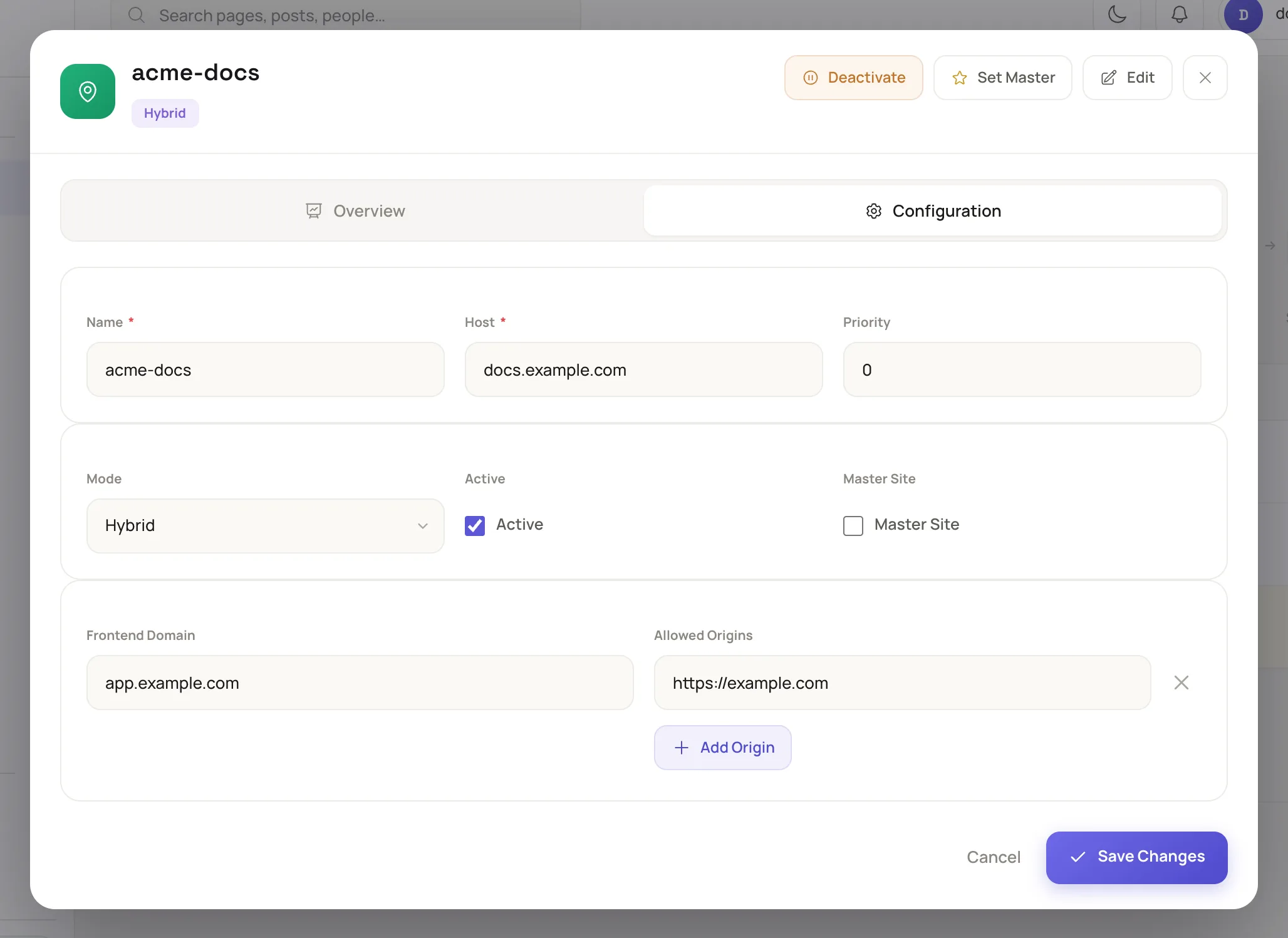
A master sets the API's browser access on the site's form.
A site admin sees these fields read only.
Read the API spec
GET /api/json/open_api returns the OpenAPI document for every route, filter and field. /api/json/swaggerui is the interactive browser for it. Both answer a 403 unless the request carries a bearer token that holds a name under admin:api.
Fix common errors
| Status | Code | Cause |
|---|---|---|
| 400 | missing_host | The request has no Host header. |
| 404 | domain_not_found | The host is not a site's address. |
| 403 | api_access_denied | The site is Phoenix Only. |
| 503 | website_unavailable | The site is switched off. |
| 503 | site_offline | The site is offline for maintenance. Only API admins and masters get through. Sign-in, me, logout and the password reset routes stay open. |
| 403 | forbidden | The token is missing or holds no admin:api: name for the route. A sign-in with a wrong password, or on another site's address, answers 403 too. |
| 401 | second_factor_required, second_factor_invalid | The account has an authenticator app, and the sign-in sent no code or a wrong one. |
| 400 | tenant_required | A request without a site reached a route that works on one site. |
| 429 | rate_limited | Too many sign-in attempts. Wait the seconds in retry-after. |
Next steps
- Headless or coupled: choose how a site uses the API.
- Permission names: every
admin:api:name. - Add a site and its domain: set a site's mode and host.
- Secure sign-in: two-step codes and sign-in limits.