Add the visual editor to your own host
v0.0.2
The visual editor of Mishka CMS is a package of its own, mishka_cms_builder. A project cloned from the Mishka CMS repository already has it. This guide adds it to a host you built yourself. You finish with the editor opening from the Pages screen.
Before you begin
- A host that runs
mishka_cms_core0.0.4 or later, on Elixir 1.20 or later. See Install Mishka CMS and sign in. - The host's
config/config.exsand its adminapp.js, where you add lines. - An account that can open the editor. See Permission names.
Without the package, the CMS works. The admin shows no editor button, and you write a page in its form or its code tab.
Add the package
Add the package to the host's mix.exs and fetch it:
{:mishka_cms_builder, "~> 0.0.1-alpha.4"}mix deps.getRegister it with the core and Ash
In config/config.exs, add the web module to the core's extensions and the domain to the host's Ash domains, and turn the editor's strict checks on outside production:
config :mishka_cms_core,
  extensions: [MishkaCmsCoreWeb, MishkaBlogWeb, MishkaDocumentWeb, MishkaCmsBuilderWeb]

config :mishka_cms,
  ash_domains: [
    MishkaCmsBuilder,
    MishkaDocument,
    MishkaBlog,
    MishkaCmsCore.Runtime,
    MishkaCmsCore.Accounts,
    MishkaCmsCore.Notify,
    MishkaCmsCore.Mail
  ]

config :mishka_cms_core, builder_strict: config_env() != :prod
Keep your own extensions and domains in the two lists. The builder_strict line makes the editor raise in development and test when something it treats as impossible happens. The core reads it when it compiles, so after you change it run mix deps.compile mishka_cms_core --force.
The package starts its own processes, so the host adds no supervision child. The core starts MishkaCmsCore.PubSub, so remove a child of your own for it. The editor's routes come from extension_routes(:admin_standalone) inside the admin session of the Mishka CMS router.
Import its JavaScript
The editor's hooks ship as ES module sources. In the admin's app.js, import them beside the core's and spread both sets:
import CoreHooks from "mishka_cms_core";
import BuilderHooks from "mishka_cms_builder";

boot({ ...SharedHooks, ...CoreHooks, ...BuilderHooks });
esbuild finds both packages by name through its NODE_PATH. The host's deps directory on that path is enough.
Create the tables
The editor keeps its history, review notes and snippets in four tables that come from the MishkaCmsBuilder domain. Generate and run the migration:
mix ash.codegen add_cms_builder
mix ash.migrate
Check that the editor opens
- Restart the server and sign in to the admin with an account that holds
admin:dashboard:runtime:pageoradmin:dashboard:code. - Open Pages and add a page. The editor opens at
/admin/dashboard/runtime/builder/page.
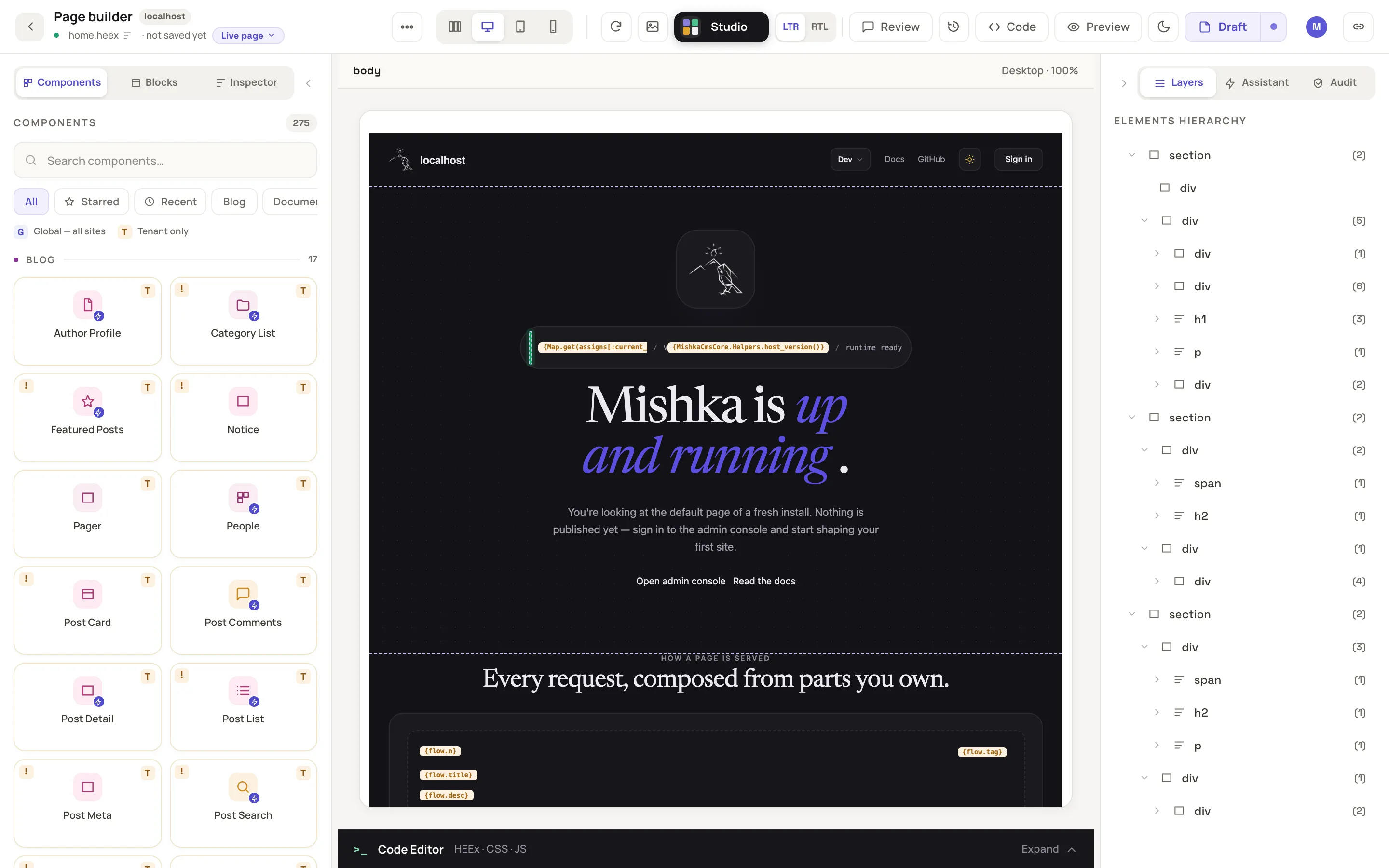
The editor opens on the page, with the canvas set to Desktop.
The package adds no permission of its own. The permission to edit a kind of document opens the editor for it, and also lets the person write the editor's settings. See Settings.
Next steps
- Build a page in the visual editor: the first page in the editor you added.
- Connect a model to the editor's Assistant: the module the Assistant calls.
- Plugin events: the
builder:*events a plugin can answer.