Add custom CSS, JS hooks and components
v0.0.1
Three lists under Runtime hold code you write yourself. A stylesheet adds CSS to the site's compiled styles. A JS hook adds browser JavaScript that you attach to an element. A component is a reusable piece of markup that you place on pages like a ready-made one. This guide adds each of them and uses it in the visual editor.
Before you begin
- Sign in with an account that may write the type. Stylesheets need
admin:dashboard:runtime:stylesheet, JS hooksadmin:dashboard:runtime:js_hookand componentsadmin:dashboard:runtime:component. The nameadmin:dashboard:codewrites all three. See How permissions work. - A record with no site is shared by every site. A site account can use it and cannot change it. Only a master creates one: choose Global (no site) in the Site field.
Add a stylesheet
- In the admin sidebar, under Runtime, click Stylesheets.
- Click + Add Stylesheet. The New Stylesheet window opens.
- Enter a Name. The CMS saves it as a slug.
- Pick a Kind. It decides where your CSS goes in the compiled sheet. Leave it on Custom for your own rules.
- Paste the CSS into CSS content. Priority runs from 0 to 100, and within a kind a lower value loads first. Leave Active on.
- Click Create.
| Kind | Use it for |
|---|---|
| App base | A copy of the app's own CSS file. It loads first. |
| Theme | @theme blocks and :root variables. They load before Tailwind builds its classes. |
| Base | Layers and utilities that a kit ships. |
| Custom | Your overrides. They load last and win. |
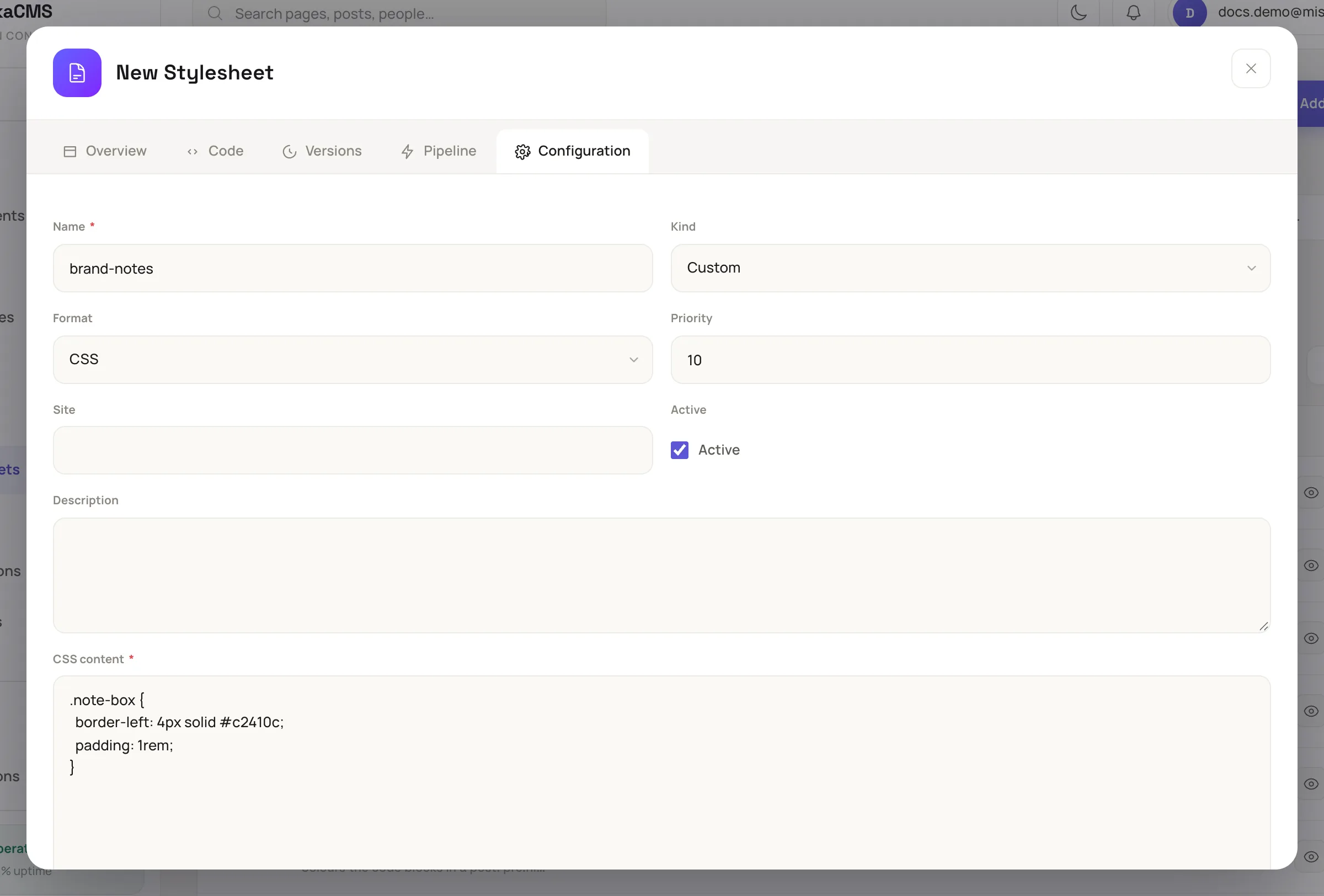
The New Stylesheet window holds the CSS and where it loads.
Saving queues a background job that rebuilds the site's CSS. To use a class from your sheet, select an element in the editor, open Attributes in the Inspector and add the class name to its class. If the element has no class row, click + Add attribute, enter class and the name.
.note-box {
  border-left: 4px solid #c2410c;
  padding: 1rem;
}
Add a JS hook
- Under Runtime, click JS Hooks, then + Add JS Hook.
- Enter a Name, such as
copy-text. Format lists JavaScript and TypeScript. The example below is JavaScript. - Paste the code into Content (JavaScript/TypeScript). It must
export defaultone object whose methods are the hook's callbacks. - Click Create.
export default {
  mounted() {
    this.handleClick = async () => {
      const text = this.el.dataset.clipboardText || this.el.textContent.trim();
      await navigator.clipboard.writeText(text);
    };
    this.el.addEventListener("click", this.handleClick);
  },
  destroyed() {
    this.el.removeEventListener("click", this.handleClick);
  }
};
The CMS imports the file into the site's JavaScript bundle. A hook registers in the browser under a name built from its own: a global hook user-menu becomes GlobalUserMenu, and a hook shopping-cart on the site main becomes MainShoppingCart.
You do not type that name. Select an element, open Behavior in the Inspector, open JS hook, pick the hook and click Apply. The editor writes the name and gives the element an id if it has none. A hook needs one to mount.
Add a component
- Under Runtime, click Components, then + Add Component. The editor opens with the Name your component dialog.
- Enter a Name and click Create. The component builder opens.
- Build the markup on the canvas. In the Blocks tab, Component content marks where whatever you put inside the component appears, and Property value prints one of its properties. Both are offered only in this builder.
- Click Code and open the Interface tab to declare the component's properties and slots.
- Publish it as in Build a page in the visual editor.
The component now appears in the Components tab of the page builder. A T badge marks one that only this site has, and a G badge marks a global one.
The menu beside + Add Component also offers Create with the full form. That form has a Live component switch. Off, the component is a function component that draws what it is given and holds nothing. On, it is a Phoenix LiveComponent that keeps its own state and answers its own events.
Check that it built
Click View on the record's row and open the Pipeline tab. It reports Compiling… while the job runs and Compile failed with the reason if it did not build. A hook that cannot build shows Left out of the bundle. The site's other hooks still build.
Next steps
- Reuse work with snippets and design tokens: change a token that your stylesheet reads.
- Components and UI kits: how your components sit beside a kit's.
- How a page reaches visitors: what happens after you save.