Introducing Mishka CMS: How We Built a Runtime CMS on Phoenix LiveView
Two years of Mishka Chelekom, three or four CMS attempts and one idea from Beacon: why Mishka CMS compiles your pages at runtime, what it does today and where it goes next.

Mishka CMS is an open source content management system that runs many websites from one install. It is built with Elixir, Phoenix LiveView and the Ash Framework. Pages, layouts and components live in the database and compile into real LiveView modules while the site keeps running, so publishing a change never needs a redeploy.
Today we are releasing its first version. This post tells how we got here: the libraries that came first, the CMS attempts that did not work out, the idea that finally did, and what we want Mishka CMS to become. Here is the short version first.
- Open source and free. The app and every package it uses are on GitHub.
- Built on Elixir, Phoenix LiveView and the Ash Framework.
- Many websites, one install. Each site has its own domain, languages, pages and users.
- Runtime pages. You edit and publish while the site keeps serving visitors.
- Realtime in the admin and on the site, from the editor to the open page.
- Extensions. A blog, documentation and social sign-in ship with the first release.
- First release.
mishka_cms_core0.0.2 on Hex, and the app tagged v0.0.1.
Read about it on the Mishka CMS page, click through the interactive admin preview, or install it.
It started with Mishka Chelekom
Before Mishka CMS there was Mishka Chelekom, our component library for Phoenix and Phoenix LiveView. In its first two years it passed 76,000 downloads on Hex, and it grew from a handful of styled components into a set that covers most of what a web app draws.
The headless set gives you behavior and accessibility with no styling of its own. The Mob components bring the same ideas to native Android and iOS apps built with Mob. Since Chelekom v0.0.9, an MCP server lets AI coding assistants look up and generate components for you.
Chelekom also showed us where most of the work in a real project goes. Every app that used it still needed admin screens, permissions, content and a way to publish that content. That is the work Mishka CMS takes on, and Chelekom stays at its heart: the UI kits the CMS installs come from it.
Mishka Gervaz: admin screens for Ash
Our backend work runs on the Ash Framework. Ash describes data and actions very well, but every admin screen around a resource meant writing the same table, the same filters and the same form again. A CMS has dozens of resources, so we needed a faster way that fits Ash.
We started Mishka Gervaz inside the CMS in December 2025 and moved it into its own library in February 2026. Gervaz is a declarative UI library for Ash. You describe a table (columns, filters, row and bulk actions, pagination, live updates) or a form (fields, groups, wizard steps, uploads) in a mishka_gervaz block, and it renders the LiveView for you.
Today 27 resources in the CMS core build their admin screens with it, plus 8 in the blog extension and 11 in the documentation extension. If you build with Ash, start with how Gervaz works.
Three or four tries before this one
We tried to build a CMS more than once before this one. Each attempt left something behind that we still use.
The first Mishka CMS
A real-time, API-based CMS split into six sub-systems in one umbrella app. We learned a lot from it and archived it. Its plugin system lived on and became Mishka Installer in 2022.
Mishka Template Creator
A visual template builder for LiveView, with panels for elements, layout, history and settings. It never became a product, but it was our first editor.
The building blocks ship
Mishka Chelekom and GuardedStruct, our data validation library, are released on Hex.
The current Mishka CMS begins
Its very first commit already compiles modules at runtime.
An editor in React, then in LiveView
The first visual editor of this CMS was written in React and Inertia.js. In July 2026 we deleted all of it and rebuilt the editor in LiveView, in one commit that added 15,069 lines and removed 11,240.
The first release
The core, the blog, the documentation extension and the sign-in providers are published on Hex.
The React editor was the most expensive lesson. An editor for LiveView pages works best when it is written in LiveView, with the same components, the same state and the same server as the page it edits.
What Beacon showed us
Beacon CMS, from DockYard, showed us that Phoenix LiveView pages can live in a database and compile while the application runs. That idea sits at the center of Mishka CMS. A few pieces of our editor started as code from Beacon's live admin, its HEEx decoder and JSON encoder, and our source files say so.
We needed more around Beacon's idea: many sites in one install, a visual editor, extensions with their own data, and publishing that never restarts anything. So we built our own runtime on the same foundation.
How a website comes together in Mishka CMS
A website in Mishka CMS is a site record, a domain and a set of rows in the database: layouts, pages, components, stylesheets and JS hooks. Here is the path from an empty install to a live website.
And this is what happens when a visitor opens one of its pages:
A request arrives for mishka.tools/blog.
The domain finds the site. Everything after this point is scoped to that one site.
The address finds the page, its layout and its language edition, from an in-memory routing table.
The page's module is ready, or compiles once. Many requests for the same cold page wait for one compile, and a server runs at most one compile per CPU core.
LiveView renders it with the layout, the components and the site's own CSS and JS bundle, then keeps the connection open for realtime updates.
Publishing in the admin rebuilds only the changed module and bundle in the background. The next request gets the new version.
Pages marked to precompile are built at boot, and the rest on their first visit. Visitors already on the site keep their connection while you publish, and nothing restarts. The details are in how pages reach visitors and drafts and versions. Two problems shaped this part of the CMS:
Code stored in the database can be signed, and when signing is on, a page whose code was changed outside the CMS does not run that code. If you write your own handlers, read custom code first.
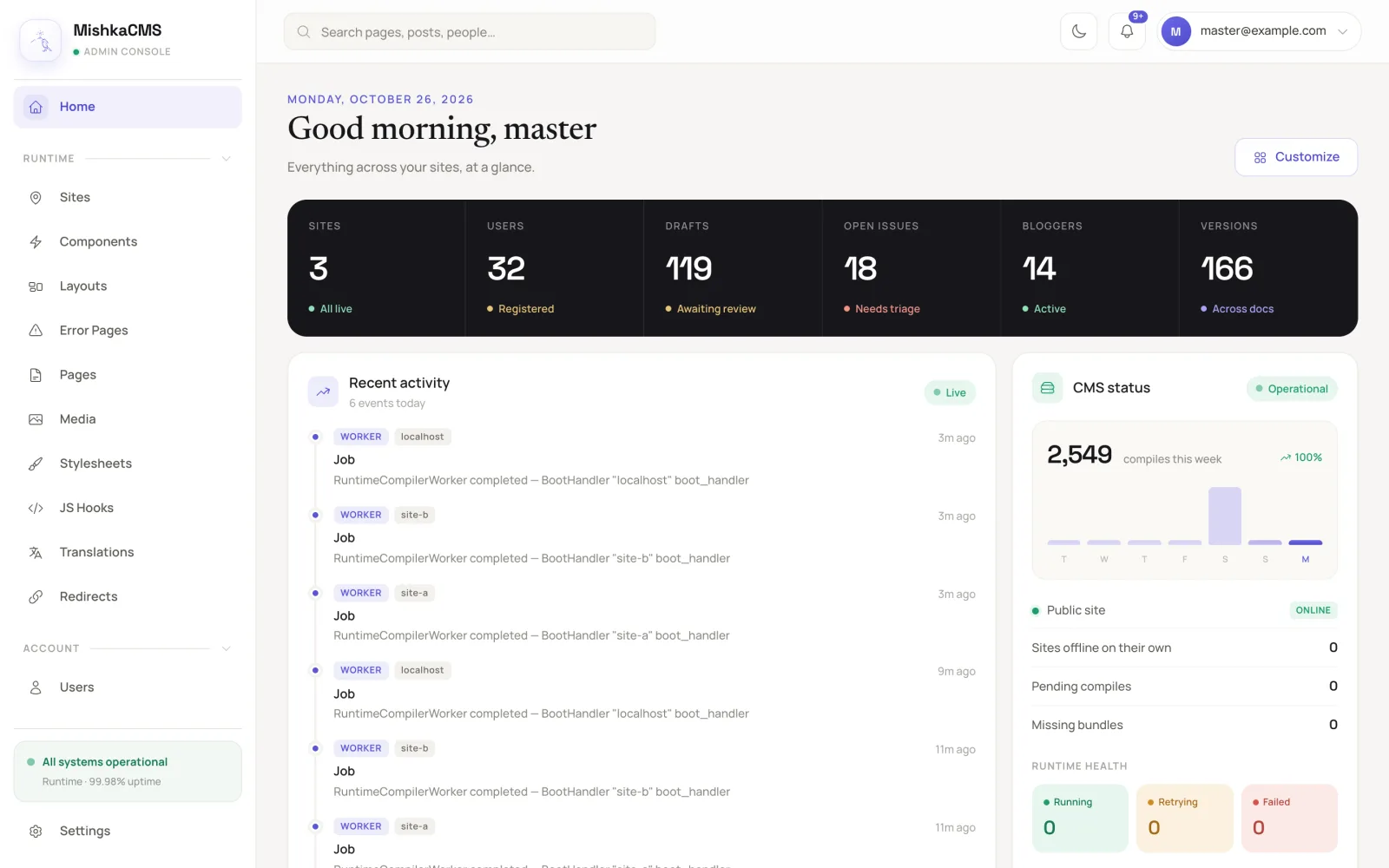
The dashboard of a local demo install. The runtime card counts the compiles of the week.
Realtime, from the editor to the visitor
The admin and the site are both Phoenix LiveView, so a change travels to the people who are looking at it, without a reload.
- Admin tables update live. A Gervaz table can refresh when a record changes anywhere, so two admins looking at the same list see the same rows.
- The editor shows who is there. When someone else opens the page you are editing, you see them.
- Styles reach open pages. When a site's CSS is rebuilt, pages that are already open swap in the new stylesheet without a reload.
- Access is checked again. If an admin locks a page, visitors who are reading it and no longer have access are sent away from it.
- The dashboard follows the runtime. Its activity feed shows compiles and other jobs as they finish.
For your own admin screens, Gervaz explains how to share table state and update it live.
One install, as many websites as you need
One Mishka CMS install serves many websites. Each site has its own domain, pages, media, languages and users. The CMS reads the domain of every request, finds its site and scopes everything after that to it. In the data layer every record carries its site, so one site never sees another site's rows.
Two kinds of people sign in. A master user manages every site from one admin and can add new ones. A site's own users see only their site, with the permissions you give them. The code sets no limit on the number of sites, so you can add as many as your servers can carry. Some things are shared across sites: layouts, components and translations can be global, so a fix to one component reaches every site that uses it.
Each site also picks how it is served. A Hybrid site draws its own pages and answers the API too. A Phoenix Only site serves pages and refuses the API. An API Only site serves its content to a separate frontend. Read about multi-tenant sites, sites and masters, headless or coupled and how to add a site.
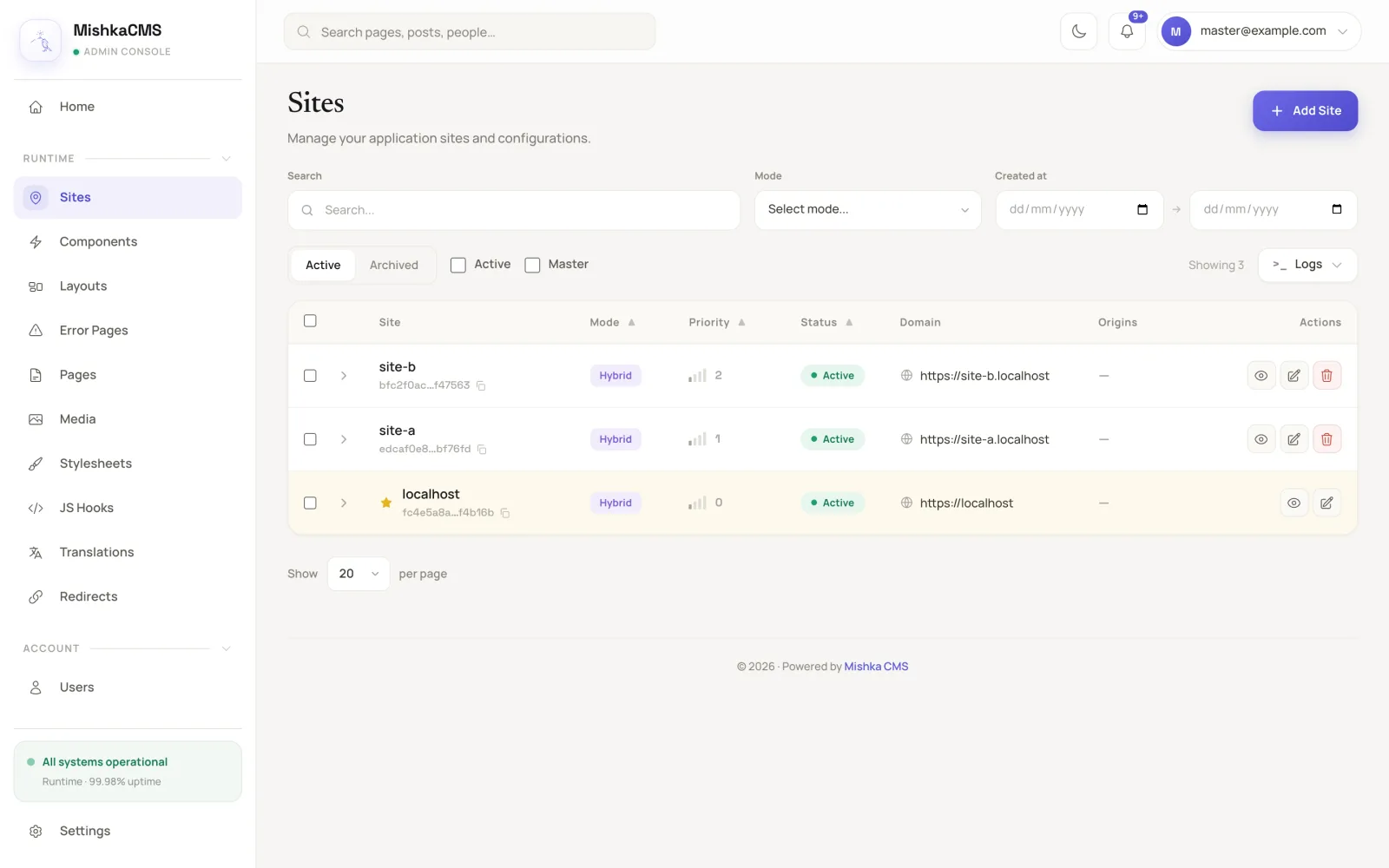
Three websites on their own domains, managed from one install.
Every site speaks its own languages
Each site picks its own list of languages, and the first one is its primary language. You choose how languages show in addresses: the primary language without a prefix and the others with one (/blog and /fa/blog), or a prefix for every language.
A translated page is an edition of the original. The editions are linked, so the language menu and the hreflang tags always point at the right page. Persian, Arabic, Hebrew and Urdu pages render right to left. The words in your templates, such as a button label or a form message, are translated in the admin's Translations screen, with no deploy. The guides cover languages and editions, how to translate a page and how to translate the interface.
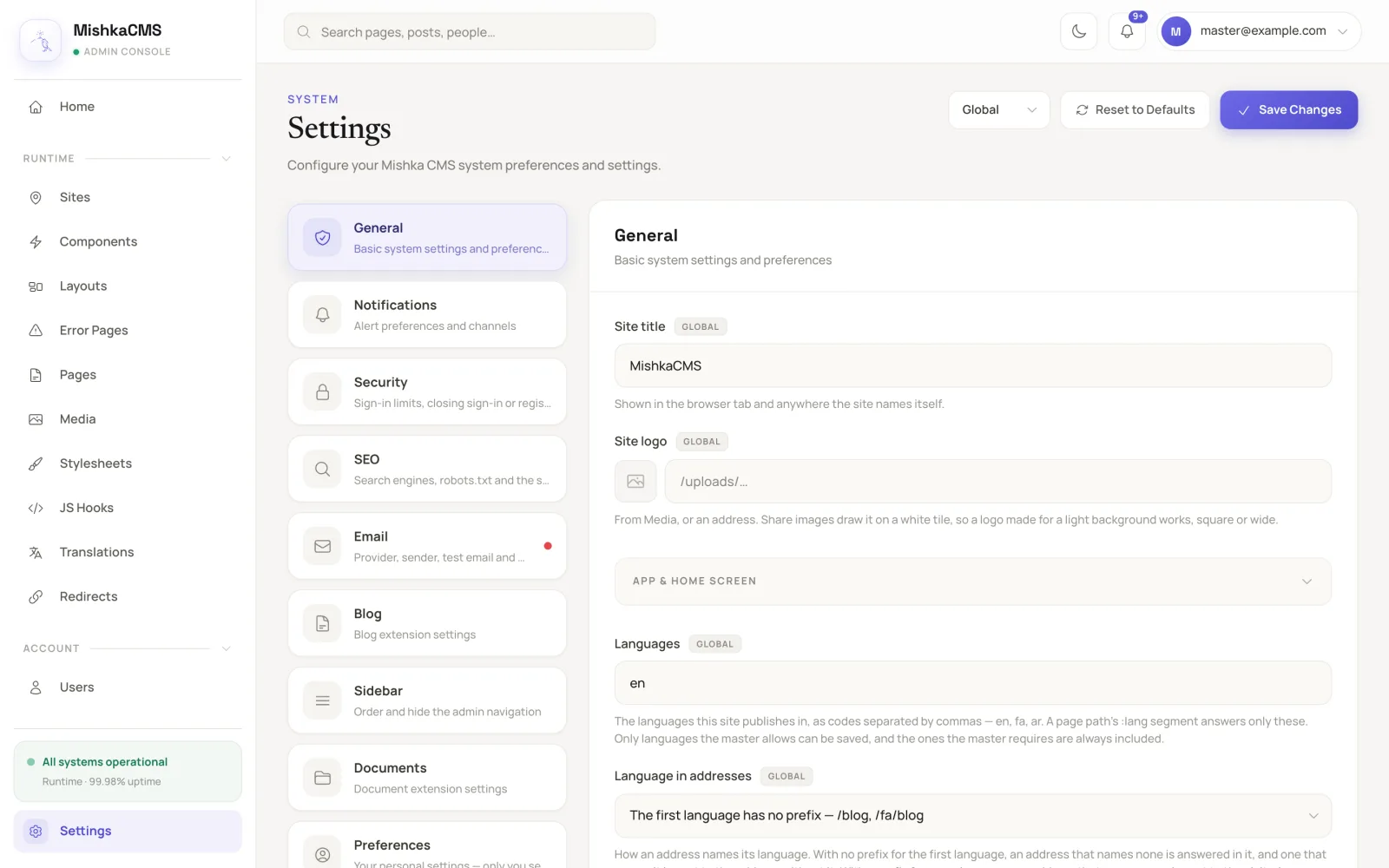
A site's languages and how they show in its addresses, in Settings.
SEO built in, and open to plugins
Every page Mishka CMS serves already carries a complete head: a title, a description, a canonical address, robots rules, Open Graph and X tags for link previews, and structured data. A page that needs a permission, and every sign-in page, gets noindex. When a page has no picture, the CMS draws a share card for it. Each site gets its own sitemap, and every language edition gets its hreflang link. See set a page's SEO and share card.
Extensions add their own layer through events. The blog hooks the runtime:page:seo event, so each post, category, tag, author and team page gets its own title, description and structured data. Anything set on the page itself still wins, and it can use variables such as {{post.title}}. The head of this post comes from that plugin. See set a post's SEO.
The same events open the head to your own code. On mishka.tools we added privacy-friendly analytics with one small plugin and no change to the CMS itself: it hooks RootHtml.MetaTags to add its script inside <head>, and web:response:before_security_headers to allow that script in the Content Security Policy.
An event-based CMS you can customize
Under all of this sits Mishka Installer. Every action in the CMS fires a named event, such as blog:comment:after_create, and plugins hook in by priority. A plugin can change what passes through, stop the chain, or just listen, and plugins can be started, stopped or removed while the site runs.
Much of the CMS is put together this way. Sign-in providers answer auth:providers, email services answer mail:providers, captchas answer captcha:providers, and extensions add sidebar menus, dashboard widgets, settings tabs and sitemap entries the same way. Your own plugin can do what an extension does, without forking the core. See plugin events, extensions and plugins and how events work.
Extensions, and Chelekom components in your content
Mishka CMS keeps its core small and grows through extensions. Two ship with the first release:
- Mishka Blog: posts with several authors, teams, categories, tags, threaded comments, ratings and SEO fields. This post is published with it.
- Mishka Document: versioned documentation with nested pages and a two-step content and technical review. Our own docs run on it.
You set up an extension per site from the admin. It adds its permission names, its components and its sample pages, and leaves your own edits alone.
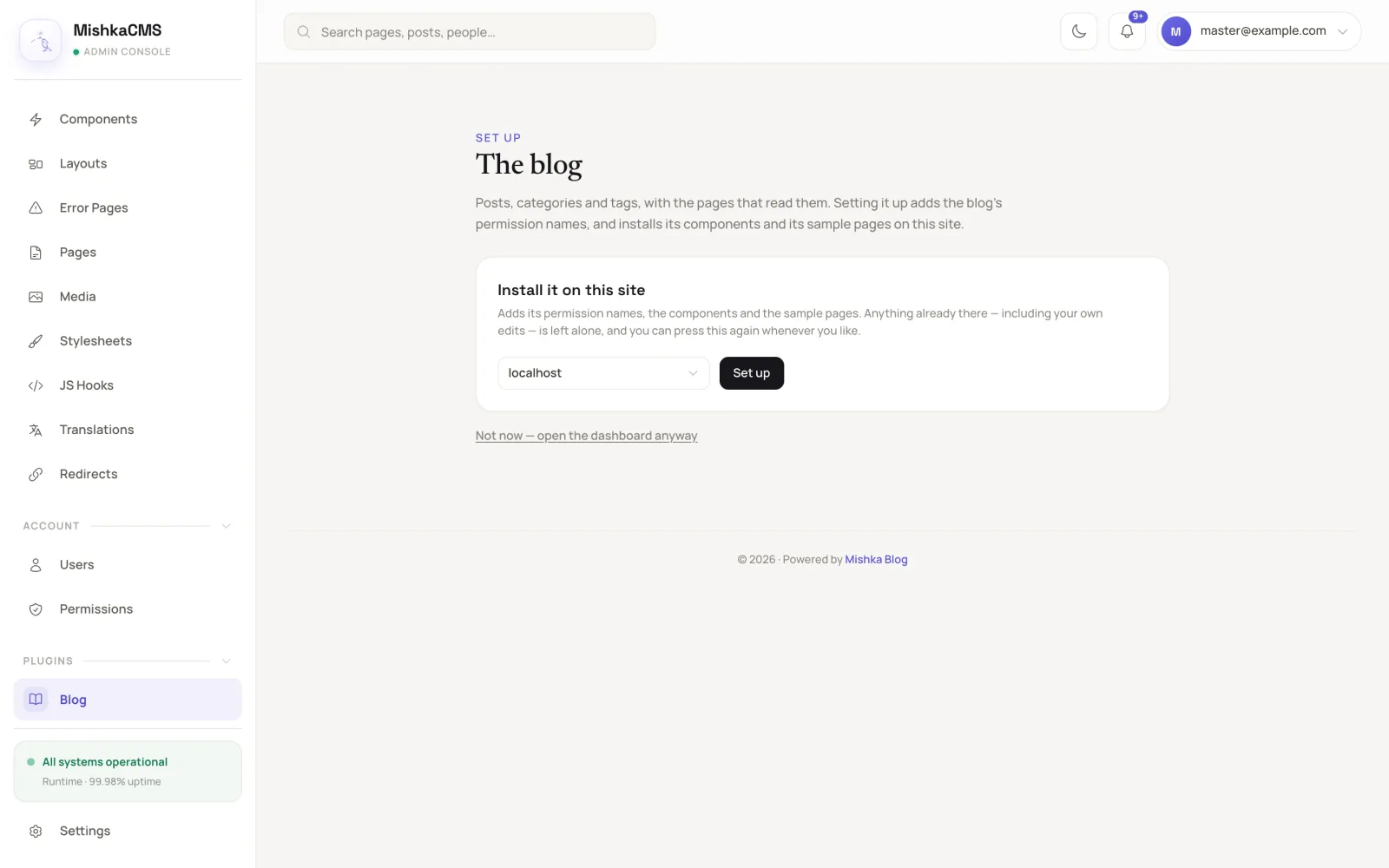
An extension is set up on one site at a time, from the admin.
Content can use components too. A post or a docs page places any component of its site with a short tag, and the CMS renders it as a real LiveView component with the site's styles. This post is an example: its timeline, its notes, its quote and the questions at the end are Chelekom components, written straight into the text like this:
[[component chelekom-alert kind="info" title="Planned"]]
  A short note for the reader.
[[/component]]
So a writer gets accordions, tabs, alerts, timelines, cards and the rest of the UI kit inside an article, and an extension can ship its own components for the pages it adds. The blog alone brings 17. See components and UI kits.
A visual editor built in LiveView
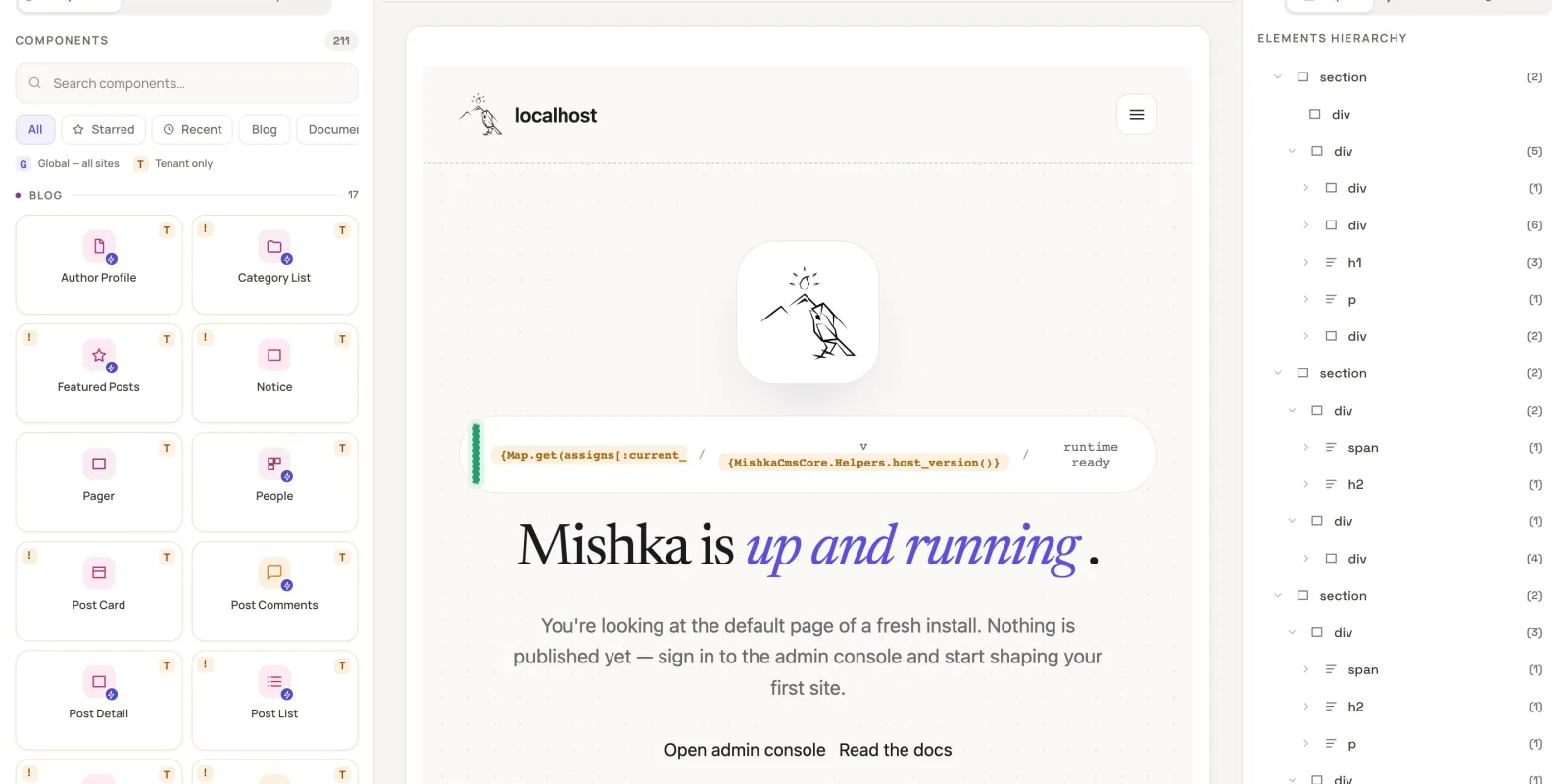
The editor shows the real page. It renders the site's own CSS in a canvas you can switch between desktop, tablet and mobile widths. The left side holds your components and blocks, from your UI kits and Chelekom's styled and headless sets, and the Inspector for the element you select. On the right, the Layers panel shows the structure of the page.
When you need code, a drawer opens the page's template, state, handlers, helpers and styles in HEEx, CSS and JavaScript. Every save is a draft, and a draft never touches the live page until you publish it. You can share a draft with a private link and step back through the page's history.
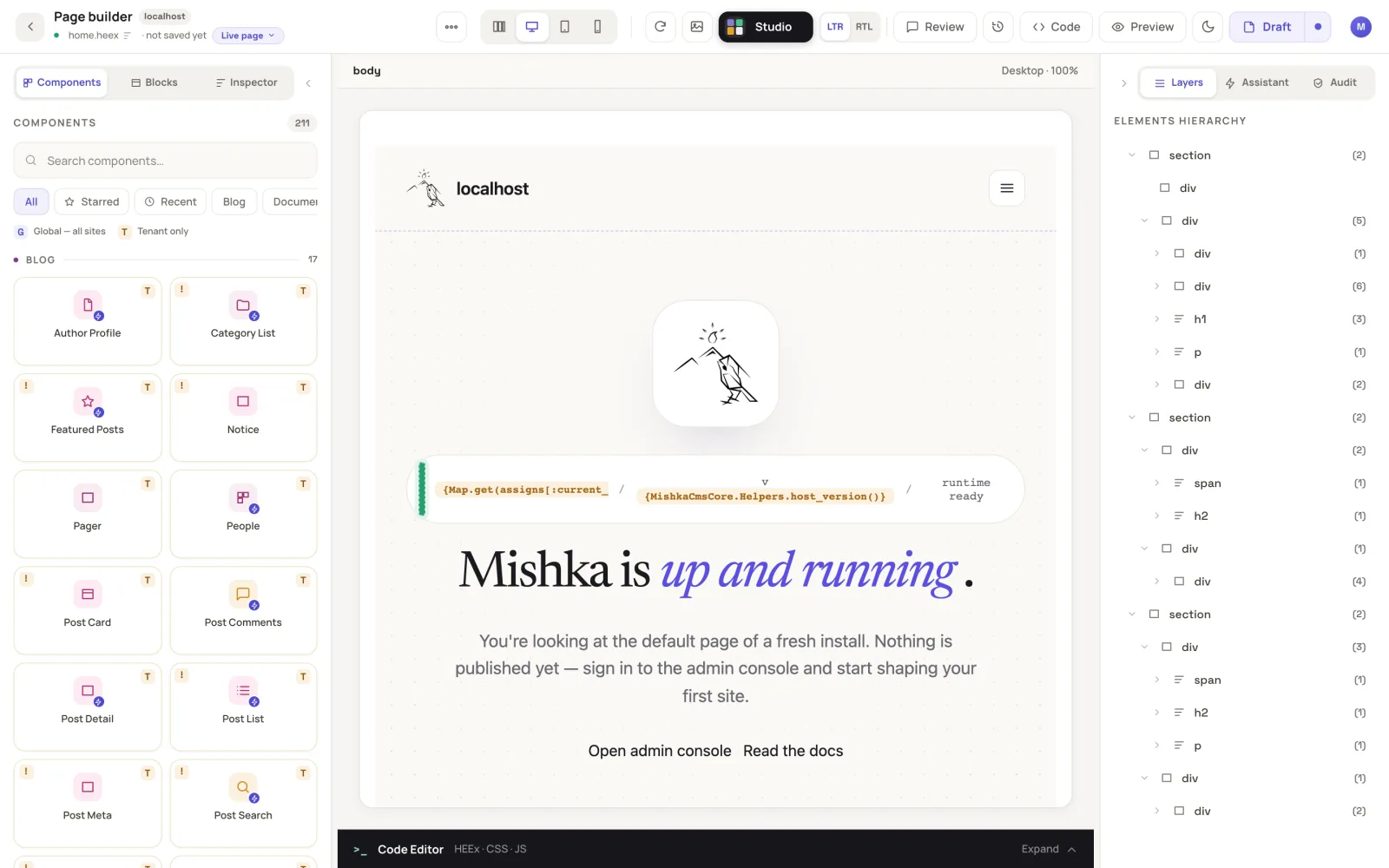
The visual editor: components, the live canvas and the page's layers.
The quickest way to get a feel for it is the interactive admin preview on our CMS page. When you are ready to build, follow build a page and keep the editor reference open.
Sign-in, security and integrations
Sign-in is part of the core, and each site sets its own rules:
- Several ways in. A password, a magic link sent by email, and sign-in with Google, GitHub, Slack or Discord. Each social provider is a small package, and each site adds its own keys in its settings.
- Protection. Two-step sign-in with an authenticator app and recovery codes, limits on password attempts, a Cloudflare Turnstile captcha on the sign-in forms, and a switch that closes sign-up on a site.
- Permissions. Screens and actions are guarded by named permissions, given per site.
- Email. Each site sends through its own provider. Resend ships with the core, other services plug in through events, and the admin keeps an email history.
- APIs. A JSON:API with an OpenAPI description and a GraphQL endpoint, for your own apps or a separate frontend.
The guides cover secure sign-in, sending email, permission names and the JSON:API.
Where we are going
We want Mishka CMS to be a CMS you can run by talking to it. Two parts of that are on our roadmap:
- An assistant that works around the clock. It will live inside the admin and help with your sites at any hour, 24/7.
- MCP APIs for your own agents. You will be able to manage everything in the CMS through your own AI agents.
Some of the groundwork is in place. The editor has an Assistant panel with a pluggable backend, and you can connect your own AI model to it today. Until a model is connected, it tells you so instead of pretending to edit. The JSON:API and GraphQL endpoints already cover the data, and Chelekom's MCP server shows the direction we are taking.
Our final goal is bigger than a CMS. We want Mishka CMS to become an SDK and a framework for building websites very fast, even for people who do not know Elixir. Developers who know Elixir and Phoenix keep the whole stack in their hands, and everyone else can still build a real website on it.
Mishka CMS is young, and it will keep getting better
This is version 0.0.1 of the app and 0.0.2 of its core. It works and it runs this website, but it still has rough edges.
If something breaks or feels wrong, please open an issue on GitHub. Bug reports, ideas and questions all help us. To try it, start with the install guide and your first site, or pull the demo image with docker pull ghcr.io/mishka-group/mishka_cms-demo:0.0.1.
Help us build Mishka CMS full time
Mishka CMS is open source and free. Building it well, along with the extensions we have planned, takes full-time work. To fund that work we offer a founding seat: lifetime access to Mishka CMS for $250 once, down from $1,200, until the countdown below ends. It includes priority support and every paid extension we release, free. The details are in the founding seat post.
If a seat is not for you, a sponsorship of any size keeps the releases coming. And if your company needs a site or an extension built, you can hire our team.
Questions people ask about Mishka CMS
Thank you
Mishka CMS stands on other people's work. Thank you to DockYard for Beacon CMS, which showed us that LiveView pages can be compiled at runtime. And a special thank you to Zach Daniel and everyone behind the Ash Framework. The Ash ecosystem powers this CMS, from its data layer to its admin screens.
Shahryar Tavakkoli writes about Elixir and Phoenix LiveView: Mishka Chelekom releases, GuardedStruct validation, static sites, service workers and SEO.