Permissions in Elixir: Roles, Masters and Site Admins in Mishka CMS
A practical guide to permissions in Mishka CMS: permission names, wildcards, masters, site admins, the grant ceiling and names from your own extension.

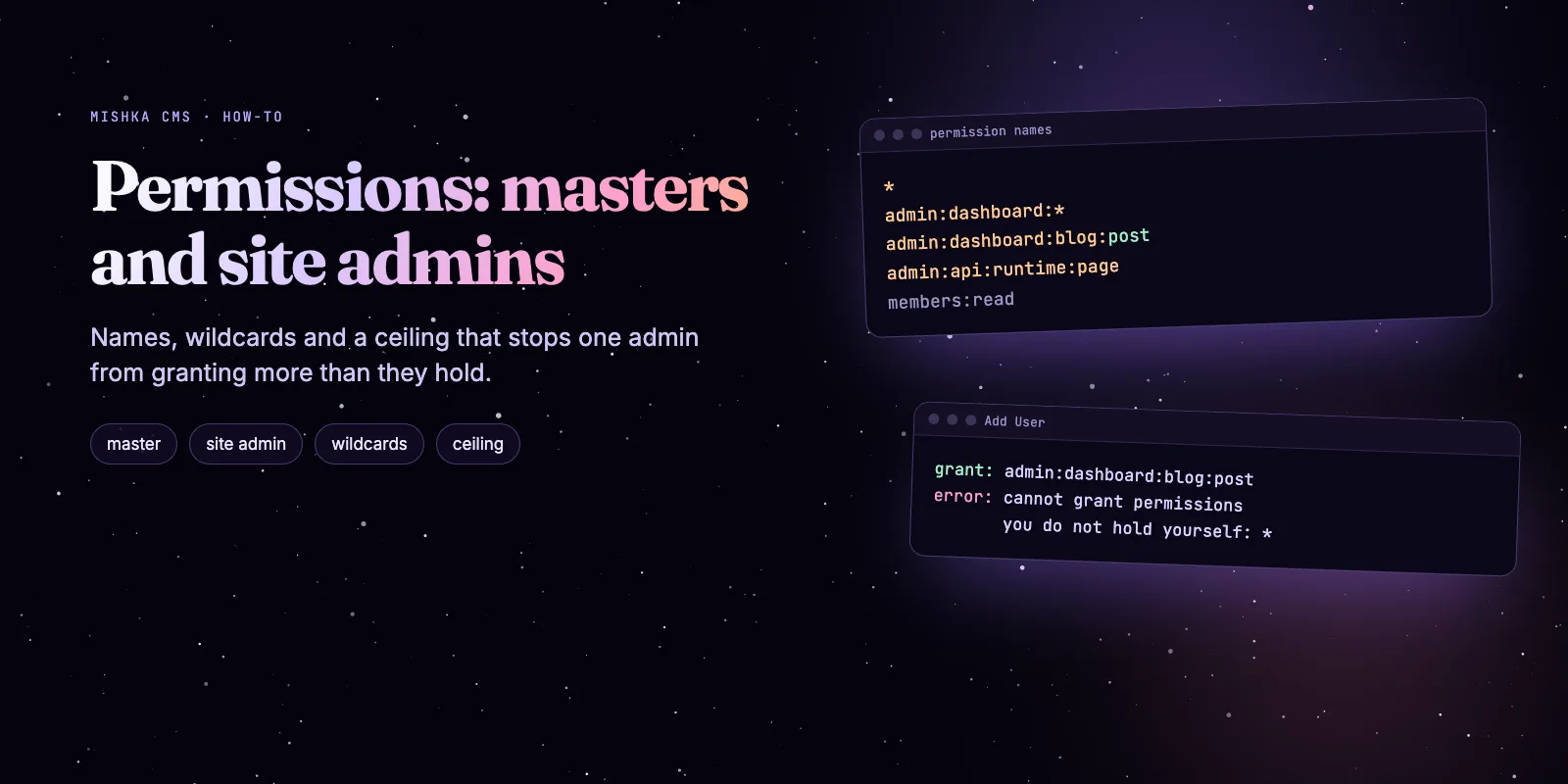
Mishka CMS has no role field. An account holds permission names, a role is the set of names you give it, and one check answers every access question: does a name the account holds cover the name the action needs? This guide sets up a master, a site admin and a blog editor, with code we ran on mishka_cms_core 0.0.5-alpha.9.
Mishka CMS stays free. A founding seat pays for the time we spend on it and on the extensions, and it gives you lifetime access, priority support and every paid extension we release.
You need Elixir 1.20 and about fifteen minutes. The code calls the same functions the policies call, and every output below is copied from an iex run.
By the end you can tell a master from a site admin, write a wildcard that does what you meant, give a colleague access without a master, see what the grant ceiling refuses, and add permission names from your own extension. The Mishka CMS page has the overview.
Mishka CMS releases. Once a month.
New Mishka CMS releases, Elixir and Phoenix patterns, and case studies from the team. No spam, unsubscribe anytime.
The short answer
Give each account the smallest set of names it needs, and let the CMS refuse the rest. A name that ends in * covers everything below it, an account with no site is a master, and nobody can grant a name they do not hold.
Step 1: open a console that has the CMS
In a Mishka CMS host, run iex -S mix. To follow along in an empty project, add the package and tell it which host it belongs to before it compiles.
# mix.exs
{:mishka_cms_core, "0.0.5-alpha.9"}

# config/config.exs
config :mishka_cms_core,
  repo: Demo.Repo,
  endpoint: Demo.Endpoint,
  host_app: :demo
The checks below read names from a plain map, so they need no database. A real account carries the same list under :permissions.
Step 2: read the names
A permission is a lowercase string of segments joined by colons. admin:dashboard:<area> opens a dashboard area, and admin:api:<area> opens the same area over the admin JSON:API. AccessPermissions.covers?/2 answers whether a held name covers a needed one.
alias MishkaCmsCore.Accounts.Checks.AccessPermissions, as: Access

Access.covers?("admin:dashboard:*", "admin:dashboard:blog:post")
# true
Access.covers?("admin:dashboard:runtime:page", "admin:dashboard:*")
# false: a narrow name never meets a wildcard
Access.covers?("admin:dashboard:code", "admin:dashboard:code:x")
# false: a name without * covers only itself
Access.covers?("*", "admin:api:user")
# true
A name also counts only on its own surface. We asked match?/3 to check a page write on both surfaces for five accounts.
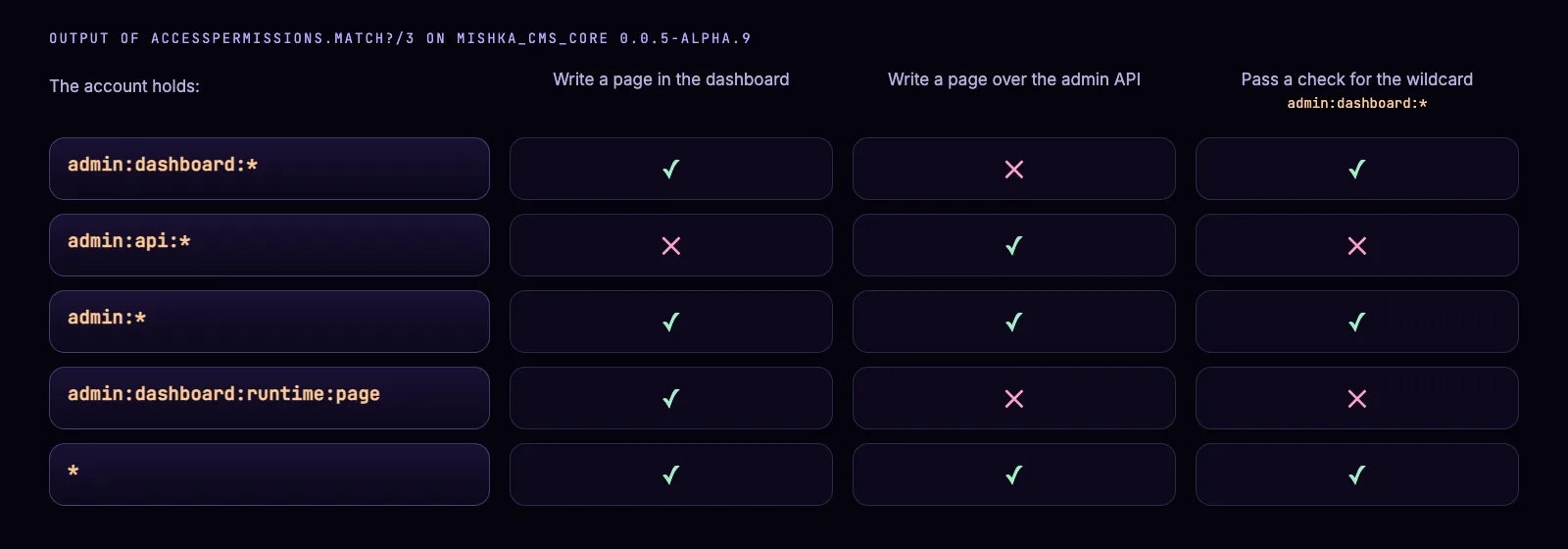
Each row is the one name an account holds.
dash = %{site_id: "acme", permissions: [%{name: "admin:dashboard:*"}]}
names = ["admin:dashboard:runtime:page", "admin:api:runtime:page"]

Access.match?(dash, %{}, permissions: names)
# true: the dashboard asks for the first name
Access.match?(dash, %{shared: %{admin_surface: :api}}, permissions: names)
# false: the API asks for the second
The installer creates 35 core names (Bootstrap.permissions/0 returned 35 on our run). The permission names reference lists each one with what it opens.
Step 3: tell a master from a site admin
A master is an account whose site_id is nil. Every other account belongs to one site, and what it holds counts on that site only. Holding * does not change that.
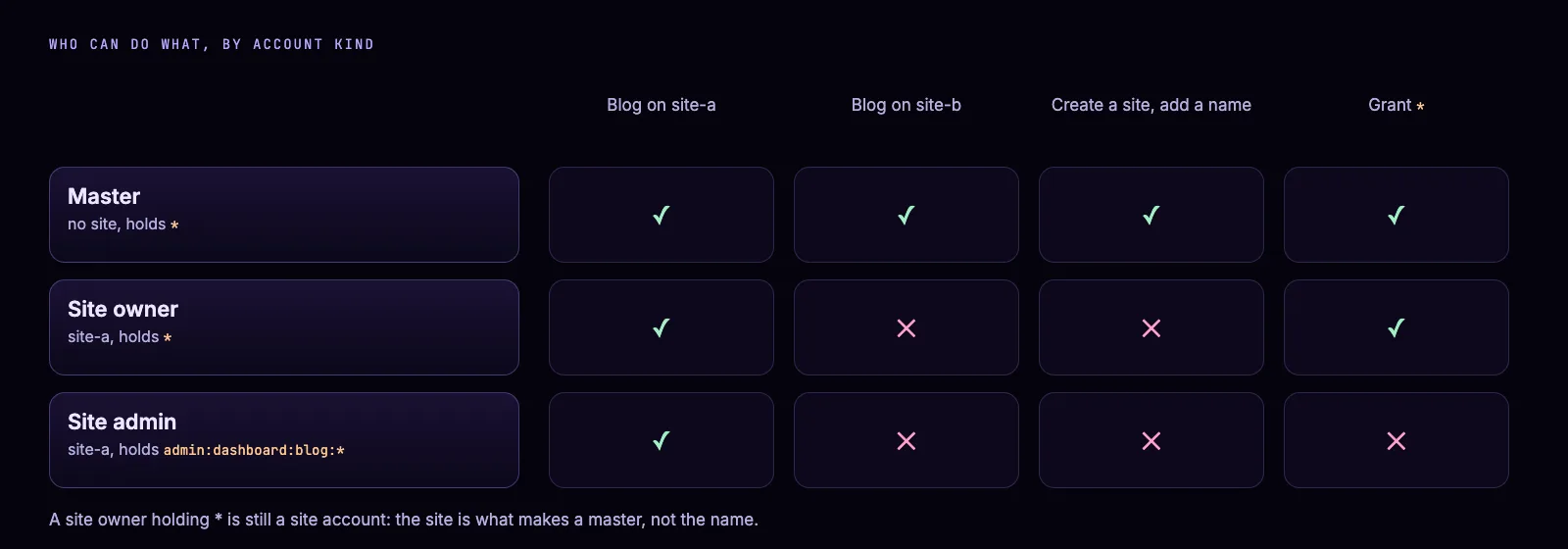
Where each kind of account can act. The check marks come from the policies and the docs.
owner  = %{site_id: "site-a", permissions: [%{name: "*"}]}
master = %{site_id: nil,      permissions: [%{name: "*"}]}
on_b   = %{subject: %{tenant: "site-b", resource: nil, action: nil}}

Access.match?(owner,  on_b, permissions: ["admin:dashboard:user"])
# false: a site owner holds nothing on site-b
Access.match?(master, on_b, permissions: ["admin:dashboard:user"])
# true: a master holds its names on every site

MishkaCmsCore.Accounts.Helper.master_user?(owner)   # false
MishkaCmsCore.Accounts.Helper.master_user?(master)  # true
A master signs in on the master site at /auth?master_user=true, and every other site signs in its own accounts only. Actions written for masters, such as creating a site or adding a permission name, are refused to a site account. Read sites, masters and global records for the rest.
Step 4: give a colleague access
On the Users screen, a site admin who holds admin:dashboard:user and admin:dashboard:permission creates an account and picks its names. Take a blog editor.
- Under Account, click Users, then + Add User.
- Enter the email and a password of at least 8 characters.
- In Permissions, pick
admin:dashboard:blog:postandadmin:dashboard:blog:comment. - Click Create.
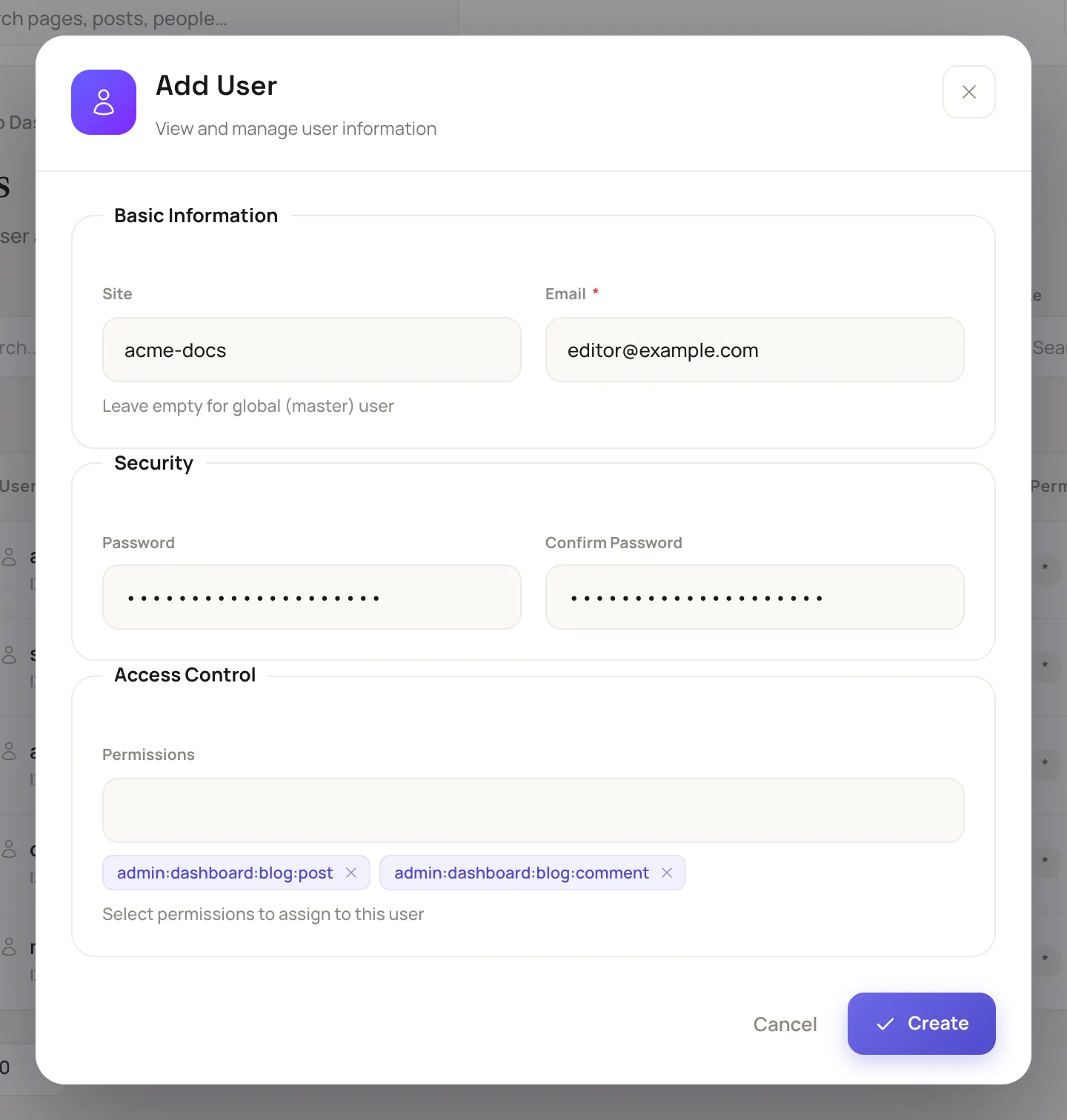
The Add User dialog from Give a teammate access.
The colleague signs in and sees Blog in the sidebar. Writing a page still needs admin:dashboard:runtime:page.
What the ceiling refuses
Granting has a ceiling: you can hand out only names that your own names cover. AccessPermissions.beyond/2 returns what an actor would gain by granting a list.
admin = %{
  site_id: "acme",
  permissions: for(n <- ["admin:dashboard:user", "admin:dashboard:permission", "admin:dashboard:blog:*"], do: %{name: n})
}

Access.beyond(admin, ["admin:dashboard:blog:post", "admin:dashboard:blog:comment"])
# []
Access.beyond(admin, ["admin:dashboard:blog:post", "*", "admin:dashboard:runtime:page"])
# ["*", "admin:dashboard:runtime:page"]
On the form the second call is the refusal cannot grant permissions you do not hold yourself, followed by the names. A site admin also cannot change its own permissions, or edit an account that holds more than it does, or reach another site. A master has a ceiling too: what it holds.
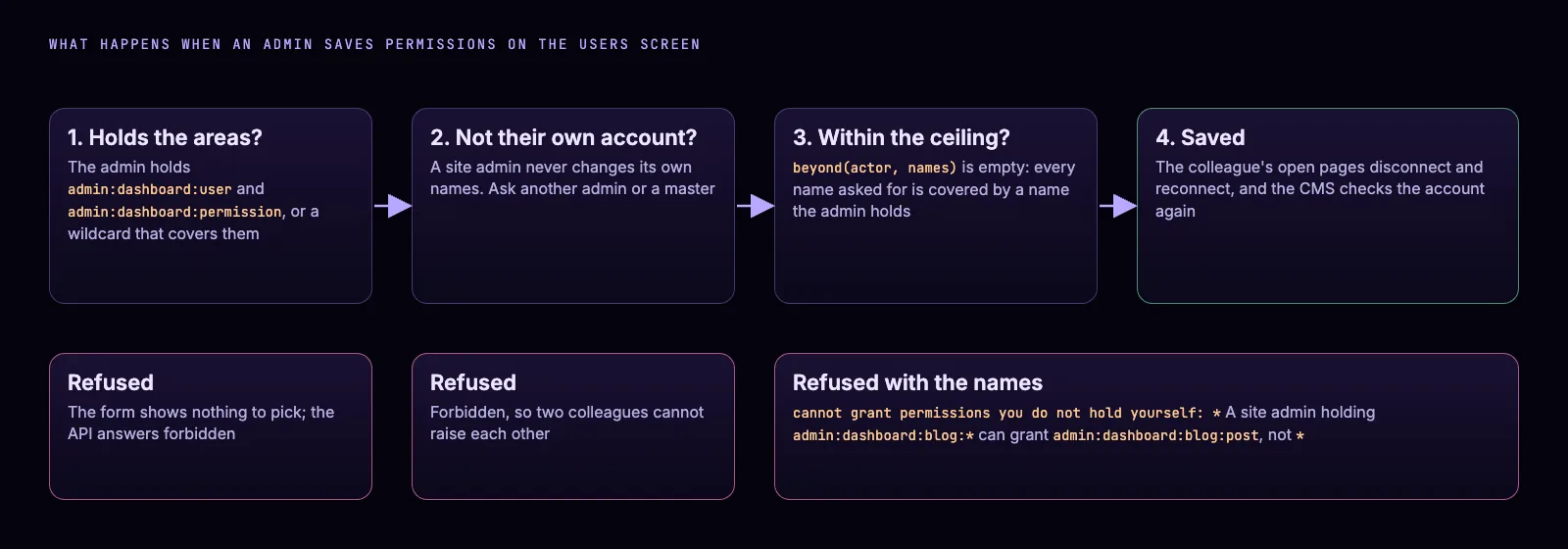
The order of the gates on the Users screen.
The same grant, step by step.
Step 5: add the names of your own extension
An extension carries its permission names in its install manifest, and the installer creates them when an admin installs it on a site. A site that never installs Mishka Blog has no blog names to grant. The extension answers the installer:extension:install event of Mishka Installer.
use MishkaInstaller.Event.Hook,
  event: "installer:extension:install",
  initial: %{priority: 50, extra: [%{label: gettext_noop("Blog"), fields: []}]}

# in the manifest
permissions: [
  {"admin:dashboard:blog:*", "The whole blog on the dashboard: posts and comments."},
  {"admin:dashboard:blog:post", "The editorial side of the blog: posts, collections, tags, ..."},
  {"admin:dashboard:blog:comment", "Comment moderation: comments and comment votes."},
  {"admin:api:blog:*", "The whole blog over the admin JSON:API."}
  # ...
]
Mishka Blog lists six names this way, and Mishka Document lists six. Your extension guards its resources with the same check, so its names obey the same wildcards and the same ceiling. For a shop extension, a policy looks like this.
authorize_if {MishkaCmsCore.Accounts.Checks.AccessPermissions,
              permissions: ["admin:dashboard:shop:order", "admin:api:shop:order"]}
List one name for each surface the policy answers on. Read how events work in Runtime plugins in Elixir.
Step 6: lock a page with any name
Every page has a Permissions field. Empty means open to everyone. With names, only an account holding one of them opens the page, and every other visitor gets the not-found page and a noindex, nofollow robots tag. A master adds a name of your own, such as members:read, on the Permissions screen.
member = %{site_id: "acme", permissions: [%{name: "members:read"}]}
guest  = %{site_id: "acme", permissions: []}

Access.match?(member, %{}, permissions: ["members:read"])  # true
Access.match?(guest,  %{}, permissions: ["members:read"])  # false
Access.match?(nil,    %{}, permissions: ["members:read"])  # false: a visitor
Set the field with the pencil icon on a row of the Pages list, or in Page settings in the visual editor. A name that starts with admin:api: opens for nobody, so pick another. Lock a page or post to members has the screens.
Four mistakes to avoid
- Do not treat
*as master status. It is every permission on the account's own site, nothing more. - Do not expect
admin:dashboard:*to open the API. Grantadmin:api:*oradmin:*for that. - Do not write a wildcard check and hold a narrow name. A check for
admin:dashboard:*passes only foradmin:dashboard:*,admin:*or*. - Do not plan on a site admin editing its own names. Ask another admin or a master.
Next steps
Start with the Mishka CMS page and keep the Mishka CMS docs open: how permissions work, give a teammate access and permission names are the three to read next.
To see the CMS these screens belong to, read Mishka CMS 0.0.2 and the visual editor package.
Mishka CMS is free, and a small team builds it. If you want to help us work on it full time, a founding seat gives you lifetime access, priority support and every paid extension we release.
You can also sponsor our open source work, or hire our team for an Elixir project.
Mishka CMS releases. Once a month.
New Mishka CMS releases, Elixir and Phoenix patterns, and case studies from the team. No spam, unsubscribe anytime.
Questions people ask about Mishka CMS permissions
Thank you
Mishka CMS stands on Elixir, Ash Framework, Spark and Phoenix LiveView. The permission matcher began as work by Toomaj Boloorian. Thank you to everyone who builds them, and to you for reading this far.
Shahryar Tavakkoli writes about Elixir and Phoenix LiveView: Mishka Chelekom releases, GuardedStruct validation, static sites, service workers and SEO.