Real-Time Editing and Locks in Phoenix LiveView with Mishka CMS
A hands-on guide to working in one Mishka CMS editor session: invite a colleague, see who is in with Presence, watch changes arrive, lock an element and go back through the history.

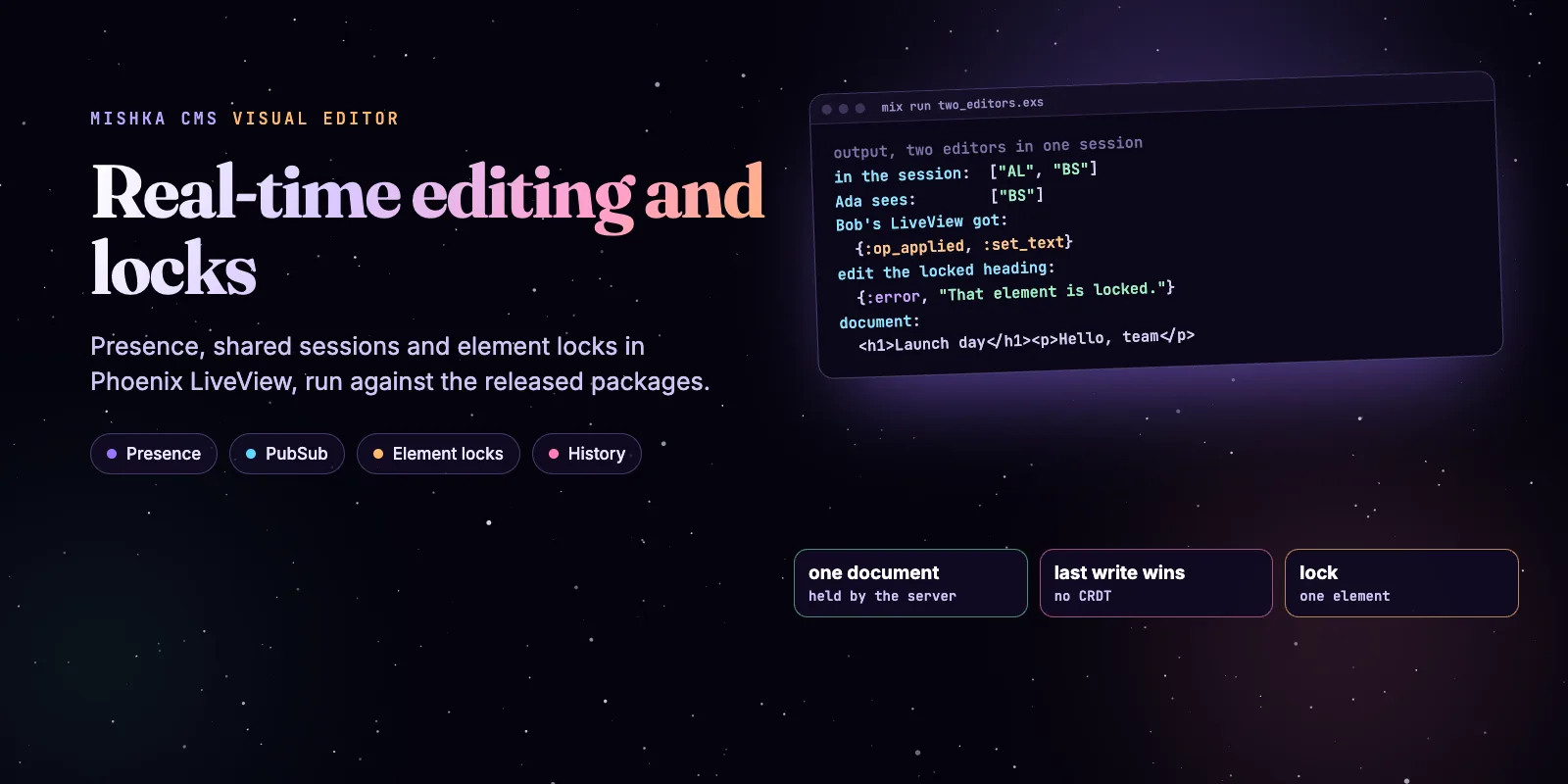
Several people can work in one Mishka CMS visual-editor session at the same time. The server holds one document, applies every change there and tells every open editor, and a row of avatars shows who is in. This guide invites a second editor, watches a change arrive on their screen, locks an element and goes back through the history. It also says where the line is, because this is not a shared text document. Every script ran against Mishka CMS Builder 0.0.1-alpha.6 and Mishka CMS core 0.0.5-alpha.9.
Mishka CMS is free and open source. A founding seat pays for the time we spend on it and on the extensions around it, and it gives you lifetime access, priority support and every paid extension we release.
You need a Mishka CMS site with the visual editor added to your own host, and two accounts that can open it. To run the Elixir parts alone, a Mix project with mishka_cms_builder and mishka_cms_core is enough. If the editor is new to you, start with Mishka CMS 0.0.2: Visual Editor Package and Faster Previews, and read Introducing Mishka CMS: How We Built a Runtime CMS on Phoenix LiveView for what happens after you publish.
Here is what exists, so you do not hunt for the rest. People share one editor session by an invitation link, see each other as avatars, see each other's changes as they happen, can lock an element, and can go back through the history. Two things do not exist. Two people typing in the same text do not get their words merged: the editor's own source calls it last-write-wins at the level of one change, and a CRDT is out of scope. And the "locks" in Mishka Blog are not edit locks: they decide who may read a post.
Mishka releases. Once a month.
New Mishka CMS releases, Elixir and Phoenix patterns, and case studies from the team. No spam, unsubscribe anytime.
How the session fits together
The editor is two LiveViews, the chrome and the canvas in an iframe, and they cannot each keep a copy of the page. They hold a token instead. MishkaCmsBuilder.EditorSession keeps the document in an ETS table under that token, and every change goes through one function, apply_op/3. It validates the change, checks that the element may go there, refuses a locked element, stores the new document and announces it on the PubSub topic builder:session:<token>. Every LiveView subscribed to that topic draws again.
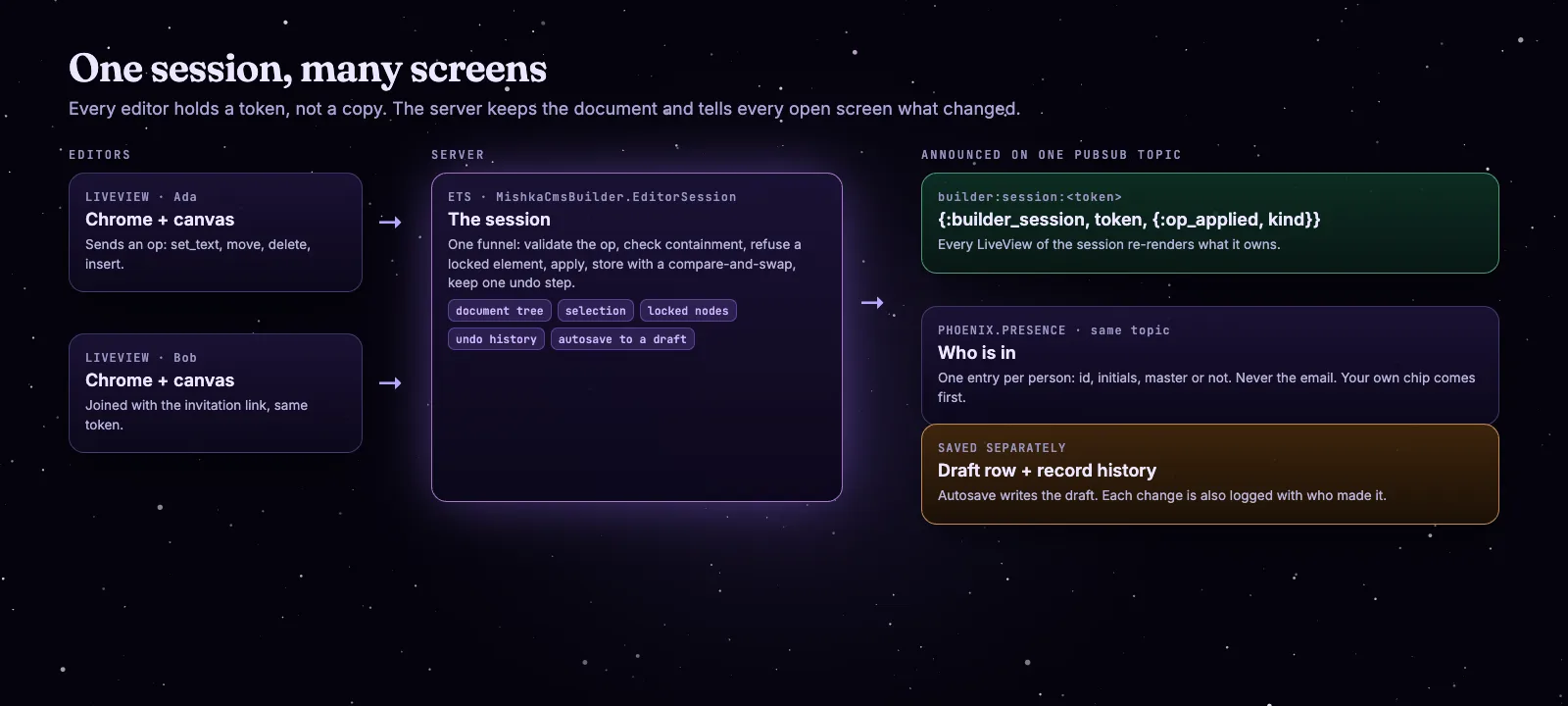
Each editor holds a token. The session keeps the document and announces every change on one topic.
Presence rides on the same topic, so it costs nothing extra. Each person is tracked once, however many tabs they open, and the entry holds an id, two initials and whether the person is a master. It never holds an email address.
Step 1: Invite a second editor
Open a page in the visual editor. Without an invitation, a colleague who opens the same page gets a session and a draft of their own, so the two of you never overwrite each other. To work in one session, send them the link:
- In the top bar, click the invite button. Its tooltip reads Invite someone to edit with you.
- Copy the Invitation link. It is the editor's address with
?session=<token>. - Your colleague signs in with an account that can open that builder and opens the link.
Step 2: See who is here
Both of you now see a stack of avatars in the top bar. Yours is first, and each other person has their own colour and a name on hover. Two people with the same initials are told apart by that name. A master shows to a site account as M, and a master sees site accounts by their initials.
You can see the same thing without a browser. This script is the whole demo, run in a scratch Mix project. The packages read your repo and endpoint when they compile, so the project had three config keys and two empty modules, and it starts only the processes the builder supervises: PubSub, the session table, the history table and Presence. In a real site the application starts them.
# mix.exs
{:mishka_cms_builder, "0.0.1-alpha.6"},
{:mishka_cms_core, "0.0.5-alpha.9"}

# config/config.exs
config :mishka_cms_core, repo: Demo.Repo, endpoint: DemoWeb.Endpoint, host_app: :demoalias MishkaCmsBuilder.{EditorSession, Presence}
alias MishkaCmsCore.Runtime.Authoring.Tree
Enum.each([:phoenix_pubsub, :ash, :gettext, :telemetry], &Application.ensure_all_started/1)
{:ok, _} =
Supervisor.start_link(
[
{Phoenix.PubSub, name: MishkaCmsCore.PubSub},
MishkaCmsBuilder.States.EditorSessionState,
MishkaCmsBuilder.States.EditorHistoryState,
Presence
],
strategy: :one_for_one
)
ada = %{id: "u-ada", email: "[email protected]"}
bob = %{id: "u-bob", email: "[email protected]"}
{:ok, session} =
EditorSession.open(%{section: "page", template: "<main><h1>Launch</h1><p>Hello</p></main>"})
token = session.token
IO.puts("topic: " <> EditorSession.topic(token))
# Bob's side: subscribe to the session and join its presence, then wait for an edit.
parent = self()
spawn_link(fn ->
EditorSession.subscribe(token)
Presence.join(token, bob)
send(parent, :bob_ready)
receive do
{:builder_session, _token, message} -> send(parent, {:bob_saw, message})
end
Process.sleep(:infinity)
end)
receive do: (:bob_ready -> :ok)
# Ada's side.
EditorSession.subscribe(token)
Presence.join(token, ada)
Process.sleep(200)
IO.inspect(Enum.map(Presence.editors(token), & &1.initials), label: "in the session")
IO.inspect(Enum.map(Presence.others(token, ada), & &1.initials), label: "Ada sees")
text_of = fn tag ->
{:ok, s} = EditorSession.fetch(token)
el = s.tree |> Tree.walk() |> Enum.find(&(&1.tag == tag))
Tree.get(s.tree, hd(el.children))
end
h1 = text_of.("h1")
p = text_of.("p")
edit = fn node, text -> EditorSession.apply_op(token, %{"kind" => "set_text", "node_id" => node.id, "text" => text}) end
{:ok, _} = edit.(h1, "Launch day")
receive do: ({:bob_saw, message} -> IO.inspect(message, label: "Bob's LiveView got"))
{:ok, _} = EditorSession.toggle_lock(token, h1.id)
IO.inspect(edit.(h1, "Bob was here"), label: "edit the locked heading")
IO.inspect(elem(edit.(p, "Hello, team"), 0), label: "edit the paragraph")
{:ok, s} = EditorSession.fetch(token)
IO.puts("document: " <> MishkaCmsCore.Runtime.Authoring.Tree.Serializer.serialize(s.tree))Run it with mix run --no-start scripts/two_editors.exs. The first lines are the presence:
topic: builder:session:w7kblyqnhzzpaxn5u5xbi4mrowneyfvw
in the session: ["AL", "BS"]
Ada sees: ["BS"]
Ada sees only Bob, because your own presence is not news. The list for the session has both of them, once each.
Step 3: Edit together
Every change is an op: set_text, set_attr, move, insert, delete and a few more. The script sends one for Ada, and Bob's process, subscribed to the topic like a LiveView would be, gets the announcement:
Bob's LiveView got: {:op_applied, :set_text}The message names the kind of change, not the new text. Each LiveView then reads the session and draws what it owns, so the canvas and the panels draw from the same document. The editor works out a change on the session as stored and writes it with a compare-and-swap, so the chrome, the canvas and the autosave cannot put back what another one just changed.
One change from Ada reaches Bob through the session and one broadcast. Then a lock refuses Bob.
Two limits are worth knowing. Consecutive text edits on one element inside 600 ms become one undo step, so typing a headline is one undo. And if you and a colleague change the same element, the later change wins. The damage of a real collision is one element, never the page.
Step 4: Lock an element
A lock is the escape hatch for the last-write-wins rule. In the Layers panel, hover a row and click the lock icon. Its tooltip reads Lock, then Unlock. The element dims on the canvas, and every edit that targets it is refused, as is a move into it. The script locks the heading and tries Bob's edit:
edit the locked heading: {:error, "That element is locked."}
edit the paragraph: :ok
document: <main><h1>Launch day</h1><p>Hello, team</p></main>
The refusal is the text That element is locked. A different element still takes edits. The lock lives in the session, so it is not part of the saved page, and a session that nobody touched for 24 hours is swept. Nothing is lost by that, because a live session autosaves to a draft.
Step 5: Leave notes for each other
Notes are for what a lock cannot say. Click Review in the top bar, click an element to note it or select nothing to note the page, pick a type such as Bug or Suggestion and write the note. Type @ and pick a teammate to name them: they get a notification that links to the page in the editor. The red number on Review counts only unresolved bugs. The share a draft guide has the full steps, including the draft link a client can read without an account.
Step 6: Go back
There are three ways back, from smallest to largest:
Open More, then Record history in the editor for the second one, and the Versions tab of a row in the Pages list for the third. The drafts, publishing and versions page explains how they relate, including the 20 drafts a page keeps. Blog posts, collections, tags, bloggers and teams keep the same kind of version history with a Restore button.
Step 7: Watch it go live
Publishing writes the page and queues a compile in a background job. Nothing restarts. People who already have the page open are told: when the stylesheet changes, the page loads the new one beside the old one and drops the old one when it has loaded, with no reload. When the script or the page itself is rebuilt, the page shows a bar that reads This page was updated with a Refresh button. It does not rewrite the text under the reader.
In the admin, the activity log fills as it happens: while the log is open, new entries you may see appear at the top, each with the account that made the change. The visual editor's own changes are in it too.
Not the same lock
If you use Mishka Blog you will meet another lock, and it is a different thing. A lock on a post, a collection or a tag lists permission names, and only readers who hold one of them may open it. Everyone else gets the not-found page, and the record is left out of lists, search and the sitemap. It stops reading, not editing. The how blog locks work page has the rules, and lock a page or post to members has the steps.
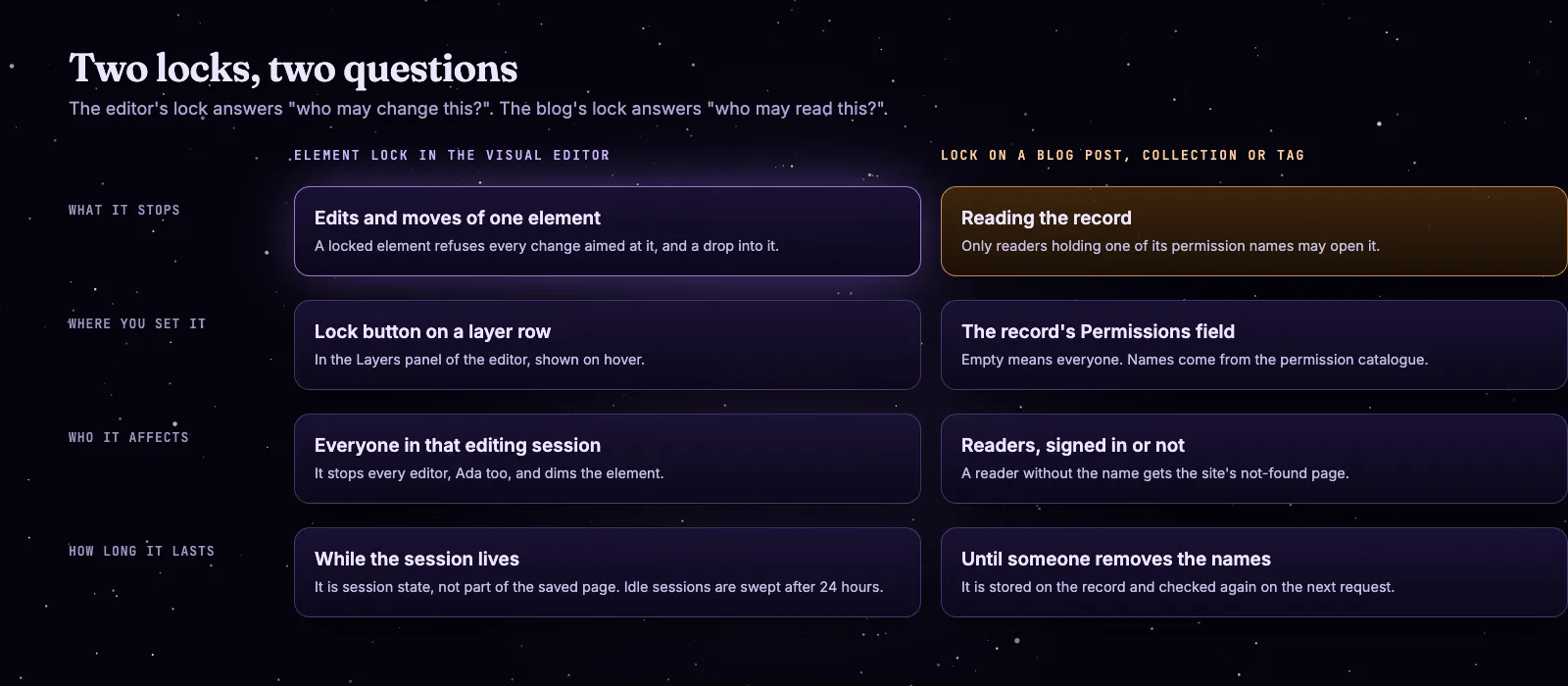
The editor lock decides who may change an element. The blog lock decides who may read a record.
Where this stops
The editor session lives in one node's memory. Presence and the announcements travel over PubSub, so they reach every connected node, but the session table is ETS on the node that opened it. If you run several nodes, test that two editors land on the same one before you rely on a shared session. We have not run that setup for this guide.
That is the whole of it: one invitation link, one session, a broadcast for every change, a lock for the part you must not lose, and history for the rest. The Mishka CMS page and the Mishka CMS documentation cover the rest of the editor, and the Mishka Blog page covers the blog.
You can also sponsor our open source work, or hire our team for an Elixir or Phoenix LiveView project. Found a bug? Please open an issue on GitHub: the editor is young and we read every one.
Mishka releases. Once a month.
New Mishka CMS releases, Elixir and Phoenix patterns, and case studies from the team. No spam, unsubscribe anytime.
Questions people ask about editing together in Mishka CMS
Thank you
The editor stands on Elixir, Phoenix LiveView, Phoenix PubSub and Presence, and Ash Framework, and on the libraries in its dependency list. Thank you to everyone who builds them, and to you for reading this far.
Shahryar Tavakkoli writes about Elixir and Phoenix LiveView: Mishka Chelekom releases, GuardedStruct validation, static sites, service workers and SEO.