Translate a Phoenix LiveView Site: Multi-Language SEO in Mishka CMS
A hands-on guide to a multi-language Mishka CMS site: set the languages and address style, translate a page, a post and the interface words, and check hreflang and right to left with curl.

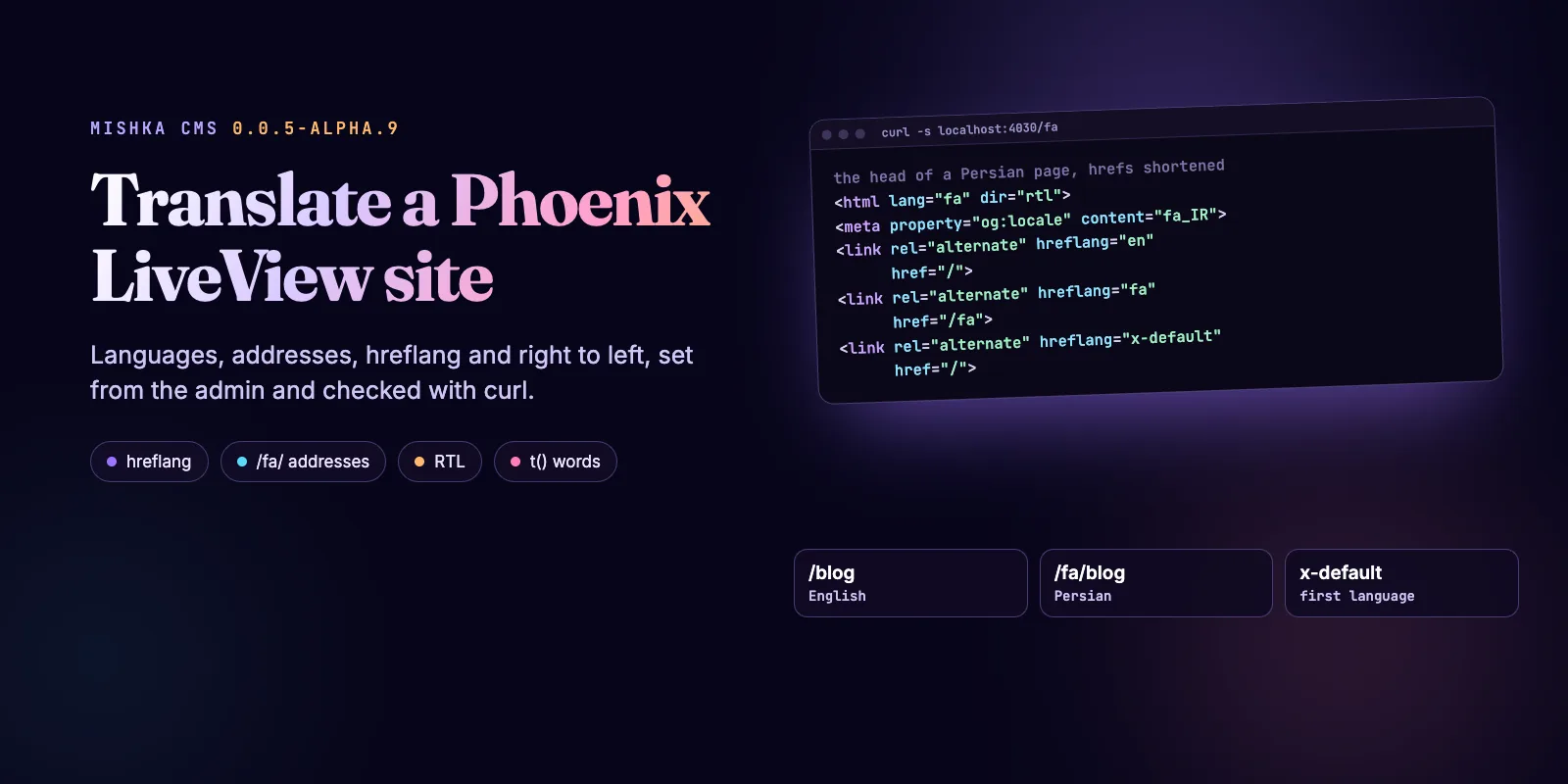
A Mishka CMS site can publish its pages and blog posts in more than one language, and it writes the right address, text direction and hreflang tags for each one, all set from the admin with no deploy. This guide adds Persian to an English site: it sets the languages, picks the address style, translates a page, a post and the words in your templates, then checks the head with curl. The code ran against mishka_cms_core 0.0.5-alpha.9 and mishka_blog 0.0.3-alpha.5.
Mishka CMS is free and open source. A founding seat pays for the time we spend on it and on the extensions around it, and it gives you lifetime access, priority support and every paid extension we release.
You need a Mishka CMS site, an admin account that holds admin:dashboard:setting, and for the blog steps the Blog extension. Persian titles can also keep their own script in the address, which Unicode Slugs in Elixir: Persian, Hindi and Japanese URLs shows.
Mishka releases. Once a month.
New Mishka CMS releases, Elixir and Phoenix patterns, and case studies from the team. No spam, unsubscribe anytime.
The six steps at a glance
How translation fits together
In Mishka CMS a translation is a page of its own, at its own address, grouped with the original. The site keeps one ordered list of languages, and a page answers a language only when the list names it. Every address, switcher link, hreflang tag and sitemap entry is built from the same editions, so none of them can disagree.
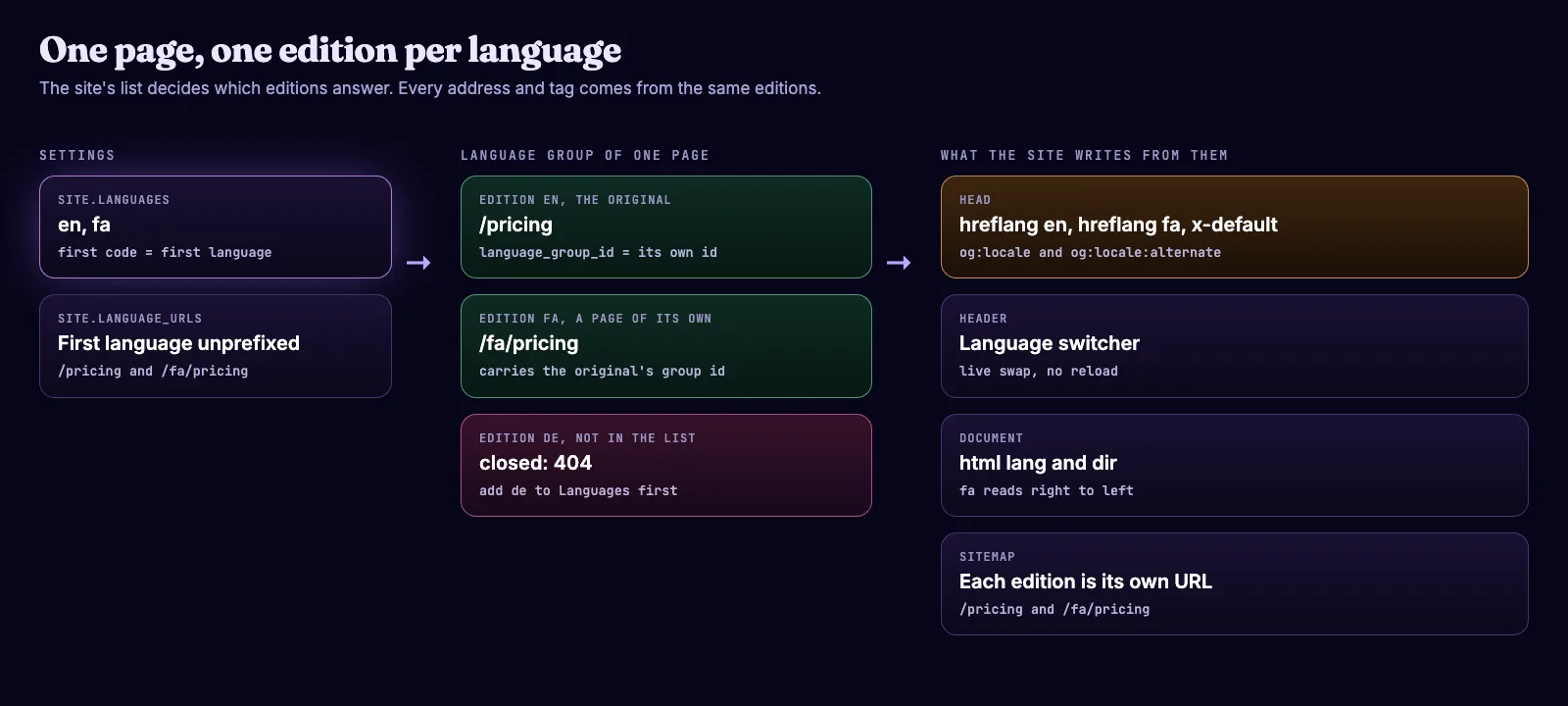
The site list decides which editions answer, and the head, the switcher and the sitemap all follow the editions.
A page has a language and a language_group_id. The original is its own group, and a translation carries the original's id. A group holds one page per language, and the CMS refuses a second one. Blog posts, collections and tags use the same two fields.
Step 1: Set the languages
The languages are one setting on the Settings screen. Open Settings, then the General tab, type en, fa in Languages and click Save Changes.
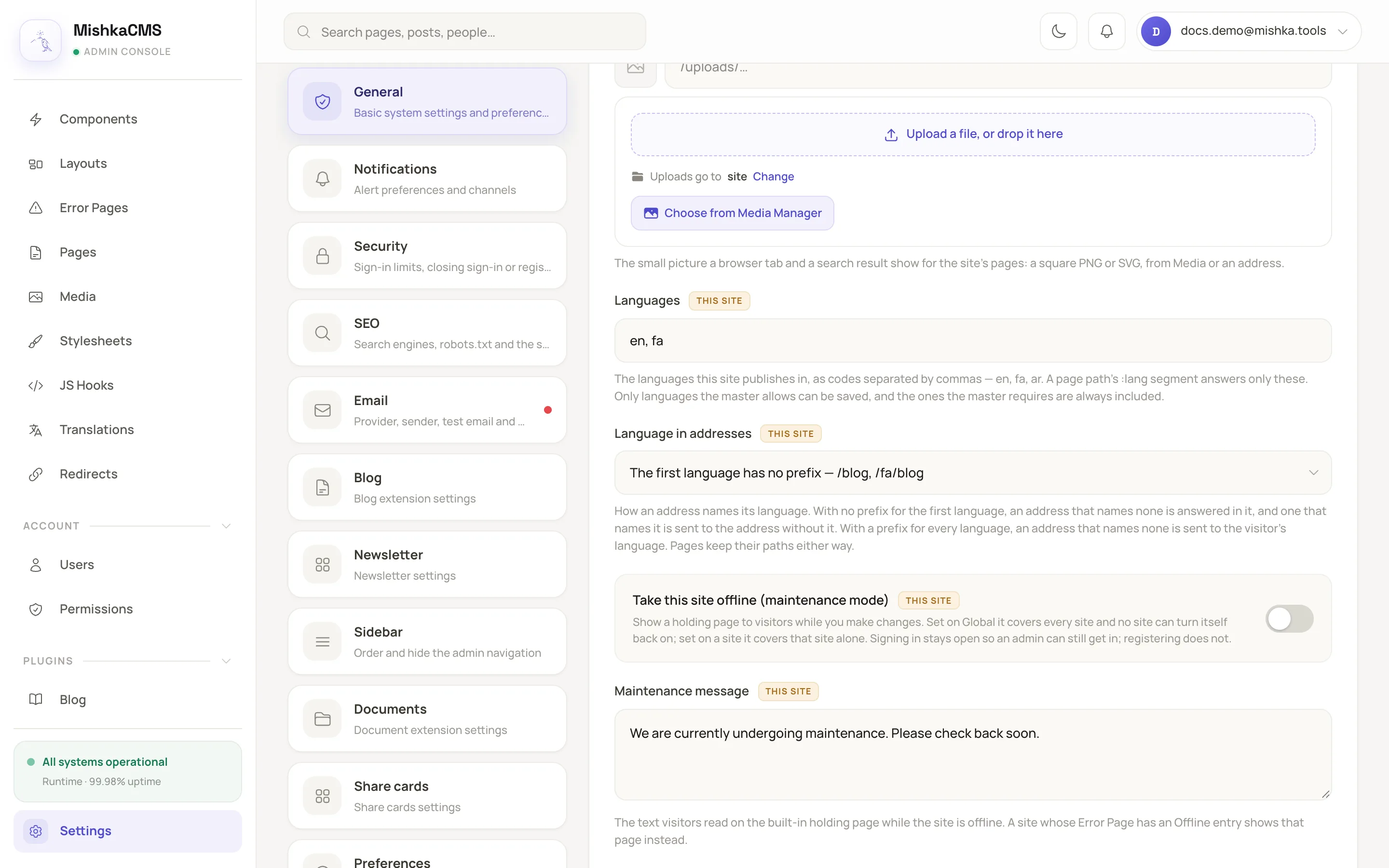
Languages and Language in addresses on the General tab.
The CMS trims each code, lowercases it and drops repeats. A list that is empty, or holds text that is not a code, such as Persian, is not saved. The first code is the site's first language, and there is no separate default setting: to change which language leads, move its code to the front.
Step 2: Choose the address style
Language in addresses has two styles, and both keep every stored path as it is. The default leaves the first language without a prefix. The other puts a prefix on every language. Pick one on a new site, because it decides which address search engines see for each page.
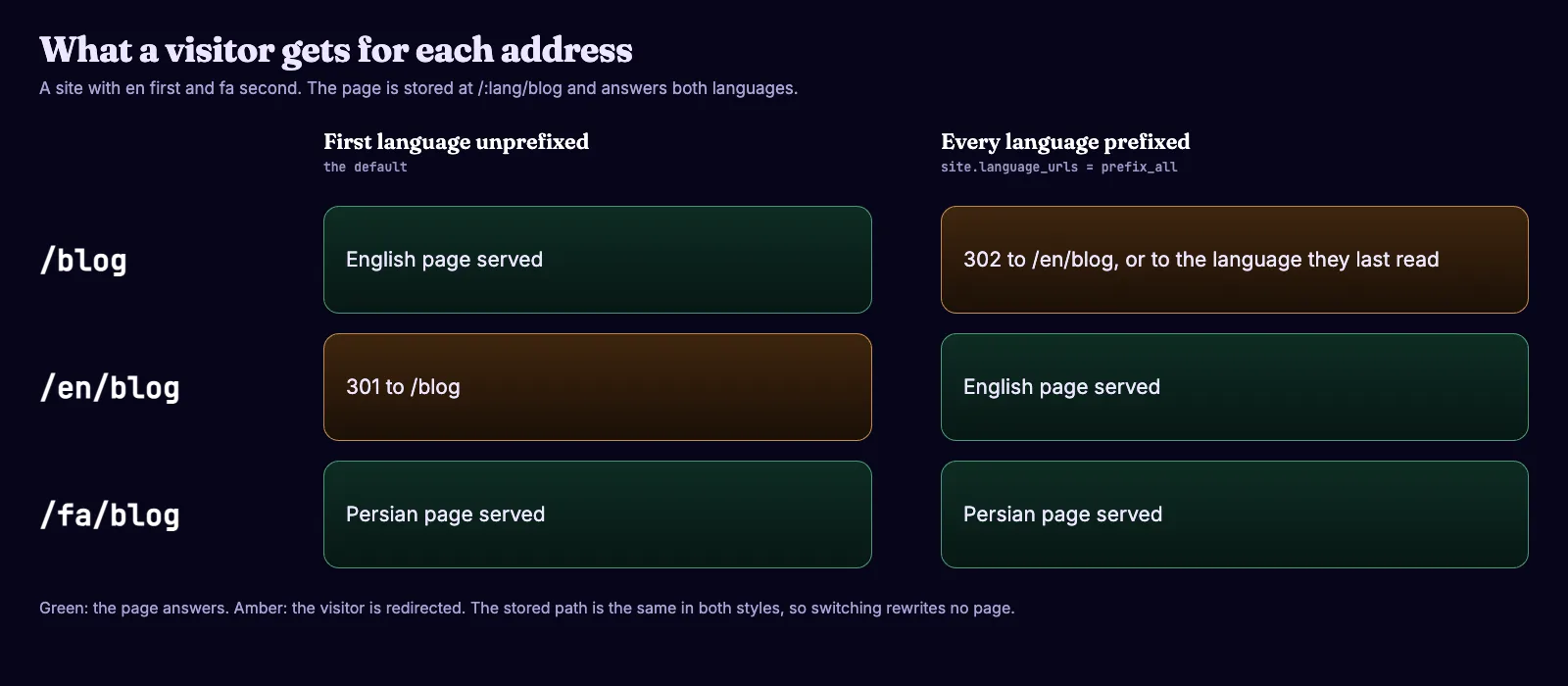
What /blog, /en/blog and /fa/blog answer in each style, for a site with en first and fa second.
With the default style, /en/blog is sent with a 301 to /blog, so each page has one address. In a template, build links with site_path/2 so they follow the style you chose:
<.link navigate={site_path("/:lang/about", @page.language)}>About</.link>The address rules are plain functions, so you can run them without a site. In a scratch project with mishka_cms_core 0.0.5-alpha.9 in mix.exs, this script fills the settings cache by hand and asks for the pricing page in both styles:
Application.ensure_all_started(:localize)
:ets.new(:mishka_cms_settings, [:named_table, :public])
:ets.insert(:mishka_cms_settings, {{nil, "site.languages"}, %{"value" => ["en", "fa"]}})

alias MishkaCmsCore.Runtime.Languages

for mode <- Languages.url_modes(), lang <- ["en", "fa", "de"] do
  IO.inspect(Languages.url("/:lang/pricing", %{"lang" => lang}, nil, mode), label: "#{mode} #{lang}")
end
Run it with mix run --no-start script.exs. A language outside the list gives no address at all:
prefix_others en: "/pricing"
prefix_others fa: "/fa/pricing"
prefix_others de: nil
prefix_all en: "/en/pricing"
prefix_all fa: "/fa/pricing"
prefix_all de: nil
Step 3: Translate a page
A translation starts as an inactive copy of the page, so its address stays closed until you translate and publish it. Under Runtime, click Pages, find the page and click Add translation on its row.
- In Language, type the code, such as
fa. The box suggests the site's languages that the page has no edition in yet. - Check Path. It follows the language until you type your own:
/pricingbecomes/fa/pricing. - Click Create translation.
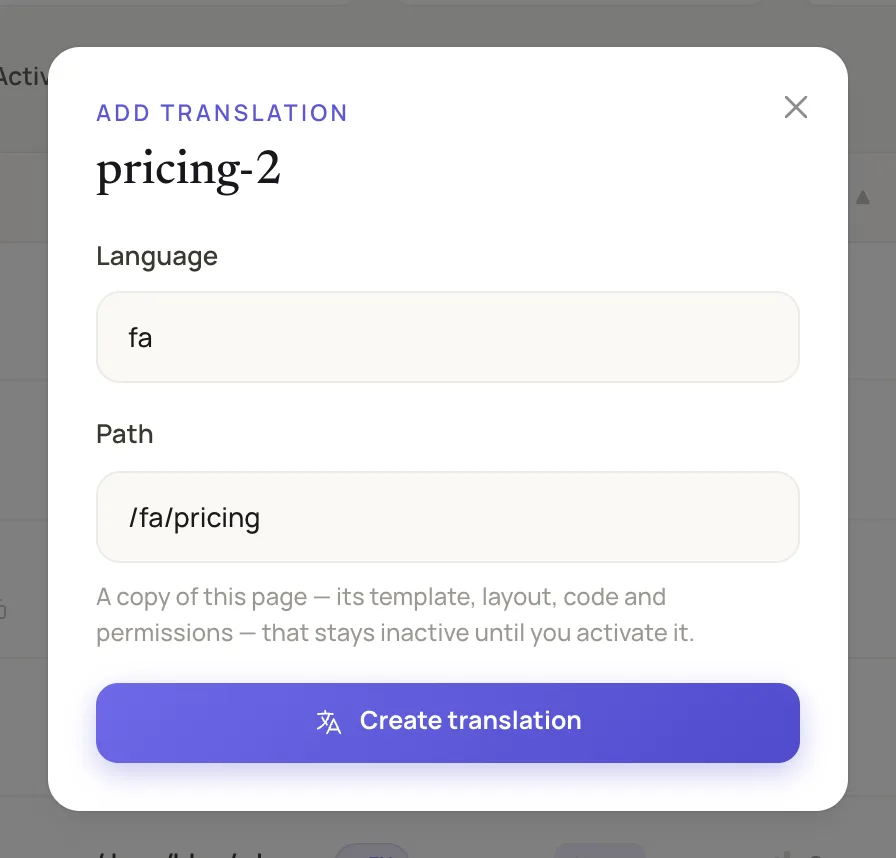
The Add translation dialog suggests the path from the language.
The copy keeps the template, layout, permissions, SEO tags and code. Only the name, path, language and Active differ, and its name is the original's followed by the language, such as pricing-fa. Open it in the Visual Editor, replace the text, then change Title and the SEO Description on the Configuration tab. Click Draft, choose Published and click Publish.
From the language list to a live Persian page, in five steps.
Step 4: Translate a blog post
A translated post is a post of its own with its own slug and content, joined to the original by a language group. Open Blog Posts Management and click Add Post.
- In Language, enter the code, such as
fa. - In Language Group, search for the original and choose it. The default option starts a separate group instead.
- Write the translated Title and Content, and give it a slug no other post uses. A Persian slug can stay in Persian script.
- Click Create.
The Posts page shows one row for each original, with a chip such as EN and FA for each edition. Readers pick a language in the header's dropdown, which offers each published edition at its own slug, and the post's head lists them as alternates. A post page answers only for a post written in the page's language: /fa/blog/<english-slug> finds nothing. Publish a post in more than one language has the full list of rules.
Step 5: Translate the interface words
The words inside a template are not part of a translated page, so you mark them with t() and translate them per language on the Translations screen. A page is a database row, which is why translation files cannot reach it.
<h2>{t("Categories")}</h2>
<p>{t("Read %{count} posts", count: @count)}</p>
Save the template and the CMS adds a row for each word in every language the site publishes in. Under Runtime, click Translations, click Translate on the row and type the text. For a word, the CMS looks first at the site's own row, then the global row, then the word itself, so an untranslated word still shows in English.
Step 6: Check hreflang and right to left
Ask for the head of both editions and read it. This ran against a Mishka CMS dev site with en first and fa second, at localhost:4030:
SITE=http://localhost:4030
for path in / /fa; do
  echo "== $path"
  curl -s $SITE$path | grep -oE '<html[^>]*>|<(link|meta)[^>]*(hreflang|og:locale)[^>]*>' \
    | sed -E 's/ data-phx-loc="[0-9]+"//; s/ data-mishka-seo//'
done== /
<html lang="en" dir="ltr">
<meta content="en_US" property="og:locale">
<meta content="fa_IR" property="og:locale:alternate">
<link href="http://localhost:4030" hreflang="en" rel="alternate">
<link href="http://localhost:4030/fa" hreflang="fa" rel="alternate">
<link href="http://localhost:4030" hreflang="x-default" rel="alternate">
== /fa
<html lang="fa" dir="rtl">
<meta content="fa_IR" property="og:locale">
<meta content="en_US" property="og:locale:alternate">
<link href="http://localhost:4030" hreflang="en" rel="alternate">
<link href="http://localhost:4030/fa" hreflang="fa" rel="alternate">
<link href="http://localhost:4030" hreflang="x-default" rel="alternate">Three things in this output are what hreflang needs. Each page lists itself and the other edition, both pages list the same set, so every link has a link back, and one x-default points at the first language. The Persian page also gets dir="rtl".
The same tags are written on a post that has two or more published editions, by Mishka Blog, and a post in one language gets none.
Try it
Start with the Mishka CMS page and the Mishka CMS documentation, or read the source and the Hex package.
Concepts are in Languages and language editions, and the words are in Translate interface words with t(). A small team builds this. If you want to help us work on it full time, a founding seat gives you lifetime access, priority support and every paid extension we release.
You can also sponsor our open source work, or hire our team for an Elixir or Phoenix LiveView project. Found a bug? Please open an issue on GitHub: Mishka CMS is young and we read every one.
Mishka releases. Once a month.
New Mishka CMS releases, Elixir and Phoenix patterns, and case studies from the team. No spam, unsubscribe anytime.
Questions people ask about translating a site
Thank you
Mishka CMS stands on Elixir, Phoenix LiveView and Ash Framework, and on the libraries in its dependency list. Thank you to everyone who builds them, and to you for reading this far.
Shahryar Tavakkoli writes about Elixir and Phoenix LiveView: Mishka Chelekom releases, GuardedStruct validation, static sites, service workers and SEO.