Multi-Tenant Elixir: Run Many Sites from One Mishka CMS Install
A practical guide to running many sites from one Mishka CMS install: how a request finds its site, how to add one, and how masters, site admins and settings stay apart.

One Mishka CMS install can serve many websites. Each site is a record with its own host, pages, accounts and settings, and the CMS finds the right one from the host name of each request. This guide adds two sites to one install and keeps their admins apart, using Mishka CMS.
Mishka CMS stays free. A founding seat pays for the time we spend on it and on its extensions, and it gives you lifetime access, priority support and every paid extension we release.
The routing checks below ran against a local Mishka CMS host while we wrote this, and the output is real. The steps in the admin come from the CMS docs, which this post links as it goes.
You need a Mishka CMS install, a master account and about fifteen minutes. By the end you know how a request finds its site, how to add one, and how an agency can host two clients without them seeing each other.
Mishka CMS releases. Once a month.
New Mishka CMS releases, Elixir and Phoenix patterns, and case studies from the team. No spam, unsubscribe anytime.
The short answer
A master adds each site on the Sites screen with a host, points the domain at the install, and creates an admin account for that site. Everything a visitor sees then comes from that site alone, and only layouts, components and a few other records are shared.
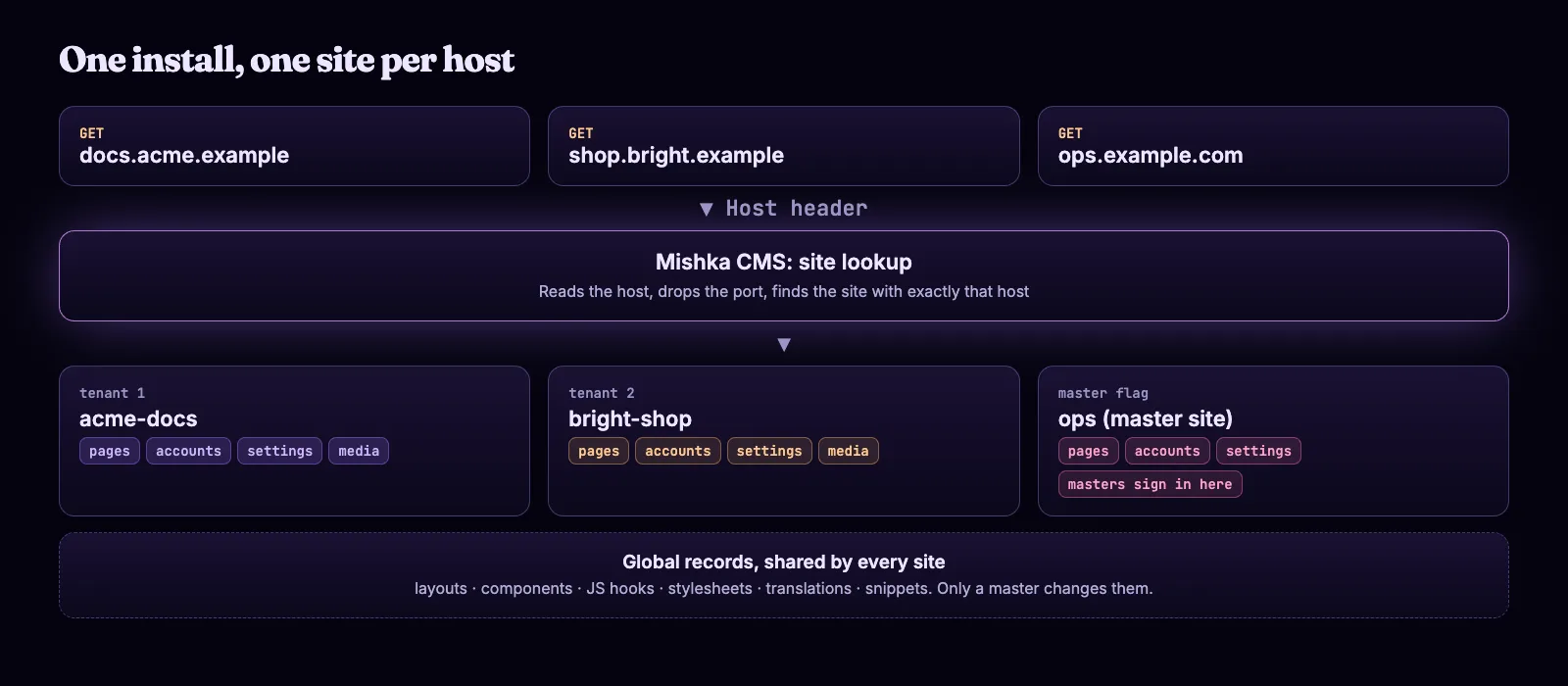
One install. The host decides the site, and each site keeps its own records.
How a request finds its site
The CMS reads the host name from the request, drops the port and looks for a site with exactly that host. A request to docs.example.com:4000 reaches the site whose host is docs.example.com. The code calls the site the tenant, and each record carries its site's id.
A request arrives for docs.example.com.
The CMS reads the Host header and drops the port.
It looks for a site with exactly that host.
An active site answers with its own pages, layouts, media, redirects and settings.
No site, or an inactive one, gets a 503 page. The JSON:API answers 404 domain_not_found.
The lookup is by exact host. Nothing falls back to another site.
You can see this without a second site. This Elixir script asks one install for posts with two Host headers. It uses Req and reads the public posts route of the JSON:API, which needs no token.
Mix.install([{:req, "~> 0.5"}])

for host <- ["localhost", "acme-docs.localhost"] do
  api = "http://localhost:4030/api/json/v1/user/mishka-blog/post/published"

  resp =
    Req.get!(api,
      headers: [host: host, accept: "application/vnd.api+json"],
      params: ["page[limit]": 2, "fields[blog_post]": "title"],
      retry: false
    )

  titles = for %{"attributes" => %{"title" => t}} <- List.wrap(resp.body["data"]), do: t
  IO.puts("#{host} -> #{resp.status} #{inspect(titles)}")
end
The first host belongs to a site, so it answers with posts. The second holds no site yet, so the install refuses it. A web request to the same host gets the 503 page Service Unavailable.
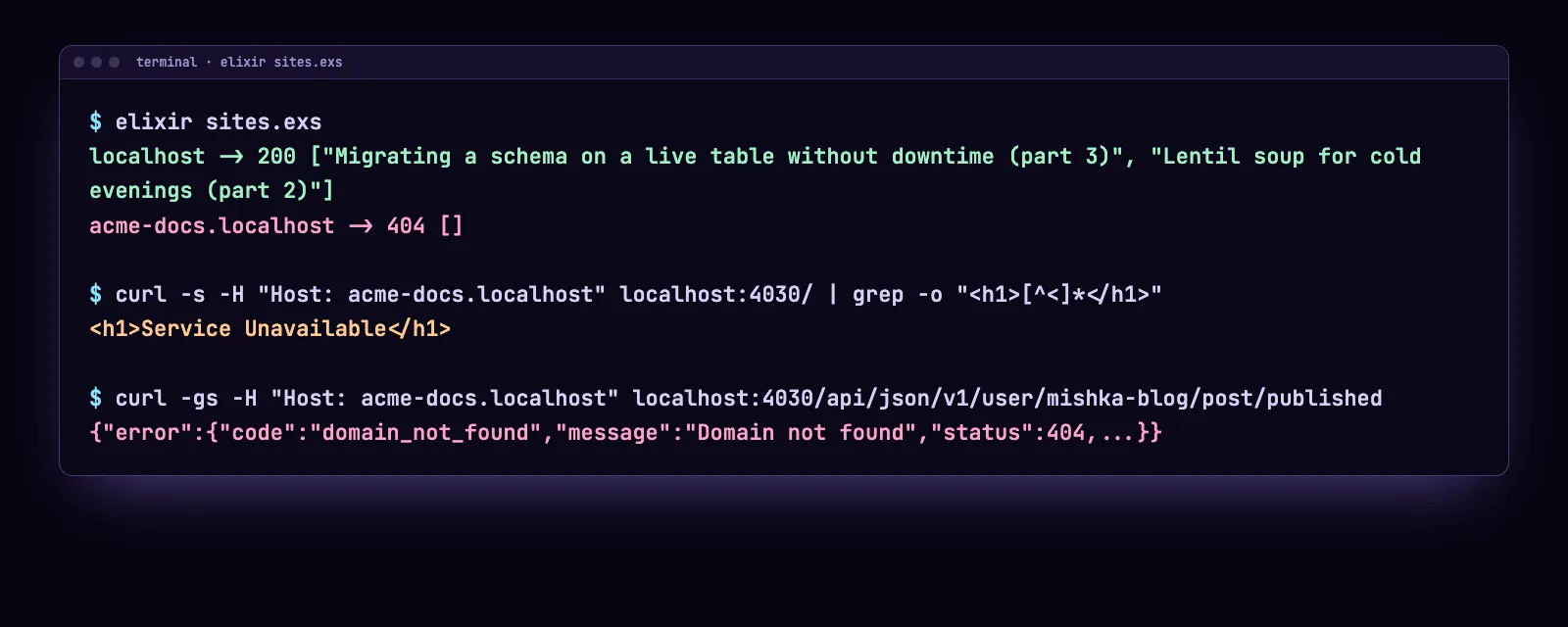
Real output from a local demo install that has one site. Your titles will differ.
Step 1: Sign in as a master
A master is an account that belongs to no site, so it can create sites. Open /auth?master_user=true on the master site's address and sign in. The installer made the first account and the first site, and the first site carries the master flag.
The master needs admin:dashboard:runtime:site, or a wildcard that covers it. Only the missing site makes an account a master: holding * does not. A site account with * holds every permission on its own site and nothing on another. Keep the master site's address private, and link to it from no other site.
Step 2: Add a site
Open Sites under Runtime, click Add Site and fill in the form. Only Name and Host need a decision, because the other fields have defaults.
| Field | What to enter |
|---|---|
| Name | 3 to 70 characters, unique. Acme Docs is saved as the slug acme-docs. |
| Host | The domain with no scheme and no port, 3 to 200 characters, unique. The CMS trims it and lowercases it. |
| Priority | A whole number from 0 to 100. The default is 0. |
| Mode | Hybrid (default), Phoenix Only or API Only. |
| Active | On by default. An inactive site answers every request with a 503 page. |
| Master Site | Leave it off. An install has one master site. |
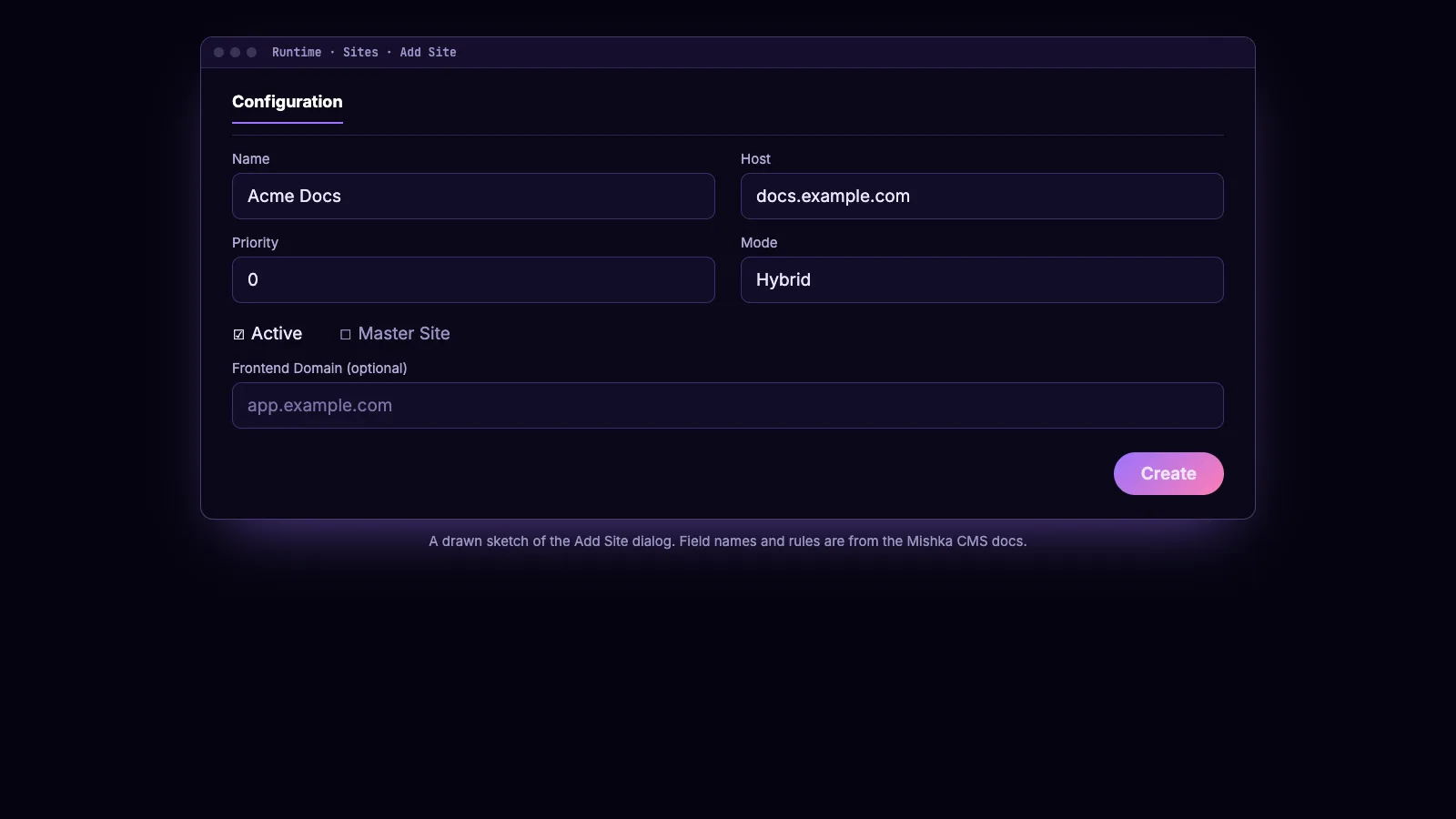
The Add Site dialog, redrawn from the docs.
Click Create. The CMS gives the new site the starter content the first site gets: a stylesheet, a header and footer, the site-main layout, a Home page, an error page and the sign-in pages. A background job writes it, so it can take a moment. The mode choices are explained in Headless or coupled.
Step 3: Point the domain and check it
Your DNS and reverse proxy must send requests for the domain to this install with the original Host header. If a proxy rewrites the header, every request lands on the wrong site or on a 503 page.
Then click View on the site's row and read the pill under Runtime Health. It reads Working while the background jobs run and Healthy when they finish. Open the site's robots.txt link: a page that loads confirms the domain reaches the CMS. Re-run the script above with the new host and it now answers 200.
Step 4: Give each client their own admin
Open Users under Account and click + Add User. A master sees a Site field: search for the client's site and pick the permission names the account should hold. The client signs in on its own domain, and the sidebar shows only what its names open.
An admin cannot grant more than it holds. A site admin with admin:dashboard:blog:* can make a blog editor with admin:dashboard:blog:post, but not an account with *. It never changes its own permissions, and it sees only its own site's accounts. Details are in Give a teammate access and How permissions work.
A write that points at another site's record is refused with not found or does not belong to your site. A record on another site and a record that does not exist get the same answer, so a reply never shows which ids exist elsewhere.
Step 5: Share what is common, split the rest
Layouts, components, JS hooks, stylesheets, translations and snippets can be global. A master makes one global by choosing Global (no site) in its Site field, and every site can use it. A site account reads it and cannot change it, so one footer serves every client and no client edits it.
Settings follow the same split. On the Settings screen a master picks Global or one site, and each field has a badge: Global, This site or Just for you. A read for a site uses the site's value, then the Global value, then the default.
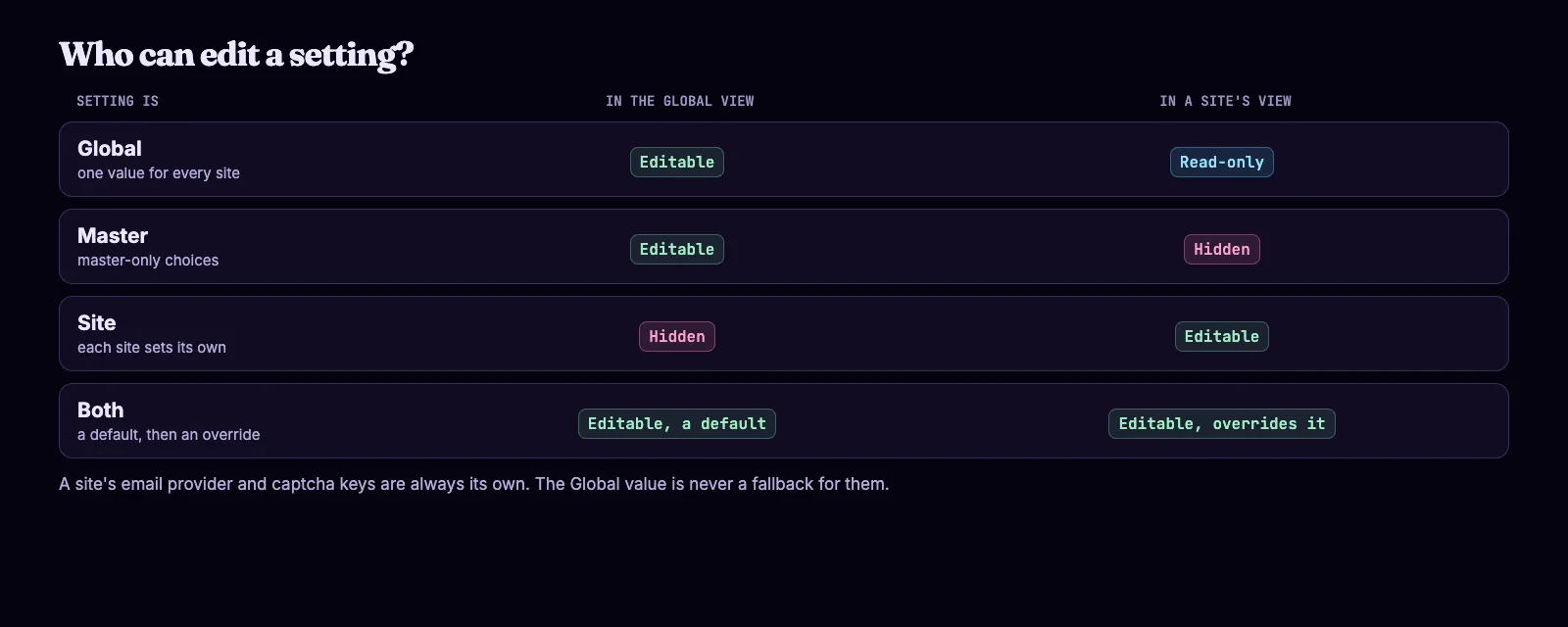
A setting declares whether the Global view and a site view may edit it.
Languages work this way too. A site's own list replaces the global one, so one client can publish in English and Persian while another stays English only. See Set a site's languages.
Step 6: Switch a site off or archive it
In the site's View dialog, a master clicks Deactivate. The site then answers every request with a 503 page until Activate brings it back. Delete archives a site, and Restore brings it back. Delete permanently works only on an archived site, removes its records and cannot be undone.
The CMS refuses changes that would lock every master out: switching off, archiving, deleting or unmarking the master site, or making it API Only. To move the master flag, click Set Master on another active site, and confirm.
Example: an agency with two clients
Add both sites
A master adds acme-docs and bright-shop. Neither is the master site.
Share one footer
A master creates a footer layout with Site set to Global (no site). Both sites can use it.
One admin per client
A master creates an account for each client, with that client's site in Site.
The result
The Acme admin edits Acme's pages. It cannot see Bright Shop's pages and cannot edit the footer layout.
Next steps
Start with Add a site and its domain, then read Sites, masters and global records for what a site owns and what it shares. The settings reference is Settings, and the full docs start at the Mishka CMS docs.
If you want to see how we ship the CMS, read how we built a runtime CMS on Phoenix LiveView and what changed in Mishka CMS 0.0.2.
Mishka CMS is free, and a small team builds it. If you want to help us work on it full time, a founding seat gives you lifetime access, priority support and every paid extension we release.
You can also sponsor our open source work, or hire our team for a Phoenix LiveView project.
Mishka CMS releases. Once a month.
New Mishka CMS releases, Elixir and Phoenix patterns, and case studies from the team. No spam, unsubscribe anytime.
Questions people ask about multi-tenant Mishka CMS
Thank you
Mishka CMS stands on Elixir, Phoenix LiveView and Ash Framework, which carries the tenant on every record. Thank you to everyone who builds them, and to you for reading this far.
Shahryar Tavakkoli writes about Elixir and Phoenix LiveView: Mishka Chelekom releases, GuardedStruct validation, static sites, service workers and SEO.