Blog SEO in Elixir: Structured Data, Sitemaps and Redirects with Mishka Blog
A hands-on guide to the SEO of Mishka Blog: read the page head and the JSON-LD with curl, change one post's tags, keep tag pages out of the index, read the sitemap and add a 301 redirect.

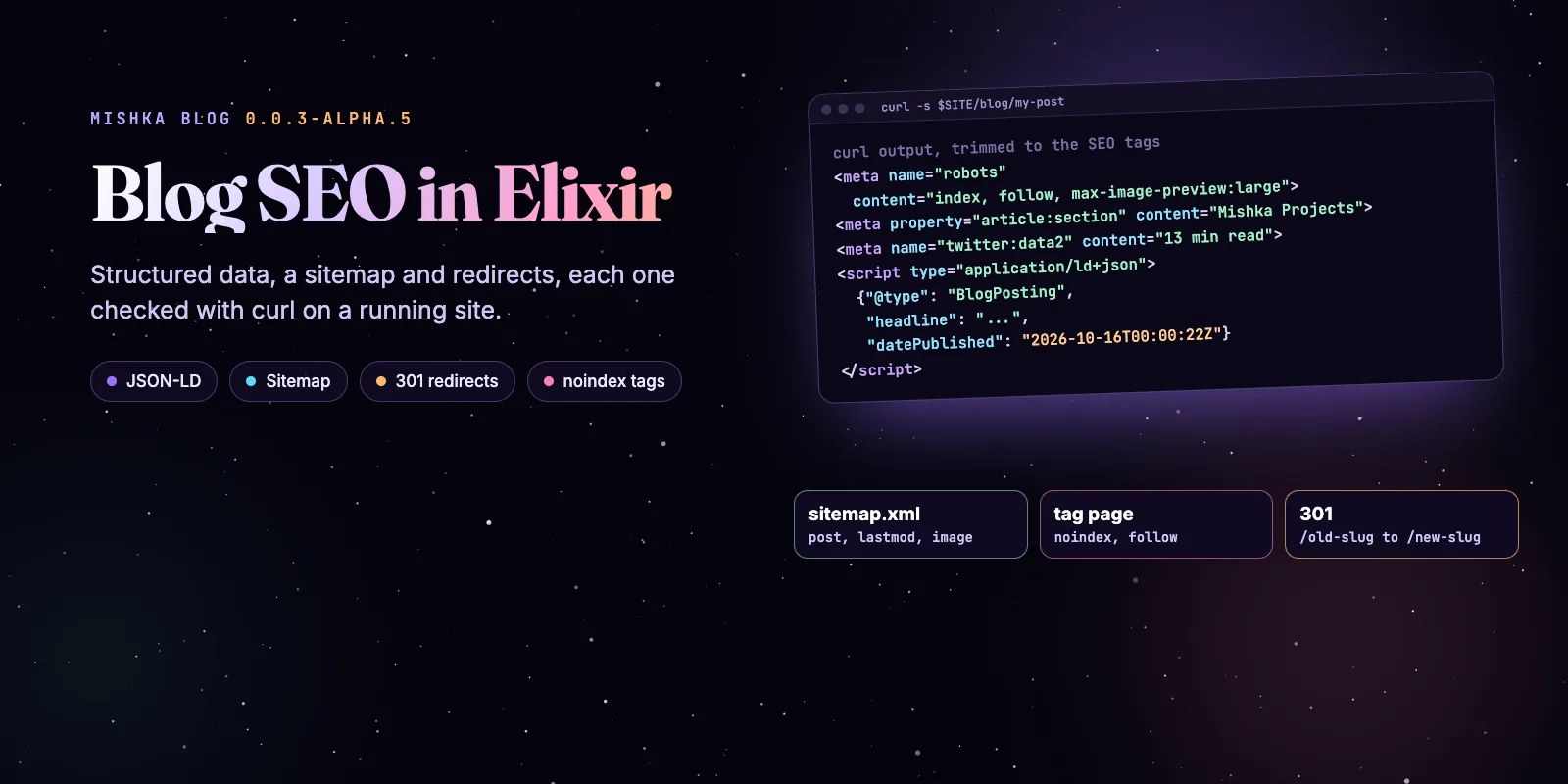
Mishka Blog writes the SEO of a blog post for you: a title, a description, article tags, a reading time, BlogPosting structured data and a sitemap entry, all from the fields you already fill in. This guide checks each part with curl on a running site and then covers the two things you decide yourself: which pages stay out of the index, and where an old address goes. Every sample ran against Mishka Blog 0.0.3-alpha.5.
Mishka Blog is free and open source. A founding seat pays for the time we spend on it and on the Mishka CMS extensions around it, and it gives you lifetime access, priority support and every paid extension we release.
You need a Mishka CMS site with the blog set up on it, one published post, and a terminal with curl and jq. If you are moving from another CMS, the migration in How to Move WordPress to Phoenix LiveView with Mishka CMS writes the 301 redirects for you, and the Mishka Blog: The Free Phoenix LiveView Blog Inside Mishka CMS 0.0.1 shows the whole blog.
Mishka releases. Once a month.
New Mishka CMS releases, Elixir and Phoenix patterns, and case studies from the team. No spam, unsubscribe anytime.
The six steps at a glance
How the SEO fits together
Mishka Blog owns two plugins and Mishka CMS core owns the redirects. MishkaBlog.Plugins.PageSeo answers the runtime:page:seo event when a blog page loads and returns the head. MishkaBlog.Plugins.SitemapUrls answers seo:sitemap:urls when the site builds its sitemap. A redirect is a rule that core answers before any page is resolved.
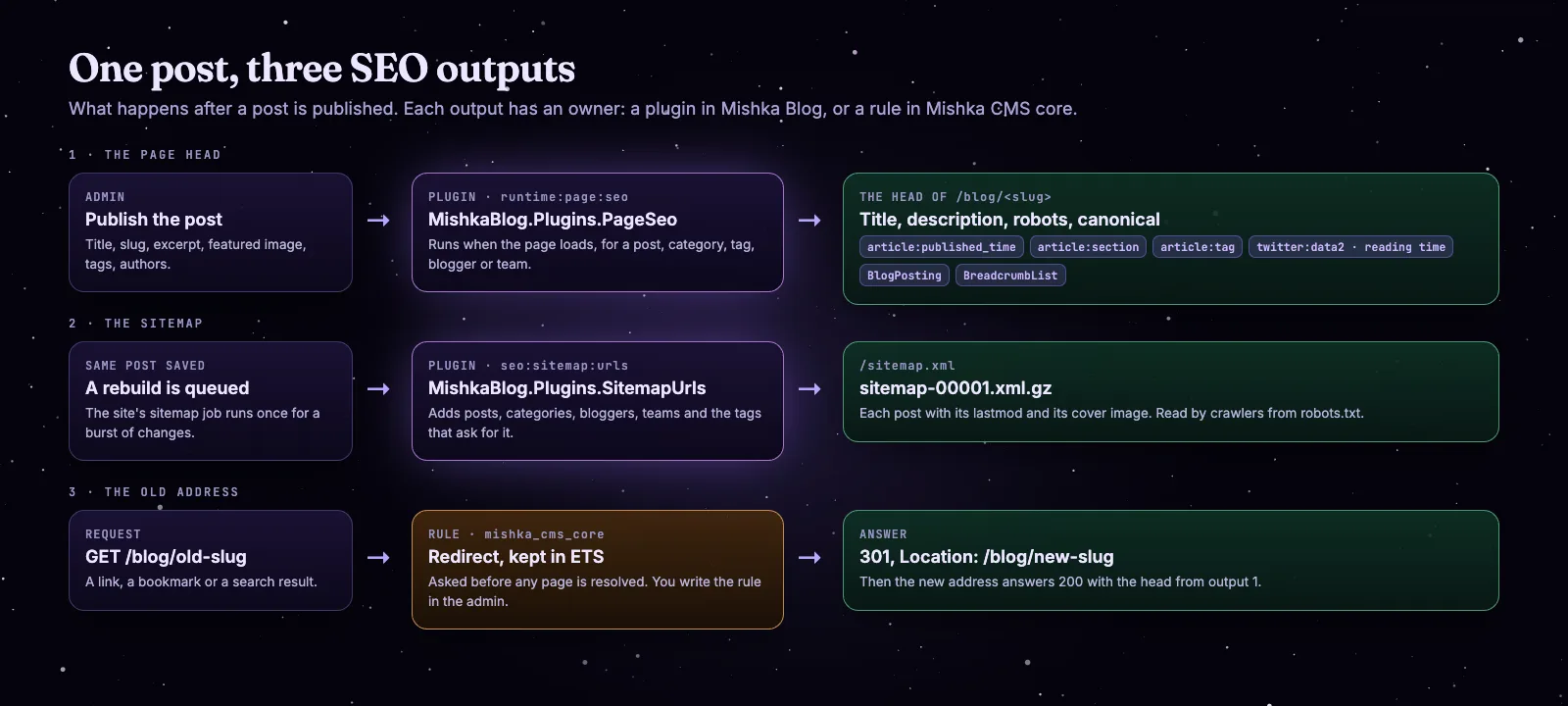
One published post feeds the page head, the sitemap and, once you move it, a redirect.
What a page sets in its own SEO always wins. The blog only supplies defaults, so you can change any part of this without touching code. The plugin events are the same Mishka Installer mechanism you can use for your own extensions.
Step 1: Read the page head
A published post already has a complete head. Set the address of your site once and ask for a post:
SITE=http://localhost:4000
SLUG=mishka-cms-founding-seat

curl -s $SITE/blog/$SLUG | grep -o '<meta[^>]*data-mishka-seo>' \
  | grep -E 'name="(robots|description|author)"|property="(og:type|og:locale|article:[a-z_]*)"|name="twitter:(label|data)[12]"' \
  | sed -E 's/ data-phx-loc="[0-9]+"//; s/ data-mishka-seo//'
The answer, trimmed to the tags that matter:
<meta content="Lifetime access to Mishka CMS, the open-source multi-site CMS on Phoenix LiveView, is $250 until the offer ends, ..." name="description">
<meta content="index, follow, max-image-preview:large" name="robots">
<meta content="article" property="og:type">
<meta content="en_US" property="og:locale">
<meta content="Shahryar Tavakkoli" name="author">
<meta content="2026-10-16T00:00:22Z" property="article:published_time">
<meta content="2026-10-20T21:24:07Z" property="article:modified_time">
<meta content="Mishka Projects" property="article:section">
<meta content="Mishka CMS" property="article:tag">
<meta content="Phoenix LiveView" property="article:tag">
<meta content="Written by" name="twitter:label1">
<meta content="Shahryar Tavakkoli" name="twitter:data1">
<meta content="Reading time" name="twitter:label2">
<meta content="1 min read" name="twitter:data2">
The description is the post's excerpt, the section is its first category and each tag becomes an article:tag. The two label and value pairs are what Slack and Discord show under a link: who wrote the post and its reading time. The time is the post's words at 200 a minute, rounded up, and never less than one minute.
Step 2: Read the structured data
The structured data sits in application/ld+json scripts. Pull them out and list their types:
ld() { curl -s $SITE/blog/$1 | perl -0ne 'print "$1\n" while /<script[^>]*ld\+json[^>]*>(.*?)<\/script>/sg'; }

ld $SLUG | jq -c '."@type"'"BlogPosting"
"BreadcrumbList"
"WebSite"
"Organization"The post gets a BlogPosting and a BreadcrumbList. The site adds WebSite and Organization, and the post's publisher points at the organization by its @id. Print the posting itself:
ld $SLUG | jq 'select(."@type"=="BlogPosting")'{
"@context": "https://schema.org",
"@type": "BlogPosting",
"articleSection": "Mishka Projects",
"author": [
{
"@type": "Person",
"name": "Shahryar Tavakkoli",
"url": "http://mishka.tools:4000/blog/author/shahryar-tavakkoli"
}
],
"dateModified": "2026-10-20T21:24:07Z",
"datePublished": "2026-10-16T00:00:22Z",
"description": "Lifetime access to Mishka CMS, ...",
"headline": "Mishka CMS Lifetime Access for $250",
"inLanguage": "en",
"keywords": "Mishka CMS, Phoenix LiveView",
"mainEntityOfPage": "http://mishka.tools:4000/blog/mishka-cms-founding-seat",
"publisher": { "@id": "http://mishka.tools:4000/#organization" }
}Each author is a Person with a link to their profile page on your site and, when they have social links, a sameAs list. The breadcrumb runs from Home to the post, with the blog's list page in the middle when your site has one. Blogger and team pages get a ProfilePage, and category and tag pages get a CollectionPage.
Step 3: Change the SEO of one post
Everything above is a default. To replace a part, open the post in the admin and use the SEO fields:
Under Plugins, open Blog, then Blog Posts, and click Edit on the post.
Scroll to SEO Tags and click + Add SEO Tag. Pick title, meta or link.
Write the Attributes as JSON and the text in Content, then click Save Changes.
A tag you add replaces the generated tag with the same name. For a title, the attributes are {}. For a description, use a meta tag with these attributes and put the text in Content:
{ "name": "description" }A value can name a variable in double braces. A title tag with the content {{post.title}} | My blog gives every post its own title. A post has post.title, post.excerpt, post.image, post.author, post.published_at, post.modified_at, post.url, post.collection and post.tags, and post.rating and post.rating_count once a reader has rated it.
The Schema (JSON) field takes a list of your own structured data objects. When it holds any, they replace the generated BlogPosting and its inLanguage, so write the whole object. The breadcrumb is still added. Run step 2 again to see the change. The Set a post's SEO and share image guide has the same steps with the field list.
Step 4: Keep thin pages out of the index
A public tag page says noindex, follow by default, and a post page says index, follow. Compare them:
curl -s $SITE/blog/tag/mishka-blog | grep -o '<meta[^>]*name="robots"[^>]*>' \
| sed -E 's/ data-[a-z-]*="[0-9]+"//; s/ data-mishka-seo//'<meta content="noindex, follow" name="robots">The tag page still carries a CollectionPage and a breadcrumb, and crawlers follow its links to your posts. It just stays out of the results. If one tag deserves to rank, add a meta tag named robots with the content index to the tag's own SEO tags. The tag's own tag replaces the default and, as step 5 shows, the sitemap then lists it.
Step 5: Read the sitemap
Nobody adds a post to the sitemap by hand. The site builds it ahead of the request, and a post, category, tag, blogger or team that is saved queues a new build. Start where a crawler starts, at robots.txt:
curl -s $SITE/robots.txt | tail -3Disallow: /_preview/
Sitemap: http://mishka.tools:4000/sitemap.xmlThat file points at /sitemap.xml, an index of the gzipped files next to it. Each file holds up to 50,000 addresses.
curl -s $SITE/sitemap.xml | grep "<loc>"
curl -s $SITE/sitemap-00001.xml.gz | gunzip | grep -A2 "/blog/$SLUG<" <loc>http://mishka.tools:4000/sitemap-00001.xml.gz</loc>
<loc>http://mishka.tools:4000/blog/mishka-cms-founding-seat</loc>
<lastmod>2026-10-20T21:24:07Z</lastmod>
</url>A post with a featured image also gets an image:image entry with its address. Both the index and the files answer with x-robots-tag: noindex, so the sitemap files themselves stay out of the results. Now count what is in the sitemap and what is not:
curl -s $SITE/sitemap-00001.xml.gz | gunzip > sitemap.xml
grep -c "<url>" sitemap.xml
grep -c "/blog/tag/" sitemap.xml
grep -c "/blog/author/" sitemap.xml510
0
3On the test site the blog has tag pages and none of them is in the sitemap, because none of their SEO tags says index. The authors are. The chart shows the full rule: a row is listed exactly when its own page lets a search engine index it.
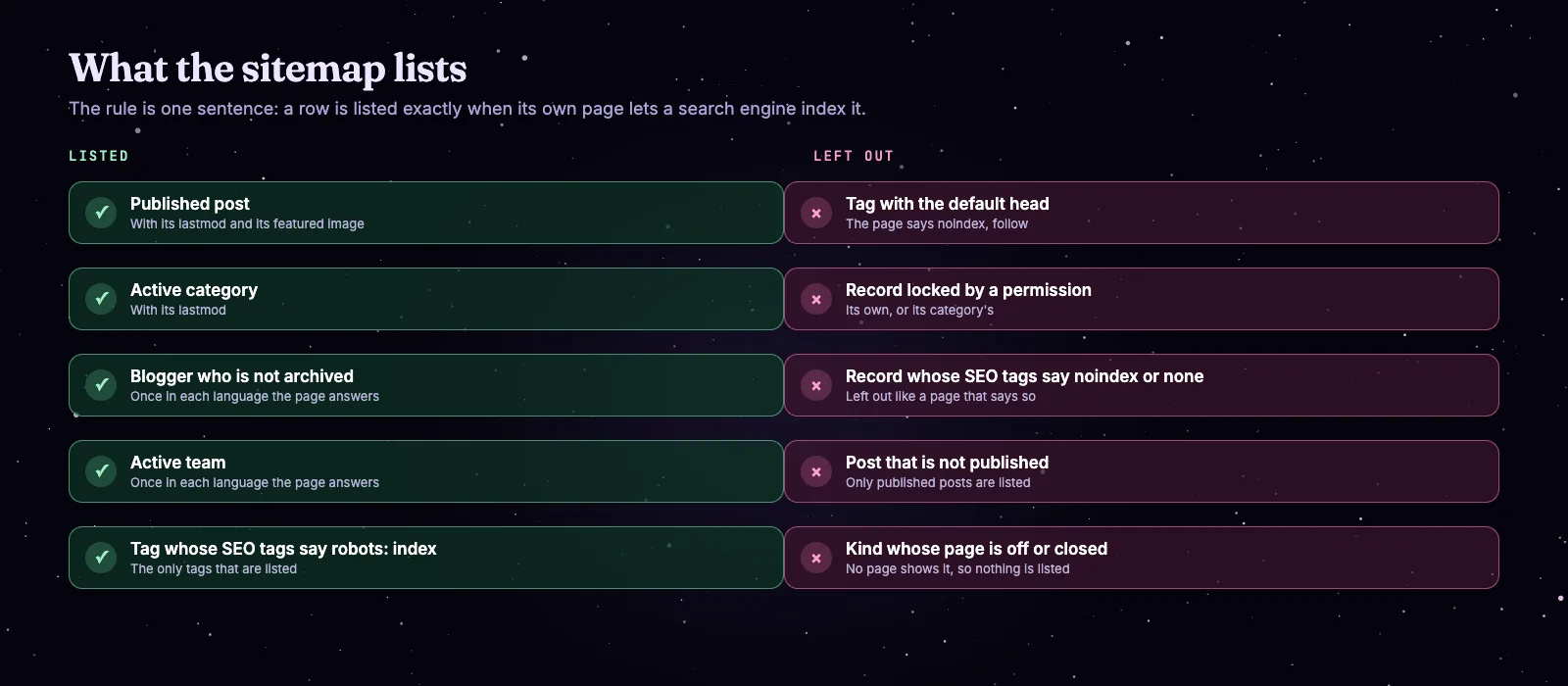
What the Mishka Blog sitemap lists and what it leaves out.
A kind is also listed only while a page that shows it is switched on, open to visitors and open to search engines. Other pages of your site can join the sitemap too: the seo.sitemap.paths setting adds paths of your own, and any plugin on seo:sitemap:urls can add rows of its own resources.
Step 6: Keep old links alive with redirects
When you change a post's slug, its address changes, and every link, bookmark and search result to the old one now lands on a 404. Mishka Blog does not write a redirect when a slug changes, so you add the rule. Mishka CMS core owns redirects, and a rule is one row:
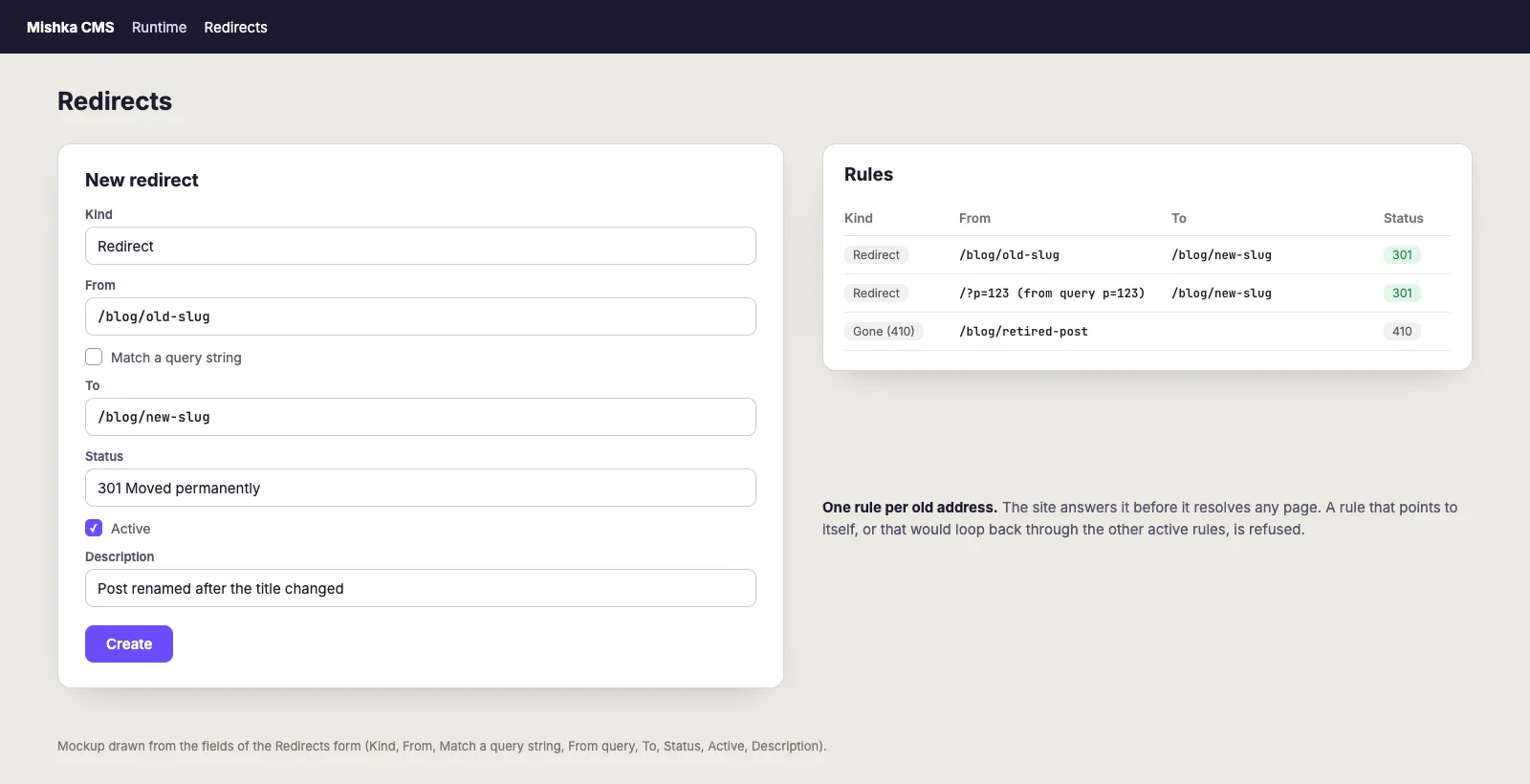
The Redirects form, drawn from its fields. It is a mockup, not a screenshot.
Open Redirects under Runtime in the admin. You need the admin:dashboard:runtime:redirect permission.
Keep Kind on Redirect, write the old path in From and the new path in To.
Leave Status on 301 for a move that stays, and save. The rule answers at once.
The default status is 301. You can also choose 302, 307 or 308. The old address is stored without its scheme, host, query or trailing slash, so one rule matches however a browser spelled it. Follow one request through the site:
A request for the old address: the rule is found first, the site answers 301, and the new address answers 200.
The rule is held in memory and the site asks it before the session is touched and before any page is resolved, so a redirect is answered without any page being built. A rule that points at itself, or that would send a visitor round a loop through your other active rules, is refused when you save it.
Other kinds of rule
A redirect is the default kind. A rewrite serves another page of your site at the address that was asked, and the address stays in the browser. Gone (410) and Not found (404) answer the site's error page with that status, for a post you retired on purpose. To catch a WordPress style address such as /?p=123, write / in From, tick Match a query string and write p=123 in From query. The rule then answers only a request that carries that query, and sends the visitor on without it.
A short checklist
- Publish the post, then run step 1 and read
robots,article:sectionand the reading time. - Run step 2 and confirm one
BlogPostingand oneBreadcrumbList. - Check that a tag page says
noindex, followunless you meant it to rank. - Find the post in
sitemap-00001.xml.gzwith itslastmod. - Before you change a slug, add the 301 rule, then request the old address and expect a 301 to the new one.
Try Mishka Blog
Start with the Mishka Blog page and the Mishka Blog documentation, or read the source and the Hex package. It runs on Mishka CMS.
A small team builds this. If you want to help us work on it full time, a founding seat gives you lifetime access, priority support and every paid extension we release.
You can also sponsor our open source work, or hire our team for an Elixir or Phoenix LiveView project. Found a bug? Please open an issue on GitHub: the blog is young and we read every one.
Mishka releases. Once a month.
New Mishka CMS releases, Elixir and Phoenix patterns, and case studies from the team. No spam, unsubscribe anytime.
Questions people ask about blog SEO in Elixir
Thank you
Mishka Blog stands on Elixir, Phoenix LiveView and Ash Framework, and on the libraries in its dependency list. Thank you to everyone who builds them, and to you for reading this far.
Shahryar Tavakkoli writes about Elixir and Phoenix LiveView: Mishka Chelekom releases, GuardedStruct validation, static sites, service workers and SEO.