Mishka Gervaz: Build an Ash Admin with Tables and Forms
A hands-on guide to Mishka Gervaz 0.0.7: take an Ash resource to a working admin page with a filtered table, row and bulk actions and a step-by-step form, all from one DSL in Phoenix LiveView.

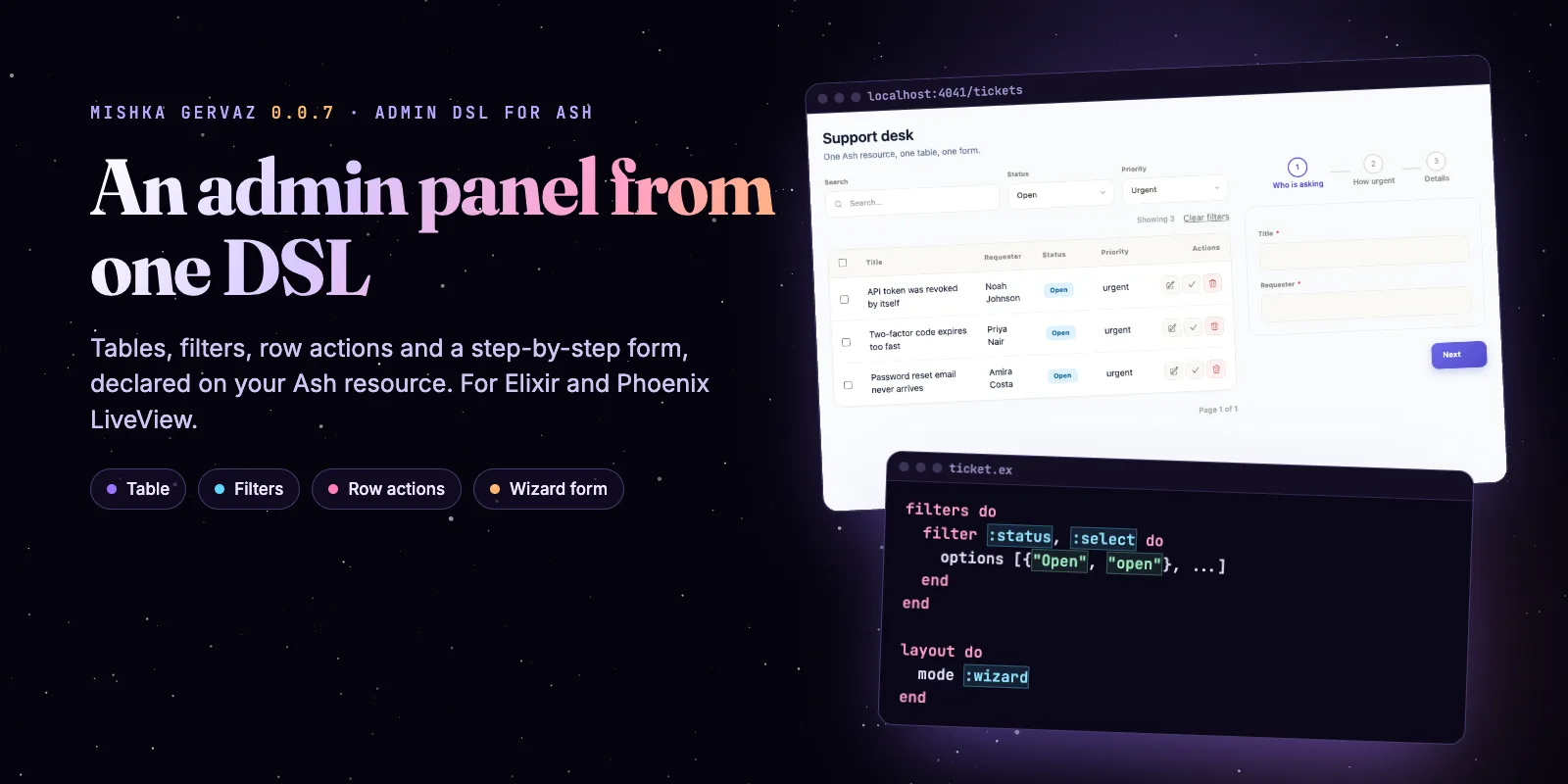
You can build an admin page for an Ash resource without writing a query, an event handler or a form. Mishka Gervaz reads a DSL you put on the resource and draws a table with search, filters, row actions and bulk actions, plus a create and edit form that can run as a wizard. This post builds that page, step by step, in about 120 lines of DSL.
Mishka Gervaz is free and open source. A founding seat pays for the time we spend on it, on Mishka CMS and on the extensions, and it gives you lifetime access, priority support and every paid extension we release.
The page you will build is a small support desk: tickets in a table, filtered by status and priority, with a step form to edit one. Gervaz is also what draws the admin of Mishka CMS, so the pattern holds up on real screens.
The code comes from a demo app we ran against the 0.0.7 release from Hex. Copy the blocks in order and you get the page in the animation.
Mishka CMS releases. Once a month.
New Mishka CMS releases, Elixir and Phoenix patterns, and case studies from the team. No spam, unsubscribe anytime.
What you build
You build one Ash resource, a table with three filters and three row actions, and a three-step form. The animation shows the finished page: filter by status and priority, search, open a ticket in the form, walk through its steps and save.
The page from this post, step by step: filter, search, edit, step through the form, save.
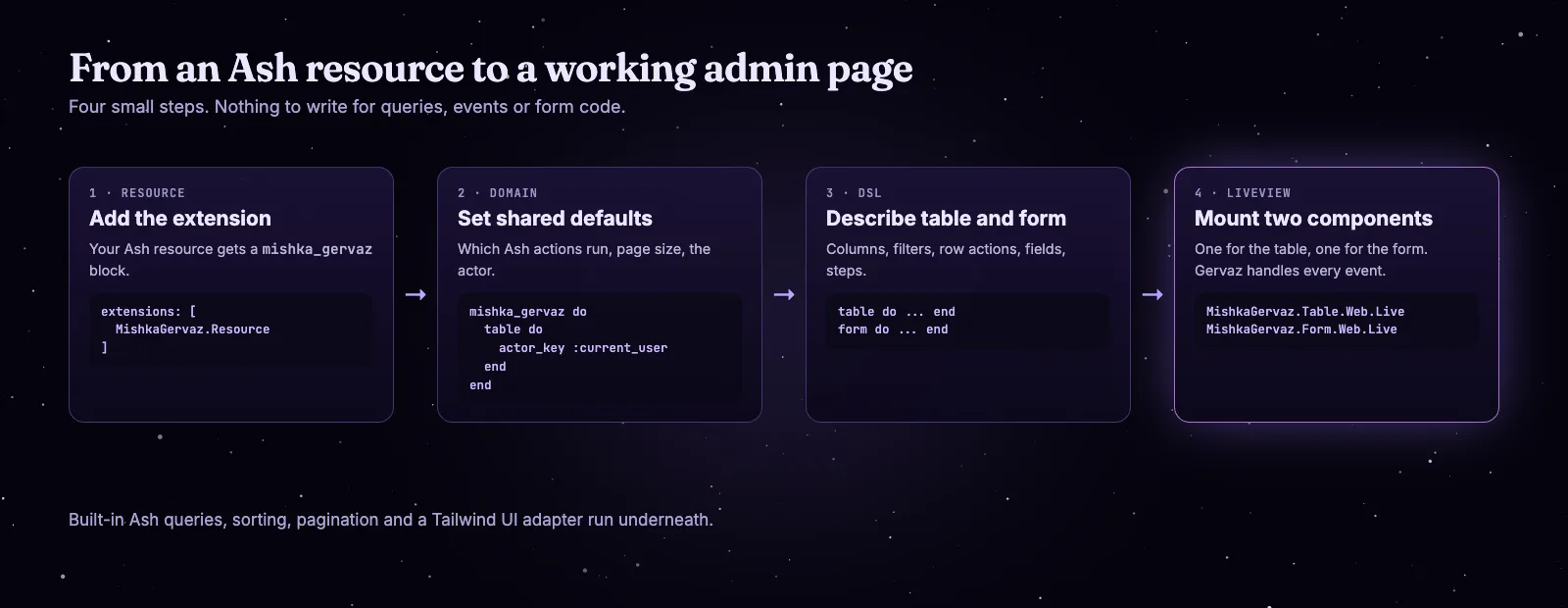
The whole path, from an Ash resource to a page.
Before you start
You need a Phoenix LiveView app that already uses Ash. Gervaz 0.0.7 asks for these versions and pieces:
- Elixir 1.20 or later (the
mix.exsof the release says~> 1.20). - Ash 3.37 or later and Phoenix LiveView 1.2.
- Tailwind CSS in the app. The default UI adapter draws Tailwind classes.
- The signed-in user in
@current_useron your LiveView. Gervaz uses it as the actor.
Step 1: add the dependency
Add Gervaz to mix.exs. Then add it to import_deps in .formatter.exs and keep Spark.Formatter in the plugins, or the formatter rewrites the DSL into calls with parentheses.
# mix.exs
def deps do
  [
    {:mishka_gervaz, "~> 0.0.7"}
  ]
end

# .formatter.exs
[
  import_deps: [:ash, :spark, :phoenix, :mishka_gervaz],
  plugins: [Spark.Formatter, Phoenix.LiveView.HTMLFormatter]
]
Run mix deps.get. The project still compiles, because nothing uses Gervaz yet.
Step 2: the resource and the domain defaults
Gervaz needs two things from Ash: a resource with the MishkaGervaz.Resource extension, and a domain with the MishkaGervaz.Domain extension. The domain holds what every resource shares, such as which Ash actions the table and the form run and how big a page is.
Start with the resource. It is an ordinary Ash resource with one extra extension. The solve action is ours: it sets the status to solved, and a row button will run it.
defmodule MyApp.Support.Ticket do
  use Ash.Resource,
    domain: MyApp.Support,
    extensions: [MishkaGervaz.Resource],
    data_layer: Ash.DataLayer.Ets

  attributes do
    uuid_primary_key :id
    attribute :title, :string, allow_nil?: false, public?: true
    attribute :requester, :string, allow_nil?: false, public?: true
    attribute :status, :atom, constraints: [one_of: [:open, :pending, :solved]], default: :open, public?: true
    attribute :priority, :atom, constraints: [one_of: [:low, :normal, :urgent]], default: :normal, public?: true
    attribute :note, :string, public?: true
    create_timestamp :inserted_at
  end

  actions do
    defaults [:read, :destroy, create: :*, update: :*]

    update :solve do
      change set_attribute(:status, :solved)
    end
  end

  # The mishka_gervaz block goes here.
end
Then the domain. Each action is a plain atom here. If your app splits masters and site users, an action can be a {master_action, tenant_action} tuple instead; the Master and tenant users page explains it.
defmodule MyApp.Support do
  use Ash.Domain,
    extensions: [MishkaGervaz.Domain],
    validate_config_inclusion?: false

  resources do
    resource MyApp.Support.Ticket
  end

  mishka_gervaz do
    table do
      actor_key :current_user

      pagination do
        type :numbered
        page_size 8
      end

      actions do
        read :read
        get :read
        destroy :destroy
      end
    end

    form do
      actor_key :current_user

      actions do
        create :create
        update :update
        read :read
      end
    end
  end
end
Step 3: describe the table
A table section needs a name, a route and its columns. Put this block where the comment is in the resource. A column takes its value from the field with the same name, and type :badge turns a value into a colored pill.
mishka_gervaz do
  table do
    identity do
      name :tickets
      route "/tickets"
      stream_name :tickets
    end

    columns do
      default_sort inserted_at: :desc

      column :title
      column :requester

      column :status do
        ui do
          type :badge

          extra %{
            colors: %{
              "open" => "bg-sky-100 text-sky-800",
              "pending" => "bg-amber-100 text-amber-800",
              "solved" => "bg-emerald-100 text-emerald-800"
            }
          }
        end
      end

      column :priority
    end

    url_sync do
      mode :bidirectional
      params [:filters, :sort, :page, :search]
      prefix "tickets"
    end
  end
end
The url_sync block keeps filters, sort, page and search in the address bar. A filtered view becomes a link you can share, and a reload keeps it.
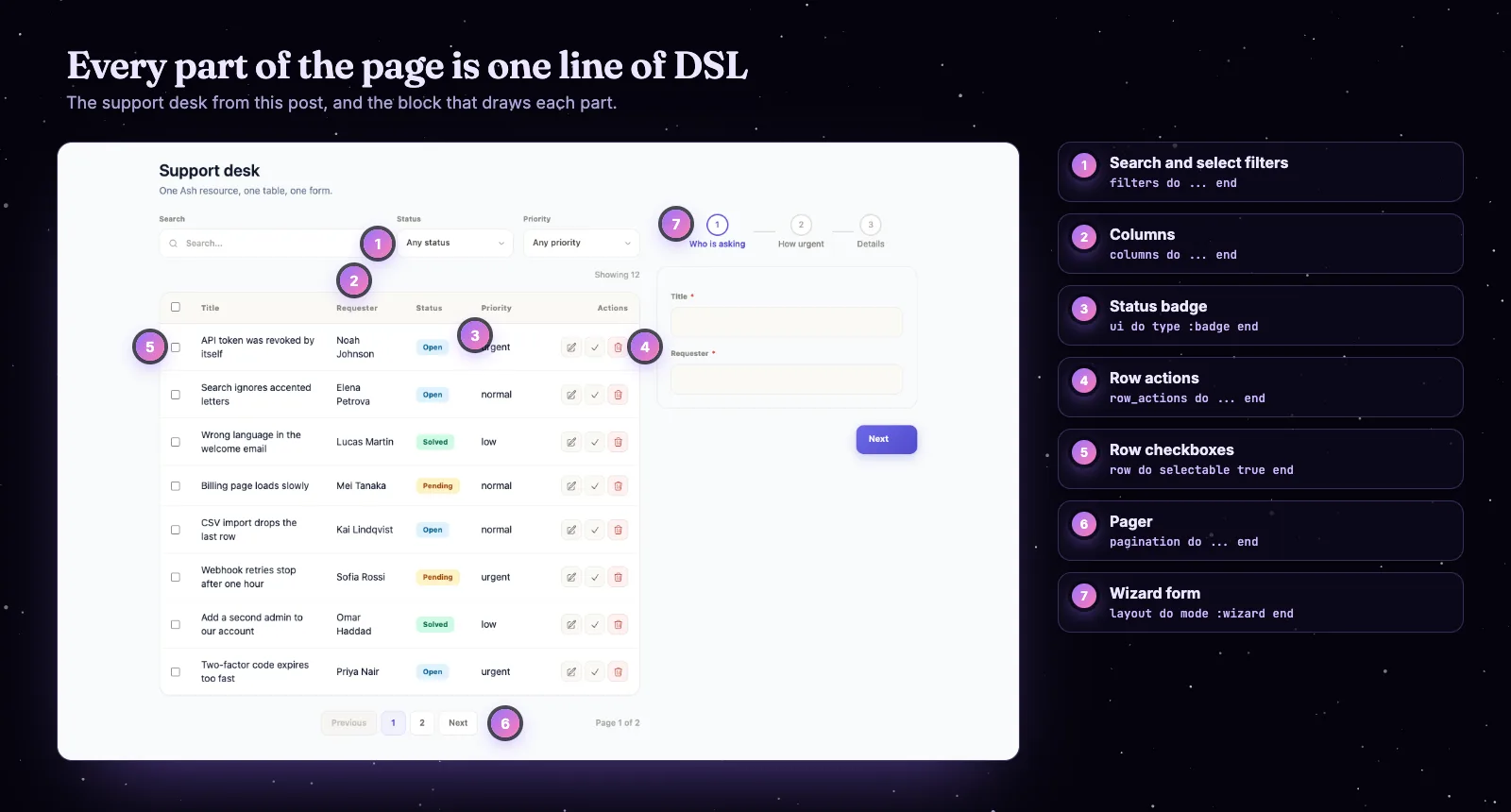
Every part of the page maps to one DSL block.
Step 4: add search and filters
Filters narrow the query that loads the rows. A :text filter is a search box, and fields makes one box search several fields. A :select filter is a dropdown fed by a list of {label, value} pairs. Put the block inside table do.
filters do
  filter :search, :text do
    fields [:title, :requester]
  end

  filter :status, :select do
    options [{"Open", "open"}, {"Pending", "pending"}, {"Solved", "solved"}]

    ui do
      prompt "Any status"
    end
  end

  filter :priority, :select do
    options [{"Low", "low"}, {"Normal", "normal"}, {"Urgent", "urgent"}]

    ui do
      prompt "Any priority"
    end
  end
end
We checked the URL sync in the running demo. Choosing Status "Pending" wrote this address, and loading it again restored the select and the three matching rows:
/tickets?tickets_filter_status=pending&tickets_sort=inserted_at:descNeed more? There are also boolean, number, date, date range and relation filters, and one filter can depend on another. The guide Filter a table shows each one.
Step 5: row actions and bulk actions
Row actions are the buttons on each row. Bulk actions work on ticked rows, and setting selectable true makes the checkboxes appear. Put these blocks inside table do too.
row_actions do
  action :edit, type: :edit

  action :solve do
    type :update
    action :solve

    ui do
      label "Mark solved"
      icon "hero-check"
    end
  end

  action :delete do
    type :destroy
    confirm fn _record -> "Delete this ticket?" end
  end
end

row do
  selectable true
end

bulk_actions do
  action :delete, type: :destroy, confirm: "Delete the selected tickets?"
end
The :edit type needs no code from you. When someone clicks it, the table tells the form component to load that record. The :update type runs the Ash action you name (here :solve), and confirm asks first.
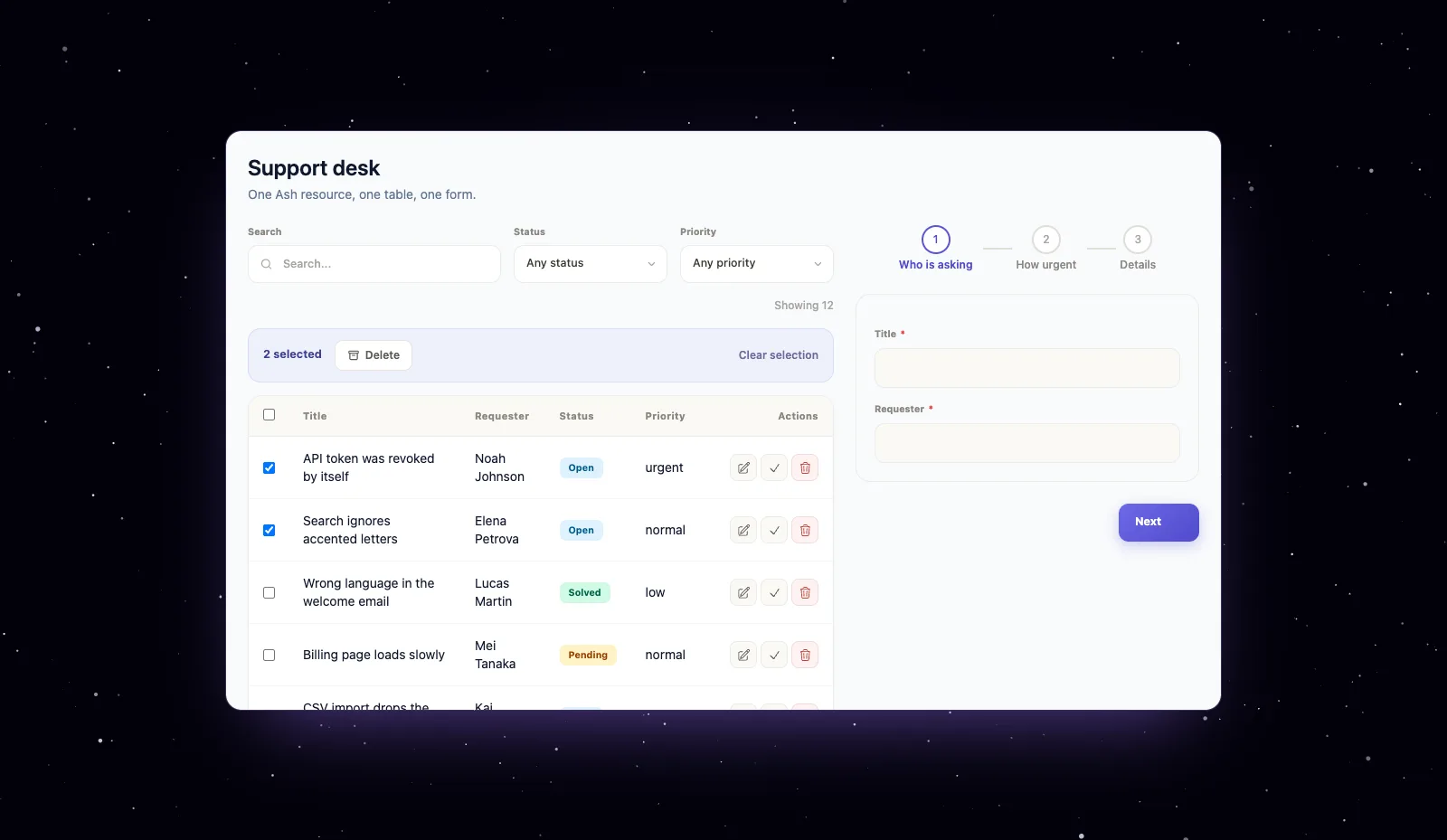
Tick rows and the bulk bar appears. That is row do selectable true plus a bulk_actions block.
Gervaz counts the ticked rows for you and shows the bar. The guide Add row and bulk actions covers restore, permanent delete and dropdown layouts.
Step 6: describe the form and split it into steps
Add a form section beside table. A field takes its type from the Ash attribute unless you set one. Groups collect fields, and layout do mode :wizard turns each group into a step with its own label.
form do
  identity do
    name :ticket_form
  end

  fields do
    field :title, :text, required: true
    field :requester, :text, required: true

    field :status, :select do
      options [{"Open", "open"}, {"Pending", "pending"}, {"Solved", "solved"}]
    end

    field :priority, :select do
      options [{"Low", "low"}, {"Normal", "normal"}, {"Urgent", "urgent"}]
    end

    field :note, :textarea
  end

  groups do
    group :who do
      fields [:title, :requester]
    end

    group :how do
      fields [:status, :priority]
    end

    group :details do
      fields [:note]
    end
  end

  layout do
    mode :wizard

    step :who do
      groups [:who]

      ui do
        label "Who is asking"
      end
    end

    step :how do
      groups [:how]

      ui do
        label "How urgent"
      end
    end

    step :details do
      groups [:details]

      ui do
        label "Details"
      end
    end
  end
end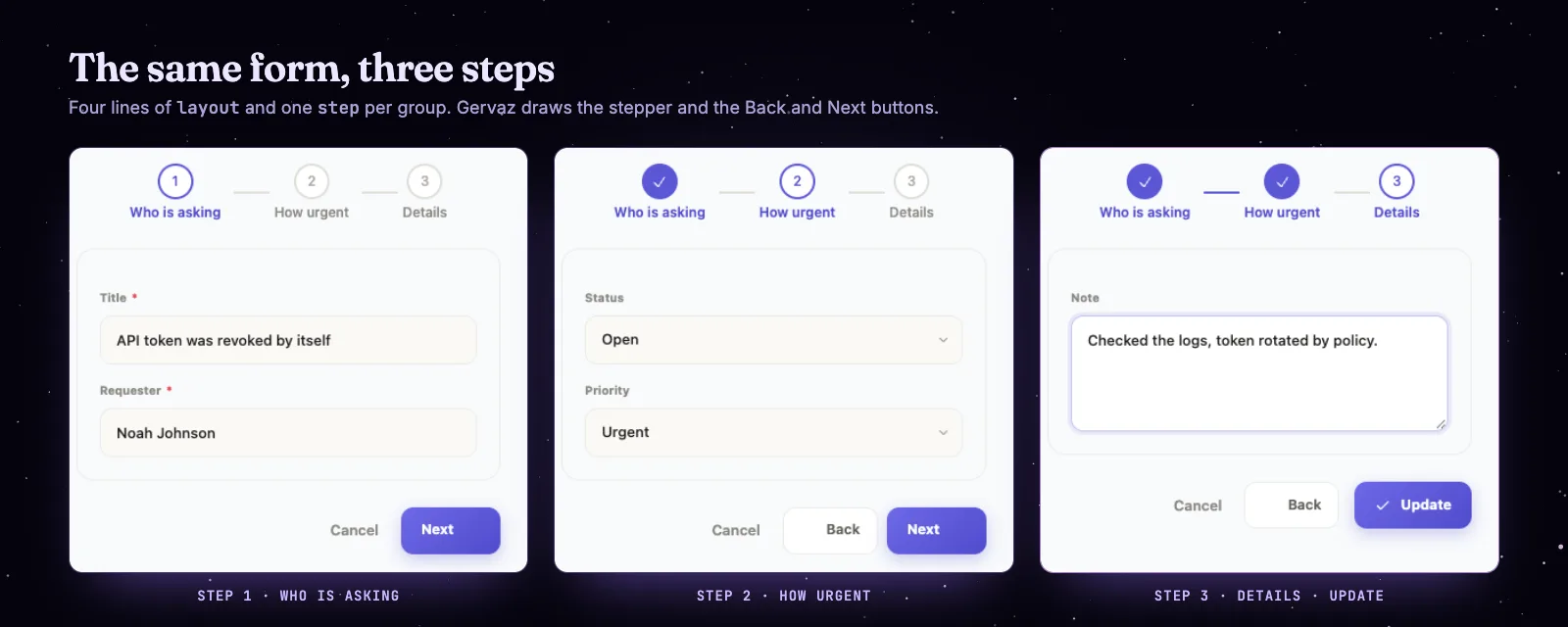
One form, three steps. Gervaz draws the stepper and the buttons.
Delete the layout block and you get a single-page form with the same groups. Version 0.0.6 made the wizard's Next and Back move one step at a time, and 0.0.6 also added a loading_label for the submit button. The guide Split a form into steps has the rest.
Step 7: mount the table and the form in a LiveView
A table and a form are two Phoenix LiveComponents. Your LiveView gives each one the user, decodes the URL for the table, and answers two messages. This is the whole page:
defmodule MyAppWeb.TicketsLive do
  use MyAppWeb, :live_view

  alias MyApp.Support.Ticket
  alias MishkaGervaz.Table.Web.UrlSync

  @impl true
  def mount(_params, _session, socket) do
    {:ok, assign(socket, :url_state, nil)}
  end

  @impl true
  def handle_params(params, uri, socket) do
    {:noreply, assign(socket, :url_state, UrlSync.decode(params, uri, Ticket))}
  end

  @impl true
  def handle_info({:form_saved, _mode, _result}, socket) do
    send_update(MishkaGervaz.Table.Web.Live, id: "tickets-table", gervaz_refresh: true)
    {:noreply, put_flash(socket, :info, "Saved")}
  end

  def handle_info({:put_flash, kind, message}, socket) do
    {:noreply, put_flash(socket, kind, message)}
  end

  def handle_info(_message, socket), do: {:noreply, socket}

  @impl true
  def render(assigns) do
    ~H"""
    <.live_component
      module={MishkaGervaz.Table.Web.Live}
      id="tickets-table"
      resource={Ticket}
      current_user={@current_user}
      url_state={@url_state}
    />

    <.live_component
      module={MishkaGervaz.Form.Web.Live}
      id={MishkaGervaz.Resource.Info.Form.component_id(Ticket)}
      resource={Ticket}
      current_user={@current_user}
    />
    """
  end
end
Add the route inside the scope that signs your user in:
live "/tickets", MyAppWeb.TicketsLiveOpen /tickets. The table loads its rows, the filters work, Edit loads a ticket into the form and Next walks the steps. The form's id comes from component_id/1 so it cannot drift from the DSL.
What Gervaz read from your DSL
Everything you wrote is data you can inspect. The MishkaGervaz.Resource.Info modules return it, which helps when you debug a column or a step. This is the real output for the resource above:
iex> alias MishkaGervaz.Resource.Info.{Table, Form}
iex> Table.column_order(MyApp.Support.Ticket)
[:title, :requester, :status, :priority]
iex> Enum.map(Table.filters(MyApp.Support.Ticket), &{&1.name, &1.type})
[search: :text, status: :select, priority: :select]
iex> Enum.map(Table.row_actions(MyApp.Support.Ticket), &{&1.name, &1.type})
[edit: :edit, solve: :update, delete: :destroy]
iex> Form.field_order(MyApp.Support.Ticket)
[:title, :requester, :status, :priority, :note]
iex> Enum.map(Form.steps(MyApp.Support.Ticket), & &1.name)
[:who, :how, :details]
iex> Form.component_id(MyApp.Support.Ticket)
"ticket_form"
The same DSL on real screens
Mishka CMS runs on Gervaz. The Redirects, Media and Blog tags pages in the Mishka CMS admin are each one Gervaz table and one Gervaz form, and so are the workspaces of Mishka Document. Their code is what the Gervaz docs use as examples, cut down to what each guide needs.
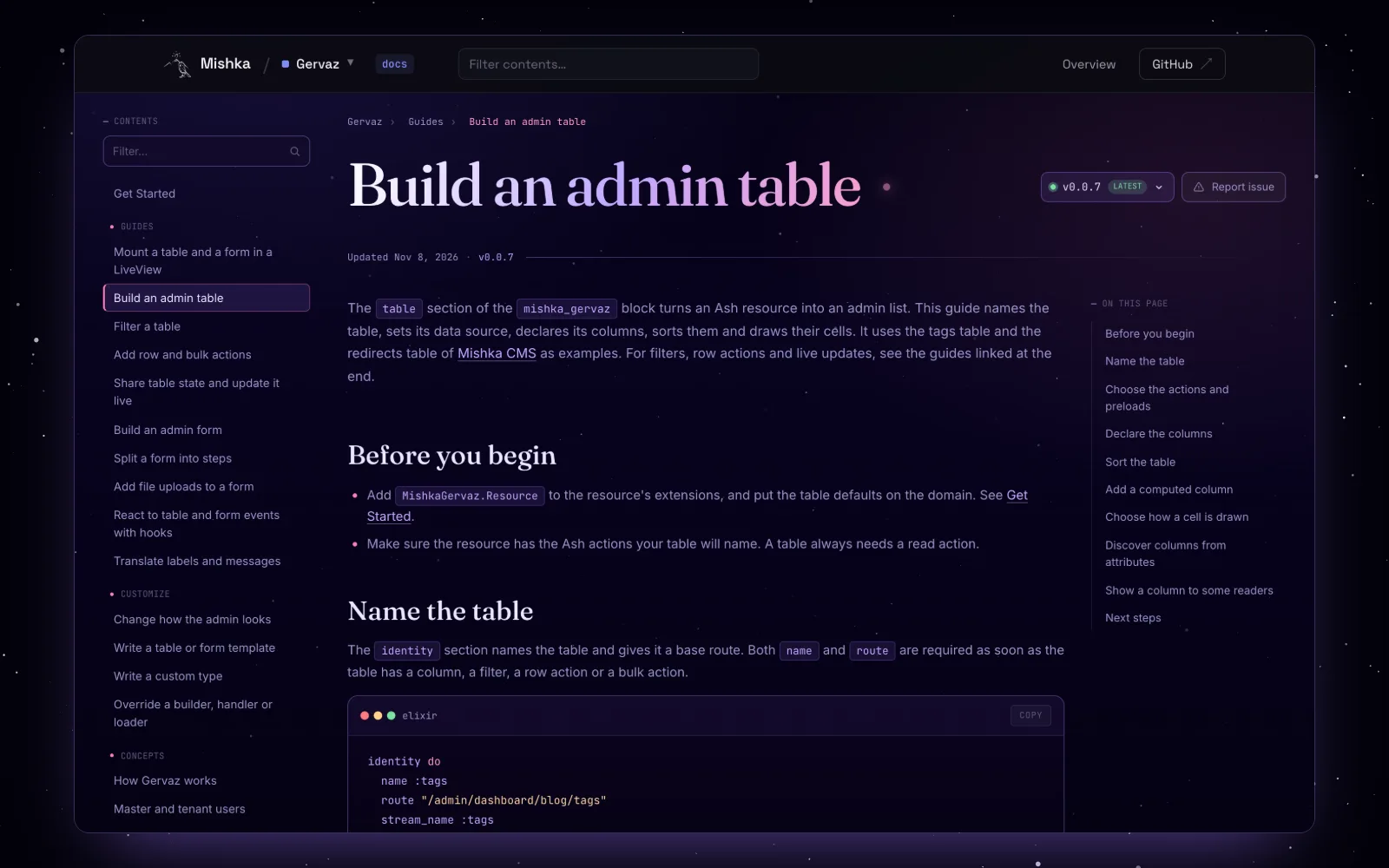
The Gervaz docs have a how-to for every part of this post.
What changed from 0.0.5 to 0.0.7
Gervaz moves quickly, and these are the changes in the last three releases that a page like this one feels.
on_validate hook, so dependent fields refresh.Where to go next
If you want to see how Mishka CMS and its extensions use these pieces, start with what changed in Mishka CMS 0.0.2 and the story of how we built the CMS on Phoenix LiveView.
Still young
Try Mishka Gervaz
Read the Mishka Gervaz page and the docs, or open the repository and the Hex package.
A small team builds Gervaz and Mishka CMS. If you want to help us work on them full time, a founding seat gives you lifetime access, priority support and every paid extension we release.
You can also sponsor our open source work, or hire our team to build an Ash and Phoenix LiveView admin for you.
Mishka CMS releases. Once a month.
New Mishka CMS releases, Elixir and Phoenix patterns, and case studies from the team. No spam, unsubscribe anytime.
Questions people ask about Mishka Gervaz
Thank you
Mishka Gervaz stands on Elixir, Phoenix LiveView and Ash Framework, and on Spark, the DSL library behind Ash. Thank you to everyone who builds them, and to you for reading this far.
Shahryar Tavakkoli writes about Elixir and Phoenix LiveView: Mishka Chelekom releases, GuardedStruct validation, static sites, service workers and SEO.