Get Started
v0.0.1
Mishka Gervaz is an Elixir library that turns an Ash resource into an admin surface: a table with filters, sorting, pagination, row actions and bulk actions, and a create and edit form. You declare both in a Spark DSL on the resource. Gervaz builds the state, runs the Ash queries, handles every phx- event and draws the result through two Phoenix LiveComponents and a swappable UI adapter. This tutorial adds Gervaz to a project and wires one resource, a redirect rule, into a working admin page.
What you will build
You will build an admin page for a Redirect resource. The page lists the rules in a table with a search box, filters, sorting, row buttons and bulk actions, and a form on the same page creates and edits them. The code is taken from the MishkaCmsCore.Runtime.Redirect resource of Mishka CMS, cut down to what this page needs.
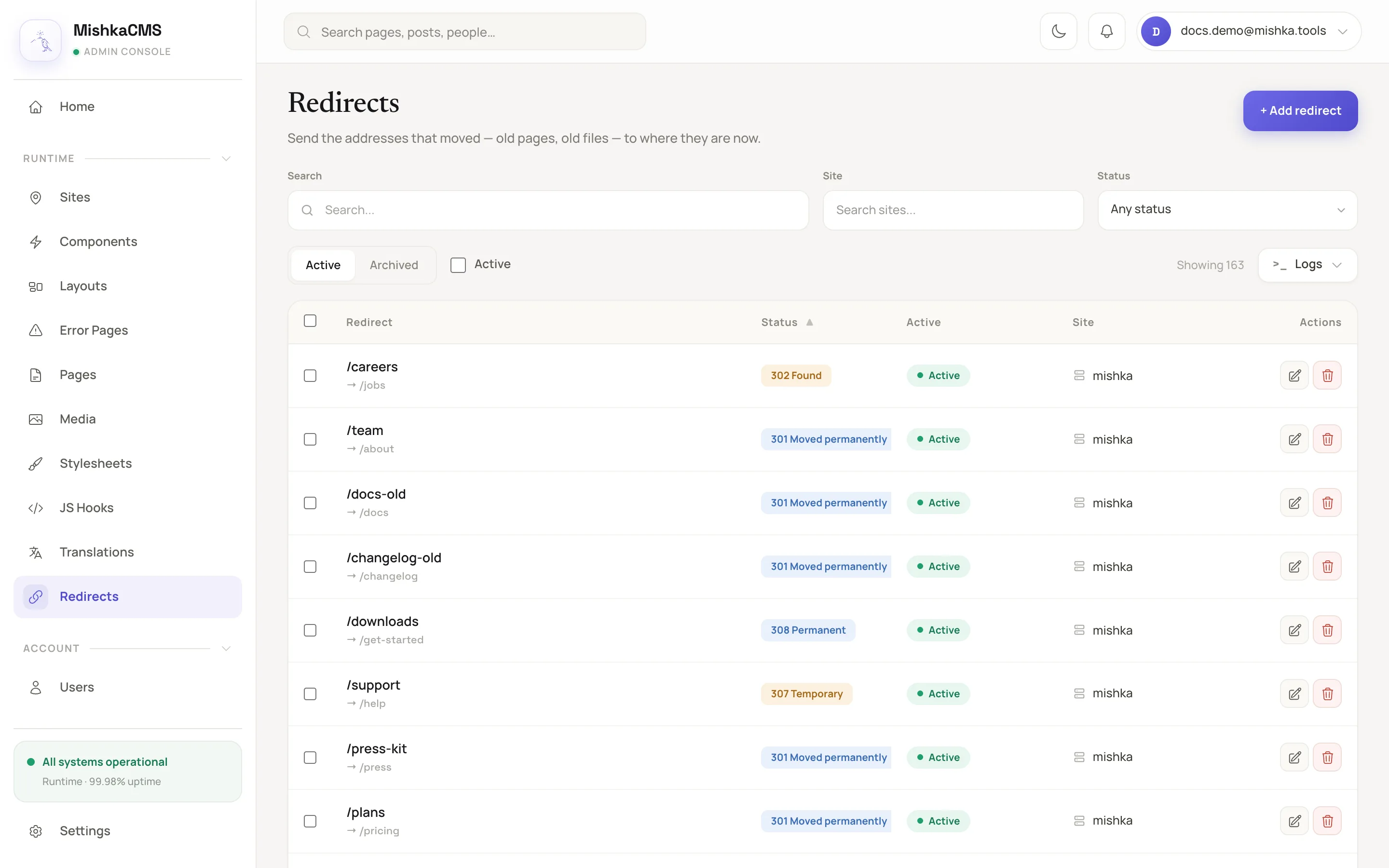
The Redirects page of Mishka CMS is one Gervaz table and one Gervaz form.
The picture shows more than this tutorial builds. A master also sees a Site filter above the table and a Site column, and the last column, Actions, holds the row buttons. The tutorial's code leaves those out.
Before you begin
- Use Elixir 1.17 or later and a Phoenix application with Phoenix LiveView 1.2 and Ash 3.
- Have an Ash resource with a data layer. The resource needs read actions for the list and for a single record, a destroy action, a create action and an update action.
- Have Tailwind CSS in the application. The default UI adapter draws Tailwind classes.
- Have a way to put the signed-in user in
@current_useron your LiveView. Gervaz takes it as the actor.
Step 1: add the dependency
Add Gervaz to mix.exs. It brings Ash, AshPhoenix, Spark and Gettext. Phoenix LiveView is an optional dependency that your application supplies.
def deps do
  [
    {:mishka_gervaz, "~> 0.0.1"}
  ]
end
Then add :mishka_gervaz to import_deps in .formatter.exs, and keep Spark.Formatter in the plugins. Without it, the formatter rewrites the DSL into calls with parentheses.
[
  import_deps: [:ash, :spark, :phoenix, :mishka_gervaz],
  plugins: [Spark.Formatter, Phoenix.LiveView.HTMLFormatter],
  inputs: ["{mix,.formatter}.exs", "{config,lib,test}/**/*.{heex,ex,exs}"]
]
Run mix deps.get. The project still compiles, because nothing uses Gervaz yet.
Step 2: set the defaults on the domain
Add MishkaGervaz.Domain to the Ash domain and declare what every resource shares: which Ash actions the table and the form run, how pages are sized, and the labels of the form buttons. This block comes from the MishkaCmsCore.Runtime domain of Mishka CMS, which the Redirect resource belongs to. A resource inherits each key and can override it.
defmodule MishkaCmsCore.Runtime do
  use Ash.Domain,
    extensions: [MishkaGervaz.Domain]

  use MishkaGervaz.Messages, backend: MishkaCmsCore.Gettext

  mishka_gervaz do
    table do
      actor_key :current_user

      pagination do
        type :load_more
        page_size 20
        page_size_options [20, 50, 100, 150]
      end

      realtime do
        pubsub MishkaCmsCore.PubSub
      end

      actions do
        read {:master_read, :read}
        get {:master_get, :read}
        destroy {:master_destroy, :destroy}
      end

      archive do
        read_action {:master_archived, :archived}
        get_action {:master_get_archived, :get_archived}
        restore_action {:master_unarchive, :unarchive}
        destroy_action {:master_permanent_destroy, :permanent_destroy}
      end
    end

    form do
      actions do
        create {:master_create, :create}
        update {:master_update, :update}
        read {:master_get, :read}
      end

      submit do
        create label: fn -> dgettext("mishka_gervaz", "Create") end
        update label: fn -> dgettext("mishka_gervaz", "Save Changes") end
        cancel label: fn -> dgettext("mishka_gervaz", "Cancel") end
        position :bottom
      end
    end
  end
enduse MishkaGervaz.Messages gives the domain dgettext. Pass backend: your Gettext backend, or leave it out to use the default. Replace MishkaCmsCore.PubSub with a module of your application. The domain verifier needs a module that can be loaded, so Mishka CMS defines an empty module with that name and starts {Phoenix.PubSub, name: MishkaCmsCore.PubSub} under it. A realtime block with a module that is not loaded is reported when the domain compiles.
An action value is an atom, which serves every user, or a tuple {master_action, tenant_action}. If your application has no master and tenant split, use plain atoms such as read :read. See Master and tenant users. Every action you name must exist on the resource with the matching kind.
Step 3: describe the table
Add MishkaGervaz.Resource to the resource's extensions, and write a mishka_gervaz block with a table section. The identity names the table and gives its base route. Each column says where a value comes from and how to draw it.
use Ash.Resource,
  domain: MishkaCmsCore.Runtime,
  extensions: [MishkaGervaz.Resource]

import Phoenix.Component, only: [sigil_H: 2]
import MishkaGervaz.UIAdapters.Tailwind, only: [cell_stacked: 1]

use MishkaGervaz.Messages

mishka_gervaz do
  table do
    identity do
      name :redirects
      route "/admin/dashboard/runtime/redirects"
      stream_name :redirects
    end

    columns do
      default_sort [{:inserted_at, :desc}]

      column :rule do
        static true
        requires [:from_path, :to]
        label fn -> dgettext("mishka_gervaz", "Redirect") end

        render fn record ->
          assigns = %{from: record.from_path, to: "→ " <> record.to}

          ~H"""
          <.cell_stacked variant={:title} primary={@from} secondary={@to} />
          """
        end
      end

      column :active do
        label fn -> dgettext("mishka_gervaz", "Active") end

        ui do
          type :badge

          extra %{
            variant: :pill,
            colors: %{
              "true" => "bg-[#e6f6ee] text-[#177a53]",
              "false" => "bg-[#f2f1ec] text-[#8a877f]"
            },
            labels: %{
              "true" => dgettext_noop("mishka_gervaz", "Active"),
              "false" => dgettext_noop("mishka_gervaz", "Inactive")
            }
          }
        end
      end
    end

    url_sync do
      mode :bidirectional
      params [:filters, :sort, :page, :search]
      prefix "redirects"
      max_filter_length 500
    end
  end
endThe url_sync block keeps the filters, sort, page and search in the address bar. The imports give the render function its ~H sigil and the cell_stacked component, and use MishkaGervaz.Messages gives you dgettext and dgettext_noop for labels. The :rule column has no database field of its own, so it is static. requires lists the fields its render function reads, and the function receives them as a map. The :active column uses the built-in :badge type, which maps each value to a color and a label.
Step 4: add filters and actions
Filters narrow the query. Row actions are the buttons on each row. Bulk actions work on a selection and make the checkboxes appear.
filters do
  filter :search, :text do
    fields [:from_path, :to, :description]

    ui do
      label fn -> dgettext("mishka_gervaz", "Search") end
    end
  end

  filter :active, :boolean
end

row_actions do
  action :edit do
    type :edit

    ui do
      label fn -> dgettext("mishka_gervaz", "Edit") end
      icon "hero-pencil-square"
    end
  end

  action :delete do
    type :destroy
    confirm fn _record -> dgettext("mishka_gervaz", "Archive this redirect?") end

    ui do
      label fn -> dgettext("mishka_gervaz", "Delete") end
      icon "hero-trash"
    end
  end
end

row do
  selectable true
end

bulk_actions do
  action :archive,
    handler: :destroy,
    confirm: dgettext_noop("mishka_gervaz", "Archive selected redirects?")
endThe :edit type needs no code on your side. When a reader clicks it, the table tells the form component to load that record.
Step 5: describe the form
Add a form section beside table. A field takes its type from the Ash attribute unless you set one. Groups arrange the fields into the grid.
form do
  identity do
    name :redirect_form
  end

  fields do
    field :from_path, :text do
      required true

      ui do
        label fn -> dgettext("mishka_gervaz", "From") end
        placeholder "/images/blog/old-photo.jpg"
        extra %{dir: "ltr"}
      end
    end

    field :to, :text do
      required true

      ui do
        label fn -> dgettext("mishka_gervaz", "To") end
        extra %{dir: "ltr"}
      end
    end

    field :active do
      ui do
        label fn -> dgettext("mishka_gervaz", "Active") end
      end
    end
  end

  groups do
    group :addresses do
      fields [:from_path, :to]

      ui do
        columns 1
      end
    end

    group :behaviour do
      fields [:active]

      ui do
        columns 2
      end
    end
  end
endThe form identity is the id of the form component. Gervaz returns it from MishkaGervaz.Resource.Info.Form.component_id/1.
Step 6: mount the components
A LiveView draws a table and a form with two live components. It also answers a few messages from them. The page decodes the URL into url_state, so that the filters and the sort that the table's url_sync block names survive a reload.
defmodule MyAppWeb.RedirectsLive do
  use MyAppWeb, :live_view

  alias MishkaCmsCore.Runtime.Redirect
  alias MishkaGervaz.Table.Web.UrlSync

  @impl true
  def mount(_params, _session, socket) do
    {:ok, assign(socket, :url_state, nil)}
  end

  @impl true
  def handle_params(params, uri, socket) do
    {:noreply, assign(socket, :url_state, UrlSync.decode(params, uri, Redirect))}
  end

  @impl true
  def handle_info({:form_saved, _mode, _result}, socket) do
    {:noreply, put_flash(socket, :info, "Saved")}
  end

  def handle_info({:put_flash, kind, message}, socket) do
    {:noreply, put_flash(socket, kind, message)}
  end

  def handle_info(_message, socket), do: {:noreply, socket}

  @impl true
  def render(assigns) do
    ~H"""
    <.live_component
      module={MishkaGervaz.Form.Web.Live}
      id={MishkaGervaz.Resource.Info.Form.component_id(Redirect)}
      resource={Redirect}
      current_user={@current_user}
    />

    <.live_component
      module={MishkaGervaz.Table.Web.Live}
      id="redirects-table"
      resource={Redirect}
      current_user={@current_user}
      url_state={@url_state}
    />
    """
  end
endAdd a live route for RedirectsLive to your router, at the path you set as the table's route and inside the scope that signs the user in. Open the page. The table loads its rows, the search box filters them, and the Edit button loads a rule into the form.
The Mishka CMS page does the same with its own LiveView base module and a modal around the form. See Mount a table and a form in a LiveView for the assigns, the messages and the modal.
What you learned
- The domain holds the defaults, and each resource adds a
mishka_gervazblock with atableand aformsection. - A column, a filter, an action and a field are entities. Their presentation sits in a
uiblock. - A static column draws a value that has no database column, and receives the fields in
requiresas a map. - Two live components draw the page, and the parent LiveView answers their messages.
Next steps
- Build an admin table: columns, sorting and cells.
- Filter a table: select, relation and dependent filters.
- Build an admin form: relation fields, nested fields and groups.
- How Gervaz works: what the DSL compiles into.
- Domain DSL: every default a domain can set.