Add row and bulk actions
v0.0.1
A Gervaz table acts on one row with row actions and on a selection with bulk actions. This guide adds an edit button, a soft delete, a restore and a permanent delete to each row, lays the buttons out inline or in a dropdown, and adds bulk versions. The examples come from the redirects and tags tables of Mishka CMS.
Before you begin
- Have a table with an identity and columns. See Build an admin table.
- Declare the actions the buttons run in
source.actions, on the resource or the domain. Any bulk action, a selectable row, and a row action of type:destroy,:update,:unarchive,:permanent_destroyor:accordionneedget. A:destroyaction also needsdestroy. - For archive and restore, add
AshArchival.Resourceto the resource and declare the archive actions, usually on the domain. See How domain defaults work.
Add row actions
Each row action has a name and a required type. The type decides what the button does. These four are the built-in edit, delete, restore and permanent delete:
row_actions do
  action :edit do
    type :edit
    js fn _record -> MishkaCmsCore.CoreComponents.show_modal("redirect-form-modal") end

    ui do
      label fn -> dgettext("mishka_gervaz", "Edit") end
      icon "hero-pencil-square"
    end
  end

  action :delete do
    type :destroy
    confirm fn _record -> dgettext("mishka_gervaz", "Archive this redirect?") end

    ui do
      label fn -> dgettext("mishka_gervaz", "Delete") end
      icon "hero-trash"
    end
  end

  action :unarchive do
    type :unarchive
    confirm fn _record -> dgettext("mishka_gervaz", "Restore this redirect?") end

    ui do
      label fn -> dgettext("mishka_gervaz", "Restore") end
      icon "hero-arrow-path"
    end
  end

  action :permanent_destroy do
    type :permanent_destroy

    confirm fn _record ->
      dgettext("mishka_gervaz", "Permanently delete this redirect? This cannot be undone.")
    end

    ui do
      label fn -> dgettext("mishka_gervaz", "Delete permanently") end
      icon "hero-trash"
    end
  end
endThe types behave like this:
:editsends the record to the form component, with no message to your LiveView. Ajsfunction runs first, so it can open the modal that holds the form.:destroysoft-deletes withsource.actions.destroy.:unarchiverestores with the archive restore action, and:permanent_destroydeletes an archived record with the archive destroy action.:updateruns the Ash action named inaction, an atom or a{master_action, tenant_action}tuple.:eventsends{:row_action, event, payload}to the parent LiveView.:linknavigates topath, a string used as written or a function of the record. Both require their option.:accordiondeclares that the row expands, and draws nothing unless the:expandfeature is on.:row_clickdraws nothing. The built-in templates do not call its click handler, so a row does not become clickable from it.
confirm takes a string or a function of the record, and Gervaz shows the text as written. Gervaz does not replace placeholders in it. A :destroy action with no confirm asks "Are you sure?". The label is ui.label when you set it. Without one, :destroy draws "Delete", :unarchive "Restore" and :permanent_destroy "Delete Permanently", and the other types draw the humanized action name.
Control when an action shows
A row action shows for active records by default. visible changes that: :active, :archived, true, false, or a function of the record and the table state. The function has two arguments here. The visible of the realtime block also has two, the record and the user. Every other predicate of the table takes the state alone.
visible fn _record, state ->
  state.archive_status == :active and Redirects.writes?(state.current_user)
end
Two shortcuts cover most cases: visible :archived for restore and permanent delete, and restricted true for an action only masters should see.
Lay the actions out
Name the actions that draw inline and the ones that fold into a dropdown with actions_layout. A dropdown holds actions and separators, and it needs a ui block with a label. The tags table puts three buttons inline and the rest in a menu:
row_actions do
  actions_layout do
    position :end
    sticky true
    inline [:table_edit, :table_archive, :table_unarchive]
    dropdown [:tag_actions]
  end

  action :table_edit do
    type :edit
    js fn _record -> MishkaCmsCore.CoreComponents.show_modal("blog-tag-form-modal") end

    ui do
      label fn -> dgettext("mishka_gervaz", "Edit") end
      icon "hero-pencil"
    end
  end

  action :table_archive do
    type :destroy

    ui do
      label fn -> dgettext("mishka_gervaz", "Delete") end
      icon "hero-trash"
    end
  end

  action :table_unarchive do
    type :unarchive

    ui do
      label fn -> dgettext("mishka_gervaz", "Restore") end
      icon "hero-arrow-uturn-left"
    end
  end

  dropdown :tag_actions do
    ui do
      label fn -> dgettext("mishka_gervaz", "Actions") end
      icon "hero-ellipsis-vertical"
    end

    action :versions do
      type :event
      event "show_versions"
      visible :active

      ui do
        label fn -> dgettext("mishka_gervaz", "Versions") end
        icon "hero-clock"
      end
    end

    separator label: dgettext_noop("mishka_gervaz", "Permanent")

    action :permanent_destroy do
      type :permanent_destroy
      visible :archived
      confirm dgettext_noop(
                "mishka_gervaz",
                "Are you sure you want to PERMANENTLY delete this tag? This action cannot be undone!"
              )

      ui do
        label fn -> dgettext("mishka_gervaz", "Delete forever") end
        icon "hero-x-circle"
      end
    end
  end
endGervaz does not check the names in inline and dropdown when it compiles, and a name that matches no action draws nothing. Once either list is set, an action or dropdown that neither list names is not drawn. The auto_collapse_after option is accepted but no built-in template reads it. sticky true pins the Actions column to the right edge while the table scrolls sideways.
The :versions action is an :event. The tags page answers it in its LiveView:
def handle_info({:row_action, "show_versions", %{"id" => tag_id}}, socket) do
  ...
end
Add bulk actions
A bulk action works on the selected rows. A built-in type resolves the handler for you. Use the inline form for short ones:
bulk_actions do
  action :archive,
    type: :destroy,
    confirm: dgettext_noop("mishka_gervaz", "Archive selected tags?")

  action :unarchive,
    type: :unarchive,
    confirm: dgettext_noop("mishka_gervaz", "Restore selected tags?"),
    visible: :archived

  action :permanent_destroy,
    type: :permanent_destroy,
    confirm: dgettext_noop("mishka_gervaz", "Permanently delete selected tags? This cannot be undone."),
    visible: :archived
end
confirm is the text of the browser's confirmation dialog. {count} in it becomes the number of rows the action runs on. visible is :active or :archived, or a function of the state alone. The redirects table uses the function form, with handler: :destroy instead of type, which acts the same way:
action :archive,
  handler: :destroy,
  confirm: dgettext_noop("mishka_gervaz", "Archive selected redirects?"),
  visible: fn state ->
    state.archive_status == :active and Redirects.writes?(state.current_user)
  end
Without a type, a bulk action's handler is :parent. The table sends {:bulk_action, name, selected_ids} to the parent LiveView, and you run the work there. A handler can also be a function fn selected_ids, state -> {:ok, state} end, an Ash action name, or a {master_action, tenant_action} tuple. The ids arrive as a list, as :all, or as {:all_except, ids}, so select-all does not list the whole table.
Show the checkboxes
The built-in templates draw checkboxes when the :select feature is on and at least one bulk action is visible in the current archive scope. Add row do selectable true end as well. It is what makes source.actions.get required, but it does not draw the checkboxes by itself.
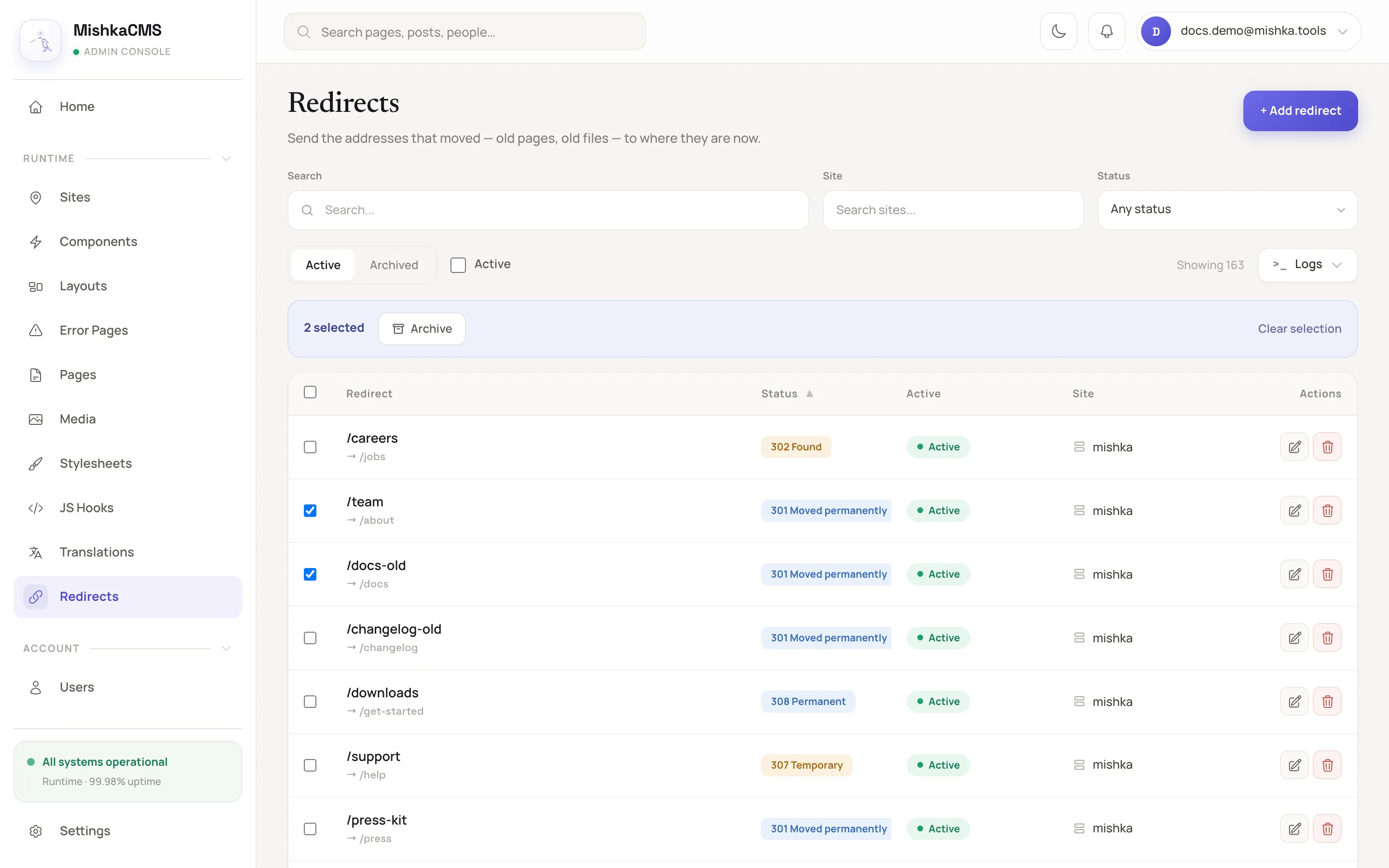
Selecting rows shows the bulk action bar.
Archive and restore
With an archive block on the domain or the resource, and AshArchival.Resource on the resource, the table gains an archive toggle in its filter area. In the archived view the :archived actions show. The two flags below remove the manual step of switching back:
hooks do
  switch_to_active_on_empty_archive true
  switch_to_archive_on_empty_active true
end
The first switches to the active list after an unarchive or a permanent delete leaves the archive empty. The second switches to the archive after a delete leaves the active list empty. See React to table and form events with hooks for them and for the hooks that run around an action.
Next steps
- React to table and form events with hooks: observe, refuse or replace an action.
- Write a custom type: an action type such as a Fork button.
- Table actions DSL: every option of an action, a dropdown and a row.