Build an admin form
v0.0.1
The form section of the mishka_gervaz block turns an Ash resource into a create and edit form. This guide names the form, declares fields of several types, picks related records, edits nested shapes, groups the fields and sets the buttons. The examples come from the tags and blog posts forms of Mishka CMS and the component form of its page builder.
Before you begin
- Add
MishkaGervaz.Resourceto the resource. See Get Started. - Have a create, an update and a read action, on the resource or named on the domain. A form with any field needs all three.
Name the form
The identity name is what MishkaGervaz.Resource.Info.Form.component_id/1 returns. Declare it, and mount the form with that id. Gervaz does not require the id, because the page that mounts the form chooses it.
form do
  identity do
    name :tag_form
  end
end
route is optional. Gervaz stores it, and the built-in form does not redirect with it.
Choose the actions and the preloads
The three form actions usually come from the domain. See How domain defaults work. In edit mode the form fetches the record with the read action. If a field reads a relationship, preload it by role, so that the master and tenant forms load different relationships. The blog post form does this for its collections, tags and bloggers:
source do
  preload do
    master [:master_collections, :master_tags, :master_bloggers]
    tenant [:tenant_collections, :tenant_tags, :tenant_bloggers]
  end
end
The read action of a preloaded relationship must set required?: false on its pagination, because a preload passes no page. Gervaz reports a violation when it compiles.
Declare fields
In the common case a field takes its type from the Ash attribute when you give none: a string is :text, a number is :number, a boolean is :checkbox, a date is :date and a datetime is :datetime. A string or atom attribute with constraints one_of: becomes a :select whose options Gervaz builds from the constraint. A long string, a UUID, a list and a map infer other types. Form fields DSL lists them all. Write options yourself to translate the labels, as the status field below does.
fields do
  field :title, :text do
    required true

    ui do
      label fn -> dgettext("mishka_gervaz", "Title") end
      placeholder fn -> dgettext("mishka_gervaz", "Post title") end
    end
  end

  field :status do
    options fn ->
      [
        {dgettext("mishka_gervaz", "Draft"), :draft},
        {dgettext("mishka_gervaz", "Published"), :published},
        {dgettext("mishka_gervaz", "Scheduled"), :scheduled}
      ]
    end

    ui do
      label fn -> dgettext("mishka_gervaz", "Status") end
    end
  end

  field :content, :textarea do
    required true

    ui do
      label fn -> dgettext("mishka_gervaz", "Content") end
      rows 8
    end
  end
endA select draws an empty choice ahead of its options. The choice is labeled with ui placeholder when you set one. A required field or one with a default has no empty choice. Otherwise the choice reads "Select...".
Fields take these behavior options in the body, and presentation options in ui:
required,readonly,visibleandrestrictedgate the field.readonly,visibleandrestrictedtake a boolean or a function of the state.show_on :createorshow_on :updateshows the field in one mode.virtual truemarks a field that is not an attribute of the resource.defaultis stored with the field, and the built-in form uses it for one thing: a select with a default has no empty choice. Pass starting values with thedefaultsassign of the mount.uiholdslabel,placeholder,description,icon,debounce,span,rows,autocomplete,add_label,remove_label,disabled_promptandextra. The optionsclass,wrapper_classandstepare accepted, and the Standard form template does not read them.
A field the action neither accepts nor takes as an argument is drawn read-only and left out of the save. A value that is always written left to right, such as a slug, an address or a token, says so with ui do extra %{dir: "ltr"} end.
Edit nested shapes
A :nested field edits an embedded resource or a constrained map column as repeatable rows. The rows are nested_field entities, which accept a narrower set of types: :text, :textarea, :number, :checkbox, :date, :datetime, :select, :hidden, :toggle, :range, :json, :key_map and :key_list.
field :seo_tags, :nested do
  ui do
    label fn -> dgettext("mishka_gervaz", "SEO Tags") end
    add_label fn -> dgettext("mishka_gervaz", "+ Add SEO Tag") end
    remove_label fn -> dgettext("mishka_gervaz", "Remove") end
  end

  nested_field :tag, :select do
    options [{"title", "title"}, {"meta", "meta"}, {"link", "link"}]

    ui do
      label fn -> dgettext("mishka_gervaz", "Tag") end
    end
  end

  nested_field :attrs, :json do
    ui do
      label fn -> dgettext("mishka_gervaz", "Attributes") end
    end
  end

  nested_field :content, :textarea do
    ui do
      label fn -> dgettext("mishka_gervaz", "Content") end
      rows 3
    end
  end
endWhen the keys of a map are known and few, draw one control per key instead of asking for JSON. A :key_map edits one map, and a :key_list edits a list of maps with rows the reader adds and removes. Each key is a keyword list with a :name and, optionally, :type, :label, :placeholder and :options. The component form of the page builder declares a slot's options and attributes this way:
nested_field :opts, :key_map do
  options [
    [name: :required, type: :toggle, label: dgettext_noop("mishka_gervaz", "Required")],
    [name: :doc, type: :text, label: dgettext_noop("mishka_gervaz", "What goes in it")]
  ]

  ui do
    label fn -> dgettext("mishka_gervaz", "Options") end
  end
end
A blank key is left out of the stored map, and a toggle left off is left out too, so "not set" stays distinct from "set to nothing". Gervaz reports a nested_field outside a :nested field when it compiles.
Group the fields
Groups put fields in named sections and set the grid. A field may sit in one group. A field in no group still draws, but a wizard step can reach it only through a group. ui do columns N end sets the grid of one group, and layout do columns N end sets the default grid for the form.
groups do
  group :basic_info do
    fields [:site_id, :name, :slug, :language]

    ui do
      label fn -> dgettext("mishka_gervaz", "Basic Information") end
      columns 2
    end
  end

  group :organization do
    fields [:language_group_id, :parent_tag_id]

    ui do
      label fn -> dgettext("mishka_gervaz", "Organization") end
      columns 2
    end
  end
end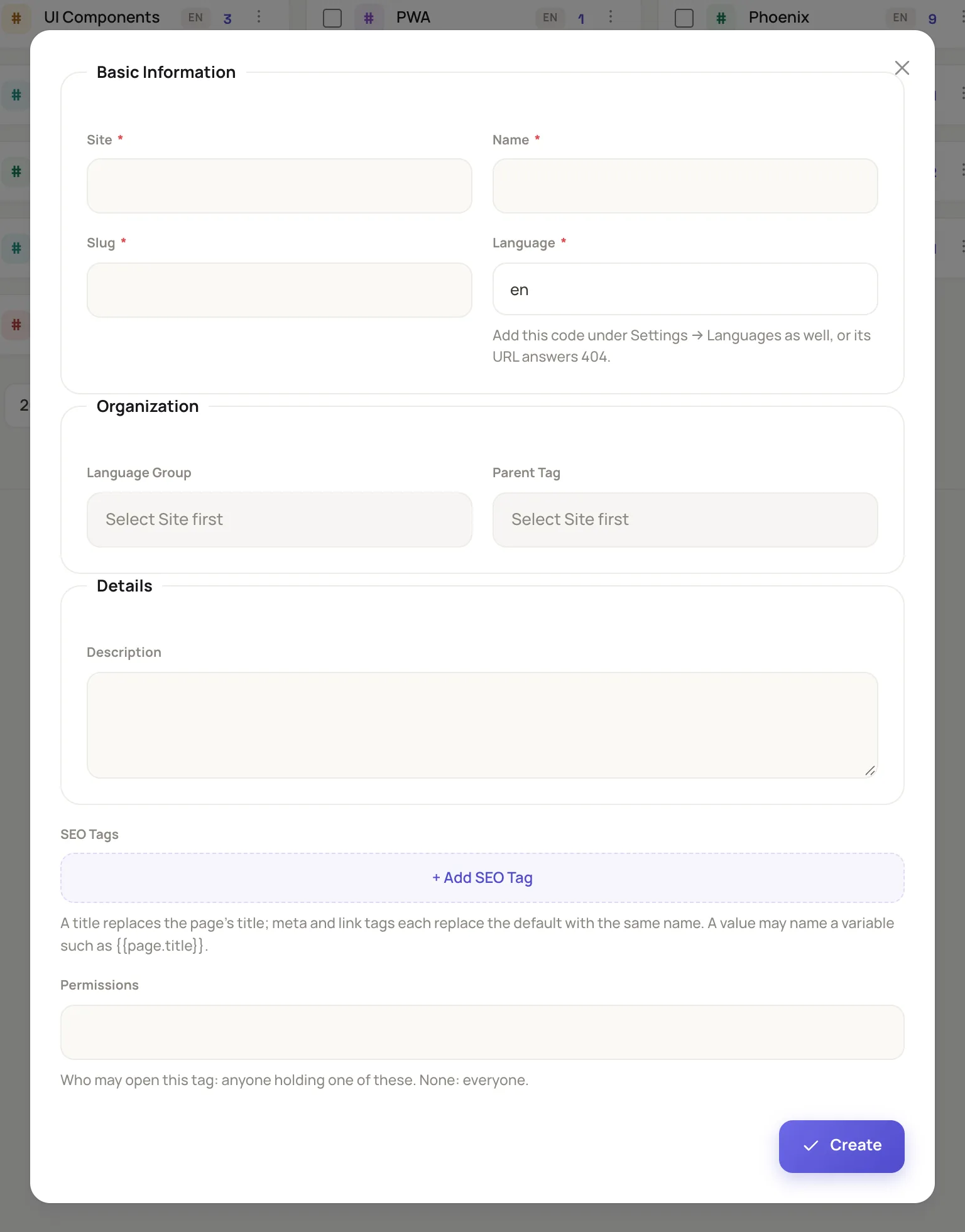
The tag form draws its groups in a two-column grid.
The example shows two groups. The real tag form has more under them: Details, which holds Description, and a last group of one-column fields for SEO Tags and Permissions.
Limit a field or a mode to masters
restricted true on a field, a group or a button limits it to master users. The tags form shows the site field to masters only, and only when a tag is created:
field :site_id, :relation do
  restricted true
  required true
  show_on :create
  display_field :name
  search_field :name
  mode :search
end
To close a whole mode, use source.access. The permissions form lets only masters create and update:
source do
  access :create, restricted: true
  access :update, restricted: true
end
access :update, false closes a mode for everyone, and then its action need not exist. A denied mode leaves the form without fields.
Explain a field with a notice
A notice in the layout draws a banner at a position. The page form of Mishka CMS shows help after the group that holds the field it explains, and only while that field is on the form:
layout do
  notice :permissions_help do
    position {:after_group, :access}
    show_when fn state -> Enum.any?(state.static.fields, &(&1.name == :permissions)) end

    render fn assigns ->
      ~H"""
      <MishkaCmsCore.CoreComponents.tip id="pb-permissions-help" class="mt-2.5 mb-4">
        {dgettext(
          "mishka_gervaz",
          "Who may open this page; empty means everyone. If the page shows records, leave it empty: each record's own Permissions are used."
        )}
      </MishkaCmsCore.CoreComponents.tip>
      """
    end
  end
endValid positions and bindings are listed in Form groups and layout DSL.
Next steps
- Split a form into steps: a wizard or tabs.
- Add file uploads to a form: a dropzone and existing files.
- React to table and form events with hooks:
before_saveandon_validate. - Form fields DSL: every option of a field.