Write a table or form template
v0.0.1
A template decides where things go: the rows of a table, a grid of cards, a gallery, or the groups of a form. It never decides how a button or an input looks, because that is the job of the UI adapter. This guide writes a table template that draws cards, switches a table between two templates, and writes a form template. The examples come from the notification, tags and snippet templates of Mishka CMS.
Before you begin
- Check that the built-in templates cannot do it.
MishkaGervaz.Table.Templates.Tabledraws rows and columns,MishkaGervaz.Table.Templates.MediaGallerydraws a thumbnail gallery, andMishkaGervaz.Form.Templates.Standarddraws the standard, wizard and tabs layouts. Write a template only when the arrangement differs. - Know that a template owns the whole table, including the filter bar, the selection toolbar and the pagination. Gervaz supplies each piece as a default that you can reuse.
Start a table template
use MishkaGervaz.Table.Behaviours.Template gives you working defaults for the optional callbacks and imports get_cell_value/2. You write the eight required callbacks. Six are metadata:
defmodule MishkaBlogWeb.Templates.TagCard do
  use MishkaGervaz.Table.Behaviours.Template
  use MishkaGervaz.Messages, backend: MishkaCmsCore.Gettext

  @impl true
  def name, do: :tag_grid

  @impl true
  def label, do: dgettext("mishka_gervaz", "Cards")

  @impl true
  def icon, do: "hero-squares-2x2"

  @impl true
  def description, do: dgettext("mishka_gervaz", "Chip grid for tags")

  @impl true
  def features do
    [:filter, :select, :bulk_actions, :paginate]
  end

  @impl true
  def default_options, do: []
endname/0 is what state.template.name() returns, so your visible predicates compare against it. features/0 lists what the template draws. With the default features :all, the table uses the union of this list and the lists of the switchable templates, minus :paginate when the table has no pagination. Return only what the template genuinely draws. default_options/0 is the keyword list that template_options overrides.
Draw the table
render/1 draws everything and render_item/1 draws one record. The renderer passes these assigns:
| Assign | Holds |
|---|---|
@static | The configuration that does not change: the id, columns, filters, row actions, bulk actions, UI adapter, features, theme, notices and template options. It is the same reference on every render, so LiveView skips it. |
@state | The dynamic state: page, filter values, selected ids, archive status, loading and path params. |
@stream | The LiveView stream of records, under static.stream_name. |
@empty? | Whether there is nothing to show. |
@myself | The component target for phx-target. |
Read the configuration from @static and do not re-derive it from the resource. The notification card defines its own filter bar, selection toolbar and pagination footer, and takes everything else from Gervaz. It decides whether to show checkboxes from the same rule the plain table uses, then draws the filters, the selection toolbar, the records and the pagination:
@impl true
def render(assigns) do
  static = assigns.static
  state = assigns.state
  features = static.features

  show_checkboxes =
    :select in features and static.bulk_actions != [] and
      Shared.has_visible_bulk_actions?(static.bulk_actions, state.archive_status)

  assigns =
    assigns
    |> assign(:show_checkboxes, show_checkboxes)
    |> assign(:show_filters, static.filters != [] and :filter in features)
    |> assign(:show_pagination, :paginate in features)

  ~H"""
  <div class="mishka-gervaz-notification-card">
    <div :if={@state.has_initial_data? or @state.loading == :loaded}>
      <.render_filters :if={@show_filters} static={@static} state={@state} myself={@myself} />

      <.render_selection_toolbar
        show_checkboxes={@show_checkboxes}
        static={@static}
        state={@state}
        myself={@myself}
      />

      <div id={"#{@static.stream_name}"} phx-update="stream">
        <.render_item
          :for={{id, record} <- @stream}
          id={id}
          record={record}
          static={@static}
          state={@state}
          show_checkboxes={@show_checkboxes}
          myself={@myself}
        />
      </div>

      <.render_pagination :if={@show_pagination} static={@static} state={@state} myself={@myself} />
    </div>
  </div>
  """
endReuse MishkaGervaz.Table.Templates.Shared instead of rewriting the furniture. These helpers are public:
| Helper | Use |
|---|---|
render_cell/1 | One cell, honoring format, render and the column type. |
render_row_actions/1 | The action strip, with visible already applied. |
has_user_visible_actions?/3, action_visible?/3 | Whether to draw an actions area, and the :active, :archived or function rule. |
render_filters/1, render_pagination/1, render_bulk_actions/1 | The standard bars. |
render_empty_state/1, render_error_state/1, render_loading/1 | The standard states. |
record_checked?/2 | Selection state, including select-all with excluded ids. |
custom_row_class/2 | The class from the DSL row class apply function. |
has_visible_bulk_actions?/2 | Whether the bulk bar has anything to show. |
prepare_filter_groups/3, accessible_group?/2, grid_cols/1 | Filter panel layout. |
build_active_filter_chips/2 | The chips for the filters in use. |
pagination_type/1 | :numbered, :load_more or :infinite, from the config. |
From MishkaGervaz.Helpers, get_visible_columns/2 applies each column's visible, accessible?/2 applies restricted, and dynamic_component/1 reaches the UI adapter.
Read cells and records
MishkaGervaz.Table.Behaviours.Template.get_cell_value(record, column) resolves every source shape, plus default and separator. To draw a cell the way the plain table does, call Shared.render_cell/1 instead. The tags template reads its record directly and uses the shared helpers for selection and actions:
def render_item(assigns) do
  %{record: record, state: state} = assigns

  assigns =
    assigns
    |> assign(:checked?, Gervaz.record_checked?(state, record.id))
    |> assign(:row_class, Gervaz.custom_row_class(assigns.static, record))
    |> assign(
      :has_actions?,
      Gervaz.has_user_visible_actions?(
        assigns.static.row_actions,
        assigns.static.row_action_dropdowns,
        state
      )
    )

  ~H"""
  ...
  """
endSwitch between two templates
Name the templates in switchable_templates and keep template inside the list. The reader sees a switcher. Add :template to the url_sync params to make the choice survive a reload.
presentation do
  template MishkaBlogWeb.Templates.TagCard
  ui_adapter MishkaCmsCoreWeb.UIAdapters.Admin

  switchable_templates [
    MishkaGervaz.Table.Templates.Table,
    MishkaBlogWeb.Templates.TagCard
  ]
end
Declare every column and let visible decide which template shows it. The tags table shows its stats column only in the plain table:
column :stats_info do
  static true
  visible fn state -> state.template.name() == :table end
end
A row action can do the same with fn record, state -> ... end. A template that groups rows under headings cannot draw from a stream, because a stream is one flat container. Set keep_loaded_records true in presentation so that state.loaded_records holds every loaded page, and draw from it. This costs the memory that streams avoid, so use it only for a grouped template. The design tokens table of Mishka CMS does.
The media gallery template draws with MishkaGervaz.UIAdapters.MediaGallery whenever the adapter in effect is MishkaGervaz.UIAdapters.Tailwind, so a card carries the same buttons everywhere. It uses any other adapter as it is. It also expects the application to register a MediaThumb JavaScript hook in its admin bundle, which hides a thumbnail that fails to load.
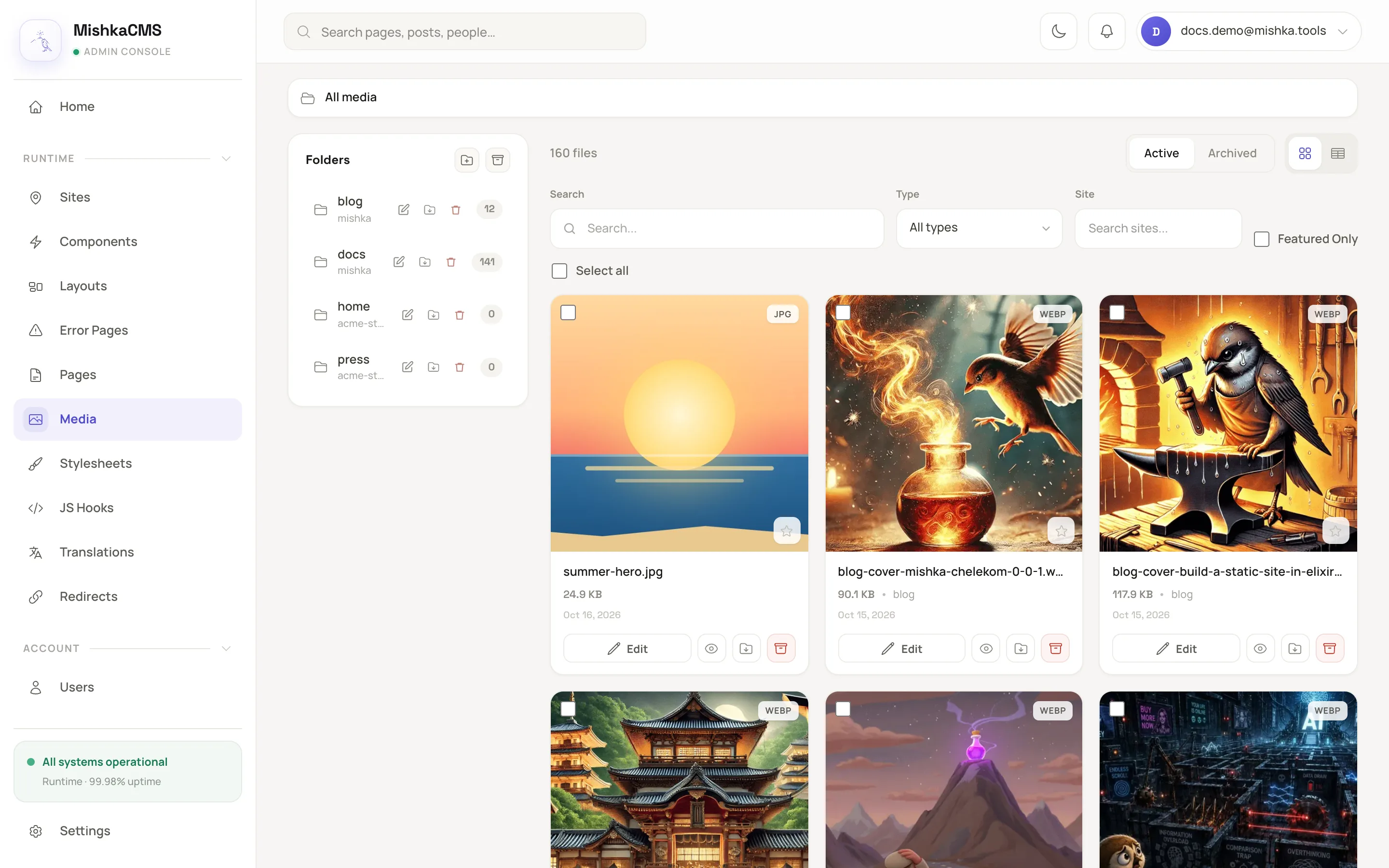
The media table switches between the gallery template and the plain table.
Write a form template
use MishkaGervaz.Form.Behaviours.Template delegates the four optional callbacks to MishkaGervaz.Form.Templates.Standard. You write name/0, label/0, icon/0 and render/1. Most form templates also override render_loading/1. The snippet form of the page builder draws a small box of its own:
defmodule MishkaCmsCoreWeb.Templates.SnippetForm do
  use MishkaGervaz.Form.Behaviours.Template
  use MishkaGervaz.Messages, backend: MishkaCmsCore.Gettext

  @impl true
  def name, do: :studio_snippet

  @impl true
  def label, do: dgettext("mishka_gervaz", "Save as snippet")

  @impl true
  def icon, do: "hero-document-plus"

  @impl true
  def render(assigns) do
    ~H"""
    <form id="pb-snippet-form" phx-submit="save" phx-target={@myself}>
      <input type="text" id="pb-snippet-name" name="form[name]" dir="auto" autocomplete="off" ... />
      ...
      <button type="submit" id="pb-snippet-save" ...>{@save_label}</button>
    </form>
    """
  end
endThe assigns are @static (the id, fields, groups, steps, uploads, submit config, UI adapter, theme and layout), @state (the form, mode, current step, field values, errors and existing files), @myself and @uploads. The event names, such as save, and the form[...] param names are the contract with Gervaz. Only the look is yours.
If you replace render/1, keep the order that Standard uses, because the notice positions are defined against it: notices at :form_top, the header, notices before the groups and fields, the body, the upload sections, notices before the submit row, the submit row, and the bottom notices and footer. Respect static.submit_visible? and static.submit_alternatives. Keep id={"#{@static.id}-form-wrapper"} on your root element, or the form's JS hooks do nothing.
If only the wrapper around an input differs, override the adapter's field_wrapper/1 and not the template.
Next steps
- Behaviours: every callback of both template behaviours.
- Change how the admin looks: pair the template with an adapter.
- Table layout and presentation DSL:
template,switchable_templatesandtemplate_options.