Build a Phoenix LiveView UI Fast: 300+ Chelekom Components and the CLI
A hands-on guide to Mishka Chelekom: add it to a Phoenix app, generate one component or all of them with the mix CLI, add headless parts, change the theme and connect an AI editor.

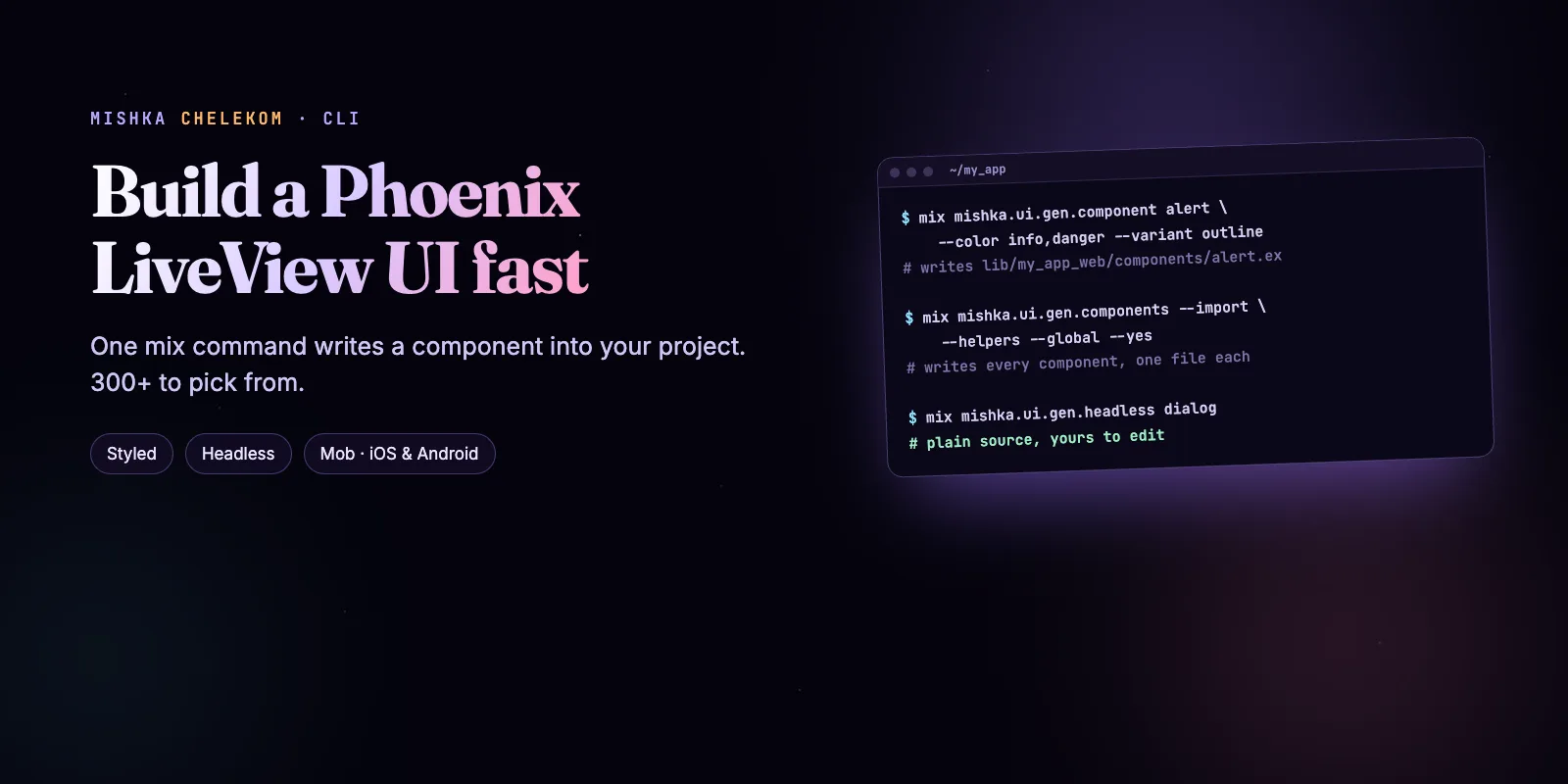
You can have a Phoenix LiveView UI on screen in minutes, because Mishka Chelekom writes the components into your project with one mix command. Pick one component or all of them, choose the colors you want, and the code is yours to edit. This guide takes a new Phoenix app through six steps, and every command ran against Mishka Chelekom 0.0.10.
Mishka Chelekom is free and open source. A founding seat pays for the time we spend on it and on the Mishka CMS that uses it, and it gives you lifetime access, priority support and every paid extension we release.
You need a Phoenix 1.8 app, Elixir 1.18 or newer and Tailwind CSS v4, which a new Phoenix 1.8 app already has. We ran everything below on Elixir 1.20.5 and Phoenix 1.8.16. Chelekom is a dev-only dependency, so nothing from it runs in production.
Mishka releases. Once a month.
New Mishka CMS releases, Elixir and Phoenix patterns, and case studies from the team. No spam, unsubscribe anytime.
About the number in the title: the landing page counts 300+ components. By generator template, version 0.0.10 has 74 styled, 92 headless and 73 for native iOS and Android with Mob. Counting every part, such as a card title or a card footer, the two CMS kits list 136 styled and 109 headless components, and together with the Mob ones that is more than 300.
The six steps at a glance
mix.exs, as a dev-only dependency.How Chelekom works
Chelekom is a generator, not a runtime library. A mix task copies the component you ask for into your lib/my_app_web/components folder as a plain Elixir file, and from then on it is your code. The package is only needed while you generate, which is why it is a dev-only dependency.
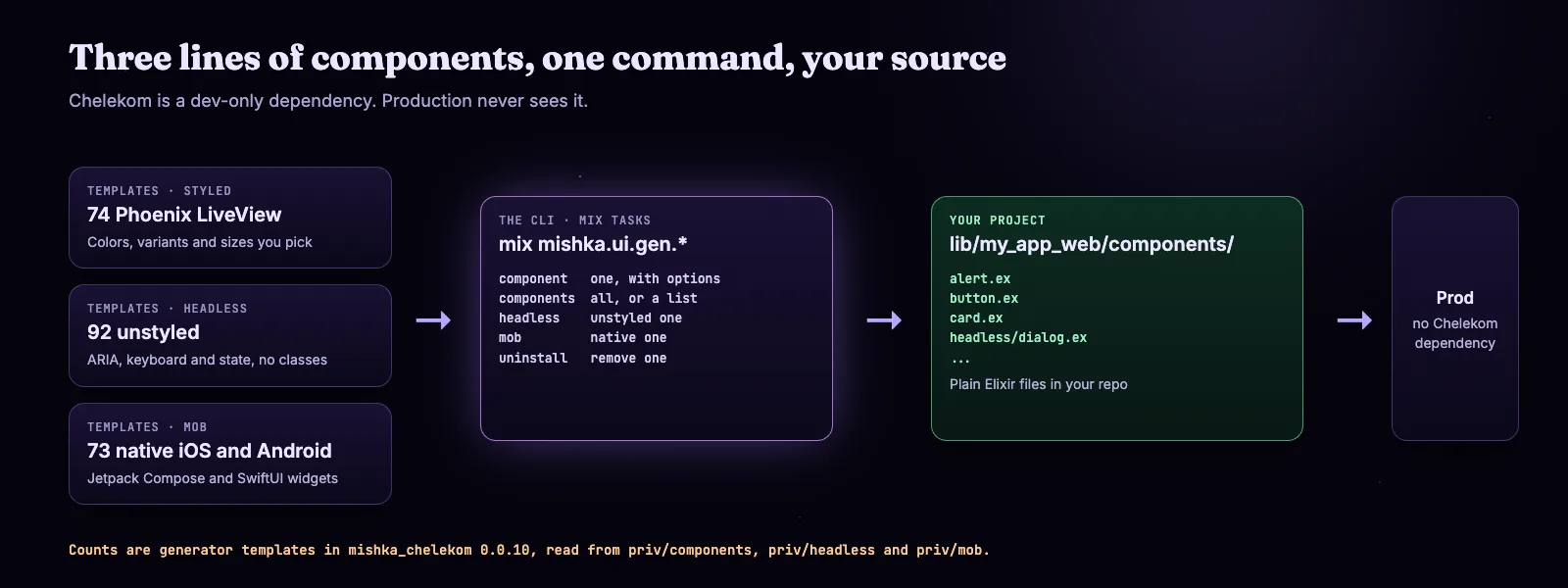
Templates go in, plain source comes out. Counts are generator templates in 0.0.10.
There are three lines of components with their own tasks. Styled components come with colors, variants and sizes. Headless components ship the markup, ARIA and behavior, with no colors. Mob components are native widgets for iOS and Android. This guide builds the Phoenix side, and Mishka Chelekom v0.0.10 Galaxy: Phoenix, Headless and Mobile UI covers Mob.
Here is the whole run in a few seconds:
The whole process in six steps, from the dependency to the AI editor.
Step 1: Add the dependency
Add Chelekom to mix.exs as a dependency for the dev environment only, then fetch it. We started from a new app made with mix phx.new demo_ui --no-ecto --no-mailer --no-dashboard.
# mix.exs
defp deps do
  [
    {:mishka_chelekom, "~> 0.0.10", only: :dev},
    # ... your other dependencies
  ]
endmix deps.getStarting a new project? One command makes the app and installs Chelekom, through Igniter: mix igniter.new my_app --with phx.new --install mishka_chelekom. We did not run this one here, because the guide starts from a Phoenix app made with phx.new.
Step 2: Generate one component
To add one component, run mix mishka.ui.gen.component with its name. The options choose which colors, variants, sizes and rounded corners the file contains, so you only carry the code you use.
mix mishka.ui.gen.component alert --color info,danger --variant outline,default --yesThe first run also wrote priv/mishka_chelekom/config.exs, the icon component the alert needs, and the Tailwind CSS file assets/vendor/mishka_chelekom.css, which app.css now imports. The alert itself is lib/demo_ui_web/components/alert.ex, 506 lines. The same command with no options wrote 827 lines. We measured four components both ways:
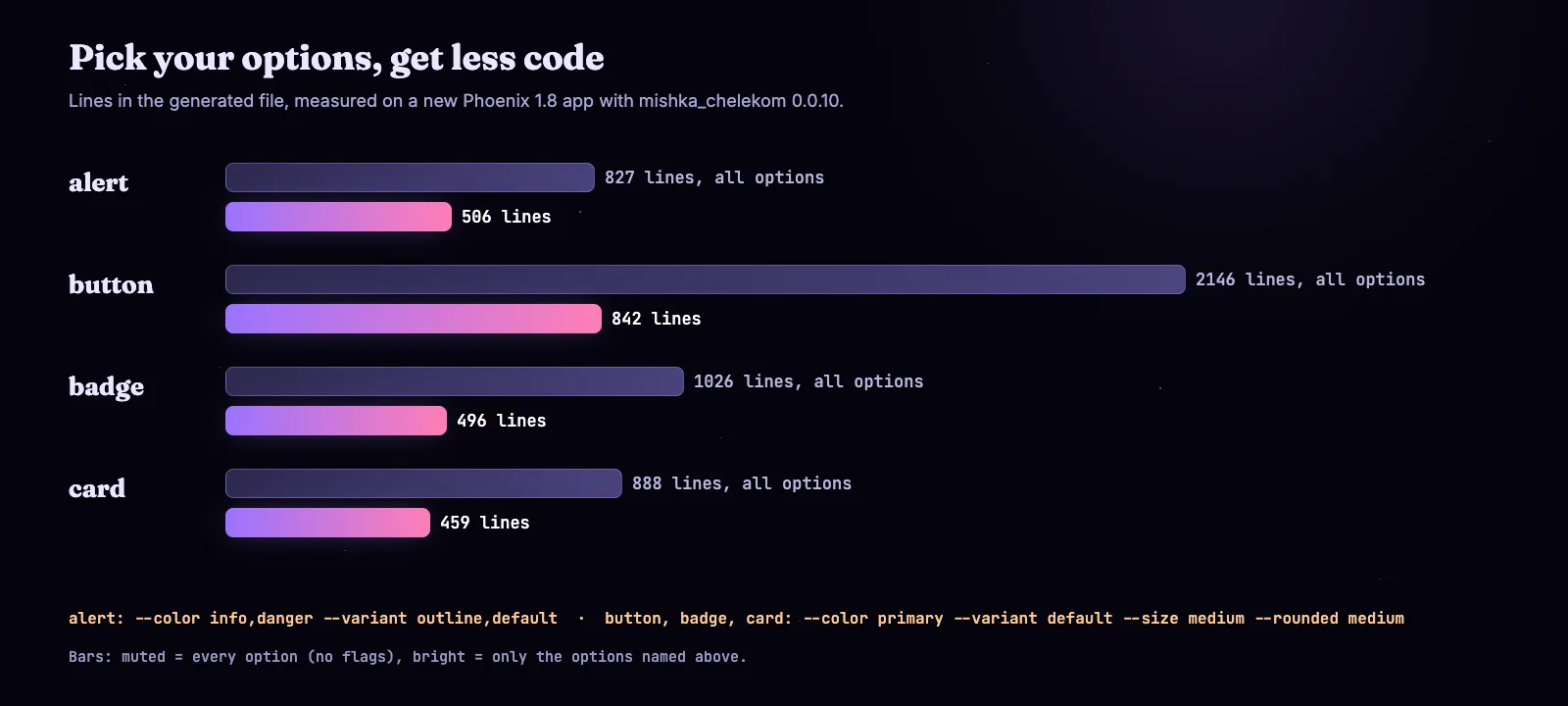
Generated lines per component, with every option and with chosen options.
On a Windows shell, quote a list of values, as in --color "info,danger". The CLI docs list every option, and the Alert docs show what the component can do.
Step 3: Generate every component
To add all the styled components in one go, use mix mishka.ui.gen.components. We used the three flags the README recommends: --import writes a file that imports everything, --helpers lists each component's helper functions in it, and --global makes the components available in every module without an import.
mix mishka.ui.gen.components --import --helpers --global --yesIt took 3.5 seconds on our machine and left 74 component files plus mishka_components.ex, the import module. In lib/demo_ui_web.ex it replaced import DemoUiWeb.CoreComponents with use DemoUiWeb.Components.MishkaComponents, and it added the JavaScript for the components that need it under assets/vendor and wired it into app.js. The project compiled with no changes from us.
You can also pass a list, as in mix mishka.ui.gen.components alert,accordion,chat, or skip some with --exclude alert,badge.
Use it in a LiveView
Now the components are plain function components. Here is a page we ran at /ui, with an alert, a card and a button that counts clicks:
# lib/demo_ui_web/live/ui_live.ex
defmodule DemoUiWeb.UiLive do
  use DemoUiWeb, :live_view

  def mount(_params, _session, socket), do: {:ok, assign(socket, :count, 0)}

  def handle_event("add", _params, socket), do: {:noreply, update(socket, :count, &(&1 + 1))}

  def render(assigns) do
    ~H"""
    <Layouts.app flash={@flash}>
      <.alert kind={:info} variant="outline" title="Chelekom works">
        This alert is source code inside lib/demo_ui_web/components/alert.ex.
      </.alert>
      <.card padding="large" rounded="large" class="mt-6">
        <.card_title>Signups today</.card_title>
        <.card_content>
          <p>{@count} new users</p>
        </.card_content>
        <.card_footer>
          <.button color="primary" phx-click="add">Add one</.button>
        </.card_footer>
      </.card>
    </Layouts.app>
    """
  end
end# lib/demo_ui_web/router.ex, inside scope "/"
live "/ui", UiLiveWith the server running, GET /ui answered 200 and the page held the alert, the card and the button text. Open the file of any component to see how it is built, because it is your code now.
Step 4: Add a headless component
To get behavior without our styling, generate a headless component with mix mishka.ui.gen.headless. It writes markup, ARIA wiring and named slots, and you add the classes yourself.
mix mishka.ui.gen.headless dialog --yes
mix mishka.ui.gen.headless.components dialog,tabs
mix mishka.ui.gen.headless.components
The first command wrote lib/demo_ui_web/components/headless/dialog.ex, 149 lines, as DemoUiWeb.Components.Headless.Dialog. Its module doc says it traps focus, closes on Escape or an outside click, and returns focus to the opener, and it ships no colors or spacing. The second line is the same task for a list, and the third one wrote 90 of the 92 in our run, and the project still compiled. It skips chart and editor because they install npm packages: generate them by name, or pass --with-npm. The headless components docs list them.
Step 5: Make it yours
The theme is a set of CSS variables, and you change them in one config file. Uncomment a value in priv/mishka_chelekom/config.exs, validate, and regenerate the CSS.
# priv/mishka_chelekom/config.exs, inside css_overrides
primary_light: "#7c3aed",mix mishka.ui.css.config --validate
mix mishka.ui.css.config --regenerate --yesAfter that, assets/vendor/mishka_chelekom.css had --primary-light: #7c3aed in place of the default #007f8c. The same file has component_colors, component_variants and exclude_components, so you can set your limits once instead of repeating flags. The design system docs explain the tokens.
To remove a component, run mix mishka.ui.uninstall alert. Add --headless for a headless one, or --all for everything.
Step 6: Connect your AI editor
Chelekom ships an MCP server, so tools such as Claude Code, Cursor and Claude Desktop can read its components while they write your templates. The stdio setup needs no Phoenix change:
mix mishka.mcp.setup --stdio --yesIt wrote .mcp.json with a mishka-chelekom entry that starts mix mishka.mcp.server --transport stdio. Without --stdio, the task adds an HTTP route to your router instead, and only in development by default. The AI and MCP docs have the details.
When it fits, and when it does not
It fits when you want your own UI code with a head start: an admin, a dashboard, a product site, a prototype. You can also use the headless line to keep your own design. It is a poor fit when you want a package you never open, because generated code is yours to read and update, and a new Chelekom release changes nothing until you regenerate.
Where to go next
The Chelekom docs follow the same steps in more detail. Start with the page that matches what you are building.
Try Mishka Chelekom
Start with the Mishka Chelekom page and the Mishka Chelekom documentation, or read the source and the Hex package.
A small team builds this. If you want to help us work on it full time, a founding seat gives you lifetime access, priority support and every paid extension we release.
You can also sponsor our open source work, or hire our team for an Elixir or Phoenix LiveView project.
Mishka releases. Once a month.
New Mishka CMS releases, Elixir and Phoenix patterns, and case studies from the team. No spam, unsubscribe anytime.
Questions people ask about Mishka Chelekom
Thank you
Mishka Chelekom stands on Elixir, Phoenix, Phoenix LiveView, Tailwind CSS and Igniter, and on the libraries in its dependency list. Thank you to everyone who builds them, and to you for reading this far.
Shahryar Tavakkoli writes about Elixir and Phoenix LiveView: Mishka Chelekom releases, GuardedStruct validation, static sites, service workers and SEO.